

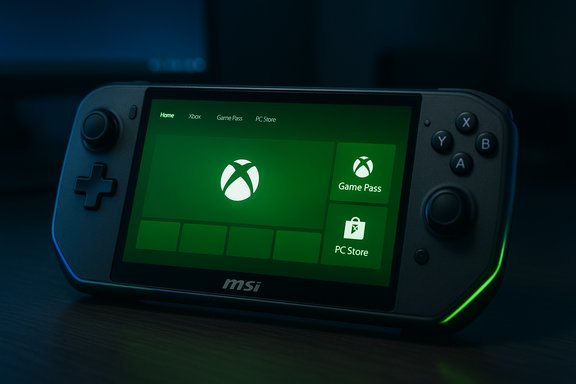
Microsoft has begun rolling out the Xbox Full Screen Experience (FSE) to MSI Claw handhelds through the Windows 11 Insider Preview, expanding the console‑style, game‑first interface that launched with the ROG Xbox Ally devices in October and signaling a broader push to make Windows handhelds behave more like dedicated gaming consoles.
The Xbox Full Screen Experience is a new, purpose‑built user interface for Windows 11 handheld gaming PCs that places a full‑screen Xbox‑style launcher and aggregated game library at the center of the device experience. Designed in partnership with OEMs, FSE is intended to simplify navigation with a gamepad, reduce non‑essential background activity, and present games from your Xbox library, Game Pass, and supported PC storefronts in one place. The feature debuted alongside the co‑developed ROG Xbox Ally and ROG Xbox Ally X, which shipped with FSE as a core part of the handheld experience.
Since that debut, Microsoft has been rolling the experience outward in staged preview waves. The initial release was tightly coupled to the ROG Xbox Ally launch, but Microsoft recently expanded the preview to include MSI Claw models via a Windows Insider Preview build. OEMs including Lenovo have publicly stated timelines for coming support on their handhelds (Lenovo has publicly indicated a spring 2026 availability window for the Legion Go 2), and Microsoft has said additional manufacturers will enable FSE on compatible Windows 11 handhelds in the coming months.
This staged availability reflects a deliberate approach: FSE is more than a new skin. It changes startup behavior, defers and suppresses certain desktop processes, and redirects the session posture of Windows to favor a controller‑driven, low‑distraction environment that aims to improve sustained gaming performance on thermally constrained handheld APUs.
Key behaviors include:
Highlights of the Claw line relevant to FSE:
Microsoft’s official approach has been to gate FSE by OEM entitlement and preview channels: initial public availability came on the ROG Xbox Ally and Ally X at launch. Subsequent waves—including a preview rollout to MSI Claw models—have used Windows Insider builds to expand testing while OEMs and Microsoft work through driver, firmware, and usability rough edges.
The practical takeaway: if you see the FSE option appear or disappear on your handheld, it may be part of a controlled A/B rollout. That behavior is expected during a preview phase.
The move to bring FSE to additional OEMs is sensible and necessary: real‑world compatibility and performance tuning require the variety of devices already on the market. However, the current preview phase exposes the typical preview trade‑offs—feature gating, variable stability, and device‑dependent quirks. For mainstream users, waiting for the feature to land in stable builds and for vendor firmware updates may be the safest path. For enthusiasts and testers, the Windows Insider route offers a chance to shape the experience and to push Windows handhelds closer to the "turn on and play" simplicity gamers expect from consoles.
Whether FSE will be enough to shift the handheld gaming balance in favor of Windows depends on execution: how quickly Microsoft and OEMs resolve early issues, how consistently the experience is delivered across devices, and how well studios and platform teams exploit features like shader pre‑delivery and the Handheld Compatibility Program. For MSI Claw owners, the arrival of FSE in preview is an encouraging sign—but it’s also a reminder that this is an iterative journey, and the smooth, polished handheld experience Microsoft envisions will require cooperation across hardware vendors, app developers, and the Windows platform itself.
Source: Gadgets 360 https://www.gadgets360.com/games/ne...rience-msi-claw-windows-11-handhelds-9571752/
 Background
The Xbox Full Screen Experience is a new, purpose‑built user interface for Windows 11 handheld gaming PCs that places a full‑screen Xbox‑style launcher and aggregated game library at the center of the device experience. Designed in partnership with OEMs, FSE is intended to simplify navigation with a gamepad, reduce non‑essential background activity, and present games from your Xbox library, Game Pass, and supported PC storefronts in one place. The feature debuted alongside the co‑developed ROG Xbox Ally and ROG Xbox Ally X, which shipped with FSE as a core part of the handheld experience.Since that debut, Microsoft has been rolling the experience outward in staged preview waves. The initial release was tightly coupled to the ROG Xbox Ally launch, but Microsoft recently expanded the preview to include MSI Claw models via a Windows Insider Preview build. OEMs including Lenovo have publicly stated timelines for coming support on their handhelds (Lenovo has publicly indicated a spring 2026 availability window for the Legion Go 2), and Microsoft has said additional manufacturers will enable FSE on compatible Windows 11 handhelds in the coming months.
This staged availability reflects a deliberate approach: FSE is more than a new skin. It changes startup behavior, defers and suppresses certain desktop processes, and redirects the session posture of Windows to favor a controller‑driven, low‑distraction environment that aims to improve sustained gaming performance on thermally constrained handheld APUs.
What the Full Screen Experience actually is
A console-like shell on top of Windows 11
At its core, FSE is a session posture and a full‑screen launcher rather than a separate operating system. When enabled, FSE makes the Xbox app (or another chosen home app) the primary interface at boot and while gaming, and it alters which Windows components are active in that session.Key behaviors include:
- A full‑screen, controller‑friendly launcher and library that aggregates installed PC games, Game Pass titles, and Xbox purchases.
- Navigation and system flows optimized for a gamepad (Game Bar and Task View are refactored for controller use).
- Suppression or deferral of non‑essential background tasks to free memory and reduce idle CPU activity.
- A simplified focus on launch‑to‑play: boot, pick a game, play—without fighting the desktop or a mouse‑centric shell.
How the optimizations work (practical details)
FSE does not rewrite the Windows kernel or swap out drivers. Instead, it changes the desktop session and shell behavior:- The chosen home app runs as a full‑screen shell and is elevated as the initial UI.
- Certain explorer and desktop cosmetic elements are hidden or delayed, reducing userland memory footprint and eliminating some frequent background wakeups.
- Non‑critical startup applications and scheduled tasks are deprioritized while in FSE, which can result in measurable reclaimed RAM and fewer CPU interrupts.
- Integration points—like the Xbox aggregated library and shader pre‑delivery—are surfaced within the launcher to shorten launch times and smooth first‑run experiences for compatible titles.
Why MSI Claw matters
MSI’s Claw family occupies an important niche in the portable Windows ecosystem. With larger displays and a range of CPU/APU options (including modern Intel Core Ultra and AMD Ryzen Z‑series chips across different Claw SKUs), the Claw is a natural candidate to host FSE.Highlights of the Claw line relevant to FSE:
- Large, high‑refresh displays (7–8 inches on recent models) that benefit from a console‑style UI.
- High‑capacity batteries on higher‑end variants (some models advertise up to 80Wh), increasing the value of runtime optimizations.
- Desktop‑grade Windows 11 installs out of the box—meaning FSE must interoperate with existing drivers, vendor utilities, and MSI’s system software.
- A user base that frequently customizes Windows behavior, making a preview rollout through Windows Insider channels a sensible way to gather feedback and harden compatibility.
How to enable FSE on a compatible Windows handheld
If you have a supported device and you’re comfortable with preview software, enabling FSE is straightforward. Follow these steps carefully and back up your system first.- Update Windows to the (Insider) build that contains FSE for your device.
- Update your OEM firmware and vendor utilities (BIOS, MSI Center, Armory Crate, etc..
- (Optional) Join the Windows Insider Program if the feature is distributed via Insider Preview builds.
- Open Settings > Gaming > Full screen experience.
- Under “Set your home app,” select Xbox (or another supported launcher).
- Optionally toggle “Enter full screen experience on startup” to boot directly into FSE.
- Restart and verify: the device should launch into the Xbox full‑screen launcher. FSE can also be accessed from Task View and the Game Bar.
Early reports, leaks, and the reality of staged rollouts
The FSE story includes a mixture of product launches, leaked access, and community tinkering. Before the ROG Xbox Ally launch, experimental FSE bits were found in Windows 11 preview builds and in some cases were toggled on via registry hacks and developer utilities. Enthusiast communities used those early discoveries to run FSE on a variety of handhelds—sometimes successfully, sometimes encountering stability problems.Microsoft’s official approach has been to gate FSE by OEM entitlement and preview channels: initial public availability came on the ROG Xbox Ally and Ally X at launch. Subsequent waves—including a preview rollout to MSI Claw models—have used Windows Insider builds to expand testing while OEMs and Microsoft work through driver, firmware, and usability rough edges.
The practical takeaway: if you see the FSE option appear or disappear on your handheld, it may be part of a controlled A/B rollout. That behavior is expected during a preview phase.
Benefits for gamers and handheld users
Enabling FSE yields several immediate advantages for the handheld gaming experience:- Cleaner boot‑to‑play flow: devices can boot directly into a controller‑driven home screen, reducing friction for quick pickup gaming sessions.
- Unified game library: aggregated listings bring Xbox, Game Pass, and supported PC storefront titles together in one navigable list.
- Performance and battery improvements: by deferring non‑essential tasks and minimizing background activity, FSE can free memory and reduce idle CPU wakeups—particularly valuable on thermally constrained APU handhelds.
- Better controller integration: remapped flows and a guide button that ties into Task View and Game Bar simplify navigation without a keyboard or mouse.
- First‑run improvements: features like pre‑delivered shaders (where supported) speed up initial launches and decrease stutter on first play.
Known issues, limitations, and risks
The rollout and early adoption of FSE expose several practical risks and trade‑offs that owners should weigh:- Preview instability and feature gating: many early adopters report that FSE availability is being enabled in waves, and options may appear or vanish between updates. This variability is normal for preview software but disruptive for users expecting consistent behavior.
- Compatibility with vendor utilities and overlays: functions like overclocking, power profiles, or custom vendor launchers may conflict with FSE’s session posture. Some users have reported issues requiring firmware or vendor app updates.
- Game compatibility edge cases: titles that rely on background services, anti‑cheat systems, or constant overlays may behave differently under FSE. Test critical games before switching permanently.
- Persistent desktop dependency: unlike console OSes, FSE sits on top of Windows. Certain desktop apps and workflows can still exist and may be less accessible when FSE is running. Users who rely on background sync, streaming utilities, or productivity workflows should understand the trade.
- Authentication and wake behavior: some early reports show the device still prompting for Windows sign‑in while attempting to boot into FSE, which breaks the intended seamless boot experience unless users adjust sign‑in settings.
- Fragmentation risk across OEMs: each vendor must enable and test FSE on their hardware. Differences in driver quality, firmware, and vendor utilities mean the experience will not be uniform across devices.
- Security and system‑update implications: changing startup shells and session behaviors adds complexity to recovery, repair, and the delivery of system updates. Users must be prepared to recover via cloud recovery or image restoration if things go wrong.
Market and ecosystem implications
The rollout of FSE to more Windows handhelds affects several market vectors:- Windows handheld positioning: Microsoft is actively making Windows more handheld‑friendly. FSE is a direct attempt to close the usability gap between SteamOS/Steam Deck and Windows handhelds by adding a console‑like launcher and resource discipline.
- OEM differentiation: manufacturers like ASUS, MSI, and Lenovo now have an additional software lever to optimize gameplay. How each OEM integrates FSE with firmware, power profiles, and vendor software will shape user perceptions and reviews.
- Competition with Valve: Valve’s SteamOS still enjoys advantages in tight integration, battery efficiency, and a Linux‑centric stack. But FSE narrows the convenience gap for Windows handhelds by combining a focused launcher with Windows compatibility for native PC games.
- Developer opportunity: game developers and publishers can benefit from the Handheld Compatibility Program and features like advanced shader delivery, which could reduce first‑run stutter and improve perceived performance on handhelds.
- Consumer upgrade paths: as FSE enables a more cohesive handheld experience on Windows, buyers may be more willing to choose higher‑end Windows handhelds for their compatibility with PC ecosystems (Steam, Epic, Xbox, Battle.net) while retaining the ease of a console UI.
What users should do now: a practical checklist
If you own an MSI Claw or another Windows handheld and are contemplating FSE, follow this checklist to minimize disruption.- Create a full system image backup and a bootable recovery USB.
- Update firmware, BIOS, and vendor system software (MSI Center, Armory Crate, etc..
- Confirm whether FSE is being distributed for your model (Insider Preview channels often gate availability).
- If you’re risk‑averse, wait for the vendor and Microsoft to move the feature out of Insider Preview and into stable channels.
- If you want to test FSE now:
- Join the Windows Insider Program (select the channel that includes the relevant preview build).
- Update to the build containing FSE.
- Update the Xbox PC app to the preview version (Xbox Insider Hub may be required).
- Enable FSE via Settings > Gaming > Full screen experience and select Xbox as the home app.
- Verify critical games and tools work correctly and confirm you can exit FSE if needed.
- Monitor vendor and Microsoft updates; FSE will receive frequent iterative fixes during preview.
Technical caveats developers and power users should note
- FSE modifies the shell and session behavior; it does not alter kernel scheduler policies or driver stacks. Performance wins will come from reduced userland overhead (less memory used by the desktop shell, fewer background tasks).
- Some launcher‑level optimizations, such as advanced shader delivery, rely on platform integration and content support by studios; not all games will benefit immediately.
- Testing more than one game and more than one power profile is essential—FSE’s benefits are workload dependent.
- Users who rely on background sync, streaming, or productivity services should validate those workflows before making FSE their default.
Conclusion
The expansion of the Xbox Full Screen Experience to MSI Claw handhelds is an important milestone in the evolution of Windows as a viable handheld gaming platform. By presenting a focused, controller‑first interface and trimming non‑essential background activity, Microsoft aims to combine Windows’ broad game compatibility with a console‑style front end—lowering friction for players who want the convenience of a dedicated launcher without sacrificing access to the PC game ecosystem.The move to bring FSE to additional OEMs is sensible and necessary: real‑world compatibility and performance tuning require the variety of devices already on the market. However, the current preview phase exposes the typical preview trade‑offs—feature gating, variable stability, and device‑dependent quirks. For mainstream users, waiting for the feature to land in stable builds and for vendor firmware updates may be the safest path. For enthusiasts and testers, the Windows Insider route offers a chance to shape the experience and to push Windows handhelds closer to the "turn on and play" simplicity gamers expect from consoles.
Whether FSE will be enough to shift the handheld gaming balance in favor of Windows depends on execution: how quickly Microsoft and OEMs resolve early issues, how consistently the experience is delivered across devices, and how well studios and platform teams exploit features like shader pre‑delivery and the Handheld Compatibility Program. For MSI Claw owners, the arrival of FSE in preview is an encouraging sign—but it’s also a reminder that this is an iterative journey, and the smooth, polished handheld experience Microsoft envisions will require cooperation across hardware vendors, app developers, and the Windows platform itself.
Source: Gadgets 360 https://www.gadgets360.com/games/ne...rience-msi-claw-windows-11-handhelds-9571752/
