

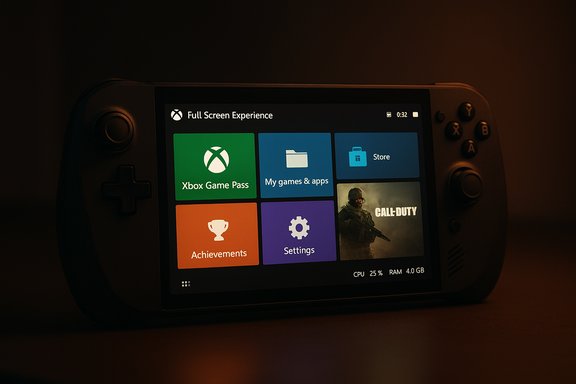
Microsoft’s Xbox Full Screen Experience has begun to escape its early exclusivity and is appearing on third‑party Windows handhelds, delivering a console‑style, controller‑first shell that boots the Xbox PC app as a full‑screen launcher and trims desktop noise so games run with fewer interruptions and less background overhead.
Background: why FSE matters for handheld Windows gaming
Handheld Windows PCs have long suffered from a mismatch: a full desktop operating system built for mouse and keyboard sits on hardware with tight thermal and battery limits. The Xbox Full Screen Experience (FSE) is Microsoft’s engineering answer — not a new OS, but a session posture that changes what Windows initializes and what the user sees during play. In FSE, an appointed “home app” (most commonly the Xbox PC app) becomes the primary surface at startup; common desktop ornaments and some background services are deferred or suppressed to free resources for interactive workloads. Microsoft delivered the earliest, preinstalled builds of FSE on the ASUS ROG Xbox Ally and ROG Xbox Ally X. Over recent Insider releases — notably Windows 11 Insider Preview Build 26220.7051 (KB5067115) — the platform groundwork was widened and Microsoft began gating access for additional OEM models, with MSI’s Claw family becoming the first non‑Ally handhelds to receive the preview in the Insider channels.What the Full Screen Experience actually does
The design goals
FSE is built around three practical aims:- Provide a controller‑first, thumb‑friendly UI with large tiles and simplified navigation.
- Minimize desktop overhead so more RAM and fewer CPU wakeups are available to games.
- Offer a console‑like single‑click entry and exit flow while keeping Windows intact underneath for full compatibility with Steam, Epic, GOG and other PC ecosystems.
Visible behavior and system changes
When FSE is active:- The chosen home app runs full screen at startup; typical desktop elements such as some Explorer ornamentation and startup apps are deferred.
- Notifications are muted and maintenance activities (like some background updates and scans) are paused or delayed to avoid frame stutters.
- Game Bar and Task View are refactored for controller navigation so you can switch back to the desktop or exit FSE without a full reboot.
How you access and control FSE on a supported device
On qualifying Windows 11 builds the controls live in a single place:- Settings > Gaming > Full screen experience — set your home app (for most users, Xbox) and optionally enable Enter full screen experience on startup.
- Game Bar (Win+G or the Xbox button on supported hardware) and Task View expose controls to enter/exit FSE during a session.
- A hardware Xbox button can be mapped for quick overlays or task switching on OEM designs that include it.
The current rollout: who has FSE and how it’s being distributed
Microsoft is using a controlled feature rollout model. The binaries are included in preview builds, but visibility is gated by device entitlements and server‑side flags. That means not every Insider on the same build will see FSE — Microsoft and OEMs decide which models are treated as supported during the preview.- Initially preinstalled on: ASUS ROG Xbox Ally and ROG Xbox Ally X.
- Recent expansion (Insider Preview Build 26220.7051 / KB5067115): MSI Claw models moved into preview availability, making them the first non‑Ally devices to see the experience in the wild.
Hands‑on reports: what testers are seeing
Early testers and outlets report three consistent effects:- A cleaner console‑like UI that aggregates your Xbox/Game Pass games alongside many installed PC titles in a single grid, with storefront labels for provenance.
- Measurable runtime improvements in some scenarios: reclaimable RAM and fewer idle CPU wakeups can translate into steadier frame delivery on constrained handheld APUs. Reported gains vary by system, game, and driver maturity. Some hands‑on testing suggests tangible benefits in long, thermally throttled sessions.
- Fragmentation and volatility: community‑enabled ports and registry tweaks can unlock FSE on unsupported devices, but stability and feature parity vary widely across hardware. Many early adopters have encountered UX glitches or discovered that the FSE option appeared and then vanished due to gating or AB testing.
How to try it (supported route and community methods)
Supported path (recommended)
- Join the Windows Insider Program on an appropriate ring that includes the 25H2 preview builds.
- Update to the build that contains the FSE bits (for example, Windows 11 Insider Preview Build 26220.7051 / KB5067115 where available).
- Update the Xbox PC app preview if required, then open Settings > Gaming > Full screen experience and choose Xbox as the home app.
Community / unsupported method (do not use on production or mission‑critical systems)
The enthusiast community has published a repeatable method that forces feature exposure by toggling Microsoft feature flags and changing a registry DeviceForm value. The typical steps circulating in community guides are:- Use ViVeTool to enable the internal feature IDs for FSE.
- Add or edit a DWord (32‑bit) named DeviceForm under HKEY_LOCAL_MACHINE\SOFTWARE\Microsoft\Windows NT\CurrentVersion\OEM and set it to 0x2E (46 decimal).
- Reboot and look for the Settings > Gaming > Full screen experience entry.
Benefits to players and OEMs
- Faster path to play: a home app that aggregates storefronts and cloud titles reduces friction on small screens where multi‑launcher navigation is painful.
- Improved sustained performance: by deferring background tasks, systems with modest thermal envelopes can get steadier frame rates during prolonged sessions.
- OEM differentiation: manufacturers can ship tailored images that include FSE, aligning firmware, battery profiles, and controller mappings for a polished handheld experience.
- Preserves Windows openness: unlike a separate console OS, FSE leaves the Windows layer intact so Steam, Epic, Battle.net and other ecosystems remain available.
Risks, compatibility issues and operational caveats
Fragmentation and support complexity
This is not a one‑size‑fits‑all solution. Windows runs on a wide diversity of silicon, driver stacks, and thermal designs; FSE’s benefits and stability will vary by model. Expect:- OEM‑specific tuning to be necessary for good battery life and thermal performance.
- Some titles and anti‑cheat solutions to behave differently (or not run) under FSE if they rely on desktop launchers or services that get deferred.
User experience and recovery issues
Several community reports document FSE appearing and disappearing in Settings, or a system rebooting into the Xbox app but still showing the desktop chrome — symptomatic of gating logic and early QA gaps. Users who rely on their handhelds for more than gaming (work, emulation, development) may find the mode too disruptive until switching flows are hardened.Security, telemetry and privacy
Any mode that changes background services and pauses maintenance tasks must offer transparent controls and opt‑outs. Enterprises should evaluate whether paused maintenance or muted notifications conflict with IT policies and update cycles. Consumers should also understand that telemetry gating the rollout can make features appear to some devices and not others.The community dynamic: hobbyists, tools, and the tradeoffs
Enthusiasts moved quickly: they found the hooks in preview builds, packaged scripts and installers, and published step‑by‑step guides. That rapid experimentation accelerates real‑world feedback but also surfaces risks:- Unvalidated community tools can simplify enabling FSE, but they bypass manufacturer testing and warranty safeguards.
- Forum threads show some users achieving measurable gains while others encounter breakage or missing inputs in the Xbox UI. That variability is the core downside of community ports versus OEM‑blessed images.
What this means for Microsoft’s hardware strategy (and the hybrid console rumor)
The FSE expansion squares with a broader Microsoft posture: make Windows behave more like a console where beneficial while retaining the openness and ecosystem breadth of PC gaming. That lets Microsoft influence handheld experiences without forcing OEM exclusivity.A separate, more speculative thread in industry coverage suggests Microsoft may be exploring hybrid console concepts that blur the line between PC services and console hardware. Concrete evidence for a next‑generation hybrid console that can run full PC services — and is entering mass production — is not definitive in public reporting. Many outlets and analysts discuss hybrid strategies for future Xbox hardware, but those are planning and rumor territory rather than confirmed manufacturing timelines. Treat those hybrid console claims cautiously until Microsoft issues firm product and production announcements.
Recommendations for enthusiasts, OEMs, and IT buyers
- Enthusiasts: Try FSE via the Windows Insider program if you want the earliest access, but prefer the supported route (Insider + official Xbox app preview) over registry hacks. Back up your system before attempting any unsupported tweak.
- OEMs: If you ship handhelds, plan validated images and firmware updates that pair FSE with controller mappings, thermal profiles, and driver certifications to minimize fragmentation and return tickets.
- IT and power users: Don’t rely on community ports for critical work devices. Evaluate how FSE’s deferral of maintenance and notification muting interacts with enterprise patching and monitoring policies.
Final assessment: promising, but the real test is scale and polish
The Xbox Full Screen Experience is a smart, pragmatic engineering approach to a long‑standing problem: give handheld Windows PCs a console‑like front end without fracturing the Windows ecosystem. Early reports show it delivers meaningful UX and runtime benefits on tuned hardware, and the staged expansion to MSI Claw via Insider builds proves Microsoft is serious about broadening support. That said, we are still in the preview phase. The two most important bottlenecks are:- Driver and firmware maturity — FSE’s benefits are only as consistent as the underlying platform stack.
- Developer and OEM coordination — to make a truly seamless handheld experience, Microsoft needs validated launch flows, consistent anti‑cheat behavior, and a clear certification path for partners.
The next few months of Insider feedback and OEM updates will tell whether FSE becomes a standard expectation for handheld Windows PCs — or remains a power‑user curiosity until the platform is fully harmonized.
Source: TechPowerUp Xbox Full Screen Experience Rolls Out to Third-Party Handhelds | TechPowerUp}
