

Microsoft began rolling out Xbox Mode for Windows 11 PCs on April 30, 2026, bringing a controller-first, full-screen Xbox interface to laptops, desktops, tablets, and handhelds in select markets through a phased release. The move is smaller than a new console and bigger than a cosmetic Xbox app update. It is Microsoft’s clearest admission yet that Windows remains both the company’s greatest gaming asset and its most stubborn living-room liability.
For years, PC gaming has had a strange split personality. On paper, Windows is the biggest gaming platform Microsoft owns: Steam, Epic, Battle.net, Xbox, Game Pass, emulators, mods, drivers, overlays, and the entire messy richness of the PC ecosystem all live there. In practice, the moment you put that PC under a television or squeeze it into a handheld, Windows starts behaving like a productivity operating system that has been asked to wear a hoodie.
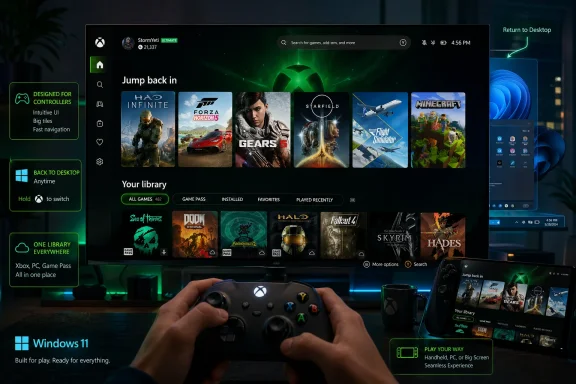
Xbox Mode is Microsoft’s latest attempt to close that gap without closing Windows. It does not replace the desktop, and it does not turn a PC into an Xbox console. It launches a console-inspired, controller-optimized interface built around the Xbox app, an aggregated game library, Game Pass, Game Bar, and a path back to the Windows desktop when the player needs it.
That distinction matters. Microsoft is not trying to make Windows disappear; it is trying to make Windows less visible at the precise moment when visibility becomes a disadvantage. The company wants the driver model, the storefront flexibility, and the Win32 compatibility of the PC, but it wants the first ten seconds of the experience to feel less like logging into a workstation.
The rollout began exactly where Microsoft said it would, though just barely: April 30, the final day of the month it had promised. That timing is amusing, but not especially damning. The more important fact is that Xbox Mode is now moving from handheld experiments and Insider previews into the mainstream Windows 11 channel.
That is a surprisingly large job for the Xbox app. Historically, Microsoft’s PC gaming software has been less a unified front door than a collection of adjacent pieces: the Microsoft Store, the Xbox app, Game Bar, Game Pass, cloud gaming, Play Anywhere, and Windows’ own Gaming settings. Xbox Mode is an effort to make those pieces feel like one system.
The interface promises three core behaviors. You can browse and launch games using a controller. You can move between Xbox Mode and the Windows desktop. You can access an aggregated library that includes Xbox content, Game Pass, and installed games from other major PC storefronts.
That last promise is the hardest one. PC gamers do not have a library; they have strata. A decade of Steam purchases, an Epic free-game archive, a GOG nostalgia shelf, an EA or Ubisoft launcher graveyard, Xbox Game Pass installs, itch.io oddities, mod managers, and standalone executables all coexist uneasily. Microsoft is not going to unify that chaos by decree, but it can make the first layer more navigable.
The April Xbox update helps explain the direction of travel. Microsoft is adding manual library entries, game pinning, a Gamepad Cursor, repositionable notifications, and handheld-focused improvements. None of these sounds revolutionary in isolation. Together, they suggest Microsoft has finally accepted that a controller-first PC cannot simply be a desktop PC with bigger tiles.
Xbox Mode is Microsoft answering that embarrassment from inside the house. It does not need a compatibility layer to run Windows games because it is Windows. It does not need to persuade developers to target a new operating system because developers already target the platform underneath it. Its weakness is not compatibility; it is discipline.
SteamOS benefits from opinionated design. The Steam Deck is not trying to be a laptop, a managed enterprise endpoint, a tablet, a dev workstation, and a console all at once. Windows is. That makes Xbox Mode both technically easier and strategically harder.
Microsoft cannot simply lock down the system and call it done. The openness of Windows is the feature. Players expect mods, alternate launchers, weird peripherals, Discord, OBS, anti-cheat systems, storefront competition, cloud saves, and the occasional driver ritual performed under moonlight. Xbox Mode must simplify without suffocating the thing it is simplifying.
That is why this rollout is best understood as a truce between the console and the PC, not a conquest by either side. Xbox Mode is not SteamOS for Windows. It is Microsoft’s attempt to make the Windows gaming stack feel like a console until the exact moment the user needs it to behave like a PC again.
That is why the Xbox full-screen experience first made sense on Windows handhelds, including the ROG Xbox Ally family and similar devices. On that class of hardware, the desktop is not just inelegant; it is ergonomically wrong. The system needs to boot into something that assumes a controller, assumes a couch or commute, and assumes the user wants to get into a game rather than manage a file system.
Microsoft says the lessons from handhelds shaped the broader Windows 11 rollout. That is the correct direction. Too many Windows features start on the desktop and then get awkwardly miniaturized. Xbox Mode starts from the place where Windows is weakest and then expands outward.
The trick is that desktops and laptops are not merely bigger handhelds. On a living-room PC, Xbox Mode might be the primary interface. On a gaming laptop, it may be a convenience. On a workstation with a controller plugged in, it may be something the owner tries once and forgets. Microsoft’s phased release gives it room to discover which of those audiences actually exists at scale.
It also gives Microsoft cover. A phased rollout means some users will not see the feature immediately even after updating Windows 11 and enabling “Get the latest updates as soon as they are available.” That will frustrate enthusiasts, but it is standard modern Windows behavior: the bits, the switch, and the eligibility logic do not always arrive as a single, satisfying event.
Still, there is a sensible idea underneath the marketing. A gaming-focused shell can reduce friction, suppress unnecessary interruptions, make controller navigation possible, and streamline the path between power-on and play. If Microsoft can quiet the background without breaking the flexibility people expect from Windows, that is useful even if frame rates do not suddenly leap upward.
But Xbox Mode should not be judged as a benchmark feature first. Its primary competition is not a GPU overclock or a driver update. Its competition is the moment a user picks up a controller, stares at a Windows desktop from ten feet away, and decides to use a console instead.
On handhelds, even small reductions in background activity can matter because memory, thermals, and battery life are always constrained. On desktops, the gains may be less dramatic. The experience layer still matters, though, because “performance” in gaming is not only frames per second; it is also how long it takes to get from intent to play.
That is where Microsoft has historically lost to both consoles and Steam Deck. The PC may be more powerful, more flexible, and more open, but it often asks the user to perform small administrative acts before delivering fun. Xbox Mode is an attempt to hide those acts, or at least postpone them until the player is back at the desktop.
That does not mean hardware is irrelevant. It means the next Xbox hardware is likely to be judged by how well it participates in this broader Windows-and-Xbox continuum. The more Microsoft makes Windows feel Xbox-like, the easier it becomes to imagine future Xbox devices that are less sealed-off from the PC ecosystem.
This is why Xbox Mode matters beyond the handful of users who will immediately enable it on a desktop tower. It is a platform rehearsal. Microsoft is teaching Windows to present itself as Xbox when that is useful, and teaching Xbox users that PC libraries, alternate storefronts, and Windows flexibility are not alien concepts.
The risk is dilution. If everything is Xbox, then Xbox must mean something more specific than “a place where Microsoft lets you play games.” The console experience has historically meant reliability, simplicity, and a predictable target for developers. The PC experience has meant power, openness, and chaos. Xbox Mode tries to borrow from both columns.
That is a compelling strategy, but it also raises expectations. If Microsoft tells users this is console-inspired, users will expect console-like polish. If it tells PC gamers the system remains open, they will expect their non-Xbox libraries and tools to behave. Falling between those expectations is the danger.
Microsoft can improve the surface, but it cannot fully control the plumbing. That is the cost of openness. It is also the reason many PC gamers prefer Windows in the first place.
The most interesting part of the April PC updates may be the ability to manually add games and apps to the Xbox library on handheld devices. That sounds mundane, but it acknowledges reality. Automated library detection will never catch everything that PC gamers consider a “game,” and a serious gaming shell must let users curate their own front door.
Customization is not a side feature here; it is the escape valve. If Xbox Mode only works elegantly for Microsoft Store and Game Pass titles, it becomes a subscription kiosk. If it can gracefully accommodate Steam, GOG, Epic, emulators, launch scripts, and non-game utilities, it becomes a credible living-room shell.
That line will determine whether enthusiasts treat Xbox Mode as useful infrastructure or another Microsoft surface that looks good in demos and slowly fills with edge-case frustration.
Microsoft’s Release Preview work around the same period included enterprise-facing changes such as expanded removal options for default Microsoft Store packages. That matters because Windows is increasingly modular in practice, even when it still feels monolithic in branding. Microsoft wants consumer experiences like Xbox Mode to evolve quickly, while IT administrators want predictable controls over what appears on managed systems.
The obvious question for admins is not whether accountants will start gaming in Xbox Mode. It is whether the components behind Xbox Mode, Game Bar, Store packages, and Xbox services remain manageable through existing policy and provisioning tools. If Microsoft handles that cleanly, the feature becomes background noise for business environments. If not, it becomes another “why is this on our image?” conversation.
There is also a subtler point. Microsoft is trying to make Windows more adaptive by context: work shell, tablet shell, gaming shell, handheld shell, cloud endpoint. That is powerful, but it increases the number of experiences IT must understand, disable, support, or explain. Consumer Windows and managed Windows are sharing the same foundation, but their priorities keep drifting apart.
Xbox Mode is not an enterprise crisis. It is a reminder that Windows 11 is no longer just an operating system with apps on top. It is a set of competing surfaces that Microsoft can promote, suppress, or reframe depending on the audience.
The problem is that consumer excitement does not map neatly onto controlled feature rollout. Enthusiasts read “available today” and expect a button. Microsoft means “the deployment pipeline starts today.” Both statements can be technically true, but only one feels honest to the person refreshing Windows Update.
This has become a recurring Windows communications problem. Feature drops, cumulative updates, enablement packages, Store updates, app updates, server-side flags, regional eligibility, and Insider rings all blur together. Even technically literate users can struggle to know whether they are missing an update, waiting for a rollout, blocked by region, or simply looking in the wrong settings pane.
For Xbox Mode, that confusion is survivable. Nobody’s security posture depends on getting a controller-friendly shell this afternoon. But the rollout does slightly undercut the drama of the launch. Microsoft wants to say Xbox Mode is here; many users will discover that “here” means “eventually, if your device is selected.”
That is not unique to Microsoft, but Microsoft feels it more acutely because Windows users still remember a time when installing an update meant the feature was on the machine, not waiting behind a cloud-controlled velvet rope.
But the more interesting story is not lateness; it is caution. Microsoft could have rushed a broad switch-flip earlier in the month and dealt with the blast radius later. Instead, it is staging the release, leaning on select markets, and continuing to fold in feedback from handhelds and Insiders.
That caution is warranted because Xbox Mode sits at an awkward intersection. If it is buggy, console users will mock Windows. If it is too limited, PC users will dismiss it. If it is too aggressive, admins and desktop loyalists will complain that Microsoft is pushing gaming surfaces into places they do not belong.
The measured rollout suggests Microsoft knows the interface is not done. That is not necessarily a weakness. Steam Big Picture and SteamOS were not born fully mature either. The difference is that Valve iterated in a community already inclined to reward focus, while Microsoft iterates under the suspicion that every new surface is a funnel toward subscriptions, Store traffic, or account lock-in.
That suspicion is not entirely fair, but Microsoft earned some of it over the last decade. Xbox Mode will need to prove through behavior that it is a player convenience first and a Microsoft engagement surface second.
It is a way to access PC games, Game Pass titles, installed games, and supported libraries through an Xbox-flavored interface. Xbox Play Anywhere helps where publishers support it, and Microsoft says more than 1,500 games now participate. Cloud gaming and “stream your own game” libraries also expand what can be played across devices.
But Xbox Mode is not an Xbox Series X compatibility layer. It does not magically turn every console purchase into a local PC executable. It does not erase licensing boundaries, publisher decisions, or technical differences between console and PC builds.
Microsoft should be blunt about that because ambiguity helps in the short term and hurts in the long term. The Xbox brand now stretches across console, PC, cloud, handhelds, and mobile. That breadth is powerful, but it can also confuse customers about what they own, where they can play it, and what “Xbox” means on a Windows PC.
The best version of Xbox Mode is honest about being a launcher and environment, not a miracle. It can still be valuable on those terms. In fact, it will be more trusted if it does not pretend to be more than it is.
On that score, Microsoft still has to prove itself. The company has many of the pieces but has often struggled with coherence. Game Bar can be useful, but it can also feel like an overlay from a different team. The Xbox app has improved, but it still carries the weight of Microsoft Store history. Windows can be a great gaming OS, but it is rarely a quiet one.
Xbox Mode forces those teams into the same room. If the experience is good, users will not think about which component handled what. If it is bad, every seam will show.
There is a lesson here from consoles that has nothing to do with hardware power. Consoles succeed because they reduce decision fatigue. The user knows where the games are, where the settings are, where the friends list is, and what the controller does. Windows has always offered more choices, but more choices become a burden when the player is holding a controller and sitting on a sofa.
Microsoft does not need to make Windows less powerful. It needs to make the default gaming path less needy. Xbox Mode is a credible start, but only if Microsoft keeps sanding down the moments where the desktop leaks through unnecessarily.
Source: Windows Central “Xbox Mode is here”: the rollout of Microsoft's console-like experience begins rolling out for Windows 11
 Microsoft Finally Ships the Living-Room Windows It Has Avoided Naming
For years, PC gaming has had a strange split personality. On paper, Windows is the biggest gaming platform Microsoft owns: Steam, Epic, Battle.net, Xbox, Game Pass, emulators, mods, drivers, overlays, and the entire messy richness of the PC ecosystem all live there. In practice, the moment you put that PC under a television or squeeze it into a handheld, Windows starts behaving like a productivity operating system that has been asked to wear a hoodie.Xbox Mode is Microsoft’s latest attempt to close that gap without closing Windows. It does not replace the desktop, and it does not turn a PC into an Xbox console. It launches a console-inspired, controller-optimized interface built around the Xbox app, an aggregated game library, Game Pass, Game Bar, and a path back to the Windows desktop when the player needs it.
That distinction matters. Microsoft is not trying to make Windows disappear; it is trying to make Windows less visible at the precise moment when visibility becomes a disadvantage. The company wants the driver model, the storefront flexibility, and the Win32 compatibility of the PC, but it wants the first ten seconds of the experience to feel less like logging into a workstation.
The rollout began exactly where Microsoft said it would, though just barely: April 30, the final day of the month it had promised. That timing is amusing, but not especially damning. The more important fact is that Xbox Mode is now moving from handheld experiments and Insider previews into the mainstream Windows 11 channel.
The Xbox App Becomes a Shell, Whether Windows Admits It or Not
Microsoft’s official description is careful: Xbox Mode is a full-screen, controller-optimized experience for Windows 11. But functionally, it is a partial shell for gaming. It becomes the thing you see instead of the desktop, the place from which you launch games, the library that tries to gather titles from multiple storefronts, and the interface that says, in effect, “don’t worry about the rest of the PC right now.”That is a surprisingly large job for the Xbox app. Historically, Microsoft’s PC gaming software has been less a unified front door than a collection of adjacent pieces: the Microsoft Store, the Xbox app, Game Bar, Game Pass, cloud gaming, Play Anywhere, and Windows’ own Gaming settings. Xbox Mode is an effort to make those pieces feel like one system.
The interface promises three core behaviors. You can browse and launch games using a controller. You can move between Xbox Mode and the Windows desktop. You can access an aggregated library that includes Xbox content, Game Pass, and installed games from other major PC storefronts.
That last promise is the hardest one. PC gamers do not have a library; they have strata. A decade of Steam purchases, an Epic free-game archive, a GOG nostalgia shelf, an EA or Ubisoft launcher graveyard, Xbox Game Pass installs, itch.io oddities, mod managers, and standalone executables all coexist uneasily. Microsoft is not going to unify that chaos by decree, but it can make the first layer more navigable.
The April Xbox update helps explain the direction of travel. Microsoft is adding manual library entries, game pinning, a Gamepad Cursor, repositionable notifications, and handheld-focused improvements. None of these sounds revolutionary in isolation. Together, they suggest Microsoft has finally accepted that a controller-first PC cannot simply be a desktop PC with bigger tiles.
Steam’s Big Picture Shadow Hangs Over the Whole Launch
The unavoidable comparison is Steam Big Picture Mode, and behind that, SteamOS on the Steam Deck. Valve solved the living-room and handheld problem by building a gaming-first interface on top of Linux, then using Proton to make a huge chunk of Windows gaming work somewhere other than Windows. Microsoft’s problem is more ironic: it owns the platform most PC games are built for, but Valve has often made the overall handheld experience feel more coherent.Xbox Mode is Microsoft answering that embarrassment from inside the house. It does not need a compatibility layer to run Windows games because it is Windows. It does not need to persuade developers to target a new operating system because developers already target the platform underneath it. Its weakness is not compatibility; it is discipline.
SteamOS benefits from opinionated design. The Steam Deck is not trying to be a laptop, a managed enterprise endpoint, a tablet, a dev workstation, and a console all at once. Windows is. That makes Xbox Mode both technically easier and strategically harder.
Microsoft cannot simply lock down the system and call it done. The openness of Windows is the feature. Players expect mods, alternate launchers, weird peripherals, Discord, OBS, anti-cheat systems, storefront competition, cloud saves, and the occasional driver ritual performed under moonlight. Xbox Mode must simplify without suffocating the thing it is simplifying.
That is why this rollout is best understood as a truce between the console and the PC, not a conquest by either side. Xbox Mode is not SteamOS for Windows. It is Microsoft’s attempt to make the Windows gaming stack feel like a console until the exact moment the user needs it to behave like a PC again.
Handhelds Forced Microsoft to Fix a Problem Desktop Gamers Could Ignore
The rise of handheld gaming PCs made this work unavoidable. A desktop gamer can tolerate Windows because the keyboard and mouse are already there. A laptop gamer can shrug and alt-tab. A handheld user has no such luxury. Tiny taskbar icons, update prompts, launcher windows, UAC dialogs, Bluetooth menus, and text fields become insults when your primary input device is a pair of sticks and face buttons.That is why the Xbox full-screen experience first made sense on Windows handhelds, including the ROG Xbox Ally family and similar devices. On that class of hardware, the desktop is not just inelegant; it is ergonomically wrong. The system needs to boot into something that assumes a controller, assumes a couch or commute, and assumes the user wants to get into a game rather than manage a file system.
Microsoft says the lessons from handhelds shaped the broader Windows 11 rollout. That is the correct direction. Too many Windows features start on the desktop and then get awkwardly miniaturized. Xbox Mode starts from the place where Windows is weakest and then expands outward.
The trick is that desktops and laptops are not merely bigger handhelds. On a living-room PC, Xbox Mode might be the primary interface. On a gaming laptop, it may be a convenience. On a workstation with a controller plugged in, it may be something the owner tries once and forgets. Microsoft’s phased release gives it room to discover which of those audiences actually exists at scale.
It also gives Microsoft cover. A phased rollout means some users will not see the feature immediately even after updating Windows 11 and enabling “Get the latest updates as soon as they are available.” That will frustrate enthusiasts, but it is standard modern Windows behavior: the bits, the switch, and the eligibility logic do not always arrive as a single, satisfying event.
The Performance Promise Is Real, but It Is Not Magic
Microsoft is also positioning Xbox Mode as a way to reduce background distractions and prioritize gaming. This is the part of the pitch that will attract the most skepticism, and rightly so. PC gamers have been trained by years of “game mode” toggles, optimizer utilities, RGB control panels, and vendor overlays to distrust anything that promises free performance.Still, there is a sensible idea underneath the marketing. A gaming-focused shell can reduce friction, suppress unnecessary interruptions, make controller navigation possible, and streamline the path between power-on and play. If Microsoft can quiet the background without breaking the flexibility people expect from Windows, that is useful even if frame rates do not suddenly leap upward.
But Xbox Mode should not be judged as a benchmark feature first. Its primary competition is not a GPU overclock or a driver update. Its competition is the moment a user picks up a controller, stares at a Windows desktop from ten feet away, and decides to use a console instead.
On handhelds, even small reductions in background activity can matter because memory, thermals, and battery life are always constrained. On desktops, the gains may be less dramatic. The experience layer still matters, though, because “performance” in gaming is not only frames per second; it is also how long it takes to get from intent to play.
That is where Microsoft has historically lost to both consoles and Steam Deck. The PC may be more powerful, more flexible, and more open, but it often asks the user to perform small administrative acts before delivering fun. Xbox Mode is an attempt to hide those acts, or at least postpone them until the player is back at the desktop.
Microsoft’s Bigger Xbox Strategy Is Hiding in Plain Sight
Xbox Mode arrives at a moment when Microsoft’s gaming strategy is less console-centric than at any point in Xbox history. Game Pass, cloud gaming, Xbox Play Anywhere, PC storefront improvements, handheld partnerships, and cross-device libraries all point in the same direction: Xbox is becoming a service layer and identity system as much as a box under the TV.That does not mean hardware is irrelevant. It means the next Xbox hardware is likely to be judged by how well it participates in this broader Windows-and-Xbox continuum. The more Microsoft makes Windows feel Xbox-like, the easier it becomes to imagine future Xbox devices that are less sealed-off from the PC ecosystem.
This is why Xbox Mode matters beyond the handful of users who will immediately enable it on a desktop tower. It is a platform rehearsal. Microsoft is teaching Windows to present itself as Xbox when that is useful, and teaching Xbox users that PC libraries, alternate storefronts, and Windows flexibility are not alien concepts.
The risk is dilution. If everything is Xbox, then Xbox must mean something more specific than “a place where Microsoft lets you play games.” The console experience has historically meant reliability, simplicity, and a predictable target for developers. The PC experience has meant power, openness, and chaos. Xbox Mode tries to borrow from both columns.
That is a compelling strategy, but it also raises expectations. If Microsoft tells users this is console-inspired, users will expect console-like polish. If it tells PC gamers the system remains open, they will expect their non-Xbox libraries and tools to behave. Falling between those expectations is the danger.
The Storefront Problem Is Bigger Than the Interface
Aggregating installed games from other storefronts is a practical necessity, but it is not the same as solving PC fragmentation. Launching a Steam game from Xbox Mode still means Steam exists. Launching an EA game may still mean EA’s launcher exists. Modded games, DRM checks, cloud save prompts, and update dialogs can still pierce the illusion.Microsoft can improve the surface, but it cannot fully control the plumbing. That is the cost of openness. It is also the reason many PC gamers prefer Windows in the first place.
The most interesting part of the April PC updates may be the ability to manually add games and apps to the Xbox library on handheld devices. That sounds mundane, but it acknowledges reality. Automated library detection will never catch everything that PC gamers consider a “game,” and a serious gaming shell must let users curate their own front door.
Customization is not a side feature here; it is the escape valve. If Xbox Mode only works elegantly for Microsoft Store and Game Pass titles, it becomes a subscription kiosk. If it can gracefully accommodate Steam, GOG, Epic, emulators, launch scripts, and non-game utilities, it becomes a credible living-room shell.
That line will determine whether enthusiasts treat Xbox Mode as useful infrastructure or another Microsoft surface that looks good in demos and slowly fills with edge-case frustration.
Enterprise IT Will Notice the Consumer Feature for the Wrong Reasons
For WindowsForum readers who manage fleets rather than gaming rigs, Xbox Mode may look like consumer fluff. But gaming features in Windows often intersect with enterprise concerns because they touch app provisioning, policy, background services, Store components, notifications, and update rings. A feature that is harmless on a home PC can become another item on the image-hardening checklist.Microsoft’s Release Preview work around the same period included enterprise-facing changes such as expanded removal options for default Microsoft Store packages. That matters because Windows is increasingly modular in practice, even when it still feels monolithic in branding. Microsoft wants consumer experiences like Xbox Mode to evolve quickly, while IT administrators want predictable controls over what appears on managed systems.
The obvious question for admins is not whether accountants will start gaming in Xbox Mode. It is whether the components behind Xbox Mode, Game Bar, Store packages, and Xbox services remain manageable through existing policy and provisioning tools. If Microsoft handles that cleanly, the feature becomes background noise for business environments. If not, it becomes another “why is this on our image?” conversation.
There is also a subtler point. Microsoft is trying to make Windows more adaptive by context: work shell, tablet shell, gaming shell, handheld shell, cloud endpoint. That is powerful, but it increases the number of experiences IT must understand, disable, support, or explain. Consumer Windows and managed Windows are sharing the same foundation, but their priorities keep drifting apart.
Xbox Mode is not an enterprise crisis. It is a reminder that Windows 11 is no longer just an operating system with apps on top. It is a set of competing surfaces that Microsoft can promote, suppress, or reframe depending on the audience.
The Phased Rollout Is Sensible, but It Blunts the Moment
Microsoft says Xbox Mode is rolling out gradually in select markets, with broader availability in those markets over the next several weeks. Users who want it are told to update Windows 11 and enable the toggle for receiving the latest updates as soon as they are available. That is the modern Windows bargain: if you want new features early, you agree to live closer to the edge of Microsoft’s deployment machinery.The problem is that consumer excitement does not map neatly onto controlled feature rollout. Enthusiasts read “available today” and expect a button. Microsoft means “the deployment pipeline starts today.” Both statements can be technically true, but only one feels honest to the person refreshing Windows Update.
This has become a recurring Windows communications problem. Feature drops, cumulative updates, enablement packages, Store updates, app updates, server-side flags, regional eligibility, and Insider rings all blur together. Even technically literate users can struggle to know whether they are missing an update, waiting for a rollout, blocked by region, or simply looking in the wrong settings pane.
For Xbox Mode, that confusion is survivable. Nobody’s security posture depends on getting a controller-friendly shell this afternoon. But the rollout does slightly undercut the drama of the launch. Microsoft wants to say Xbox Mode is here; many users will discover that “here” means “eventually, if your device is selected.”
That is not unique to Microsoft, but Microsoft feels it more acutely because Windows users still remember a time when installing an update meant the feature was on the machine, not waiting behind a cloud-controlled velvet rope.
The April 30 Launch Is a Deadline Met, Not a Victory Lap
Windows Central’s framing that Microsoft barely met its own deadline is fair in the narrow calendar sense. The company said April, and the rollout began on April 30. That is the software equivalent of submitting the assignment at 11:58 p.m.But the more interesting story is not lateness; it is caution. Microsoft could have rushed a broad switch-flip earlier in the month and dealt with the blast radius later. Instead, it is staging the release, leaning on select markets, and continuing to fold in feedback from handhelds and Insiders.
That caution is warranted because Xbox Mode sits at an awkward intersection. If it is buggy, console users will mock Windows. If it is too limited, PC users will dismiss it. If it is too aggressive, admins and desktop loyalists will complain that Microsoft is pushing gaming surfaces into places they do not belong.
The measured rollout suggests Microsoft knows the interface is not done. That is not necessarily a weakness. Steam Big Picture and SteamOS were not born fully mature either. The difference is that Valve iterated in a community already inclined to reward focus, while Microsoft iterates under the suspicion that every new surface is a funnel toward subscriptions, Store traffic, or account lock-in.
That suspicion is not entirely fair, but Microsoft earned some of it over the last decade. Xbox Mode will need to prove through behavior that it is a player convenience first and a Microsoft engagement surface second.
A Console-Like PC Still Needs PC-Like Honesty
The phrase “console-like experience” is doing a lot of work. It promises simplicity without explicitly promising console compatibility. That distinction will matter to users who see Xbox branding and wonder whether their digital Xbox console library will suddenly run natively on Windows. For the most part, Xbox Mode is not that.It is a way to access PC games, Game Pass titles, installed games, and supported libraries through an Xbox-flavored interface. Xbox Play Anywhere helps where publishers support it, and Microsoft says more than 1,500 games now participate. Cloud gaming and “stream your own game” libraries also expand what can be played across devices.
But Xbox Mode is not an Xbox Series X compatibility layer. It does not magically turn every console purchase into a local PC executable. It does not erase licensing boundaries, publisher decisions, or technical differences between console and PC builds.
Microsoft should be blunt about that because ambiguity helps in the short term and hurts in the long term. The Xbox brand now stretches across console, PC, cloud, handhelds, and mobile. That breadth is powerful, but it can also confuse customers about what they own, where they can play it, and what “Xbox” means on a Windows PC.
The best version of Xbox Mode is honest about being a launcher and environment, not a miracle. It can still be valuable on those terms. In fact, it will be more trusted if it does not pretend to be more than it is.
The Real Test Starts After the Button Appears
The first wave of coverage will focus on how to enable Xbox Mode and whether it feels polished. That is natural, but the serious test will take months. A gaming shell succeeds or fails through repetition: wake, pair controller, launch game, suspend, resume, switch app, update, recover from error, add a nonstandard title, dock to a TV, undock, and do it again.On that score, Microsoft still has to prove itself. The company has many of the pieces but has often struggled with coherence. Game Bar can be useful, but it can also feel like an overlay from a different team. The Xbox app has improved, but it still carries the weight of Microsoft Store history. Windows can be a great gaming OS, but it is rarely a quiet one.
Xbox Mode forces those teams into the same room. If the experience is good, users will not think about which component handled what. If it is bad, every seam will show.
There is a lesson here from consoles that has nothing to do with hardware power. Consoles succeed because they reduce decision fatigue. The user knows where the games are, where the settings are, where the friends list is, and what the controller does. Windows has always offered more choices, but more choices become a burden when the player is holding a controller and sitting on a sofa.
Microsoft does not need to make Windows less powerful. It needs to make the default gaming path less needy. Xbox Mode is a credible start, but only if Microsoft keeps sanding down the moments where the desktop leaks through unnecessarily.
The Xbox Mode Checklist That Actually Matters
The launch is easy to overstate and easy to dismiss. The sensible reading sits in the middle: Xbox Mode is not the rebirth of Windows gaming, but it is a meaningful signal about where Microsoft wants Windows, Xbox, handhelds, and the next generation of gaming hardware to meet.- Xbox Mode began rolling out on April 30, 2026, for Windows 11 PCs in select markets, with availability expanding gradually rather than appearing for everyone at once.
- The feature provides a full-screen, controller-optimized Xbox interface for browsing, launching, and returning to games without relying on the traditional desktop.
- Microsoft is positioning the mode as a way to reduce background distractions and make Windows feel more console-like, especially on handhelds and living-room PCs.
- The experience depends heavily on how well the Xbox app, Game Bar, Game Pass, and third-party storefront libraries behave together in real use.
- Xbox Mode does not turn a Windows PC into an Xbox console or automatically make every console game purchase locally playable on PC.
- For IT pros, the feature is less important as a gaming novelty than as another example of Windows becoming a collection of context-specific shells and services.
Source: Windows Central “Xbox Mode is here”: the rollout of Microsoft's console-like experience begins rolling out for Windows 11
