

Microsoft began rolling out Xbox mode on April 30, 2026, to Windows 11 PCs in select markets, extending a controller-optimized, full-screen gaming interface from handhelds to laptops, desktops, and tablets. That is not quite the same thing as turning every Windows 11 device into an Xbox overnight. It is something more strategically important: Microsoft is trying to make Windows feel less like a compromise in the living room, on handhelds, and anywhere a keyboard is not the default input device. The company is not replacing the PC with the console; it is trying to make the PC stop reminding players that it was never designed as one.
For decades, Windows has won PC gaming by being everywhere rather than by being elegant. It had the drivers, the storefronts, the graphics APIs, the modding scene, the anti-cheat support, the hardware choice, and the sheer gravitational pull of Steam. What it did not have was grace.
That weakness was easy to ignore when PC gaming meant a desk, a monitor, a mouse, and a keyboard. It became impossible to ignore once the Steam Deck proved that a handheld PC could feel like an appliance rather than a small laptop with bad posture. Valve did not beat Windows on raw compatibility; it beat Windows on the first five minutes of use.
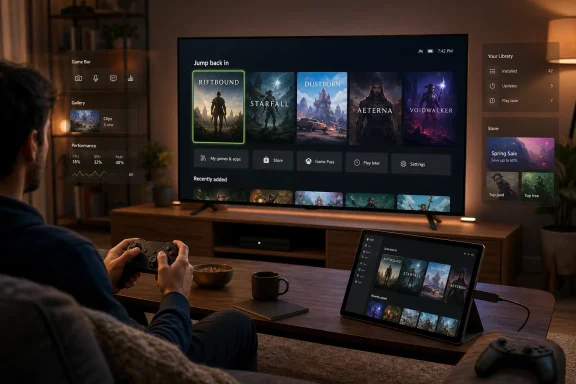
Xbox mode is Microsoft’s answer to that embarrassment. It gives Windows 11 a console-inspired front end where players can browse a library, launch games, use Game Bar, switch between apps, and step back to the desktop when needed. The underlying bet is simple: if Microsoft can hide enough of Windows at the right moments, it can preserve the openness of PC gaming without forcing players to suffer the desktop every time they want to play.
That is why the April 30 rollout matters even if the first wave is gradual and uneven. This is not merely another Xbox app redesign. It is Microsoft conceding that the Windows shell, as good as it may be for spreadsheets and sysadmin work, is a poor default environment for a controller-first gaming machine.
Some of the more breathless coverage turns the story into a switch-flip moment: every Windows 11 device now doubles as an Xbox, all at once, through a named Windows Update package. That framing is too neat. Microsoft’s own language is more cautious, emphasizing gradual availability, select markets, and the need to enable the “get the latest updates as soon as they are available” option in Windows Update.
There is also a distinction worth preserving between Xbox mode and an Xbox console. Xbox mode does not magically grant a Windows PC native compatibility with every Xbox console title. It does not make a cheap office laptop perform like a Series X. It does not erase the messy reality of PC storefronts, launchers, drivers, overlays, shader compilation, and anti-cheat systems.
What it does is more practical and, in some ways, more ambitious. It gives Windows 11 a controller-first mode that can aggregate access to games and reduce the number of moments when a player has to drop into desktop mode. In the PC world, lowering friction is not a cosmetic change. It is infrastructure.
The original full-screen experience, now rebranded as Xbox mode, was Microsoft’s attempt to paper over that mismatch. On a handheld, the need was obvious: players wanted to press a button, see a game library, launch something, and get out. They did not want to poke at File Explorer with a thumbstick.
Bringing that experience to conventional PCs changes the audience. A gaming desktop connected to a TV has many of the same problems as a handheld, only from ten feet away. A living-room mini PC may have the horsepower to embarrass a console, but if it needs a wireless keyboard on the coffee table, it has already lost part of the console argument.
This is where Xbox mode becomes more than a handheld convenience. Microsoft is building a Windows posture for the couch. The company does not need every Windows user to live in Xbox mode; it needs Windows to be able to become Xbox-like when the room, input device, and screen demand it.
Microsoft says Xbox mode can surface an aggregated library that includes Game Pass and installed games from leading PC storefronts. That point is doing a lot of work. PC gamers do not merely own games; they own launchers, accounts, save systems, overlays, mod managers, refund policies, and years of purchase history scattered across Steam, Epic Games Store, GOG, Ubisoft Connect, Battle.net, EA, itch.io, and the Microsoft Store.
A console can enforce a single storefront because the platform holder controls the hardware and software stack. Windows cannot do that without detonating the very openness that makes it dominant. Xbox mode therefore has to perform a trick: it must make the PC feel unified without becoming closed.
That is why the unified library is the real battlefield. If Xbox mode becomes just a prettier Xbox app, players will continue to use Steam Big Picture, Playnite, LaunchBox, or whatever front end best respects their library. If it can reliably launch games from multiple stores, preserve controller navigation, and recover gracefully when a third-party launcher demands attention, then Microsoft has something far more durable.
The irony is rich. Microsoft spent years trying to make the Microsoft Store matter more in PC gaming. Xbox mode suggests the company has accepted a different route: own the experience layer even when someone else owns the transaction.
Xbox mode gives Game Bar a clearer role. In a controller-first environment, the overlay becomes the escape hatch, the settings surface, and the connective tissue between games, apps, chat, friends, and system behavior. It is the closest thing Windows has to a console guide menu.
That matters because a console is not just a dashboard. It is a set of assumptions about interruption. The user expects to adjust audio, join a party, invite a friend, capture a clip, switch apps, and return to the game without the whole illusion collapsing. On Windows, those operations often cross boundaries between the OS, the launcher, the GPU driver, the game, and third-party services.
Microsoft’s challenge is to make those seams less visible. The company does not need to eliminate Windows complexity; it needs to make the most common gaming actions feel native to the mode. If Game Bar can become the trusted control plane, Xbox mode has a chance to feel like a system rather than a skin.
A console wakes into an interface designed for the screen across the room. A Windows PC wakes into possibility, which is another way of saying it wakes into ambiguity. There may be a login prompt, an update, a launcher, a display scaling problem, a Bluetooth pairing issue, a mouse cursor in the corner, or a game that opens on the wrong monitor.
The Xbox Ally docking improvements show Microsoft understands at least part of this problem. Better external display handling, controller pairing, TV-oriented behavior, and joystick cursor support are not glamorous features. They are the plumbing that determines whether a device feels appliance-like or experimental.
The joystick cursor is especially telling. It is an admission that Windows cannot fully escape its desktop heritage, so it needs a better fallback when a user gets dumped into a non-game app or settings panel. The best console-like experience is one that avoids these moments; the second-best is one that survives them without requiring a mouse.
This is where Xbox mode’s success will be measured. Not in screenshots, not in announcement posts, but in how often a player on a couch has to say, “Where’s the keyboard?”
Windows hibernation, GPU driver state, anti-cheat systems, online sessions, DRM checks, background launchers, and games that were never designed for such behavior all complicate the story. A controlled console platform can make stronger assumptions. A Windows PC has to negotiate with chaos.
That does not mean Microsoft should avoid the attempt. Quite the opposite: suspend-and-resume is exactly the kind of system-level feature that can make Windows feel less like a general-purpose computer and more like a gaming appliance. But it is also the sort of feature that will be judged brutally if it works only some of the time.
The safe expectation is that Microsoft will start with constrained scenarios and compatible titles rather than an across-the-board miracle. If the company can make even a subset of games resume reliably, it will have a powerful differentiator. If it overpromises, players will remember every frozen screen, broken session, and game that restarts anyway.
A smoother front end is only half the fight. PC games also need to start faster, stutter less, stream assets more predictably, and give developers better tools to diagnose GPU crashes and performance problems. The console-like experience breaks down quickly if the dashboard is slick but the first launch is a shader-compilation carnival.
Advanced Shader Delivery is particularly important because shader stutter remains one of PC gaming’s most visible self-inflicted wounds. Consoles avoid much of this pain through fixed hardware targets and controlled pipelines. PCs, with their vast combinations of GPUs, drivers, settings, and storefronts, make it harder.
Microsoft’s pitch is that Windows can borrow some console discipline without becoming a console. If developers can package shader data more predictably and storefronts can deliver the right assets to supported devices, the first-run experience can improve. That is the unglamorous foundation Xbox mode needs if it is going to feel like more than a launcher.
The likely direction is not a simple death of the console, nor a plain Windows desktop shoved into a black plastic box. Microsoft appears to be moving toward a family of Xbox-branded or Xbox-like devices where Windows compatibility, console presentation, and curated performance expectations coexist. The ROG Xbox Ally line is an early proof point; future living-room hardware may push the idea further.
That strategy has obvious appeal. Microsoft can court developers with a broader Windows base, court players with more hardware choice, and court OEMs with a gaming experience that differentiates Windows devices from generic PCs. It also gives Xbox a way to compete that is not just “sell more traditional consoles than Sony.”
But the risk is equally obvious. The more Xbox becomes Windows, the more it inherits Windows’ mess. The more Windows becomes Xbox, the more PC users worry about bloat, forced services, advertising surfaces, account nudges, and yet another Microsoft layer trying to mediate what was once direct.
The line Microsoft must walk is narrow. Xbox mode has to feel optional enough for PC purists, polished enough for console users, open enough for Steam loyalists, and integrated enough to justify its existence.
In most serious environments, Xbox mode will be viewed less as a feature than as another policy surface to understand. Admins will want to know how it is delivered, whether it can be hidden, whether Game Bar dependencies change, how it behaves under restricted accounts, and whether it introduces additional update cadence surprises. The fact that the rollout is gradual makes those questions more pressing, not less.
The good news is that Xbox mode is not being framed as a mandatory replacement shell. Users can move back to the Windows desktop, and the feature is designed as a mode rather than a new default for general computing. The bad news is that “mode” does not mean “irrelevant” in managed environments, especially when Microsoft consumer features have a habit of appearing before organizations have finished writing guidance.
For schools, shared devices, labs, and office machines with discrete GPUs, the policy conversation will matter. Even if Xbox mode is harmless, its presence may be unwelcome. A controller-first dashboard is delightful on a handheld and awkward on a workstation used for CAD, exams, or reception-desk duty.
Microsoft can avoid most of the backlash by giving administrators clear controls and documentation. The company should know this by now. In 2026, every Windows feature is also an IT governance story.
Microsoft’s advantage is deeper OS integration. It can tie Xbox mode into Game Bar, Windows display handling, input switching, power behavior, DirectStorage, Auto HDR, and future platform features in a way Valve cannot. If those integrations work, Xbox mode can feel more native than any third-party shell.
Valve’s advantage is credibility with PC gamers. Steam does not have to convince players that it respects their libraries. Microsoft does. Years of Windows Store awkwardness, account prompts, inconsistent Xbox app behavior, and confusing gaming services have left scars.
That makes reliability the first feature. Xbox mode does not need to be clever on day one. It needs to launch the right game, from the right store, with the right controller behavior, on the right display, and get out of the way. If it cannot do that, no amount of Xbox branding will save it.
On a handheld with tuned firmware, updated Xbox components, and known controls, it may feel coherent. On a random desktop with three monitors, a DualSense controller, Steam installed on one drive, Game Pass on another, and a TV connected through an AV receiver, the experience may be rougher. That diversity is the price of Windows.
The question is whether Microsoft can make the curve bend in the right direction. The April 30 rollout is a marker, not a destination. The real work is in months of compatibility fixes, storefront handshakes, driver coordination, app updates, and policy refinement.
Microsoft has the ingredients: Xbox brand recognition, Windows platform control, DirectX stewardship, Game Pass, OEM relationships, and a growing reason to make PC gaming feel appliance-like. What it has lacked is patience and consistency. Xbox mode will test both.
That is a healthier vision than pretending one interface can serve every context. Windows became dominant because it was flexible, but flexibility often turned into clutter. Xbox mode is an attempt to make flexibility situational rather than constant.
The danger is that Microsoft treats the mode as a branding surface instead of a discipline. A console-like Windows experience requires restraint. It requires fewer interruptions, fewer account nags, fewer inexplicable background tasks, and fewer moments where the user can see three generations of Windows design arguing on the same screen.
If Microsoft gets this right, Xbox mode could become the missing layer between the openness of PC gaming and the comfort of consoles. If it gets it wrong, it will become another full-screen app users disable while returning to Steam.
Source: Technobezz Microsoft Launches Xbox Mode for All Windows 11 Devices Starting April 30
 Microsoft Finally Admits the Desktop Is the Problem
For decades, Windows has won PC gaming by being everywhere rather than by being elegant. It had the drivers, the storefronts, the graphics APIs, the modding scene, the anti-cheat support, the hardware choice, and the sheer gravitational pull of Steam. What it did not have was grace.That weakness was easy to ignore when PC gaming meant a desk, a monitor, a mouse, and a keyboard. It became impossible to ignore once the Steam Deck proved that a handheld PC could feel like an appliance rather than a small laptop with bad posture. Valve did not beat Windows on raw compatibility; it beat Windows on the first five minutes of use.
Xbox mode is Microsoft’s answer to that embarrassment. It gives Windows 11 a console-inspired front end where players can browse a library, launch games, use Game Bar, switch between apps, and step back to the desktop when needed. The underlying bet is simple: if Microsoft can hide enough of Windows at the right moments, it can preserve the openness of PC gaming without forcing players to suffer the desktop every time they want to play.
That is why the April 30 rollout matters even if the first wave is gradual and uneven. This is not merely another Xbox app redesign. It is Microsoft conceding that the Windows shell, as good as it may be for spreadsheets and sysadmin work, is a poor default environment for a controller-first gaming machine.
The Rollout Is Real, but the “Every PC Is an Xbox” Line Runs Ahead of the Facts
The cleanest reading of Microsoft’s announcement is that Xbox mode began rolling out on April 30 to Windows 11 PCs in select markets, with availability expanding over the next several weeks. Microsoft describes the eligible form factors broadly: laptops, desktops, tablets, and handhelds. That broadness is meaningful, but it is not instant universality.Some of the more breathless coverage turns the story into a switch-flip moment: every Windows 11 device now doubles as an Xbox, all at once, through a named Windows Update package. That framing is too neat. Microsoft’s own language is more cautious, emphasizing gradual availability, select markets, and the need to enable the “get the latest updates as soon as they are available” option in Windows Update.
There is also a distinction worth preserving between Xbox mode and an Xbox console. Xbox mode does not magically grant a Windows PC native compatibility with every Xbox console title. It does not make a cheap office laptop perform like a Series X. It does not erase the messy reality of PC storefronts, launchers, drivers, overlays, shader compilation, and anti-cheat systems.
What it does is more practical and, in some ways, more ambitious. It gives Windows 11 a controller-first mode that can aggregate access to games and reduce the number of moments when a player has to drop into desktop mode. In the PC world, lowering friction is not a cosmetic change. It is infrastructure.
The Handheld Was the Test Bed, Not the Destination
Microsoft’s handheld work has always carried a strange tension. Windows was the reason devices like the ROG Ally and Lenovo Legion Go could run a vast PC game library, but Windows was also the reason those devices often felt unfinished. Tiny desktop controls, intrusive update prompts, launcher gymnastics, and inconsistent sleep behavior made the experience feel powerful but fragile.The original full-screen experience, now rebranded as Xbox mode, was Microsoft’s attempt to paper over that mismatch. On a handheld, the need was obvious: players wanted to press a button, see a game library, launch something, and get out. They did not want to poke at File Explorer with a thumbstick.
Bringing that experience to conventional PCs changes the audience. A gaming desktop connected to a TV has many of the same problems as a handheld, only from ten feet away. A living-room mini PC may have the horsepower to embarrass a console, but if it needs a wireless keyboard on the coffee table, it has already lost part of the console argument.
This is where Xbox mode becomes more than a handheld convenience. Microsoft is building a Windows posture for the couch. The company does not need every Windows user to live in Xbox mode; it needs Windows to be able to become Xbox-like when the room, input device, and screen demand it.
The Storefront War Gives Way to the Library War
The most important promise in Xbox mode is not that it looks like a console dashboard. Big tiles are easy. Horizontal rails are easy. The hard part is making Windows’ fragmented game economy feel coherent without breaking what makes PC gaming valuable.Microsoft says Xbox mode can surface an aggregated library that includes Game Pass and installed games from leading PC storefronts. That point is doing a lot of work. PC gamers do not merely own games; they own launchers, accounts, save systems, overlays, mod managers, refund policies, and years of purchase history scattered across Steam, Epic Games Store, GOG, Ubisoft Connect, Battle.net, EA, itch.io, and the Microsoft Store.
A console can enforce a single storefront because the platform holder controls the hardware and software stack. Windows cannot do that without detonating the very openness that makes it dominant. Xbox mode therefore has to perform a trick: it must make the PC feel unified without becoming closed.
That is why the unified library is the real battlefield. If Xbox mode becomes just a prettier Xbox app, players will continue to use Steam Big Picture, Playnite, LaunchBox, or whatever front end best respects their library. If it can reliably launch games from multiple stores, preserve controller navigation, and recover gracefully when a third-party launcher demands attention, then Microsoft has something far more durable.
The irony is rich. Microsoft spent years trying to make the Microsoft Store matter more in PC gaming. Xbox mode suggests the company has accepted a different route: own the experience layer even when someone else owns the transaction.
Game Bar Becomes the Console OS Microsoft Never Shipped
Game Bar has long been one of those Windows features that sounds better in a product demo than it feels in daily use. It records clips, exposes widgets, handles social features, and offers quick access to system controls. Yet for many users it has lived in the same mental bucket as other Windows overlays: useful when needed, ignorable when not.Xbox mode gives Game Bar a clearer role. In a controller-first environment, the overlay becomes the escape hatch, the settings surface, and the connective tissue between games, apps, chat, friends, and system behavior. It is the closest thing Windows has to a console guide menu.
That matters because a console is not just a dashboard. It is a set of assumptions about interruption. The user expects to adjust audio, join a party, invite a friend, capture a clip, switch apps, and return to the game without the whole illusion collapsing. On Windows, those operations often cross boundaries between the OS, the launcher, the GPU driver, the game, and third-party services.
Microsoft’s challenge is to make those seams less visible. The company does not need to eliminate Windows complexity; it needs to make the most common gaming actions feel native to the mode. If Game Bar can become the trusted control plane, Xbox mode has a chance to feel like a system rather than a skin.
The Living Room Is Where Windows Has Always Looked Least Confident
Windows PCs have been plugged into TVs for years, but they have rarely felt at home there. The old home theater PC dream produced some beloved setups, but it never became mainstream in the way consoles did. The reason was not just price or size; it was confidence.A console wakes into an interface designed for the screen across the room. A Windows PC wakes into possibility, which is another way of saying it wakes into ambiguity. There may be a login prompt, an update, a launcher, a display scaling problem, a Bluetooth pairing issue, a mouse cursor in the corner, or a game that opens on the wrong monitor.
The Xbox Ally docking improvements show Microsoft understands at least part of this problem. Better external display handling, controller pairing, TV-oriented behavior, and joystick cursor support are not glamorous features. They are the plumbing that determines whether a device feels appliance-like or experimental.
The joystick cursor is especially telling. It is an admission that Windows cannot fully escape its desktop heritage, so it needs a better fallback when a user gets dumped into a non-game app or settings panel. The best console-like experience is one that avoids these moments; the second-best is one that survives them without requiring a mouse.
This is where Xbox mode’s success will be measured. Not in screenshots, not in announcement posts, but in how often a player on a couch has to say, “Where’s the keyboard?”
Quick Resume on PC Is the Dream Microsoft Has to Earn
The idea of Quick Resume on PC is intoxicating because it attacks one of the console’s best quality-of-life advantages. On Xbox Series consoles, suspending and resuming games helped redefine what “instant” meant for modern play. On PC, the same promise runs into a swamp of variables.Windows hibernation, GPU driver state, anti-cheat systems, online sessions, DRM checks, background launchers, and games that were never designed for such behavior all complicate the story. A controlled console platform can make stronger assumptions. A Windows PC has to negotiate with chaos.
That does not mean Microsoft should avoid the attempt. Quite the opposite: suspend-and-resume is exactly the kind of system-level feature that can make Windows feel less like a general-purpose computer and more like a gaming appliance. But it is also the sort of feature that will be judged brutally if it works only some of the time.
The safe expectation is that Microsoft will start with constrained scenarios and compatible titles rather than an across-the-board miracle. If the company can make even a subset of games resume reliably, it will have a powerful differentiator. If it overpromises, players will remember every frozen screen, broken session, and game that restarts anyway.
Developers Are the Other Audience for Xbox Mode
The player-facing dashboard is the shiny part, but Microsoft’s GDC messaging made clear that Xbox mode sits inside a broader developer strategy. Alongside the interface rollout, Microsoft talked up Advanced Shader Delivery, DirectStorage improvements, Zstandard support, expanded tooling in PIX, DirectX dump files, and early work around machine-learning-enhanced graphics. That is not coincidence.A smoother front end is only half the fight. PC games also need to start faster, stutter less, stream assets more predictably, and give developers better tools to diagnose GPU crashes and performance problems. The console-like experience breaks down quickly if the dashboard is slick but the first launch is a shader-compilation carnival.
Advanced Shader Delivery is particularly important because shader stutter remains one of PC gaming’s most visible self-inflicted wounds. Consoles avoid much of this pain through fixed hardware targets and controlled pipelines. PCs, with their vast combinations of GPUs, drivers, settings, and storefronts, make it harder.
Microsoft’s pitch is that Windows can borrow some console discipline without becoming a console. If developers can package shader data more predictably and storefronts can deliver the right assets to supported devices, the first-run experience can improve. That is the unglamorous foundation Xbox mode needs if it is going to feel like more than a launcher.
This Is Also About the Next Xbox, Even When Microsoft Says Windows
It is difficult to look at Xbox mode without seeing the outline of Microsoft’s next hardware strategy. The company has been steadily blurring Xbox and PC for years through Game Pass, Play Anywhere, cloud gaming, cross-save, and simultaneous releases. Xbox mode makes the blur visible at the operating-system level.The likely direction is not a simple death of the console, nor a plain Windows desktop shoved into a black plastic box. Microsoft appears to be moving toward a family of Xbox-branded or Xbox-like devices where Windows compatibility, console presentation, and curated performance expectations coexist. The ROG Xbox Ally line is an early proof point; future living-room hardware may push the idea further.
That strategy has obvious appeal. Microsoft can court developers with a broader Windows base, court players with more hardware choice, and court OEMs with a gaming experience that differentiates Windows devices from generic PCs. It also gives Xbox a way to compete that is not just “sell more traditional consoles than Sony.”
But the risk is equally obvious. The more Xbox becomes Windows, the more it inherits Windows’ mess. The more Windows becomes Xbox, the more PC users worry about bloat, forced services, advertising surfaces, account nudges, and yet another Microsoft layer trying to mediate what was once direct.
The line Microsoft must walk is narrow. Xbox mode has to feel optional enough for PC purists, polished enough for console users, open enough for Steam loyalists, and integrated enough to justify its existence.
Enterprise IT Will See the Toggle Before the Vision
For WindowsForum’s sysadmin crowd, Xbox mode raises a familiar question: how much consumer ambition is going to land on managed PCs? Microsoft’s announcement is aimed at players, but Windows 11 is not neatly divided into gaming machines and work machines. A laptop can be a domain-joined productivity device by day and a Game Pass device by night.In most serious environments, Xbox mode will be viewed less as a feature than as another policy surface to understand. Admins will want to know how it is delivered, whether it can be hidden, whether Game Bar dependencies change, how it behaves under restricted accounts, and whether it introduces additional update cadence surprises. The fact that the rollout is gradual makes those questions more pressing, not less.
The good news is that Xbox mode is not being framed as a mandatory replacement shell. Users can move back to the Windows desktop, and the feature is designed as a mode rather than a new default for general computing. The bad news is that “mode” does not mean “irrelevant” in managed environments, especially when Microsoft consumer features have a habit of appearing before organizations have finished writing guidance.
For schools, shared devices, labs, and office machines with discrete GPUs, the policy conversation will matter. Even if Xbox mode is harmless, its presence may be unwelcome. A controller-first dashboard is delightful on a handheld and awkward on a workstation used for CAD, exams, or reception-desk duty.
Microsoft can avoid most of the backlash by giving administrators clear controls and documentation. The company should know this by now. In 2026, every Windows feature is also an IT governance story.
Steam Big Picture Is the Benchmark Microsoft Cannot Ignore
Xbox mode will inevitably be compared with Steam Big Picture, and Microsoft should welcome the comparison. Steam Big Picture exists because Valve understood that the game library, not the operating system, is where players begin. It is not perfect, but it has the advantage of being attached to the dominant PC storefront and a community that already trusts it.Microsoft’s advantage is deeper OS integration. It can tie Xbox mode into Game Bar, Windows display handling, input switching, power behavior, DirectStorage, Auto HDR, and future platform features in a way Valve cannot. If those integrations work, Xbox mode can feel more native than any third-party shell.
Valve’s advantage is credibility with PC gamers. Steam does not have to convince players that it respects their libraries. Microsoft does. Years of Windows Store awkwardness, account prompts, inconsistent Xbox app behavior, and confusing gaming services have left scars.
That makes reliability the first feature. Xbox mode does not need to be clever on day one. It needs to launch the right game, from the right store, with the right controller behavior, on the right display, and get out of the way. If it cannot do that, no amount of Xbox branding will save it.
The First Version Should Be Judged as a Foundation, Not a Finish Line
The temptation with any Microsoft platform feature is to grade the announcement rather than the trajectory. That would be a mistake here. Xbox mode is likely to arrive unevenly, improve through app and OS updates, and vary significantly by device class.On a handheld with tuned firmware, updated Xbox components, and known controls, it may feel coherent. On a random desktop with three monitors, a DualSense controller, Steam installed on one drive, Game Pass on another, and a TV connected through an AV receiver, the experience may be rougher. That diversity is the price of Windows.
The question is whether Microsoft can make the curve bend in the right direction. The April 30 rollout is a marker, not a destination. The real work is in months of compatibility fixes, storefront handshakes, driver coordination, app updates, and policy refinement.
Microsoft has the ingredients: Xbox brand recognition, Windows platform control, DirectX stewardship, Game Pass, OEM relationships, and a growing reason to make PC gaming feel appliance-like. What it has lacked is patience and consistency. Xbox mode will test both.
The Xbox Button Now Points at Windows’ Future
The most concrete reading of Xbox mode is that it is a full-screen, controller-first gaming interface rolling out gradually to Windows 11 PCs. The more interesting reading is that Microsoft is trying to make Windows modular in spirit: desktop when you need a computer, console shell when you want a game machine, and perhaps something else when new device classes demand it.That is a healthier vision than pretending one interface can serve every context. Windows became dominant because it was flexible, but flexibility often turned into clutter. Xbox mode is an attempt to make flexibility situational rather than constant.
The danger is that Microsoft treats the mode as a branding surface instead of a discipline. A console-like Windows experience requires restraint. It requires fewer interruptions, fewer account nags, fewer inexplicable background tasks, and fewer moments where the user can see three generations of Windows design arguing on the same screen.
If Microsoft gets this right, Xbox mode could become the missing layer between the openness of PC gaming and the comfort of consoles. If it gets it wrong, it will become another full-screen app users disable while returning to Steam.
The April 30 Rollout Leaves Five Things to Watch
The launch is important, but the next few weeks will tell us more than the announcement did. Xbox mode’s credibility will depend on how broadly it appears, how cleanly it handles non-Microsoft games, and how quickly Microsoft closes the gap between a good demo and a reliable living-room experience.- Microsoft has started the rollout, but availability is gradual and limited by market, device readiness, and update timing rather than instant global activation.
- Xbox mode is a controller-optimized Windows 11 gaming interface, not a native Xbox console compatibility layer for every console game.
- The unified library promise will succeed only if Steam, Epic, GOG, Ubisoft, and other launcher-based games behave predictably from the couch.
- Handheld and docked scenarios are the proving ground because they expose every weakness in Windows display, input, sleep, and launcher behavior.
- IT administrators should expect Xbox mode to become another Windows consumer feature that needs policy clarity on managed PCs.
- The feature’s long-term significance is tied to Microsoft’s broader Xbox-PC convergence strategy, not merely to the current Xbox app.
Source: Technobezz Microsoft Launches Xbox Mode for All Windows 11 Devices Starting April 30
