

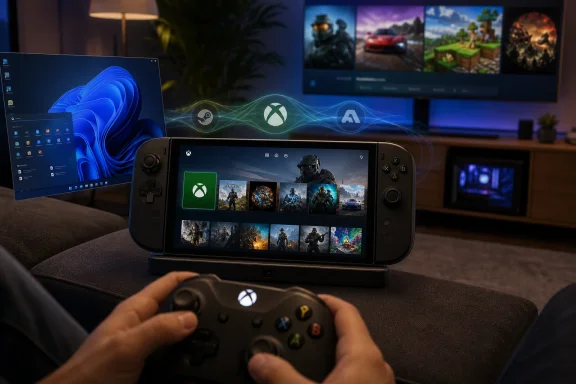
Microsoft began rolling out Xbox Mode to Windows 11 PCs on April 30, 2026, bringing a controller-optimized, full-screen Xbox-style interface to laptops, desktops, tablets, and handhelds in select markets through a gradual Windows Update release that expands over the following weeks. The feature is not a new operating system, and it is not Windows becoming an Xbox console by stealth. It is something more revealing: Microsoft has finally admitted that the Windows desktop is the wrong front door for a growing part of PC gaming. Xbox Mode is the company’s latest attempt to make Windows feel less like a productivity machine that happens to run games, and more like a gaming platform that can still become a PC when asked.
For decades, Windows has treated the desktop as the default answer to every computing question. Want to write a document, edit a photo, join a domain, compile code, or play Forza Horizon from the couch? Here is the same taskbar, the same window chrome, the same update prompts, the same tray icons, and the same assumption that a keyboard and mouse are close at hand.
That design philosophy made sense when PC gaming was chained to desks. It makes less sense in a world of handheld gaming PCs, living-room mini PCs, cloud saves, Game Pass, Steam Big Picture, and users who increasingly expect games to start with the immediacy of a console. The problem for Microsoft is not that Windows cannot run games. It is that Windows often insists on reminding you that it can also run Excel.
Xbox Mode is a concession wrapped in a feature rollout. It says, in effect, that Windows needs another personality when the user’s intent is obvious. If the machine is being held like a console, docked under a television, or navigated with a controller, the old desktop is not a sign of flexibility. It is friction.
Microsoft’s pitch is deliberately modest. Xbox Mode puts the game library and recently played titles at the center, offers a controller-optimized full-screen shell, and lets users move back to the standard Windows 11 desktop whenever they want. But the strategic meaning is larger than the visible UI. Microsoft is trying to build a gaming layer that can sit above the messiness of PC gaming without closing off the openness that made PC gaming valuable in the first place.
It is a shell, and that is both its strength and its limitation. The feature minimizes Windows system elements while playing, presents a console-like home experience, and aggregates games from Xbox Game Pass and installed games from major PC storefronts. For the user with a controller in hand, that may be enough to make the machine feel meaningfully different.
But the word feel is doing a lot of work. A console succeeds because the hardware, software, store, input model, update cadence, sleep behavior, and game certification pipeline are all designed around one assumption: the user wants to play. Windows succeeds because it is designed around the opposite assumption: the user might want to do anything. Xbox Mode is Microsoft’s attempt to bridge those worlds without choosing between them.
That bridge is inherently unstable. The more Microsoft simplifies Windows for gaming, the more it risks angering the users who value PC openness. The more it preserves PC openness, the more Xbox Mode remains a clever launcher rather than a console-grade experience. This is the central tension of Microsoft’s entire gaming strategy in 2026.
Devices like the ROG Ally, Lenovo Legion Go, and other Windows handhelds made the contradiction obvious. They offered access to a huge PC game library, better storefront flexibility than a closed console, and hardware that could run modern games respectably. Then they booted into a desktop environment designed for spreadsheets, multi-monitor workstations, and right-click context menus.
Valve’s Steam Deck exposed the gap. SteamOS is not perfect, and Linux compatibility still has edge cases, but Valve understood the product category with brutal clarity. A handheld gaming PC should wake quickly, resume cleanly, navigate naturally with sticks and buttons, and hide the underlying operating system until the user goes looking for it.
Microsoft could not ignore that lesson forever. The company’s initial handheld-focused full-screen experience was a defensive move, but the new Windows 11 rollout turns it into a broader platform statement. Xbox Mode is no longer only for niche portable devices. It is now coming to ordinary PCs, which means Microsoft sees the console-style interface not as a handheld accommodation but as a mainstream Windows gaming mode.
This is how Microsoft now ships Windows: not as a single event, but as a fog that rolls unevenly across compatible devices. Two users can install the same update and see different features at different times. For enthusiasts, that creates the familiar scavenger hunt of build numbers, staged deployments, and “why don’t I have it yet?” forum threads.
For a gaming interface, that ambiguity is awkward. Console users expect feature availability to be straightforward. PC users tolerate more uncertainty, but even they have limits. If Xbox Mode is meant to make Windows feel simpler, its arrival through the complicated rituals of Windows Update is an irony Microsoft cannot quite escape.
Still, the cautious rollout is understandable. A full-screen shell that changes app behavior, alters startup assumptions on handhelds, and interacts with Game Bar, Task View, controllers, and storefront libraries is not a small surface area. If Microsoft flips that switch too quickly and breaks enough edge cases, the narrative shifts from “Windows is becoming more console-like” to “Microsoft shipped another half-finished Windows feature.”
PC gaming is fragmented by design. Steam, Epic Games Store, GOG, Battle.net, EA app, Ubisoft Connect, Microsoft Store, itch.io, and standalone launchers all coexist in a messy equilibrium. Enthusiasts complain about launcher sprawl, but they also resist any attempt to collapse PC gaming into a single gatekeeper. Microsoft has to thread the needle: make games easier to find without making Xbox Mode feel like an Xbox Store funnel.
That is why the aggregated library matters politically as much as technically. If Xbox Mode becomes a genuinely neutral front end for PC games, it gives Microsoft a credible role as the steward of gaming on Windows. If it becomes a Game Pass billboard with grudging third-party detection, users will treat it as another corporate launcher wearing a full-screen costume.
The comparison to Steam Big Picture is unavoidable. Valve already solved much of this problem for Steam-centric users, especially on couch PCs and Steam Deck-like setups. Microsoft’s advantage is that it owns Windows itself. Its disadvantage is that PC gamers trust Valve’s gaming instincts more than Microsoft’s operating-system instincts.
With Xbox Mode, Game Bar becomes more like a portal between Windows personalities. Users can enter the mode through Game Bar, move between apps, return to a gaming home experience, and exit back to the desktop. Task View also becomes part of the navigation model, especially for switching between games and apps in a controller-friendly environment.
That integration is smart because it avoids creating yet another isolated Microsoft gaming app. It also reflects the reality that Windows cannot simply hide all non-game behavior. People still need to accept permissions, change audio devices, respond to chat apps, adjust display settings, or troubleshoot a misbehaving launcher. The question is whether those tasks feel like occasional detours or constant reminders that the console illusion is thin.
This is where Microsoft’s execution will be judged. A gaming shell does not need to make every Windows feature controller-perfect. But it does need to keep the common paths smooth: launching games, switching games, closing stuck apps, pairing controllers, managing displays, adjusting volume, and returning to the desktop without drama.
But this is not the same as proving that Xbox Mode delivers large frame-rate gains across ordinary PCs. A full-screen UI can reduce distractions, and startup management can help in constrained environments, but the hard problems of Windows gaming performance live deeper in the stack. Scheduler behavior, driver quality, shader compilation, power profiles, anti-cheat hooks, overlay conflicts, and vendor utilities are not solved by a prettier home screen.
That does not make Xbox Mode useless. User experience is performance in another form. If a system wakes faster, launches games with fewer interruptions, and avoids dumping the player into desktop housekeeping, it may feel more responsive even when frame rates barely change. For many users, especially on handhelds, that subjective improvement is meaningful.
Still, Microsoft should be careful. The company has spent years promising that Windows is the best place to play, while users have learned to distinguish between benchmark improvements and interface polish. Xbox Mode will earn credibility only if Microsoft keeps tightening the underlying Windows gaming experience, not merely the layer that appears before the game launches.
Xbox Mode reopens that old ambition from a different angle. Instead of selling a dedicated Windows living-room box, Microsoft is making any Windows 11 PC a more plausible couch gaming device. A small form factor PC under a TV, a gaming laptop connected by HDMI, or a handheld dropped into a dock can now plausibly behave more like a console when the user wants it to.
That matters because the future Xbox hardware strategy appears less tied to one traditional console shape. Microsoft has been moving Xbox into a platform identity: consoles, PCs, cloud streaming, handheld partnerships, Game Pass, cross-buy, and Xbox-branded experiences on non-console hardware. Xbox Mode fits that trajectory because it makes Windows itself a more Xbox-like endpoint.
The risk is brand dilution. If “Xbox” means everything from a console to a Windows mode to a cloud app to a storefront, it can start to mean very little. Microsoft’s counterargument is that players care less about device purity than access. If your games, saves, friends, and subscription move with you, the box matters less.
That argument is strategically sound, but emotionally incomplete. Consoles sell not only convenience but certainty. Xbox Mode must deliver enough certainty on Windows to justify borrowing the Xbox name.
The obvious concern is distraction, but that is the least interesting one. Enterprises already manage games, stores, consumer Microsoft account experiences, and Windows Update rings. The deeper issue is that Windows 11 keeps accumulating alternate shells, AI surfaces, widgets, consumer entry points, and context-dependent experiences that IT departments must understand, document, or suppress.
Microsoft is trying to make Windows more adaptive. Enterprises often want Windows to be more predictable. Those goals are not always compatible. A feature that is delightful on a gaming handheld can become another support article, another policy question, and another help-desk screenshot when it lands on a work-issued laptop.
This does not mean Xbox Mode is a mistake. It means Microsoft’s consumer Windows ambitions increasingly depend on clean management boundaries. If Xbox Mode is easy to disable, govern, or ignore in business environments, it remains a gaming feature. If it arrives as another consumer experience that IT has to chase after the fact, it becomes part of the broader Windows 11 trust problem.
That is a profound shift. For years, the Windows tax was simply accepted: if you wanted the broadest game compatibility, you used Windows. Valve did not eliminate that advantage, especially for multiplayer games with hostile anti-cheat systems, but it made the trade-off visible. Users could choose a more console-like interface and better handheld ergonomics at the cost of some compatibility.
Xbox Mode is Microsoft’s response to that pressure. It says Windows can keep the compatibility advantage while borrowing the interface lessons of console-like systems. The challenge is that Microsoft cannot merely match SteamOS at the home screen. It must make the whole journey feel less Windows-y at the wrong moments.
That includes updates. It includes sleep and resume. It includes controller focus. It includes not throwing modal dialogs behind games. It includes not letting random utilities seize attention. It includes ensuring that the user can forget the operating system exists for long stretches of play. The less visible Windows becomes in Xbox Mode, the more successful the feature will be.
That scrutiny is healthy. Microsoft has too often treated Windows gaming as a matter of market position rather than product discipline. The company owns the dominant PC gaming operating system, owns Xbox, owns Game Pass, owns DirectX, and still has watched Valve define the best handheld PC gaming experience. Xbox Mode is a sign that Microsoft understands the embarrassment.
But understanding is not the same as solving. The feature needs rapid iteration, not years of branding churn. It needs storefront neutrality, not Microsoft-first sorting disguised as convenience. It needs strong controller navigation, not a few large tiles surrounded by desktop escape hatches. It needs performance work that users can feel, not just language about minimizing distractions.
Most of all, it needs restraint. Microsoft’s worst habit is turning focused surfaces into growth canvases. If Xbox Mode fills up with promotions, recommendations, subscription nudges, AI assistants, social panels, and store campaigns before it has nailed the basics, users will flee back to Steam Big Picture or the desktop.
The strategic picture is more consequential. Microsoft is using an ordinary Windows feature rollout to test whether Xbox can become an experience layer across PC hardware, not merely a console brand. That makes this update larger than its UI.
Source: Mezha Microsoft starts rolling out Xbox Mode to all Windows 11 devices
 Microsoft Finally Stops Pretending the Desktop Is Neutral
For decades, Windows has treated the desktop as the default answer to every computing question. Want to write a document, edit a photo, join a domain, compile code, or play Forza Horizon from the couch? Here is the same taskbar, the same window chrome, the same update prompts, the same tray icons, and the same assumption that a keyboard and mouse are close at hand.That design philosophy made sense when PC gaming was chained to desks. It makes less sense in a world of handheld gaming PCs, living-room mini PCs, cloud saves, Game Pass, Steam Big Picture, and users who increasingly expect games to start with the immediacy of a console. The problem for Microsoft is not that Windows cannot run games. It is that Windows often insists on reminding you that it can also run Excel.
Xbox Mode is a concession wrapped in a feature rollout. It says, in effect, that Windows needs another personality when the user’s intent is obvious. If the machine is being held like a console, docked under a television, or navigated with a controller, the old desktop is not a sign of flexibility. It is friction.
Microsoft’s pitch is deliberately modest. Xbox Mode puts the game library and recently played titles at the center, offers a controller-optimized full-screen shell, and lets users move back to the standard Windows 11 desktop whenever they want. But the strategic meaning is larger than the visible UI. Microsoft is trying to build a gaming layer that can sit above the messiness of PC gaming without closing off the openness that made PC gaming valuable in the first place.
Xbox Mode Is a Shell, Not a Salvation
The most important thing to understand about Xbox Mode is what it does not do. It does not turn a Windows PC into an Xbox Series X. It does not erase decades of Win32 complexity. It does not make driver updates, launcher conflicts, anti-cheat systems, graphics settings, overlay wars, or background services magically disappear.It is a shell, and that is both its strength and its limitation. The feature minimizes Windows system elements while playing, presents a console-like home experience, and aggregates games from Xbox Game Pass and installed games from major PC storefronts. For the user with a controller in hand, that may be enough to make the machine feel meaningfully different.
But the word feel is doing a lot of work. A console succeeds because the hardware, software, store, input model, update cadence, sleep behavior, and game certification pipeline are all designed around one assumption: the user wants to play. Windows succeeds because it is designed around the opposite assumption: the user might want to do anything. Xbox Mode is Microsoft’s attempt to bridge those worlds without choosing between them.
That bridge is inherently unstable. The more Microsoft simplifies Windows for gaming, the more it risks angering the users who value PC openness. The more it preserves PC openness, the more Xbox Mode remains a clever launcher rather than a console-grade experience. This is the central tension of Microsoft’s entire gaming strategy in 2026.
The Handheld PC Forced Microsoft’s Hand
Xbox Mode did not appear out of nowhere. It began life as the Xbox full-screen experience on Windows gaming handhelds, where the shortcomings of desktop Windows are impossible to ignore. On a 7-inch or 8-inch screen, tiny system dialogs and mouse-first interfaces stop being annoyances and become product defects.Devices like the ROG Ally, Lenovo Legion Go, and other Windows handhelds made the contradiction obvious. They offered access to a huge PC game library, better storefront flexibility than a closed console, and hardware that could run modern games respectably. Then they booted into a desktop environment designed for spreadsheets, multi-monitor workstations, and right-click context menus.
Valve’s Steam Deck exposed the gap. SteamOS is not perfect, and Linux compatibility still has edge cases, but Valve understood the product category with brutal clarity. A handheld gaming PC should wake quickly, resume cleanly, navigate naturally with sticks and buttons, and hide the underlying operating system until the user goes looking for it.
Microsoft could not ignore that lesson forever. The company’s initial handheld-focused full-screen experience was a defensive move, but the new Windows 11 rollout turns it into a broader platform statement. Xbox Mode is no longer only for niche portable devices. It is now coming to ordinary PCs, which means Microsoft sees the console-style interface not as a handheld accommodation but as a mainstream Windows gaming mode.
The Rollout Strategy Tells Its Own Story
The release is gradual, region-limited at first, and tied to Windows Update. Users who want it early need to enable the Windows Update option to receive the latest updates as soon as they are available. That detail matters because it places Xbox Mode in the familiar Windows 11 machinery of controlled feature rollouts, server-side enablement, and optional early access.This is how Microsoft now ships Windows: not as a single event, but as a fog that rolls unevenly across compatible devices. Two users can install the same update and see different features at different times. For enthusiasts, that creates the familiar scavenger hunt of build numbers, staged deployments, and “why don’t I have it yet?” forum threads.
For a gaming interface, that ambiguity is awkward. Console users expect feature availability to be straightforward. PC users tolerate more uncertainty, but even they have limits. If Xbox Mode is meant to make Windows feel simpler, its arrival through the complicated rituals of Windows Update is an irony Microsoft cannot quite escape.
Still, the cautious rollout is understandable. A full-screen shell that changes app behavior, alters startup assumptions on handhelds, and interacts with Game Bar, Task View, controllers, and storefront libraries is not a small surface area. If Microsoft flips that switch too quickly and breaks enough edge cases, the narrative shifts from “Windows is becoming more console-like” to “Microsoft shipped another half-finished Windows feature.”
The Library Is the Battlefield
The most interesting part of Xbox Mode may not be the full-screen interface. It is the aggregated library. Microsoft says Xbox Mode can surface Game Pass titles and installed games from leading PC storefronts, which is exactly the kind of unglamorous integration work that determines whether the feature becomes a daily habit or a novelty.PC gaming is fragmented by design. Steam, Epic Games Store, GOG, Battle.net, EA app, Ubisoft Connect, Microsoft Store, itch.io, and standalone launchers all coexist in a messy equilibrium. Enthusiasts complain about launcher sprawl, but they also resist any attempt to collapse PC gaming into a single gatekeeper. Microsoft has to thread the needle: make games easier to find without making Xbox Mode feel like an Xbox Store funnel.
That is why the aggregated library matters politically as much as technically. If Xbox Mode becomes a genuinely neutral front end for PC games, it gives Microsoft a credible role as the steward of gaming on Windows. If it becomes a Game Pass billboard with grudging third-party detection, users will treat it as another corporate launcher wearing a full-screen costume.
The comparison to Steam Big Picture is unavoidable. Valve already solved much of this problem for Steam-centric users, especially on couch PCs and Steam Deck-like setups. Microsoft’s advantage is that it owns Windows itself. Its disadvantage is that PC gamers trust Valve’s gaming instincts more than Microsoft’s operating-system instincts.
Game Bar Becomes the Doorway Microsoft Always Wanted
Xbox Mode also gives Game Bar a clearer reason to exist. For years, Game Bar has been useful but oddly liminal: part overlay, part capture tool, part social layer, part settings surface. It appears when summoned, helps with performance widgets or screenshots, then fades back into the background.With Xbox Mode, Game Bar becomes more like a portal between Windows personalities. Users can enter the mode through Game Bar, move between apps, return to a gaming home experience, and exit back to the desktop. Task View also becomes part of the navigation model, especially for switching between games and apps in a controller-friendly environment.
That integration is smart because it avoids creating yet another isolated Microsoft gaming app. It also reflects the reality that Windows cannot simply hide all non-game behavior. People still need to accept permissions, change audio devices, respond to chat apps, adjust display settings, or troubleshoot a misbehaving launcher. The question is whether those tasks feel like occasional detours or constant reminders that the console illusion is thin.
This is where Microsoft’s execution will be judged. A gaming shell does not need to make every Windows feature controller-perfect. But it does need to keep the common paths smooth: launching games, switching games, closing stuck apps, pairing controllers, managing displays, adjusting volume, and returning to the desktop without drama.
Performance Claims Need More Than Vibes
Microsoft’s support material indicates that on handhelds, entering Xbox Mode at startup can limit background processes to improve performance while gaming. That is plausible and welcome. Windows has long carried background overhead that matters more on battery-powered handhelds than on desktop towers with 32GB of RAM and a wall outlet.But this is not the same as proving that Xbox Mode delivers large frame-rate gains across ordinary PCs. A full-screen UI can reduce distractions, and startup management can help in constrained environments, but the hard problems of Windows gaming performance live deeper in the stack. Scheduler behavior, driver quality, shader compilation, power profiles, anti-cheat hooks, overlay conflicts, and vendor utilities are not solved by a prettier home screen.
That does not make Xbox Mode useless. User experience is performance in another form. If a system wakes faster, launches games with fewer interruptions, and avoids dumping the player into desktop housekeeping, it may feel more responsive even when frame rates barely change. For many users, especially on handhelds, that subjective improvement is meaningful.
Still, Microsoft should be careful. The company has spent years promising that Windows is the best place to play, while users have learned to distinguish between benchmark improvements and interface polish. Xbox Mode will earn credibility only if Microsoft keeps tightening the underlying Windows gaming experience, not merely the layer that appears before the game launches.
The Living Room Is Back on Microsoft’s Map
Microsoft has repeatedly tried to put Windows in the living room. Media Center was beloved by a niche and abandoned by the mainstream. Steam Machines tried to move PC gaming to televisions and mostly collapsed under Linux compatibility and market confusion. The Xbox console succeeded in the living room, but it did so as a console, not as a Windows PC.Xbox Mode reopens that old ambition from a different angle. Instead of selling a dedicated Windows living-room box, Microsoft is making any Windows 11 PC a more plausible couch gaming device. A small form factor PC under a TV, a gaming laptop connected by HDMI, or a handheld dropped into a dock can now plausibly behave more like a console when the user wants it to.
That matters because the future Xbox hardware strategy appears less tied to one traditional console shape. Microsoft has been moving Xbox into a platform identity: consoles, PCs, cloud streaming, handheld partnerships, Game Pass, cross-buy, and Xbox-branded experiences on non-console hardware. Xbox Mode fits that trajectory because it makes Windows itself a more Xbox-like endpoint.
The risk is brand dilution. If “Xbox” means everything from a console to a Windows mode to a cloud app to a storefront, it can start to mean very little. Microsoft’s counterargument is that players care less about device purity than access. If your games, saves, friends, and subscription move with you, the box matters less.
That argument is strategically sound, but emotionally incomplete. Consoles sell not only convenience but certainty. Xbox Mode must deliver enough certainty on Windows to justify borrowing the Xbox name.
Enterprise IT Will Notice the Toggle
For WindowsForum’s sysadmin crowd, Xbox Mode may sound like consumer fluff until it appears on a fleet of Windows 11 laptops. A full-screen gaming interface on ordinary PCs has implications for managed environments, even if it is not enabled by default everywhere and even if policy controls eventually blunt its reach.The obvious concern is distraction, but that is the least interesting one. Enterprises already manage games, stores, consumer Microsoft account experiences, and Windows Update rings. The deeper issue is that Windows 11 keeps accumulating alternate shells, AI surfaces, widgets, consumer entry points, and context-dependent experiences that IT departments must understand, document, or suppress.
Microsoft is trying to make Windows more adaptive. Enterprises often want Windows to be more predictable. Those goals are not always compatible. A feature that is delightful on a gaming handheld can become another support article, another policy question, and another help-desk screenshot when it lands on a work-issued laptop.
This does not mean Xbox Mode is a mistake. It means Microsoft’s consumer Windows ambitions increasingly depend on clean management boundaries. If Xbox Mode is easy to disable, govern, or ignore in business environments, it remains a gaming feature. If it arrives as another consumer experience that IT has to chase after the fact, it becomes part of the broader Windows 11 trust problem.
The SteamOS Shadow Is the Real Competition
Microsoft’s real opponent here is not Sony or Nintendo. It is the idea that Windows is no longer the obvious default for PC-style gaming devices. SteamOS and its Linux relatives have shown that enough of the PC catalog can run well enough outside Windows to make the old assumption weaker than it used to be.That is a profound shift. For years, the Windows tax was simply accepted: if you wanted the broadest game compatibility, you used Windows. Valve did not eliminate that advantage, especially for multiplayer games with hostile anti-cheat systems, but it made the trade-off visible. Users could choose a more console-like interface and better handheld ergonomics at the cost of some compatibility.
Xbox Mode is Microsoft’s response to that pressure. It says Windows can keep the compatibility advantage while borrowing the interface lessons of console-like systems. The challenge is that Microsoft cannot merely match SteamOS at the home screen. It must make the whole journey feel less Windows-y at the wrong moments.
That includes updates. It includes sleep and resume. It includes controller focus. It includes not throwing modal dialogs behind games. It includes not letting random utilities seize attention. It includes ensuring that the user can forget the operating system exists for long stretches of play. The less visible Windows becomes in Xbox Mode, the more successful the feature will be.
The Console Mask Will Not Hide Windows Forever
Xbox Mode will be judged harshly because it sits at the intersection of two impatient audiences. Windows enthusiasts will poke at its limitations, measure its overhead, and compare it to existing launchers. Console players will expect simplicity and notice every desktop seam that shows through.That scrutiny is healthy. Microsoft has too often treated Windows gaming as a matter of market position rather than product discipline. The company owns the dominant PC gaming operating system, owns Xbox, owns Game Pass, owns DirectX, and still has watched Valve define the best handheld PC gaming experience. Xbox Mode is a sign that Microsoft understands the embarrassment.
But understanding is not the same as solving. The feature needs rapid iteration, not years of branding churn. It needs storefront neutrality, not Microsoft-first sorting disguised as convenience. It needs strong controller navigation, not a few large tiles surrounded by desktop escape hatches. It needs performance work that users can feel, not just language about minimizing distractions.
Most of all, it needs restraint. Microsoft’s worst habit is turning focused surfaces into growth canvases. If Xbox Mode fills up with promotions, recommendations, subscription nudges, AI assistants, social panels, and store campaigns before it has nailed the basics, users will flee back to Steam Big Picture or the desktop.
The Update Button Now Carries a Gaming Strategy
The practical picture is straightforward: Xbox Mode is rolling out gradually, and many users will not see it immediately. It arrives through Windows Update, requires current Windows 11 builds, and is exposed through gaming settings and Xbox-related entry points once available. On supported devices, it gives players a full-screen, controller-oriented way to browse, launch, and switch between games while preserving a path back to the normal desktop.The strategic picture is more consequential. Microsoft is using an ordinary Windows feature rollout to test whether Xbox can become an experience layer across PC hardware, not merely a console brand. That makes this update larger than its UI.
The First Week of Xbox Mode Is Really a Test of Windows Itself
Xbox Mode’s first wave gives Windows users a new interface, but it also gives Microsoft a public exam. The company must prove that it can simplify Windows without dumbing it down, foreground gaming without closing the PC, and use the Xbox brand without turning the feature into an ad surface.- Xbox Mode began rolling out to Windows 11 PCs on April 30, 2026, starting in select markets and expanding gradually through Windows Update.
- The feature provides a controller-optimized, full-screen Xbox-style interface for launching games and viewing recent titles.
- The library is designed to include Xbox Game Pass titles as well as installed games from major PC storefronts.
- Users can move between Xbox Mode and the standard Windows 11 desktop rather than committing to a separate gaming-only environment.
- The biggest unresolved question is whether Microsoft can improve the underlying Windows gaming experience enough for the new shell to feel more than cosmetic.
Source: Mezha Microsoft starts rolling out Xbox Mode to all Windows 11 devices
