

Microsoft began rolling out Xbox mode for Windows 11 PCs through the May 2026 update cycle, expanding a console-style full-screen gaming interface beyond handhelds and into the broader desktop and laptop ecosystem. The feature is real, useful, and strategically important. It is also a reminder that Microsoft’s gaming ambitions keep colliding with the same old problem: underneath the new living-room-friendly launcher is still Windows 11, with all the background services, account plumbing, telemetry, update mechanics, storefront dependencies, and AI-era clutter that implies.
Xbox mode is not just another coat of paint on the Xbox app. It is Microsoft’s clearest admission yet that normal Windows is a poor console interface, especially when a gamepad is the primary input device and the screen is across the room. The company has spent years telling PC gamers that Windows is the natural home of gaming; Xbox mode is the belated concession that Windows needs to get out of the way before that claim feels true.
The classic Windows gaming ritual is familiar: wake the PC, wait for launchers to update, dismiss a notification, click through an overlay, find the game, discover another client needs attention, and then finally play. That is tolerable at a desk with a keyboard and mouse. It is absurd on a handheld and irritating on a television.
Xbox mode tries to collapse that friction into something closer to the console contract. Boot into a full-screen shell, navigate with a controller, see the library, launch games, and avoid the uncanny valley of using a desktop operating system from ten feet away. This is the job Steam Big Picture, SteamOS, Playnite, Armoury Crate, Legion Space, and every other PC-console bridge have been trying to do for years.
Microsoft’s version matters because it sits closer to the operating system than most of those layers. The company can decide what starts, what sleeps, what receives priority, and how aggressively Windows should present itself. On supported handhelds, the pitch has included performance optimizations and direct boot into the Xbox experience rather than the traditional desktop shell.
That does not make Xbox mode a separate gaming OS. It makes it a managed front door. The room behind that door is still Windows.
Microsoft’s “full screen experience” was a response to that embarrassment. It offered a more console-like boot flow, a launcher designed for controllers, and a way to make Windows handhelds feel less like miniature laptops pretending to be consoles. For users already invested in Game Pass and the Xbox app, it addressed a real pain point.
The broader PC rollout changes the meaning. Once Xbox mode reaches desktops and laptops, Microsoft is no longer merely patching the handheld problem. It is proposing that Windows can behave like an Xbox when the user wants it to, without surrendering the flexibility of the PC.
That is a powerful idea, especially for living-room PCs. It gives Microsoft a story for the next generation of Xbox hardware, for PC Game Pass, for third-party storefront aggregation, and for a future where the line between console and computer is increasingly theatrical. But the strategy depends on a delicate illusion: that users can have the simplicity of a console without inheriting the mess of a PC.
That is the right move. A Windows gaming shell that ignored Steam would be a nonstarter, and a Microsoft-only console layer would be treated as yet another corporate land grab. Xbox mode’s value depends on its ability to make the library feel unified even when the underlying business relationships are anything but.
But aggregation is not integration. If a third-party game needs Steam installed, Steam updated, Steam logged in, and Steam’s own cloud and overlay components behaving, Xbox mode cannot magically erase that. It can make the moment of launch prettier. It cannot turn PC storefront sprawl into a console certification pipeline.
This is where the comparison to SteamOS becomes uncomfortable for Microsoft. Valve controls the default storefront, the compatibility layer, the verified experience labels, and the handheld interface on Steam Deck. Microsoft controls Windows, but Windows’ strength has always been that it runs everything. That strength becomes a liability when the goal is to feel curated, silent, and appliance-like.
Windows defenders often respond that modern PCs are powerful enough to absorb this overhead. On a high-end desktop, that is sometimes true. On a handheld, a living-room mini PC, or a midrange laptop, the margins matter more. Battery life, suspend reliability, shader compilation, RAM pressure, frame pacing, and thermal headroom all expose how much “general purpose” baggage the system is carrying.
The issue is not that Windows includes features some gamers do not use. A general-purpose OS must serve more than one audience. The issue is that Microsoft increasingly treats consumer Windows as a surface for engagement, upsell, sync, search, ads, AI prompts, cloud nudges, and recommendations. Xbox mode can suppress that visually for a session, but it does not fundamentally change the operating system’s incentives.
That is why the de-bloating conversation never dies. Users who strip Windows of preinstalled apps, disable services, remove widgets, avoid Copilot, or block certain telemetry flows are not all chasing placebo performance. Many are trying to restore a simpler relationship with the machine: run the game, preserve resources, stop interrupting me.
Still, removing or reducing a particular gaming Copilot intrusion does not settle the larger issue. Windows 11 remains increasingly shaped around Microsoft’s AI strategy. The company wants Windows to be an AI endpoint, a cloud account endpoint, and a service engagement endpoint. Gamers want it to be a low-friction runtime.
Those goals can coexist in theory. In practice, Microsoft often makes the user prove they do not want the new thing. That is backwards for a gaming mode. A console-like environment should be opt-in for games and opt-out for distractions. If Xbox mode becomes another surface where “helpful” AI suggestions, store promotions, engagement cards, and cloud prompts creep in over time, Microsoft will squander the goodwill it is trying to build.
The lesson from Steam Deck is not that every gaming device needs Linux. It is that a gaming-first shell must be disciplined. It needs restraint as much as feature work.
If Microsoft wants the next Xbox to run PC games, Windows is the obvious bridge and the obvious risk. Windows brings compatibility, drivers, anti-cheat support, storefront access, developer familiarity, and a massive back catalog. It also brings everything console buyers traditionally avoid: maintenance, visible updates, driver weirdness, configuration decisions, account edge cases, and the ambient chaos of PC software.
Xbox mode is therefore not a side feature. It is a prototype for the next Xbox user experience. It asks whether Microsoft can put a console-shaped discipline around a PC-shaped platform.
That is the right experiment. But it is not a solved problem. A console is not defined only by a controller-friendly launcher. It is defined by the expectation that every part of the system is subordinated to the act of playing. If Windows remains an all-purpose engagement machine underneath, Helix risks feeling like a very polished prebuilt PC rather than a next-generation console.
That last clause is crucial. SteamOS does not remove complexity; it quarantines it. Enthusiasts can open the desktop, install tools, mod games, and break things if they like. Most users can ignore all of that. The default path protects them from the general-purpose computer underneath.
Windows handhelds have often inverted that relationship. The desktop is never far away, because Windows assumes it is the main event. Vendor utilities, driver packages, launchers, BIOS updates, overlays, and Windows settings all compete to be the real control panel. Xbox mode is Microsoft’s attempt to build the quarantine layer Windows never had.
But SteamOS benefits from Valve’s narrower mandate. It is allowed to be opinionated. Windows is built to satisfy OEMs, enterprises, developers, accessibility needs, governments, cloud services, advertisers, and Microsoft’s own product groups. That makes Windows powerful. It also makes it politically difficult to slim down.
Microsoft has an advantage through Game Pass and the Xbox identity system. It can make the first-party path feel smooth. The harder task is making non-Microsoft games behave consistently without trying to absorb the entire PC market into Xbox services. If Xbox mode feels fair and useful, users will welcome it. If it feels like a funnel into Game Pass at the expense of Steam libraries, they will treat it as another Microsoft front end to bypass.
There is also a developer angle. A console-like Windows environment could simplify testing if Microsoft provides clear behavior, stable APIs, and predictable performance modes. But if Xbox mode is merely a shell on top of inconsistent Windows configurations, developers will still target “PC” as a broad, messy category rather than a reliable Xbox-adjacent platform.
This is where Helix could change the equation. A next-generation Xbox that runs PC games may give Microsoft a more controlled target. But if that target is too controlled, it may not satisfy PC expectations. If it is too open, it may not satisfy console expectations. The entire project lives in that tension.
It is, however, revealing. A console mode that may or may not appear depending on rollout status, region, device category, account state, or hidden feature flags already feels more like Windows than Xbox. The console promise is certainty. The Windows promise is eventual consistency.
Microsoft has good reasons to move slowly. A broken gaming shell would be embarrassing, and a bug that affects boot behavior, controllers, storefront access, or game launching would spread quickly through enthusiast communities. The company is right to avoid a reckless global enablement.
But staged rollouts also expose the awkwardness of building a console experience inside a servicing model designed for billions of heterogeneous PCs. The feature has to arrive like Windows even though it wants to feel like Xbox. That contradiction will follow Microsoft into every PC-console hybrid it ships.
The Start menu has carried recommendations. Edge has asserted itself aggressively. OneDrive prompts can feel unavoidable. Search has mixed local intent with web behavior. Widgets, ads, account nudges, and AI surfaces have made Windows feel less like a neutral platform and more like a negotiated space. Gamers remember that history when Microsoft says a new mode is optimized for them.
Xbox mode could become a trust repair mechanism if Microsoft treats it as sacred ground. No promotional clutter that cannot be disabled. No surprise Copilot surfaces. No nagging about services during play. No background tasks that wake the device at the worst possible time. No store politics disguised as convenience.
That requires institutional discipline, not just engineering. Microsoft has to decide that the value of a clean gaming experience is greater than the value of squeezing one more engagement surface into Windows. The company has not always made that choice.
Windows already has pieces of this idea. Game Mode, focus features, power profiles, graphics settings, Auto HDR, DirectStorage, Game Bar, and driver-level optimizations all exist in some form. The problem is coherence. Users should not have to understand the entire Windows settings maze to make a machine behave like a gaming appliance.
A mature Xbox mode would make aggressive, reversible choices. When active, the system should privilege frame pacing, input latency, controller navigation, suspend reliability, and network stability for games. When inactive, it can return to normal Windows behavior. That is not de-bloating in the crude script-kiddie sense; it is a first-party acknowledgment that context matters.
Microsoft is uniquely positioned to do this well because it owns the OS, the Xbox app, DirectX, Game Pass, and the console platform. That makes the current half-step more frustrating. The company can see the destination. It just has not fully committed to the journey.
But the more Xbox becomes a Windows-adjacent platform, the more important it becomes for Windows to disappear. Not vanish technically, but vanish experientially. Players should not feel the registry, the driver stack, the webview, the update scheduler, or the account broker unless they go looking for them.
This is not anti-PC. The beauty of PC gaming is that the machine can be opened, modified, extended, and repurposed. The challenge is making that freedom optional rather than mandatory. Steam Deck did not kill tinkering; it made tinkering a door rather than a hallway.
Microsoft’s task is harder because Windows has decades of assumptions baked in. But that is also why Xbox mode is significant. It is one of the few recent Windows consumer features that addresses a real user experience problem rather than inventing a new surface for Microsoft’s ecosystem strategy.
Xbox mode is not just another coat of paint on the Xbox app. It is Microsoft’s clearest admission yet that normal Windows is a poor console interface, especially when a gamepad is the primary input device and the screen is across the room. The company has spent years telling PC gamers that Windows is the natural home of gaming; Xbox mode is the belated concession that Windows needs to get out of the way before that claim feels true.
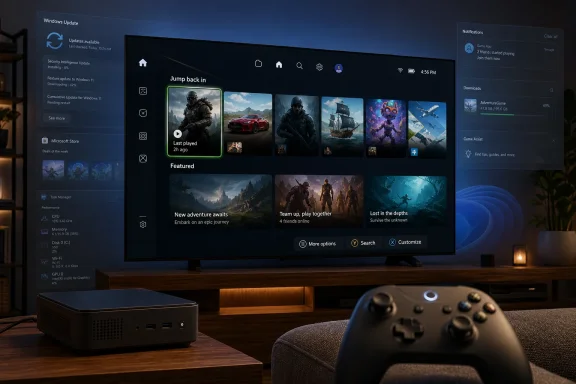 Microsoft Finally Admits the Desktop Is the Wrong Place to Start a Game
The classic Windows gaming ritual is familiar: wake the PC, wait for launchers to update, dismiss a notification, click through an overlay, find the game, discover another client needs attention, and then finally play. That is tolerable at a desk with a keyboard and mouse. It is absurd on a handheld and irritating on a television.Xbox mode tries to collapse that friction into something closer to the console contract. Boot into a full-screen shell, navigate with a controller, see the library, launch games, and avoid the uncanny valley of using a desktop operating system from ten feet away. This is the job Steam Big Picture, SteamOS, Playnite, Armoury Crate, Legion Space, and every other PC-console bridge have been trying to do for years.
Microsoft’s version matters because it sits closer to the operating system than most of those layers. The company can decide what starts, what sleeps, what receives priority, and how aggressively Windows should present itself. On supported handhelds, the pitch has included performance optimizations and direct boot into the Xbox experience rather than the traditional desktop shell.
That does not make Xbox mode a separate gaming OS. It makes it a managed front door. The room behind that door is still Windows.
The Handheld Experiment Became the Desktop Strategy
Xbox mode’s public path began on Windows gaming handhelds, most visibly around the Asus ROG Xbox Ally family. That made sense. Handheld PCs exposed Windows’ worst ergonomic habits more brutally than any tower ever could: tiny controls, small screens, battery constraints, and a user base comparing the experience not to a productivity laptop but to a Steam Deck or Nintendo Switch.Microsoft’s “full screen experience” was a response to that embarrassment. It offered a more console-like boot flow, a launcher designed for controllers, and a way to make Windows handhelds feel less like miniature laptops pretending to be consoles. For users already invested in Game Pass and the Xbox app, it addressed a real pain point.
The broader PC rollout changes the meaning. Once Xbox mode reaches desktops and laptops, Microsoft is no longer merely patching the handheld problem. It is proposing that Windows can behave like an Xbox when the user wants it to, without surrendering the flexibility of the PC.
That is a powerful idea, especially for living-room PCs. It gives Microsoft a story for the next generation of Xbox hardware, for PC Game Pass, for third-party storefront aggregation, and for a future where the line between console and computer is increasingly theatrical. But the strategy depends on a delicate illusion: that users can have the simplicity of a console without inheriting the mess of a PC.
The Launcher Looks Like a Console, but the Platform Behaves Like a PC
The best thing about Xbox mode is also the thing that reveals its limits. It does not pretend Xbox owns the whole PC gaming universe. The experience is designed to surface games from the Xbox app and other stores, acknowledging the reality that PC gaming is spread across Steam, Epic Games Store, Battle.net, Ubisoft Connect, GOG, EA’s app, and countless direct launchers.That is the right move. A Windows gaming shell that ignored Steam would be a nonstarter, and a Microsoft-only console layer would be treated as yet another corporate land grab. Xbox mode’s value depends on its ability to make the library feel unified even when the underlying business relationships are anything but.
But aggregation is not integration. If a third-party game needs Steam installed, Steam updated, Steam logged in, and Steam’s own cloud and overlay components behaving, Xbox mode cannot magically erase that. It can make the moment of launch prettier. It cannot turn PC storefront sprawl into a console certification pipeline.
This is where the comparison to SteamOS becomes uncomfortable for Microsoft. Valve controls the default storefront, the compatibility layer, the verified experience labels, and the handheld interface on Steam Deck. Microsoft controls Windows, but Windows’ strength has always been that it runs everything. That strength becomes a liability when the goal is to feel curated, silent, and appliance-like.
Windows 11 Bloat Is Not Cosmetic When Performance Is the Product
The criticism that Xbox mode cannot hide Windows 11 bloat is not merely aesthetic. For a gaming device, background behavior is part of the product. Every process, notification, service, scheduled task, account prompt, indexing run, overlay, and update agent competes with the promise that the machine exists to play games.Windows defenders often respond that modern PCs are powerful enough to absorb this overhead. On a high-end desktop, that is sometimes true. On a handheld, a living-room mini PC, or a midrange laptop, the margins matter more. Battery life, suspend reliability, shader compilation, RAM pressure, frame pacing, and thermal headroom all expose how much “general purpose” baggage the system is carrying.
The issue is not that Windows includes features some gamers do not use. A general-purpose OS must serve more than one audience. The issue is that Microsoft increasingly treats consumer Windows as a surface for engagement, upsell, sync, search, ads, AI prompts, cloud nudges, and recommendations. Xbox mode can suppress that visually for a session, but it does not fundamentally change the operating system’s incentives.
That is why the de-bloating conversation never dies. Users who strip Windows of preinstalled apps, disable services, remove widgets, avoid Copilot, or block certain telemetry flows are not all chasing placebo performance. Many are trying to restore a simpler relationship with the machine: run the game, preserve resources, stop interrupting me.
Copilot’s Retreat from Gaming Does Not End the AI Intrusion Problem
The reported retreat of gaming-oriented Copilot features is good news for players who did not want an assistant hovering over their games. Microsoft has been aggressive in inserting Copilot branding and AI features across Windows, Edge, Microsoft 365, and developer tools. Gaming was always a risky place to push too hard, because games are immersive by design and gamers are unusually sensitive to overlays, latency, and unwanted background activity.Still, removing or reducing a particular gaming Copilot intrusion does not settle the larger issue. Windows 11 remains increasingly shaped around Microsoft’s AI strategy. The company wants Windows to be an AI endpoint, a cloud account endpoint, and a service engagement endpoint. Gamers want it to be a low-friction runtime.
Those goals can coexist in theory. In practice, Microsoft often makes the user prove they do not want the new thing. That is backwards for a gaming mode. A console-like environment should be opt-in for games and opt-out for distractions. If Xbox mode becomes another surface where “helpful” AI suggestions, store promotions, engagement cards, and cloud prompts creep in over time, Microsoft will squander the goodwill it is trying to build.
The lesson from Steam Deck is not that every gaming device needs Linux. It is that a gaming-first shell must be disciplined. It needs restraint as much as feature work.
Project Helix Raises the Stakes From Convenience to Identity
Xbox mode matters more because of Microsoft’s next-generation Xbox direction. Project Helix has been described as a future Xbox platform that can play both Xbox console games and PC games, backed by custom AMD silicon and a more unified development story. Whether the final product feels like a console, a locked-down PC, a modular Windows box, or something stranger, the operating system question is no longer academic.If Microsoft wants the next Xbox to run PC games, Windows is the obvious bridge and the obvious risk. Windows brings compatibility, drivers, anti-cheat support, storefront access, developer familiarity, and a massive back catalog. It also brings everything console buyers traditionally avoid: maintenance, visible updates, driver weirdness, configuration decisions, account edge cases, and the ambient chaos of PC software.
Xbox mode is therefore not a side feature. It is a prototype for the next Xbox user experience. It asks whether Microsoft can put a console-shaped discipline around a PC-shaped platform.
That is the right experiment. But it is not a solved problem. A console is not defined only by a controller-friendly launcher. It is defined by the expectation that every part of the system is subordinated to the act of playing. If Windows remains an all-purpose engagement machine underneath, Helix risks feeling like a very polished prebuilt PC rather than a next-generation console.
The Steam Deck Comparison Is Unavoidable and Unflattering in Specific Ways
Valve’s Steam Deck did not win attention because it had the fastest hardware. It won because the experience made sense. Press the power button, land in a game-first interface, suspend and resume reliably enough, manage games without a desktop, and drop into Linux only when you want to tinker.That last clause is crucial. SteamOS does not remove complexity; it quarantines it. Enthusiasts can open the desktop, install tools, mod games, and break things if they like. Most users can ignore all of that. The default path protects them from the general-purpose computer underneath.
Windows handhelds have often inverted that relationship. The desktop is never far away, because Windows assumes it is the main event. Vendor utilities, driver packages, launchers, BIOS updates, overlays, and Windows settings all compete to be the real control panel. Xbox mode is Microsoft’s attempt to build the quarantine layer Windows never had.
But SteamOS benefits from Valve’s narrower mandate. It is allowed to be opinionated. Windows is built to satisfy OEMs, enterprises, developers, accessibility needs, governments, cloud services, advertisers, and Microsoft’s own product groups. That makes Windows powerful. It also makes it politically difficult to slim down.
The Storefront Truce Will Be Harder Than the Interface
A unified gaming shell is easy to demo and hard to maintain. The launcher can show cover art from multiple sources; the operating reality behind it is a patchwork of credentials, entitlements, DRM systems, mod managers, cloud saves, overlays, refund policies, social graphs, and update channels.Microsoft has an advantage through Game Pass and the Xbox identity system. It can make the first-party path feel smooth. The harder task is making non-Microsoft games behave consistently without trying to absorb the entire PC market into Xbox services. If Xbox mode feels fair and useful, users will welcome it. If it feels like a funnel into Game Pass at the expense of Steam libraries, they will treat it as another Microsoft front end to bypass.
There is also a developer angle. A console-like Windows environment could simplify testing if Microsoft provides clear behavior, stable APIs, and predictable performance modes. But if Xbox mode is merely a shell on top of inconsistent Windows configurations, developers will still target “PC” as a broad, messy category rather than a reliable Xbox-adjacent platform.
This is where Helix could change the equation. A next-generation Xbox that runs PC games may give Microsoft a more controlled target. But if that target is too controlled, it may not satisfy PC expectations. If it is too open, it may not satisfy console expectations. The entire project lives in that tension.
Controlled Rollouts Are Sensible, but They Undercut the Big Promise
The May 2026 rollout has not been a simple flip of the switch for every Windows 11 user. Reports indicate Microsoft is using staged availability and server-side controls, with some users not seeing the feature immediately even after installing relevant updates. That is normal for modern Windows feature deployment, and it is not inherently sinister.It is, however, revealing. A console mode that may or may not appear depending on rollout status, region, device category, account state, or hidden feature flags already feels more like Windows than Xbox. The console promise is certainty. The Windows promise is eventual consistency.
Microsoft has good reasons to move slowly. A broken gaming shell would be embarrassing, and a bug that affects boot behavior, controllers, storefront access, or game launching would spread quickly through enthusiast communities. The company is right to avoid a reckless global enablement.
But staged rollouts also expose the awkwardness of building a console experience inside a servicing model designed for billions of heterogeneous PCs. The feature has to arrive like Windows even though it wants to feel like Xbox. That contradiction will follow Microsoft into every PC-console hybrid it ships.
Enthusiasts Will Tinker Because Microsoft Has Not Earned Default Trust
The BGR argument that users may still reach for de-bloating tools cuts to a deeper trust problem. Enthusiasts do not strip Windows because they hate features in the abstract. They do it because Microsoft has repeatedly blurred the line between helpful defaults and corporate priorities.The Start menu has carried recommendations. Edge has asserted itself aggressively. OneDrive prompts can feel unavoidable. Search has mixed local intent with web behavior. Widgets, ads, account nudges, and AI surfaces have made Windows feel less like a neutral platform and more like a negotiated space. Gamers remember that history when Microsoft says a new mode is optimized for them.
Xbox mode could become a trust repair mechanism if Microsoft treats it as sacred ground. No promotional clutter that cannot be disabled. No surprise Copilot surfaces. No nagging about services during play. No background tasks that wake the device at the worst possible time. No store politics disguised as convenience.
That requires institutional discipline, not just engineering. Microsoft has to decide that the value of a clean gaming experience is greater than the value of squeezing one more engagement surface into Windows. The company has not always made that choice.
A Real Gaming Mode Would Be More Than a Shell
The obvious next step is a deeper gaming profile for Windows, one that behaves less like a theme and more like an operating posture. Xbox mode should not merely launch a dashboard. It should define which services run, which notifications are allowed, how updates are deferred, how overlays are mediated, and how power behavior is tuned.Windows already has pieces of this idea. Game Mode, focus features, power profiles, graphics settings, Auto HDR, DirectStorage, Game Bar, and driver-level optimizations all exist in some form. The problem is coherence. Users should not have to understand the entire Windows settings maze to make a machine behave like a gaming appliance.
A mature Xbox mode would make aggressive, reversible choices. When active, the system should privilege frame pacing, input latency, controller navigation, suspend reliability, and network stability for games. When inactive, it can return to normal Windows behavior. That is not de-bloating in the crude script-kiddie sense; it is a first-party acknowledgment that context matters.
Microsoft is uniquely positioned to do this well because it owns the OS, the Xbox app, DirectX, Game Pass, and the console platform. That makes the current half-step more frustrating. The company can see the destination. It just has not fully committed to the journey.
The Console Future Depends on Making Windows Less Visible
Project Helix, Xbox mode, and the handheld push all point toward the same future: Microsoft wants Xbox to be less a box under the television and more a gaming identity that spans hardware categories. That is strategically rational. The old console cycle is expensive, risky, and increasingly disconnected from how people buy and play games.But the more Xbox becomes a Windows-adjacent platform, the more important it becomes for Windows to disappear. Not vanish technically, but vanish experientially. Players should not feel the registry, the driver stack, the webview, the update scheduler, or the account broker unless they go looking for them.
This is not anti-PC. The beauty of PC gaming is that the machine can be opened, modified, extended, and repurposed. The challenge is making that freedom optional rather than mandatory. Steam Deck did not kill tinkering; it made tinkering a door rather than a hallway.
Microsoft’s task is harder because Windows has decades of assumptions baked in. But that is also why Xbox mode is significant. It is one of the few recent Windows consumer features that addresses a real user experience problem rather than inventing a new surface for Microsoft’s ecosystem strategy.
The Promise Lives or Dies Beneath the Dashboard
Xbox mode is worth taking seriously because it is pointed at the correct problem: Windows needs a game-first personality that is not just a reskinned desktop. But the feature’s long-term credibility will depend on whether Microsoft treats gaming mode as a protected environment or simply another place to route users through Windows services.- Xbox mode gives Windows 11 a controller-first gaming shell that makes sense for handhelds, living-room PCs, and players already invested in the Xbox ecosystem.
- The feature does not remove the underlying complexity of Windows, including third-party launchers, services, updates, account prompts, telemetry, and background processes.
- Microsoft’s Project Helix ambitions make Xbox mode feel like a preview of the next Xbox platform rather than a mere convenience feature for PCs.
- SteamOS remains the obvious benchmark because it hides the desktop by default while still leaving power users a path to tinker.
- Microsoft can win credibility only if it keeps Xbox mode clean, restrained, reversible, and visibly focused on play rather than engagement metrics.
- A true Windows gaming posture would manage services, notifications, updates, power behavior, overlays, and launchers as part of one coherent mode.
References
- Primary source: bgr.com
Published: Mon, 18 May 2026 16:17:00 GMT
Xbox Mode Turns Your PC Into A Console, But It Can't Hide Windows 11 Bloat
Xbox mode for Windows 11 is now live, bringing a console-style gaming experience with new features. Windows 11 bloat is still along for the ride.www.bgr.com - Related coverage: techradar.com
If you're wondering why Microsoft's Xbox mode is still missing after installing the latest Windows 11 update, here's why | TechRadar
Hopefully, the rollout will be completed soonwww.techradar.com - Related coverage: windowscentral.com
I can’t shake the feeling Xbox’s Project Helix has a major flaw, and Windows K2 might decide its future | Windows Central
Most people are treating Project Helix and Windows K2 as separate stories, but the connection between them may be the key to Xbox’s entire strategy.www.windowscentral.com - Related coverage: t3.com
New Xbox hardware leaks early – the build up to Project Helix begins here | T3
Xbox seems to be working on numerous new devices – as these leaked images showwww.t3.com - Related coverage: tomshardware.com
Microsoft confirms next-gen Xbox will play PC games — 'Project Helix' teased as more than just a console | Tom's Hardware
But will it be able to play all PC games?www.tomshardware.com - Related coverage: gamespot.com
Xbox's Next Console, Project Helix, Officially Plays PC And Xbox Games - GameSpot
The rumors about PC and Xbox games being playable on the next system have been confirmed.www.gamespot.com
- Official source: support.microsoft.com
Windows Gaming: Full screen experience - Microsoft Support
 support.microsoft.com
- Related coverage: news.xbox.com
- Related coverage: windowslatest.com
Tested: First look at the new Xbox Mode for Windows 11 PCs with console-style gaming UI
Microsoft confirms Xbox Mode for Windows 11 PCs coming in 2026, and I tested the new console-style gaming interface on a Windows PC www.windowslatest.com
- Related coverage: techspot.com
Microsoft is now testing the Xbox full screen experience on all Windows 11 PCs | TechSpot
The announcement came at the end of Microsoft's November 2025 partner direct event. Making the full screen experience generally available could significantly streamline the process of launching...www.techspot.com - Related coverage: gadgets360.com
Microsoft is Rolling Out ROG Xbox Ally's Xbox Full Screen Experience on MSI Claw Handhelds | Technology News
Xbox full screen experience minimises background tasks and holds off non-essential tasks on Windows to free up memory and optimise gaming performance.www.gadgets360.com

