

Microsoft began rolling out Xbox Mode for Windows 11 PCs on April 30, 2026, bringing a controller-first, full-screen Xbox interface to desktops, laptops, tablets, and handhelds in select markets through a gradual Windows Update release. The feature is not a new operating system, and it is not a magic conversion kit that turns a tower PC into an Xbox Series X. It is more interesting than that: Microsoft is admitting, in public and in product form, that the Windows desktop has become a liability for some kinds of gaming. Xbox Mode is the company’s latest attempt to make Windows feel less like Windows when the player has a controller in hand.
For decades, Windows has been the default home of PC gaming, but rarely the most elegant one. It won because the games were there, the drivers were there, the hardware ecosystem was there, and the storefronts multiplied around it. It did not win because Alt-Tab, system tray pop-ups, launcher updates, desktop scaling quirks, and tiny close buttons make sense from ten feet away on a television.
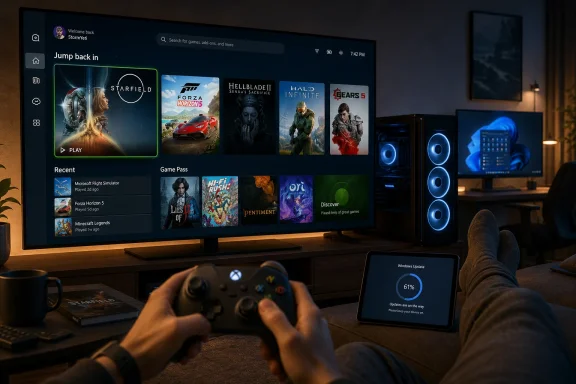
Xbox Mode is Microsoft’s answer to that old contradiction. It gives Windows 11 a full-screen, controller-optimized shell inside the Xbox experience, with a simplified interface for browsing games, launching recent titles, accessing Game Pass, and collecting installed games from major PC storefronts into something that resembles a console dashboard. Microsoft says it is designed to reduce distractions and keep the player in a mode “built for play,” which is corporate phrasing for a much plainer truth: the normal Windows desktop was not built for this.
That is why the rollout matters even if the first version feels modest. Microsoft is not merely shipping another Xbox app view. It is drawing a line between Windows as a general-purpose productivity environment and Windows as a gaming appliance, then giving users a way to move between those identities without rebooting into another OS.
The timing is also telling. SteamOS, the Steam Deck, and the broader handheld PC boom have exposed something enthusiasts have known for years: Windows is powerful, compatible, and maddening on small screens. Xbox Mode is Microsoft’s attempt to keep the Windows gaming ecosystem from being defined by other companies’ front ends.
The initial pitch was aimed at the most painful use case. Handheld Windows gaming PCs have always had an awkward bargain at their core. They can run a huge library of PC games, but they also inherit all the mismatched assumptions of desktop software: mouse-first setup screens, background utilities, launchers that demand attention, and UI elements that seem designed to punish anyone using thumbsticks.
Microsoft’s newer move is to take that handheld lesson and apply it to ordinary Windows 11 PCs. That is a more ambitious bet. A desktop gaming rig connected to a monitor may not need Xbox Mode, but a living-room PC connected to a television absolutely might. A tablet with a controller clipped nearby might. A gaming laptop docked to a big screen might.
This is how experimental features become platform strategy. Microsoft starts with a narrow pain point, gathers telemetry and feedback from enthusiasts, then broadens the experience once the shape of the problem becomes harder to deny. In that sense, Xbox Mode is less a single feature than a concession: Windows needs multiple personalities if it is going to serve every device Microsoft wants to call an Xbox.
That has been the missing piece. Game Pass on PC gave Microsoft a subscription beachhead, but the surrounding experience still felt like PC gaming: store pages, launcher friction, scattered libraries, and a keyboard never too far away. Xbox Cloud Gaming helped on devices where local installation was impractical, but it did not solve the problem of the Windows machine already sitting under the TV.
Xbox Mode tries to make the PC feel more coherent without asking Microsoft to abandon what makes PC gaming valuable. It does not wall off Steam, Battle.net, Epic, or other storefronts in favor of a pure Xbox catalog. Microsoft’s stated goal is an aggregated library, which is the only realistic approach on Windows. A console-style interface that only respected Microsoft’s own store would be dead on arrival among PC players.
That is the strategic tension at the heart of the feature. Microsoft wants the simplicity of a console without giving up the openness that makes Windows the dominant gaming platform. Xbox Mode is therefore a compromise by design: a curated front door placed in front of an unruly house.
That caution is warranted. A full-screen gaming environment is only delightful if it reliably gets out of the way. The moment a controller cannot dismiss a dialog box, a launcher demands a mouse click, an anti-cheat prompt fails to surface correctly, or Windows decides now is the right time to discuss account settings, the illusion collapses.
The harder problem is that Microsoft does not control the whole PC gaming stack. It controls Windows, the Xbox app, Game Bar, parts of DirectX, and the Microsoft Store. It does not control every launcher, driver overlay, DRM prompt, mod manager, cloud save dialog, or game-specific settings window. Xbox Mode can soften the desktop’s sharp edges, but it cannot erase decades of PC software assumptions overnight.
That is why the name change matters. “Full screen experience” sounded like a mode within an app. “Xbox Mode” sounds like a destination. With that branding comes a higher expectation: not merely that the Xbox app fills the screen, but that Windows behaves like a console-adjacent system for the duration of play.
That comparison has haunted Windows handhelds. A Windows device can often run more games, more launchers, and more anti-cheat-protected titles. Yet the first-run experience, sleep behavior, update interruptions, and touch or controller navigation have frequently made Windows feel like the wrong operating system wearing the right compatibility layer.
Microsoft could afford to ignore that when the battle was desktop tower versus console. It cannot ignore it when the battle is handheld versus handheld, docked handheld versus living-room console, and cloud-enabled subscription ecosystem versus storefront loyalty. In those environments, interface friction is not a minor annoyance. It is the product.
Xbox Mode is Microsoft trying to recover the narrative. The message is not that Windows will become SteamOS, or that Xbox consoles are going away tomorrow. The message is that Microsoft wants Windows gaming devices to have a first-party experience that does not feel outsourced to hardware vendors and community scripts.
Players do not think in storefront taxonomies when they sit down to play. They think, “Where is the game I was playing last night?” A good console dashboard understands that. A bad PC front end asks the user to remember which company sold the license, which launcher owns the installation, and which background updater needs to finish before the play session can begin.
Microsoft is in a delicate position here. It cannot be too aggressive about hiding rival stores without triggering backlash from PC gamers and scrutiny from regulators. It also cannot be too passive, because a mere list of shortcuts does not feel like an Xbox experience. The company has to make other storefront games feel present without pretending the underlying ecosystem is simpler than it is.
If Microsoft gets this right, Xbox Mode becomes a neutral-ish living-room layer for PC gaming. If it gets it wrong, it becomes just another tile in the launcher wars. The difference will be measured in small moments: whether recent games appear reliably, whether controller navigation remains consistent, whether cloud saves and updates are understandable, and whether the interface respects the player’s existing library instead of using it as bait for Game Pass.
But the bigger win is for Windows itself. Microsoft needs Windows 11 to remain the default platform for high-end PC gaming while also becoming credible on handhelds, tablets, and living-room devices. Those goals are not identical. A platform optimized for multitasking, legacy compatibility, and enterprise manageability is not automatically a platform optimized for a relaxed couch session.
Xbox Mode gives Microsoft a way to preserve the Windows base while presenting a different surface to players. That is smarter than trying to make the desktop universally more console-like, which would irritate traditional PC users and still fail to solve the edge cases. Modes are sometimes a design failure, but in this case the mode acknowledges reality: the same machine can be a workstation at 2 p.m. and a console substitute at 9 p.m.
This is also why switching back and forth matters. Microsoft is not asking users to choose between Windows and Xbox. It is asking them to trust that Windows can temporarily recede. For a company that has often treated Windows as the main character in every scenario, that is a notable shift.
In managed environments, Xbox Mode may simply be irrelevant or disabled by policy. In education labs, shared family PCs, small offices with mixed-use devices, and bring-your-own-device scenarios, it could be more visible. A student laptop that boots or switches into a console-like interface is not a crisis, but it is another reminder that Windows 11 is increasingly a bundle of role-specific experiences rather than a single uniform desktop.
There is also the question of background behavior. Microsoft says Xbox Mode minimizes distractions, and earlier versions of the full-screen experience were discussed in terms of reducing unnecessary background activity. That sounds attractive for gaming performance, especially on memory-constrained devices, but administrators will want clarity about what is paused, deferred, hidden, or merely visually suppressed.
The consumer story is “fewer distractions.” The IT story is “what changed?” Those are not the same thing. If Xbox Mode becomes widespread, Microsoft will need to document its behavior well enough that the feature does not become another black box users invoke and support teams have to explain.
What is ending is the assumption that the desktop should be the front door for every experience. On a handheld, it is often a nuisance. On a TV, it is an ergonomic mismatch. On a tablet with a controller, it can feel like a translation layer nobody asked for.
Xbox Mode is part of a larger operating-system trend: platforms are becoming context-sensitive. Apple has Stage Manager and gaming pushes of its own. Valve has Big Picture and SteamOS. Android and iPadOS keep flirting with desktop-like modes. Microsoft, characteristically, is trying to support every scenario on the same Windows foundation.
That approach can look inelegant, but it is also Microsoft’s superpower. The company does not need Xbox Mode to replace Windows. It needs Xbox Mode to make Windows tolerable in places where the desktop was never the right answer.
But names create obligations. “Xbox Mode” implies a degree of polish associated with console use: consistent navigation, quick resume-like expectations even when not technically offering Quick Resume, clean controller support, and a sense that the system will not randomly throw the user into desktop housekeeping. If Microsoft cannot deliver that, the name will become a liability.
The danger is not that Xbox Mode will be useless. The danger is that it will be almost good enough. Almost good enough is where living-room PC interfaces go to die. A player may tolerate one awkward keyboard reach, but the second or third time it happens, the controller-first illusion becomes a marketing skin over the same old Windows.
Microsoft has the advantage of owning the platform. It can improve APIs, nudge developers, integrate Game Bar more deeply, and tune Windows behavior around the mode. But it also has the burden of history. Windows users have been promised cleaner gaming experiences before, and they have learned to wait for the second or third iteration before believing the first announcement.
That does not mean Xbox hardware is irrelevant. Dedicated consoles still offer simplicity, fixed targets for developers, predictable living-room behavior, and a price-performance proposition that PCs often struggle to match. But Microsoft’s strategic flexibility increasingly depends on making Xbox less tied to one box.
Windows is the obvious beneficiary and the obvious obstacle. It gives Microsoft reach that Sony and Nintendo cannot easily match, but it also brings baggage that consoles carefully avoid. Xbox Mode is the attempt to keep the reach while hiding the baggage at the moments when it matters most.
This is not a small philosophical move. It suggests Microsoft sees the future Xbox platform as partly console, partly PC, partly cloud, and partly interface. The shell becomes the battlefield because the shell is where ecosystems become habits.
Still, controlled deployments can mark real turns. Windows 11 has often been criticized for adding surfaces that serve Microsoft’s priorities more than the user’s. Xbox Mode has a clearer user problem behind it. Players with controllers need a better way to move through a game library, launch titles, and stay out of the desktop until they actually want the desktop back.
The key test will be whether Microsoft keeps improving the parts that are hardest to demo. Launch reliability matters more than the hero screen. Storefront integration matters more than animation polish. Sleep, resume, update handling, controller pairing, and overlay behavior matter more than the name.
If Xbox Mode becomes merely a prettier Xbox app screen, it will be forgotten. If it becomes the default way Windows gaming devices behave when used like consoles, it could become one of the more consequential Windows gaming changes in years.
That second front door gives Microsoft options. It can court handheld makers without leaving them to invent their own controller shells. It can make Game Pass more natural on PCs connected to TVs. It can give desktop users a couch-friendly mode without compromising the workstation experience. It can make Windows feel more like an Xbox while keeping the PC library that no console can fully replicate.
The concrete takeaways are simple, even if the strategy behind them is not:
Source: GSMArena.com Xbox Mode is now rolling out on Windows 11
 Microsoft Finally Stops Pretending the Desktop Is Good Enough for the Couch
For decades, Windows has been the default home of PC gaming, but rarely the most elegant one. It won because the games were there, the drivers were there, the hardware ecosystem was there, and the storefronts multiplied around it. It did not win because Alt-Tab, system tray pop-ups, launcher updates, desktop scaling quirks, and tiny close buttons make sense from ten feet away on a television.Xbox Mode is Microsoft’s answer to that old contradiction. It gives Windows 11 a full-screen, controller-optimized shell inside the Xbox experience, with a simplified interface for browsing games, launching recent titles, accessing Game Pass, and collecting installed games from major PC storefronts into something that resembles a console dashboard. Microsoft says it is designed to reduce distractions and keep the player in a mode “built for play,” which is corporate phrasing for a much plainer truth: the normal Windows desktop was not built for this.
That is why the rollout matters even if the first version feels modest. Microsoft is not merely shipping another Xbox app view. It is drawing a line between Windows as a general-purpose productivity environment and Windows as a gaming appliance, then giving users a way to move between those identities without rebooting into another OS.
The timing is also telling. SteamOS, the Steam Deck, and the broader handheld PC boom have exposed something enthusiasts have known for years: Windows is powerful, compatible, and maddening on small screens. Xbox Mode is Microsoft’s attempt to keep the Windows gaming ecosystem from being defined by other companies’ front ends.
The Handheld Experiment Became a Windows Strategy
Xbox Mode did not appear out of nowhere. It began life as the Xbox full screen experience, first associated with Windows gaming handhelds and devices like the ROG Xbox Ally family. On those machines, the idea was obvious: a handheld PC should not greet a player with the same interface used to manage spreadsheets, printer drivers, and enterprise VPN clients.The initial pitch was aimed at the most painful use case. Handheld Windows gaming PCs have always had an awkward bargain at their core. They can run a huge library of PC games, but they also inherit all the mismatched assumptions of desktop software: mouse-first setup screens, background utilities, launchers that demand attention, and UI elements that seem designed to punish anyone using thumbsticks.
Microsoft’s newer move is to take that handheld lesson and apply it to ordinary Windows 11 PCs. That is a more ambitious bet. A desktop gaming rig connected to a monitor may not need Xbox Mode, but a living-room PC connected to a television absolutely might. A tablet with a controller clipped nearby might. A gaming laptop docked to a big screen might.
This is how experimental features become platform strategy. Microsoft starts with a narrow pain point, gathers telemetry and feedback from enthusiasts, then broadens the experience once the shape of the problem becomes harder to deny. In that sense, Xbox Mode is less a single feature than a concession: Windows needs multiple personalities if it is going to serve every device Microsoft wants to call an Xbox.
“Everything Is an Xbox” Needed a Windows Answer
Microsoft has spent years stretching the Xbox brand beyond the console under the television. Xbox is a console, a PC app, a cloud service, a subscription, a mobile presence, a controller button, and increasingly a strategy for putting Microsoft’s gaming layer wherever players already are. The slogan-like idea that “everything is an Xbox” only works if Windows itself can behave like one when needed.That has been the missing piece. Game Pass on PC gave Microsoft a subscription beachhead, but the surrounding experience still felt like PC gaming: store pages, launcher friction, scattered libraries, and a keyboard never too far away. Xbox Cloud Gaming helped on devices where local installation was impractical, but it did not solve the problem of the Windows machine already sitting under the TV.
Xbox Mode tries to make the PC feel more coherent without asking Microsoft to abandon what makes PC gaming valuable. It does not wall off Steam, Battle.net, Epic, or other storefronts in favor of a pure Xbox catalog. Microsoft’s stated goal is an aggregated library, which is the only realistic approach on Windows. A console-style interface that only respected Microsoft’s own store would be dead on arrival among PC players.
That is the strategic tension at the heart of the feature. Microsoft wants the simplicity of a console without giving up the openness that makes Windows the dominant gaming platform. Xbox Mode is therefore a compromise by design: a curated front door placed in front of an unruly house.
The Rollout Is Cautious Because the Promise Is Bigger Than the Feature
Microsoft says Xbox Mode is rolling out in select markets and expanding over the next several weeks. Users who want the feature are told to go to Windows Update and enable “Get the latest updates as soon as they are available,” but even that does not guarantee immediate access. This is classic staged Windows deployment: announce the feature, light it up gradually, and avoid a single global switch that turns every edge case into a support incident at once.That caution is warranted. A full-screen gaming environment is only delightful if it reliably gets out of the way. The moment a controller cannot dismiss a dialog box, a launcher demands a mouse click, an anti-cheat prompt fails to surface correctly, or Windows decides now is the right time to discuss account settings, the illusion collapses.
The harder problem is that Microsoft does not control the whole PC gaming stack. It controls Windows, the Xbox app, Game Bar, parts of DirectX, and the Microsoft Store. It does not control every launcher, driver overlay, DRM prompt, mod manager, cloud save dialog, or game-specific settings window. Xbox Mode can soften the desktop’s sharp edges, but it cannot erase decades of PC software assumptions overnight.
That is why the name change matters. “Full screen experience” sounded like a mode within an app. “Xbox Mode” sounds like a destination. With that branding comes a higher expectation: not merely that the Xbox app fills the screen, but that Windows behaves like a console-adjacent system for the duration of play.
Valve Forced the Issue by Making Linux Feel Less Weird Than Windows
The uncomfortable backdrop for Microsoft is Valve. The Steam Deck did not beat Windows handhelds on raw compatibility, and it certainly did not make Linux gaming effortless in every case. What it did was prove that a handheld gaming PC could boot into a controller-first interface that felt intentional rather than improvised.That comparison has haunted Windows handhelds. A Windows device can often run more games, more launchers, and more anti-cheat-protected titles. Yet the first-run experience, sleep behavior, update interruptions, and touch or controller navigation have frequently made Windows feel like the wrong operating system wearing the right compatibility layer.
Microsoft could afford to ignore that when the battle was desktop tower versus console. It cannot ignore it when the battle is handheld versus handheld, docked handheld versus living-room console, and cloud-enabled subscription ecosystem versus storefront loyalty. In those environments, interface friction is not a minor annoyance. It is the product.
Xbox Mode is Microsoft trying to recover the narrative. The message is not that Windows will become SteamOS, or that Xbox consoles are going away tomorrow. The message is that Microsoft wants Windows gaming devices to have a first-party experience that does not feel outsourced to hardware vendors and community scripts.
The Aggregated Library Is the Real Battleground
The most important part of Xbox Mode may not be the full-screen interface. It may be the promise of an aggregated game library that includes Game Pass and installed games from leading PC storefronts. That is where Microsoft can add real value, because the modern PC gaming library is a mess of overlapping accounts and fragmented launch paths.Players do not think in storefront taxonomies when they sit down to play. They think, “Where is the game I was playing last night?” A good console dashboard understands that. A bad PC front end asks the user to remember which company sold the license, which launcher owns the installation, and which background updater needs to finish before the play session can begin.
Microsoft is in a delicate position here. It cannot be too aggressive about hiding rival stores without triggering backlash from PC gamers and scrutiny from regulators. It also cannot be too passive, because a mere list of shortcuts does not feel like an Xbox experience. The company has to make other storefront games feel present without pretending the underlying ecosystem is simpler than it is.
If Microsoft gets this right, Xbox Mode becomes a neutral-ish living-room layer for PC gaming. If it gets it wrong, it becomes just another tile in the launcher wars. The difference will be measured in small moments: whether recent games appear reliably, whether controller navigation remains consistent, whether cloud saves and updates are understandable, and whether the interface respects the player’s existing library instead of using it as bait for Game Pass.
Game Pass Gets a Better Showroom, but Windows Gets the Bigger Win
It would be easy to reduce Xbox Mode to a Game Pass funnel. Microsoft surely wants the full Game Pass catalog visible and accessible inside a controller-first interface. A subscription service benefits when discovery is frictionless, especially on a screen where browsing can become part of the entertainment ritual.But the bigger win is for Windows itself. Microsoft needs Windows 11 to remain the default platform for high-end PC gaming while also becoming credible on handhelds, tablets, and living-room devices. Those goals are not identical. A platform optimized for multitasking, legacy compatibility, and enterprise manageability is not automatically a platform optimized for a relaxed couch session.
Xbox Mode gives Microsoft a way to preserve the Windows base while presenting a different surface to players. That is smarter than trying to make the desktop universally more console-like, which would irritate traditional PC users and still fail to solve the edge cases. Modes are sometimes a design failure, but in this case the mode acknowledges reality: the same machine can be a workstation at 2 p.m. and a console substitute at 9 p.m.
This is also why switching back and forth matters. Microsoft is not asking users to choose between Windows and Xbox. It is asking them to trust that Windows can temporarily recede. For a company that has often treated Windows as the main character in every scenario, that is a notable shift.
IT Pros Will See a Consumer Feature With Enterprise Shadows
For WindowsForum.com readers, the obvious question is what this means beyond the gaming den. Xbox Mode is a consumer feature, but Windows features rarely remain hermetically sealed from the concerns of administrators, support staff, and power users. Anything that changes shell behavior, update timing, background activity, or user expectations eventually creates support questions.In managed environments, Xbox Mode may simply be irrelevant or disabled by policy. In education labs, shared family PCs, small offices with mixed-use devices, and bring-your-own-device scenarios, it could be more visible. A student laptop that boots or switches into a console-like interface is not a crisis, but it is another reminder that Windows 11 is increasingly a bundle of role-specific experiences rather than a single uniform desktop.
There is also the question of background behavior. Microsoft says Xbox Mode minimizes distractions, and earlier versions of the full-screen experience were discussed in terms of reducing unnecessary background activity. That sounds attractive for gaming performance, especially on memory-constrained devices, but administrators will want clarity about what is paused, deferred, hidden, or merely visually suppressed.
The consumer story is “fewer distractions.” The IT story is “what changed?” Those are not the same thing. If Xbox Mode becomes widespread, Microsoft will need to document its behavior well enough that the feature does not become another black box users invoke and support teams have to explain.
The Desktop Is Not Dead, but Its Monopoly Is Over
The broader story is not that Microsoft is abandoning the Windows desktop. The desktop remains indispensable, and serious PC gaming still depends on the messy freedom that comes with it. Modding, benchmarking, streaming tools, Discord, browser tabs, capture utilities, and hardware monitoring all thrive in the flexible chaos of Windows.What is ending is the assumption that the desktop should be the front door for every experience. On a handheld, it is often a nuisance. On a TV, it is an ergonomic mismatch. On a tablet with a controller, it can feel like a translation layer nobody asked for.
Xbox Mode is part of a larger operating-system trend: platforms are becoming context-sensitive. Apple has Stage Manager and gaming pushes of its own. Valve has Big Picture and SteamOS. Android and iPadOS keep flirting with desktop-like modes. Microsoft, characteristically, is trying to support every scenario on the same Windows foundation.
That approach can look inelegant, but it is also Microsoft’s superpower. The company does not need Xbox Mode to replace Windows. It needs Xbox Mode to make Windows tolerable in places where the desktop was never the right answer.
The Name Is Cleaner, but the Experience Has to Earn It
Renaming the feature from Xbox Full Screen Experience to Xbox Mode is the right branding move. It is shorter, clearer, and more aligned with what users understand. People know what a mode is. They know it can be entered and exited. They know it changes behavior without necessarily changing the whole machine.But names create obligations. “Xbox Mode” implies a degree of polish associated with console use: consistent navigation, quick resume-like expectations even when not technically offering Quick Resume, clean controller support, and a sense that the system will not randomly throw the user into desktop housekeeping. If Microsoft cannot deliver that, the name will become a liability.
The danger is not that Xbox Mode will be useless. The danger is that it will be almost good enough. Almost good enough is where living-room PC interfaces go to die. A player may tolerate one awkward keyboard reach, but the second or third time it happens, the controller-first illusion becomes a marketing skin over the same old Windows.
Microsoft has the advantage of owning the platform. It can improve APIs, nudge developers, integrate Game Bar more deeply, and tune Windows behavior around the mode. But it also has the burden of history. Windows users have been promised cleaner gaming experiences before, and they have learned to wait for the second or third iteration before believing the first announcement.
The Console War Has Moved Into the Shell
Xbox Mode also says something about where the console business is going. The old model treated hardware boxes as the center of gravity. The newer model treats identity, libraries, subscriptions, and interfaces as the durable assets. If a player can sit down at a Windows PC and enter an Xbox-like environment, Microsoft has extended the console relationship without selling another console.That does not mean Xbox hardware is irrelevant. Dedicated consoles still offer simplicity, fixed targets for developers, predictable living-room behavior, and a price-performance proposition that PCs often struggle to match. But Microsoft’s strategic flexibility increasingly depends on making Xbox less tied to one box.
Windows is the obvious beneficiary and the obvious obstacle. It gives Microsoft reach that Sony and Nintendo cannot easily match, but it also brings baggage that consoles carefully avoid. Xbox Mode is the attempt to keep the reach while hiding the baggage at the moments when it matters most.
This is not a small philosophical move. It suggests Microsoft sees the future Xbox platform as partly console, partly PC, partly cloud, and partly interface. The shell becomes the battlefield because the shell is where ecosystems become habits.
The First Version Is a Doorway, Not a Destination
Nobody should expect this rollout to instantly settle the Windows gaming handheld debate or make every living-room PC feel like a console. The gradual release alone tells us Microsoft is still feeling its way forward. Features that begin in select markets and expand over weeks are not usually finished revolutions; they are controlled deployments.Still, controlled deployments can mark real turns. Windows 11 has often been criticized for adding surfaces that serve Microsoft’s priorities more than the user’s. Xbox Mode has a clearer user problem behind it. Players with controllers need a better way to move through a game library, launch titles, and stay out of the desktop until they actually want the desktop back.
The key test will be whether Microsoft keeps improving the parts that are hardest to demo. Launch reliability matters more than the hero screen. Storefront integration matters more than animation polish. Sleep, resume, update handling, controller pairing, and overlay behavior matter more than the name.
If Xbox Mode becomes merely a prettier Xbox app screen, it will be forgotten. If it becomes the default way Windows gaming devices behave when used like consoles, it could become one of the more consequential Windows gaming changes in years.
The Windows Gaming PC Just Got a Second Front Door
Xbox Mode is easy to misunderstand because it looks like an interface story. It is really a platform story. Microsoft is building a second front door into Windows, one that admits the traditional desktop is not always the right place to begin.That second front door gives Microsoft options. It can court handheld makers without leaving them to invent their own controller shells. It can make Game Pass more natural on PCs connected to TVs. It can give desktop users a couch-friendly mode without compromising the workstation experience. It can make Windows feel more like an Xbox while keeping the PC library that no console can fully replicate.
The concrete takeaways are simple, even if the strategy behind them is not:
- Xbox Mode began rolling out to Windows 11 PCs on April 30, 2026, in select markets, with broader availability expected gradually over the following weeks.
- The feature works across Windows 11 desktops, laptops, tablets, and handhelds, but availability depends on Microsoft’s staged rollout rather than a user-controlled guarantee.
- Users can try to receive it sooner by enabling “Get the latest updates as soon as they are available” in Windows Update.
- Xbox Mode provides a controller-optimized full-screen interface for launching games, viewing recent titles, browsing Game Pass, and accessing installed games from supported PC storefronts.
- The feature grew out of the Xbox full screen experience on Windows handhelds, where the need for a console-style interface was most obvious.
- Its long-term importance depends less on the first screen users see and more on how well Microsoft suppresses the ordinary Windows friction that interrupts gaming sessions.
Source: GSMArena.com Xbox Mode is now rolling out on Windows 11
