

Microsoft began rolling out Xbox Mode for Windows 11 PCs on April 30, 2026, in select markets, bringing a controller-first, full-screen Xbox-style interface to desktops, laptops, tablets, and handhelds, with broader availability planned over the next several weeks. The feature is not a new operating system, and it does not turn a PC into an Xbox console. It is Microsoft’s clearest admission yet that Windows remains powerful for games but awkward when the keyboard and mouse are out of reach.
That distinction matters. Xbox Mode is less about launching another app and more about Microsoft trying to sand down the sharpest edge in PC gaming: the moment when a living-room device, handheld, or docked laptop asks you to wrestle with a desktop built for spreadsheets before you can play Forza, Halo, Balatro, or whatever Steam sale purchase is waiting in the backlog.
For decades, Windows has been the default home of PC gaming because it won the software ecosystem war. It has the drivers, the storefronts, the anti-cheat support, the modding culture, the controller stack, and the maddening but valuable openness that lets a player install almost anything from almost anywhere. The trouble is that none of those strengths automatically make Windows feel good from a couch or a seven-inch handheld screen.
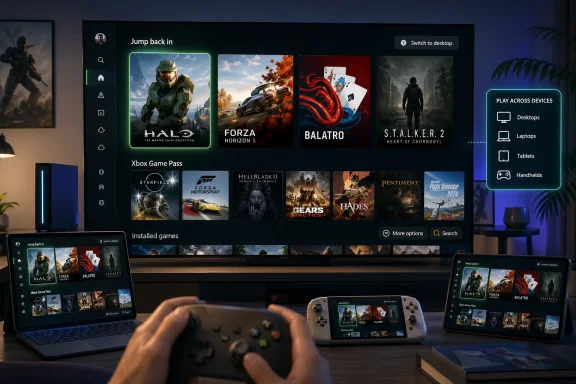
Xbox Mode is Microsoft’s attempt to answer that mismatch without abandoning Windows itself. The interface gives players a full-screen, controller-optimized shell with access to recently played games, an aggregated library, Xbox Game Pass titles, and installed games from other PC storefronts. It also lets users jump back to the regular Windows 11 desktop, which is the quiet but important clause in the announcement.
That clause is where Microsoft’s strategy lives. The company is not replacing Windows with Xbox software; it is putting a console-shaped layer on top of Windows and hoping the layer is convincing enough that most players do not need to think about the rest. This is classic Microsoft compromise: keep the platform open, keep the legacy intact, and build a friendlier front door.
The rollout also confirms that the handheld experiment was never just about handhelds. Microsoft first pushed the full-screen Xbox experience into Windows gaming handhelds, then previewed it for broader PC form factors, and now it is sending the renamed Xbox Mode to ordinary Windows 11 machines. What began as a survival response to Steam Deck-style devices has become a wider bid to make Windows feel less like Windows when gaming is the only job.
Windows handhelds, by contrast, often shipped with more horsepower and more compatibility but less grace. Users could run Game Pass, Steam, Epic, Battle.net, emulators, launchers, utilities, and niche games that would never cooperate with a locked-down console. They also had to tap tiny close buttons, summon touch keyboards, dodge update prompts, and occasionally remember that a handheld gaming PC is still, inconveniently, a PC.
Xbox Mode is Microsoft’s answer to that embarrassment. It does not magically solve every desktop-era assumption baked into Windows, but it changes the first impression. A player turning on a Windows 11 device can be met by a game library rather than a taskbar, which is a small change technically and a large change emotionally.
This is why the broader PC rollout matters. Microsoft could have treated the full-screen experience as a handheld-only concession, useful for ASUS, Lenovo, MSI, and other hardware partners trying to sell portable PCs. Instead, the company is saying the same design problem applies to desktops connected to TVs, tablets with controllers, gaming laptops in dorm rooms, and any PC that sometimes wants to behave like an appliance.
That is not just a user-interface decision. It is a platform defense. If the future of gaming hardware is more hybrid, more portable, and more living-room-adjacent, Microsoft cannot let Windows be perceived as the powerful option that feels bad to use.
That makes Xbox Mode different from the old dream of turning the PC into a console. Microsoft has tried variations of that dream before, sometimes with Games for Windows branding, sometimes through the Microsoft Store, sometimes through Xbox app integration, and often with more ambition than affection from players. The lesson was brutal but useful: PC gamers do not want a console cage around their hardware.
They may, however, accept a console hallway. If Xbox Mode can sit at the entrance, organize the library, respond properly to a controller, reduce distractions, and then get out of the way when desktop access is needed, it has a better chance than any attempt to make Windows gaming feel centrally controlled. The interface succeeds only if it respects the mess.
That is the awkward genius of PC gaming. The same openness that makes Windows clunky also makes it indispensable. A player may launch an Xbox Game Pass title, tweak a Steam game, install a mod manager, join a Discord call, change GPU settings, and run a fan utility in the same evening. A console-style interface can simplify the beginning of that journey, but it cannot pretend the journey is simple.
Microsoft appears to understand that, at least in principle. The company’s messaging emphasizes choice, openness, and the ability to switch back to the desktop. Those are not throwaway lines; they are the guardrails keeping Xbox Mode from being interpreted as another attempt to corral PC gaming into Microsoft’s storefront.
A full-screen Xbox environment on Windows is the software layer that makes that strategy feel coherent. If Microsoft’s future hardware looks more like a spectrum of Xbox-branded PCs, handhelds, consoles, and cloud endpoints, then Windows needs an interface that can scale across them without asking users to care which technical category their device belongs to.
That is why the phrase Xbox Mode is more important than the old name, full screen experience. The old name described a feature. The new name describes a posture. Microsoft is not merely saying, “Here is a full-screen UI.” It is saying, “This is what Xbox looks like when Xbox is running on Windows.”
The timing also matters. The PC handheld market has matured from novelty to category. Valve made the idea mainstream. ASUS, Lenovo, MSI, and others kept pushing Windows into the space. Microsoft then partnered around Xbox-branded handheld hardware and began tightening the software. Xbox Mode is the connective tissue between those moves.
For traditional PC users, this may feel optional, even minor. For Microsoft’s platform planners, it is foundational. A company cannot credibly sell a Windows-based gaming future if the first five minutes of using the device feel like troubleshooting a hotel kiosk.
This is where SteamOS still has an advantage. Valve controls a narrower experience and can tune the path from power button to gameplay with ruthless focus. Microsoft has to support everything from a budget tablet to a water-cooled desktop with three monitors and seven launchers. Windows is harder to simplify because Windows is asked to be more things to more people.
Xbox Mode may reduce background distractions, but the phrase deserves scrutiny. Players will want to know whether that means meaningful performance gains, fewer processes, better memory behavior, faster resume, improved controller focus, or simply a cleaner interface. On handhelds, even small reductions in overhead can matter. On desktops, the value may be less about frame rates and more about friction.
The phased rollout is also a reminder that this is not a switch flipping for everyone at once. Some users in select markets can download the experience now, while others will wait days or weeks. Microsoft is telling users to keep Windows Update current and enable the option to receive the latest updates as soon as they are available, which means availability will depend on region, device readiness, update status, and whatever server-side gates Microsoft is using.
That is sensible engineering and frustrating communication. A player reading “rolls out today” may expect to find a button today. A Windows veteran knows better: today often means today for someone, somewhere, on hardware that may or may not resemble yours.
Microsoft’s own library is not enough. Game Pass is powerful, but it is not the whole PC market. Steam remains central to PC gaming culture. Epic’s free-game strategy has filled millions of accounts. Battle.net, EA, Ubisoft, Riot, Rockstar, and smaller stores all have their own gravitational pull. A front end that cannot gracefully represent this sprawl becomes another launcher in a world already drowning in launchers.
Xbox Mode’s promise is that it can give Windows players one controller-friendly place to begin. But aggregation is a notoriously delicate art. Does the library update reliably? Does it know which launcher is required? Does it handle uninstalled games cleanly? Does it respect artwork and metadata? Does it expose cloud saves, updates, achievements, and controller compatibility in a useful way? Does it fail quietly or strand users in desktop pop-ups?
These details sound pedestrian because they are. They are also the difference between a feature people praise once and a feature they actually keep using. Console interfaces succeed through boring consistency. PC interfaces often fail through a thousand little exceptions.
Microsoft has the resources to improve this over time, and the phased rollout gives it room to collect telemetry and feedback. But users should judge Xbox Mode by repeated use, not launch-day screenshots. The first time it opens is marketing; the tenth time it launches the wrong storefront or drops you at a login prompt is the real review.
The concern is not that Xbox Mode will suddenly invade domain-joined workstations and turn accounting laptops into consoles. The concern is policy clarity. Organizations that standardize Windows images, restrict Store apps, disable gaming features, or manage user experience expectations will want to know how Xbox Mode appears, how it can be controlled, and whether it creates support tickets from curious users.
Gaming features have a habit of arriving as harmless extras and later becoming part of broader Windows service integration. Game Bar, capture tools, widgets, Store components, and Xbox app dependencies have all lived somewhere in the gray zone between consumer convenience and enterprise clutter. Xbox Mode is more visible than most of them because it changes the posture of the machine.
For schools, labs, shared PCs, and small businesses, the answer may simply be to keep gaming components off managed images or enforce existing policies around consumer experiences. For enthusiast home networks, the answer may be the opposite: Xbox Mode could make a living-room Windows box more family-friendly without giving up PC flexibility.
Either way, this is another example of Windows trying to serve both the couch and the cubicle. That has always been Microsoft’s superpower and its burden.
Xbox Mode fits that world. It makes Windows less of an obstacle between the player and the Xbox ecosystem, but it also gives Microsoft a way to participate in hardware categories it does not fully control. If a Lenovo handheld, an ASUS device, a living-room mini PC, and a conventional laptop can all boot into something that feels recognizably Xbox-like, Microsoft gains reach without requiring every device to be an Xbox console.
This is both smart and risky. The smart part is obvious: Windows already has enormous gaming reach, and Xbox Mode gives that reach a more coherent face. The risky part is that brand coherence can expose technical inconsistency. If Microsoft calls the experience Xbox, players will compare it to Xbox expectations: fast navigation, clean suspend and resume, reliable controller behavior, predictable updates, and minimal fuss.
Windows has improved tremendously as a gaming platform, but it is still not an appliance. The better Xbox Mode looks, the more glaring the remaining seams may become. A polished front end makes a desktop interruption feel less like normal PC behavior and more like a broken promise.
That may be exactly the pressure Windows needs. For years, Microsoft could rely on compatibility as the answer to every complaint. Now compatibility is table stakes. The differentiator is whether the PC can keep its freedom while borrowing enough console discipline to feel civilized.
That is a bigger philosophical shift than it first appears. Windows has long treated the desktop as the center of the universe. Apps, games, files, stores, settings, notifications, and background tasks all orbit the same general workspace. Xbox Mode suggests that for gaming, the desktop should become optional scenery.
This is the right instinct. Most people do not buy a handheld gaming PC because they want to admire Windows Explorer. They do not connect a tower to a TV because they want to navigate the Start menu from across the room. They want the compatibility of Windows with the immediacy of a console, and for too long Microsoft has delivered the first half while outsourcing the second half to third-party launchers and user patience.
But Microsoft also has to avoid overpromising. Xbox Mode will not fix bad ports. It will not make every PC game controller-native. It will not erase shader compilation stutter, launcher bloat, DRM irritations, or the periodic comedy of Windows deciding now is a good time to be Windows. It is a front end, and front ends are only as good as the system behavior beneath them.
Still, front ends matter. The first screen tells users what a device is for. Today Microsoft is telling Windows 11 users that a PC can be for games first, at least when they want it to be.
If Microsoft keeps improving the pieces beneath the interface — sleep, resume, controller focus, launcher handoffs, background overhead, storefront aggregation, and policy controls — Xbox Mode could become the default way many people experience PC gaming on Windows. If not, it will be remembered as another attractive Microsoft surface stretched over familiar Windows friction. The opportunity is real because the problem is real, and for once Microsoft seems to be aiming at the part of PC gaming users actually touch first.
Source: TwistedVoxel Xbox Mode Rolls Out on Windows 11 PCs Today
That distinction matters. Xbox Mode is less about launching another app and more about Microsoft trying to sand down the sharpest edge in PC gaming: the moment when a living-room device, handheld, or docked laptop asks you to wrestle with a desktop built for spreadsheets before you can play Forza, Halo, Balatro, or whatever Steam sale purchase is waiting in the backlog.
 Microsoft Finally Names the Thing Windows Gamers Already Knew Was Missing
For decades, Windows has been the default home of PC gaming because it won the software ecosystem war. It has the drivers, the storefronts, the anti-cheat support, the modding culture, the controller stack, and the maddening but valuable openness that lets a player install almost anything from almost anywhere. The trouble is that none of those strengths automatically make Windows feel good from a couch or a seven-inch handheld screen.Xbox Mode is Microsoft’s attempt to answer that mismatch without abandoning Windows itself. The interface gives players a full-screen, controller-optimized shell with access to recently played games, an aggregated library, Xbox Game Pass titles, and installed games from other PC storefronts. It also lets users jump back to the regular Windows 11 desktop, which is the quiet but important clause in the announcement.
That clause is where Microsoft’s strategy lives. The company is not replacing Windows with Xbox software; it is putting a console-shaped layer on top of Windows and hoping the layer is convincing enough that most players do not need to think about the rest. This is classic Microsoft compromise: keep the platform open, keep the legacy intact, and build a friendlier front door.
The rollout also confirms that the handheld experiment was never just about handhelds. Microsoft first pushed the full-screen Xbox experience into Windows gaming handhelds, then previewed it for broader PC form factors, and now it is sending the renamed Xbox Mode to ordinary Windows 11 machines. What began as a survival response to Steam Deck-style devices has become a wider bid to make Windows feel less like Windows when gaming is the only job.
The Steam Deck Forced Microsoft to Fix the Front Door
Valve did not beat Windows on game compatibility. It beat Windows on intent. SteamOS greets the player with a controller-ready interface, predictable sleep behavior, and a library-first design that understands the device is there to play games, not manage printers.Windows handhelds, by contrast, often shipped with more horsepower and more compatibility but less grace. Users could run Game Pass, Steam, Epic, Battle.net, emulators, launchers, utilities, and niche games that would never cooperate with a locked-down console. They also had to tap tiny close buttons, summon touch keyboards, dodge update prompts, and occasionally remember that a handheld gaming PC is still, inconveniently, a PC.
Xbox Mode is Microsoft’s answer to that embarrassment. It does not magically solve every desktop-era assumption baked into Windows, but it changes the first impression. A player turning on a Windows 11 device can be met by a game library rather than a taskbar, which is a small change technically and a large change emotionally.
This is why the broader PC rollout matters. Microsoft could have treated the full-screen experience as a handheld-only concession, useful for ASUS, Lenovo, MSI, and other hardware partners trying to sell portable PCs. Instead, the company is saying the same design problem applies to desktops connected to TVs, tablets with controllers, gaming laptops in dorm rooms, and any PC that sometimes wants to behave like an appliance.
That is not just a user-interface decision. It is a platform defense. If the future of gaming hardware is more hybrid, more portable, and more living-room-adjacent, Microsoft cannot let Windows be perceived as the powerful option that feels bad to use.
Xbox Mode Is a Shell, Not a Surrender
The most important thing about Xbox Mode is what it does not do. It does not close the Windows ecosystem. It does not require every game to come from the Microsoft Store. It does not pretend Steam, Epic Games Store, GOG, Battle.net, Ubisoft Connect, and other launchers do not exist. It surfaces installed games from leading PC storefronts because ignoring them would make the whole exercise irrelevant.That makes Xbox Mode different from the old dream of turning the PC into a console. Microsoft has tried variations of that dream before, sometimes with Games for Windows branding, sometimes through the Microsoft Store, sometimes through Xbox app integration, and often with more ambition than affection from players. The lesson was brutal but useful: PC gamers do not want a console cage around their hardware.
They may, however, accept a console hallway. If Xbox Mode can sit at the entrance, organize the library, respond properly to a controller, reduce distractions, and then get out of the way when desktop access is needed, it has a better chance than any attempt to make Windows gaming feel centrally controlled. The interface succeeds only if it respects the mess.
That is the awkward genius of PC gaming. The same openness that makes Windows clunky also makes it indispensable. A player may launch an Xbox Game Pass title, tweak a Steam game, install a mod manager, join a Discord call, change GPU settings, and run a fan utility in the same evening. A console-style interface can simplify the beginning of that journey, but it cannot pretend the journey is simple.
Microsoft appears to understand that, at least in principle. The company’s messaging emphasizes choice, openness, and the ability to switch back to the desktop. Those are not throwaway lines; they are the guardrails keeping Xbox Mode from being interpreted as another attempt to corral PC gaming into Microsoft’s storefront.
The Real Prize Is the Next Xbox, Not Today’s Desktop
Xbox Mode is arriving on Windows 11 PCs, but the shadow hanging over it is Microsoft’s next-generation Xbox strategy. The company has spent years blurring the old line between Xbox console and Windows PC. Game Pass spans console, PC, and cloud. Xbox Play Anywhere ties purchases across devices when supported. First-party Xbox games increasingly arrive on PC the same day as console.A full-screen Xbox environment on Windows is the software layer that makes that strategy feel coherent. If Microsoft’s future hardware looks more like a spectrum of Xbox-branded PCs, handhelds, consoles, and cloud endpoints, then Windows needs an interface that can scale across them without asking users to care which technical category their device belongs to.
That is why the phrase Xbox Mode is more important than the old name, full screen experience. The old name described a feature. The new name describes a posture. Microsoft is not merely saying, “Here is a full-screen UI.” It is saying, “This is what Xbox looks like when Xbox is running on Windows.”
The timing also matters. The PC handheld market has matured from novelty to category. Valve made the idea mainstream. ASUS, Lenovo, MSI, and others kept pushing Windows into the space. Microsoft then partnered around Xbox-branded handheld hardware and began tightening the software. Xbox Mode is the connective tissue between those moves.
For traditional PC users, this may feel optional, even minor. For Microsoft’s platform planners, it is foundational. A company cannot credibly sell a Windows-based gaming future if the first five minutes of using the device feel like troubleshooting a hotel kiosk.
The Desktop Is Still Waiting Behind the Curtain
The risk is that Xbox Mode becomes a beautiful lobby attached to a chaotic building. Full-screen launchers can hide Windows, but they cannot eliminate every Windows problem. Driver updates, storefront authentication, anti-cheat prompts, admin permissions, overlays, background launchers, cloud sync conflicts, and games that expect a keyboard can all pierce the illusion.This is where SteamOS still has an advantage. Valve controls a narrower experience and can tune the path from power button to gameplay with ruthless focus. Microsoft has to support everything from a budget tablet to a water-cooled desktop with three monitors and seven launchers. Windows is harder to simplify because Windows is asked to be more things to more people.
Xbox Mode may reduce background distractions, but the phrase deserves scrutiny. Players will want to know whether that means meaningful performance gains, fewer processes, better memory behavior, faster resume, improved controller focus, or simply a cleaner interface. On handhelds, even small reductions in overhead can matter. On desktops, the value may be less about frame rates and more about friction.
The phased rollout is also a reminder that this is not a switch flipping for everyone at once. Some users in select markets can download the experience now, while others will wait days or weeks. Microsoft is telling users to keep Windows Update current and enable the option to receive the latest updates as soon as they are available, which means availability will depend on region, device readiness, update status, and whatever server-side gates Microsoft is using.
That is sensible engineering and frustrating communication. A player reading “rolls out today” may expect to find a button today. A Windows veteran knows better: today often means today for someone, somewhere, on hardware that may or may not resemble yours.
PC Gaming’s Storefront Mess Becomes Microsoft’s Design Problem
The aggregated library is the part of Xbox Mode that will make or break daily use. A console interface is only useful if it can find the games people actually play. On PC, that means dealing with the fractured reality of modern distribution.Microsoft’s own library is not enough. Game Pass is powerful, but it is not the whole PC market. Steam remains central to PC gaming culture. Epic’s free-game strategy has filled millions of accounts. Battle.net, EA, Ubisoft, Riot, Rockstar, and smaller stores all have their own gravitational pull. A front end that cannot gracefully represent this sprawl becomes another launcher in a world already drowning in launchers.
Xbox Mode’s promise is that it can give Windows players one controller-friendly place to begin. But aggregation is a notoriously delicate art. Does the library update reliably? Does it know which launcher is required? Does it handle uninstalled games cleanly? Does it respect artwork and metadata? Does it expose cloud saves, updates, achievements, and controller compatibility in a useful way? Does it fail quietly or strand users in desktop pop-ups?
These details sound pedestrian because they are. They are also the difference between a feature people praise once and a feature they actually keep using. Console interfaces succeed through boring consistency. PC interfaces often fail through a thousand little exceptions.
Microsoft has the resources to improve this over time, and the phased rollout gives it room to collect telemetry and feedback. But users should judge Xbox Mode by repeated use, not launch-day screenshots. The first time it opens is marketing; the tenth time it launches the wrong storefront or drops you at a login prompt is the real review.
Sysadmins Should Notice the Consumer Feature With Enterprise Edges
WindowsForum readers who manage fleets may be tempted to dismiss Xbox Mode as a consumer toy. That would be a mistake. Any new shell-like experience that arrives through Windows Update, surfaces Microsoft account services, and changes how users interact with a device deserves at least a glance from IT.The concern is not that Xbox Mode will suddenly invade domain-joined workstations and turn accounting laptops into consoles. The concern is policy clarity. Organizations that standardize Windows images, restrict Store apps, disable gaming features, or manage user experience expectations will want to know how Xbox Mode appears, how it can be controlled, and whether it creates support tickets from curious users.
Gaming features have a habit of arriving as harmless extras and later becoming part of broader Windows service integration. Game Bar, capture tools, widgets, Store components, and Xbox app dependencies have all lived somewhere in the gray zone between consumer convenience and enterprise clutter. Xbox Mode is more visible than most of them because it changes the posture of the machine.
For schools, labs, shared PCs, and small businesses, the answer may simply be to keep gaming components off managed images or enforce existing policies around consumer experiences. For enthusiast home networks, the answer may be the opposite: Xbox Mode could make a living-room Windows box more family-friendly without giving up PC flexibility.
Either way, this is another example of Windows trying to serve both the couch and the cubicle. That has always been Microsoft’s superpower and its burden.
The Console War Is Turning Into an Interface War
The old console war was about boxes under televisions. The new one is about where the library lives and which interface gets the first click. Sony is pushing PlayStation beyond the console more than it once did. Valve made Steam feel native on a handheld. Nintendo continues to defend a tightly integrated hardware-software experience. Microsoft, meanwhile, is trying to make Xbox a service identity that can survive across screens.Xbox Mode fits that world. It makes Windows less of an obstacle between the player and the Xbox ecosystem, but it also gives Microsoft a way to participate in hardware categories it does not fully control. If a Lenovo handheld, an ASUS device, a living-room mini PC, and a conventional laptop can all boot into something that feels recognizably Xbox-like, Microsoft gains reach without requiring every device to be an Xbox console.
This is both smart and risky. The smart part is obvious: Windows already has enormous gaming reach, and Xbox Mode gives that reach a more coherent face. The risky part is that brand coherence can expose technical inconsistency. If Microsoft calls the experience Xbox, players will compare it to Xbox expectations: fast navigation, clean suspend and resume, reliable controller behavior, predictable updates, and minimal fuss.
Windows has improved tremendously as a gaming platform, but it is still not an appliance. The better Xbox Mode looks, the more glaring the remaining seams may become. A polished front end makes a desktop interruption feel less like normal PC behavior and more like a broken promise.
That may be exactly the pressure Windows needs. For years, Microsoft could rely on compatibility as the answer to every complaint. Now compatibility is table stakes. The differentiator is whether the PC can keep its freedom while borrowing enough console discipline to feel civilized.
The Rollout Is Small, but the Bet Is Not
The immediate news is simple: Xbox Mode is rolling out gradually in select markets, and users should keep Windows 11 updated if they want access as soon as their device is eligible. The larger story is that Microsoft is trying to make the Windows gaming experience less dependent on the desktop metaphor.That is a bigger philosophical shift than it first appears. Windows has long treated the desktop as the center of the universe. Apps, games, files, stores, settings, notifications, and background tasks all orbit the same general workspace. Xbox Mode suggests that for gaming, the desktop should become optional scenery.
This is the right instinct. Most people do not buy a handheld gaming PC because they want to admire Windows Explorer. They do not connect a tower to a TV because they want to navigate the Start menu from across the room. They want the compatibility of Windows with the immediacy of a console, and for too long Microsoft has delivered the first half while outsourcing the second half to third-party launchers and user patience.
But Microsoft also has to avoid overpromising. Xbox Mode will not fix bad ports. It will not make every PC game controller-native. It will not erase shader compilation stutter, launcher bloat, DRM irritations, or the periodic comedy of Windows deciding now is a good time to be Windows. It is a front end, and front ends are only as good as the system behavior beneath them.
Still, front ends matter. The first screen tells users what a device is for. Today Microsoft is telling Windows 11 users that a PC can be for games first, at least when they want it to be.
The Button Microsoft Wants Players to Press First
The practical read is straightforward, but the strategic read is more interesting. Xbox Mode is a feature today and a declaration of intent tomorrow.- Xbox Mode is rolling out now for Windows 11 PCs in select markets, with availability expanding gradually over the next several weeks.
- The experience provides a full-screen, controller-optimized interface for browsing and launching games.
- Microsoft says users can switch between Xbox Mode and the standard Windows 11 desktop whenever they want.
- The library is designed to include Xbox Game Pass content alongside installed games from other major PC storefronts.
- The feature builds on the earlier full-screen experience for Windows gaming handhelds and extends the same idea to desktops, laptops, and tablets.
- Users who want early access should keep Windows Update current and enable the setting to receive the latest updates as soon as they are available.
If Microsoft keeps improving the pieces beneath the interface — sleep, resume, controller focus, launcher handoffs, background overhead, storefront aggregation, and policy controls — Xbox Mode could become the default way many people experience PC gaming on Windows. If not, it will be remembered as another attractive Microsoft surface stretched over familiar Windows friction. The opportunity is real because the problem is real, and for once Microsoft seems to be aiming at the part of PC gaming users actually touch first.
Source: TwistedVoxel Xbox Mode Rolls Out on Windows 11 PCs Today
