

Verdict: install Zed 1.7.2 now only if you use Zed on macOS and have been hit by the settings window drag problem or the workspace error popup close-button glitch. Everyone else should put this release into one of three buckets: install now for affected macOS preview users, test first for mixed Windows/macOS teams that package or recommend Zed internally, and ignore for now for Windows-only users with no visible issue to solve.
Here is the extractable version:
The safest recommendation is simple: if Zed is already in your daily macOS workflow and either of the two visible UI defects has irritated you, install 1.7.2 during a low-risk window. If you are merely curious about Zed, or if your current editor setup is stable, there is no urgent reason to interrupt your day.
That distinction matters for WindowsForum readers because developer-tool updates often get treated as signals bigger than they are. A major Visual Studio Code release can justify a deeper look at new capabilities for Windows developers. A Microsoft Edge Dev build may matter because browser policy, productivity features, and security posture can affect business environments. A Microsoft Access Current Channel update can be worth attention when it lands targeted quality-of-life fixes for designers. Zed 1.7.2 belongs in that same practical coverage tradition, but at the smallest end of the scale: it changes the decision only for users who touch the affected UI.
WindowsForum’s own user-report history is useful here. Readers have repeatedly surfaced tool updates not because every release is dramatic, but because the practical question is always the same: does this build change what a developer, administrator, or power user should do today? In past WindowsForum discussions, VS Code 1.97 was framed around staying current with a fast-moving development environment, Edge Dev 134.0.3124.8 was discussed through productivity and security implications, and Access 2510 drew attention because compact designer fixes can remove daily friction. Zed 1.7.2 should be judged with the same discipline: useful if it removes a real annoyance, easy to defer if it does not.
Do not inflate the release beyond the evidence. The visible release material supports a macOS settings-window drag fix and a workspace error popup close-button layout fix. It does not support claims about a broad public feature list, model strategy, enterprise AI readiness, or a Windows-specific improvement.
If Zed is your primary editor on a Mac, removing either defect is worth a prompt update.
That includes teams where:
This is the WindowsForum-specific angle: mixed teams should not treat Zed 1.7.2 as a Windows update, but they also should not ignore it if Mac developers are part of the same workflow. A Windows-heavy organization can still have Mac build machines, iOS developers, design engineers, or cross-platform maintainers who use Zed. For them, a tiny UI fix may reduce support noise.
The supplied release facts do not identify a Windows-specific fix. There is no visible reason for Windows-only users to stop work, update immediately, or change editor policy because of this release.
Also ignore it for now if you are evaluating Zed but have not adopted it. Two UI fixes are not enough by themselves to change an editor-selection process. If you are comparing Zed with Visual Studio Code, JetBrains tools, Visual Studio, or other editors, keep evaluating the bigger questions: language support, extension needs, remote development, AI policy, performance, accessibility, team familiarity, and support model. Zed 1.7.2 does not answer those larger questions.
That means the Windows-side reading should be conservative.
If you run Zed on Windows and have not seen the popup issue, do nothing urgent. If your organization supports both Windows and macOS developers, ask whether Mac users have encountered either UI defect. If yes, let those users update or validate the preview build. If no, keep watching without turning this into a rollout.
This approach is more useful than generic advice like “stay current” or “wait for the next cycle.” The answer depends on where Zed sits in your actual fleet.
A Mac developer using Zed daily has a different risk-reward equation than a Windows developer who opens it once a week. A platform team packaging developer tools has a different duty than an individual enthusiast. A production environment that avoids preview builds has a different tolerance than a developer who intentionally tracks them.
But editors are attention tools. Small interface defects become expensive when they repeat. Developers do not experience them as isolated bugs; they experience them as interruptions that arrive while trying to configure a project, recover from an error, or keep a train of thought intact.
A settings interface is also not peripheral in a modern editor. It is where users manage themes, keybindings, language behavior, formatting, project configuration, accounts, and sometimes AI-related preferences. If the settings surface behaves poorly, the user’s control plane feels unreliable.
The workspace error popup sits in an even more sensitive place. Error UI appears when something has already gone wrong. If the recovery control is awkwardly rendered, the user sees two problems at once: the original workspace issue and a visual defect in the tool that is supposed to help them recover.
That is why the 1.7.2 decision is narrow but not meaningless. It should be boring for most users and immediately useful for a small set of macOS users.
This matters because AI-adjacent developer tools are easy to overread. Any mention of models, assistants, agents, or coding automation can pull a small release into a much larger narrative about the future of software development. That may be appropriate for a release with documented model changes, policy implications, new settings, provider changes, or enterprise controls. It is not appropriate here based on the facts provided.
For administrators, this is especially important. Do not classify Zed 1.7.2 as an AI governance change unless your own upstream channel, internal testing, or vendor documentation gives you concrete AI-related details. Do not brief security teams on assumed model behavior. Do not update policy based on speculation.
For users, the rule is even simpler: install this build because it fixes one of the two visible UI problems, not because you expect a broader AI feature change.
If you are already on Zed preview builds, 1.7.2 is the kind of targeted fix you signed up to receive. If you are not on preview, two UI fixes are probably not enough reason to switch channels.
That distinction is important for mixed teams. Individual Mac developers may reasonably want the fix right away. A team standard should move more carefully. If your organization normally avoids preview builds, do not make an exception just because a new version exists. If your organization already permits preview builds for developer tools, let affected Mac users update and document whether the defects are resolved.
The lesson is not that every update deserves excitement. The lesson is that every update deserves classification.
Zed 1.7.2 should be classified as a targeted UI repair for affected macOS users. It is not a Windows event. It is not a security bulletin. It is not a major editor milestone. It is not a reason to reconsider your whole toolchain.
That classification helps three audiences:
First, identify whether Zed is actually in use on Macs. If only one or two developers use it experimentally, there is no need for a formal rollout. Let those users update if they are affected.
Second, ask whether the settings window drag issue or workspace error popup close-button overflow has been reported. If yes, prioritize testing on macOS. If no, log the release as informational.
Third, keep Windows guidance separate. Do not tell Windows users that this is an important update unless your own testing reveals a local reason. The supplied facts do not justify that.
Fourth, avoid bundling this release into unrelated decisions. If your team is reviewing AI coding tools, editor defaults, extension policy, or developer environment standards, Zed 1.7.2 is not enough evidence to move those discussions. It can be a footnote showing that UI defects are being addressed, but not a deciding factor.
A useful internal note might look like this:
Do not describe it as a major productivity release. The visible notes are too narrow.
Do not treat it as a security update. No supplied fact supports that classification.
Do not turn it into an AI-model strategy story. The supplied facts support two UI fixes and no broader public-facing feature list.
Do not assume the release date if you cannot verify it from a cited source. The practical recommendation does not depend on the exact date, so the date should not be used as a load-bearing claim here.
Do not tell everyone to follow a vague “normal update cadence.” Use the buckets: install now, test first, or ignore.
Some users treat every update as mandatory because the latest version feels safest. Others ignore point releases because they assume nothing important changes. Both instincts are too broad.
Zed 1.7.2 is targeted workflow repair. That means it can be important to a small group and irrelevant to everyone else.
A macOS user frustrated by a non-draggable settings window should not wait for a bigger release. A Mac preview user who keeps hitting the workspace error popup should install and move on. A Windows user who has seen neither issue should not manufacture urgency.
For administrators, the useful question is not “Is Zed moving fast?” It is “Does this release reduce support friction for users we actually support?” If the answer is yes for Mac developers, test and recommend it to that group. If the answer is no, record the release and wait.
That is not a criticism. Many useful patches are small. A release can fix two annoying things and still be worth shipping. But responsible coverage should not fill the empty space with speculation.
If a release page visibly identifies two UI fixes, the upgrade decision should be based on those two fixes unless you have additional trusted information. Phrases like “bug fixes and improvements” are not enough to infer enterprise significance, security impact, AI behavior, or Windows relevance.
This is especially important for developer tools because they sit close to source code, credentials, terminals, extensions, remote environments, and sometimes AI services. When a release materially changes any of those areas, users deserve specifics. When specifics are absent, the correct move is restraint.
Zed 1.7.2 gets a restrained recommendation because the visible facts are restrained.
For WindowsForum readers, the value is in the classification. This is not a major editor moment, not a Windows-specific update, not a security event, and not an AI strategy signal. It is a targeted repair for a limited set of users.
That still matters. Developer tools earn trust by removing friction as well as by adding features. But the right response to a narrow fix is a narrow action: install where it solves a real problem, test where you support mixed fleets, and ignore where it changes nothing.
Here is the extractable version:
- Release: Zed 1.7.2 preview
- Exact visible fixes: a macOS settings UI window that could not be dragged; a workspace error popup close button that could overflow its container
- Affected users: primarily macOS Zed users, especially those already on preview builds and seeing either UI defect
- Windows-specific impact: no visible Windows-specific fix is identified in the supplied release facts
- Recommendation: install now on affected Macs; test first if you manage a mixed developer fleet; ignore for now if you are Windows-only and Zed is already behaving
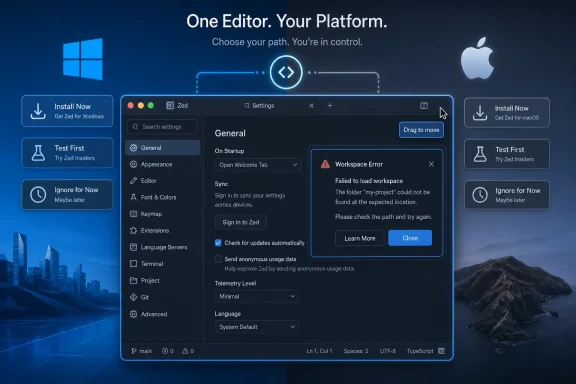 The Sensible Move Is to Patch the Annoyance, Not Chase the Version Number
The safest recommendation is simple: if Zed is already in your daily macOS workflow and either of the two visible UI defects has irritated you, install 1.7.2 during a low-risk window. If you are merely curious about Zed, or if your current editor setup is stable, there is no urgent reason to interrupt your day.That distinction matters for WindowsForum readers because developer-tool updates often get treated as signals bigger than they are. A major Visual Studio Code release can justify a deeper look at new capabilities for Windows developers. A Microsoft Edge Dev build may matter because browser policy, productivity features, and security posture can affect business environments. A Microsoft Access Current Channel update can be worth attention when it lands targeted quality-of-life fixes for designers. Zed 1.7.2 belongs in that same practical coverage tradition, but at the smallest end of the scale: it changes the decision only for users who touch the affected UI.
WindowsForum’s own user-report history is useful here. Readers have repeatedly surfaced tool updates not because every release is dramatic, but because the practical question is always the same: does this build change what a developer, administrator, or power user should do today? In past WindowsForum discussions, VS Code 1.97 was framed around staying current with a fast-moving development environment, Edge Dev 134.0.3124.8 was discussed through productivity and security implications, and Access 2510 drew attention because compact designer fixes can remove daily friction. Zed 1.7.2 should be judged with the same discipline: useful if it removes a real annoyance, easy to defer if it does not.
Do not inflate the release beyond the evidence. The visible release material supports a macOS settings-window drag fix and a workspace error popup close-button layout fix. It does not support claims about a broad public feature list, model strategy, enterprise AI readiness, or a Windows-specific improvement.
Action Buckets: Install Now, Test First, or Ignore
Install now
Install Zed 1.7.2 now if all three of these are true:- You use Zed on macOS.
- You are already comfortable with preview builds.
- You have encountered the settings window drag problem or the workspace error popup close-button overflow issue.
If Zed is your primary editor on a Mac, removing either defect is worth a prompt update.
Test first
Test Zed 1.7.2 first if you manage or influence a mixed Windows/macOS development environment.That includes teams where:
- Mac users run Zed for frontend, mobile, Rust, cross-platform, or general development work.
- Windows users evaluate Zed alongside Visual Studio Code, JetBrains IDEs, Visual Studio, or other editors.
- IT or platform teams provide internal guidance on editor versions.
- Developers are allowed to use preview tools, but support staff still need to know what changed.
This is the WindowsForum-specific angle: mixed teams should not treat Zed 1.7.2 as a Windows update, but they also should not ignore it if Mac developers are part of the same workflow. A Windows-heavy organization can still have Mac build machines, iOS developers, design engineers, or cross-platform maintainers who use Zed. For them, a tiny UI fix may reduce support noise.
Ignore for now
Ignore Zed 1.7.2 for now if you are Windows-only and Zed is working normally.The supplied release facts do not identify a Windows-specific fix. There is no visible reason for Windows-only users to stop work, update immediately, or change editor policy because of this release.
Also ignore it for now if you are evaluating Zed but have not adopted it. Two UI fixes are not enough by themselves to change an editor-selection process. If you are comparing Zed with Visual Studio Code, JetBrains tools, Visual Studio, or other editors, keep evaluating the bigger questions: language support, extension needs, remote development, AI policy, performance, accessibility, team familiarity, and support model. Zed 1.7.2 does not answer those larger questions.
The macOS Focus Is the Whole Story
For WindowsForum readers, the important detail is platform scope. One visible fix is explicitly macOS-related: the settings UI window could not be dragged. The other visible fix concerns a workspace error popup close button overflowing its container, but the supplied facts do not establish it as a Windows-specific problem.That means the Windows-side reading should be conservative.
If you run Zed on Windows and have not seen the popup issue, do nothing urgent. If your organization supports both Windows and macOS developers, ask whether Mac users have encountered either UI defect. If yes, let those users update or validate the preview build. If no, keep watching without turning this into a rollout.
This approach is more useful than generic advice like “stay current” or “wait for the next cycle.” The answer depends on where Zed sits in your actual fleet.
A Mac developer using Zed daily has a different risk-reward equation than a Windows developer who opens it once a week. A platform team packaging developer tools has a different duty than an individual enthusiast. A production environment that avoids preview builds has a different tolerance than a developer who intentionally tracks them.
Why These Small UI Fixes Still Matter
It is tempting to dismiss a settings window drag fix. No application becomes a better compiler because a window moves correctly. No project builds faster because a popup close button stays inside its box.But editors are attention tools. Small interface defects become expensive when they repeat. Developers do not experience them as isolated bugs; they experience them as interruptions that arrive while trying to configure a project, recover from an error, or keep a train of thought intact.
A settings interface is also not peripheral in a modern editor. It is where users manage themes, keybindings, language behavior, formatting, project configuration, accounts, and sometimes AI-related preferences. If the settings surface behaves poorly, the user’s control plane feels unreliable.
The workspace error popup sits in an even more sensitive place. Error UI appears when something has already gone wrong. If the recovery control is awkwardly rendered, the user sees two problems at once: the original workspace issue and a visual defect in the tool that is supposed to help them recover.
That is why the 1.7.2 decision is narrow but not meaningless. It should be boring for most users and immediately useful for a small set of macOS users.
Do Not Turn This Into an AI Strategy Story
The supplied facts do not support broad claims about AI or model strategy. They support two visible UI fixes. That is it.This matters because AI-adjacent developer tools are easy to overread. Any mention of models, assistants, agents, or coding automation can pull a small release into a much larger narrative about the future of software development. That may be appropriate for a release with documented model changes, policy implications, new settings, provider changes, or enterprise controls. It is not appropriate here based on the facts provided.
For administrators, this is especially important. Do not classify Zed 1.7.2 as an AI governance change unless your own upstream channel, internal testing, or vendor documentation gives you concrete AI-related details. Do not brief security teams on assumed model behavior. Do not update policy based on speculation.
For users, the rule is even simpler: install this build because it fixes one of the two visible UI problems, not because you expect a broader AI feature change.
Preview Builds Reward Users Who Know Why They Are There
The preview label matters. A preview release is not automatically unsafe, but it carries a different expectation than a stable channel. Preview users accept earlier fixes and the possibility of earlier regressions. They are also more likely to know how to roll back, report bugs, and isolate whether a problem comes from the editor, a language server, an extension, or a project configuration.If you are already on Zed preview builds, 1.7.2 is the kind of targeted fix you signed up to receive. If you are not on preview, two UI fixes are probably not enough reason to switch channels.
That distinction is important for mixed teams. Individual Mac developers may reasonably want the fix right away. A team standard should move more carefully. If your organization normally avoids preview builds, do not make an exception just because a new version exists. If your organization already permits preview builds for developer tools, let affected Mac users update and document whether the defects are resolved.
WindowsForum’s Practical Lens: Governance Over Fandom
WindowsForum coverage works best when it asks what a release changes for real users. The forum’s history of user reports shows that the community pays attention to many kinds of updates: Visual Studio Code releases for Windows developers, early VS Code beta and extension ecosystem developments, Edge Dev updates with productivity and security angles, Access builds with designer improvements, and even game patches where performance, cheat prevention, content support, or multiplayer fixes change the user experience.The lesson is not that every update deserves excitement. The lesson is that every update deserves classification.
Zed 1.7.2 should be classified as a targeted UI repair for affected macOS users. It is not a Windows event. It is not a security bulletin. It is not a major editor milestone. It is not a reason to reconsider your whole toolchain.
That classification helps three audiences:
- Individual Mac users can install quickly if the defects affect them.
- Mixed Windows/macOS teams can test the patch without overselling it.
- Windows-only users can safely move on.
Practical Guidance for Mixed Windows/macOS Teams
Mixed teams should handle Zed 1.7.2 with a light but structured process.First, identify whether Zed is actually in use on Macs. If only one or two developers use it experimentally, there is no need for a formal rollout. Let those users update if they are affected.
Second, ask whether the settings window drag issue or workspace error popup close-button overflow has been reported. If yes, prioritize testing on macOS. If no, log the release as informational.
Third, keep Windows guidance separate. Do not tell Windows users that this is an important update unless your own testing reveals a local reason. The supplied facts do not justify that.
Fourth, avoid bundling this release into unrelated decisions. If your team is reviewing AI coding tools, editor defaults, extension policy, or developer environment standards, Zed 1.7.2 is not enough evidence to move those discussions. It can be a footnote showing that UI defects are being addressed, but not a deciding factor.
A useful internal note might look like this:
- Zed 1.7.2 preview addresses two visible UI issues.
- One fix is macOS-specific: the settings window could not be dragged.
- The other fixes close-button overflow in a workspace error popup.
- Mac preview users affected by either issue may install.
- Windows users have no visible 1.7.2-specific action.
- No security or AI-policy action is indicated by the supplied facts.
What Not to Do
Do not push Zed 1.7.2 across a Windows-only environment as though it fixes a known Windows defect. The supplied facts do not show that.Do not describe it as a major productivity release. The visible notes are too narrow.
Do not treat it as a security update. No supplied fact supports that classification.
Do not turn it into an AI-model strategy story. The supplied facts support two UI fixes and no broader public-facing feature list.
Do not assume the release date if you cannot verify it from a cited source. The practical recommendation does not depend on the exact date, so the date should not be used as a load-bearing claim here.
Do not tell everyone to follow a vague “normal update cadence.” Use the buckets: install now, test first, or ignore.
The Real Risk Is Misclassification
The main risk with Zed 1.7.2 is not the patch itself. It is putting the patch in the wrong category.Some users treat every update as mandatory because the latest version feels safest. Others ignore point releases because they assume nothing important changes. Both instincts are too broad.
Zed 1.7.2 is targeted workflow repair. That means it can be important to a small group and irrelevant to everyone else.
A macOS user frustrated by a non-draggable settings window should not wait for a bigger release. A Mac preview user who keeps hitting the workspace error popup should install and move on. A Windows user who has seen neither issue should not manufacture urgency.
For administrators, the useful question is not “Is Zed moving fast?” It is “Does this release reduce support friction for users we actually support?” If the answer is yes for Mac developers, test and recommend it to that group. If the answer is no, record the release and wait.
Thin Release Notes Require Narrow Conclusions
The supplied release facts are thin, and thin facts should produce narrow conclusions.That is not a criticism. Many useful patches are small. A release can fix two annoying things and still be worth shipping. But responsible coverage should not fill the empty space with speculation.
If a release page visibly identifies two UI fixes, the upgrade decision should be based on those two fixes unless you have additional trusted information. Phrases like “bug fixes and improvements” are not enough to infer enterprise significance, security impact, AI behavior, or Windows relevance.
This is especially important for developer tools because they sit close to source code, credentials, terminals, extensions, remote environments, and sometimes AI services. When a release materially changes any of those areas, users deserve specifics. When specifics are absent, the correct move is restraint.
Zed 1.7.2 gets a restrained recommendation because the visible facts are restrained.
Frequently Asked Questions
Should Windows users install Zed 1.7.2 immediately?
No, not based on the supplied facts. There is no visible Windows-specific fix identified for this release. If Zed is working normally on Windows, you can ignore this update for now.Who should install Zed 1.7.2 now?
Mac users already running Zed preview builds should install now if they have encountered the settings UI window drag problem or the workspace error popup close-button overflow issue.Should mixed Windows/macOS teams roll it out?
Test first. If your Mac developers use Zed and have reported either UI defect, validate 1.7.2 on a small number of Macs. If the fixes help, recommend it to affected Mac users. Do not push it broadly to Windows users without a separate reason.Is Zed 1.7.2 a security update?
Nothing in the supplied facts supports calling it a security update. Treat it as a targeted UI fix release, not a security bulletin.Is this an AI or model-related update?
Do not treat it that way based on the supplied facts. The visible public facts support two UI fixes and no broader public-facing feature list. Any AI or model-policy conclusions would require separate evidence.Is the settings window drag fix important?
It is important only if you use Zed on macOS and have been affected by it. A settings window that cannot be moved can disrupt real workflows, especially on laptops or multi-monitor setups, but it does not matter to users who never hit the bug.What about the workspace error popup close-button fix?
Install if you have seen the popup layout problem, especially on macOS preview builds. Otherwise, it is not a reason by itself for Windows-only users to update immediately.Should stable-channel users switch to preview for this?
Usually no. If you are not already on preview builds, two UI fixes are not enough reason to change your release-channel risk profile unless one of the defects is actively hurting your work.Does this release change whether a team should standardize on Zed?
No. Zed 1.7.2 is too narrow to drive an editor-standardization decision. Teams comparing editors should focus on language support, extension needs, performance, remote development, accessibility, security posture, AI policy, and developer familiarity.What is the simplest recommendation?
Install now if you are an affected Mac preview user. Test first if you manage mixed Windows/macOS developers. Ignore for now if you are Windows-only and unaffected.Bottom Line
Zed 1.7.2 is a narrow macOS-focused UI fix release. The visible facts support two fixes: the settings UI window drag problem on macOS and a workspace error popup close-button overflow issue. That is enough to justify a prompt install for affected Mac preview users, a small validation pass for mixed teams, and no urgent action for Windows-only users.For WindowsForum readers, the value is in the classification. This is not a major editor moment, not a Windows-specific update, not a security event, and not an AI strategy signal. It is a targeted repair for a limited set of users.
That still matters. Developer tools earn trust by removing friction as well as by adding features. But the right response to a narrow fix is a narrow action: install where it solves a real problem, test where you support mixed fleets, and ignore where it changes nothing.
References
- Primary source: zed.dev

