

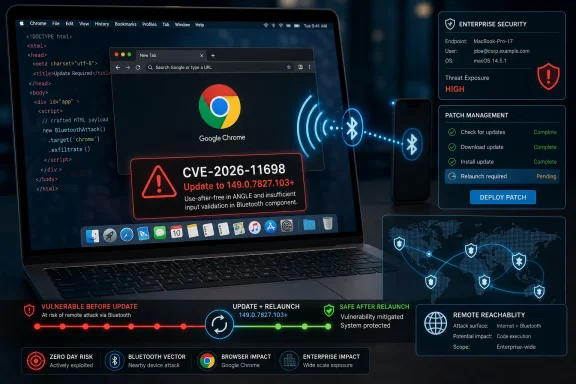
Google Chrome for Mac versions earlier than 149.0.7827.103 are affected by CVE-2026-11698, a high-severity use-after-free flaw in the browser’s Bluetooth component disclosed by Chrome and published in NVD on June 8, 2026. The short version for WindowsForum readers is blunt: this is a Mac-only Chrome bug, it is remotely reachable through a crafted web page, and it belongs in the same mental bucket as the browser memory-safety flaws that routinely turn “just visiting a site” into a security event. The longer version is more interesting, because the vulnerability sits at the intersection of Chrome’s hardware-facing web ambitions, Apple’s desktop ecosystem, and the increasingly mechanical pace of browser patch management. CVE-2026-11698 is not the biggest Chrome story of the month, but it is a useful reminder that the browser is no longer merely an app; it is an operating environment with device access, enterprise policy, and attack surface to match.
The first trap in reading CVE-2026-11698 is to dismiss it because the affected platform is listed as Mac. Windows administrators have spent years learning that Chrome vulnerabilities are cross-platform problems by default, and in most cases that instinct is right. This one is narrower: the NVD configuration ties the vulnerable application to Google Chrome versions before 149.0.7827.103 and to Apple macOS, reflecting the vulnerability description that says “Google Chrome on Mac.”
That does not make it irrelevant to a Windows-heavy environment. Many enterprises are no longer clean monocultures, and the endpoint fleet that looks like “Windows” in Active Directory often includes MacBooks in engineering, design, executive, marketing, and contractor populations. A browser bug that affects Chrome on macOS can still become a corporate risk if the same identity provider, session cookies, SaaS apps, and internal portals are reachable from those Macs.
The other reason WindowsForum readers should care is architectural. Chromium is the upstream foundation for more than Google Chrome, and even when a CVE is reported against Chrome specifically, defenders naturally ask whether the bug sits in shared code, platform glue, or a downstream integration. In this case, the public record points to Chrome on Mac, not a broad Windows Chromium exposure, but the investigation pattern is the same one admins now apply to Edge, Brave, Electron apps, and anything else that vendors a browser engine.
CVE-2026-11698 also shows why the browser patch cycle has become a first-class operational concern. The old desktop model treated browsers as user-space conveniences that could lag behind for a while as long as the operating system was patched. That world is gone. Modern Chrome has Web Bluetooth, GPU acceleration, JIT compilation, media stacks, password storage, sync, profile isolation, enterprise policies, and constant contact with sensitive cloud services.
A use-after-free vulnerability occurs when software continues to use memory after it has been released. In a memory-safe fantasy world, that mistake would simply crash the program. In the world of high-performance C++ browser components, heap corruption can sometimes be shaped into control over program behavior, data disclosure, sandbox escape chains, or code execution primitives when combined with other weaknesses.
The attacker interaction model is also important. The CVSS vector attributed by CISA-ADP uses network attack vector, low attack complexity, no privileges required, and user interaction required. In plain English, the attacker does not need an account on the target machine, but the victim likely has to load or interact with a malicious page.
That is not a comforting requirement. Browser exploitation has always relied on getting users to open pages, click links, follow redirects, preview content, or land on compromised sites. “User interaction required” often sounds like a meaningful barrier in a vulnerability database, but in browser security it can mean the same thing phishing has meant for decades: a human uses the web.
The severity rating of 8.8 reflects that combination. Confidentiality, integrity, and availability are all rated high in the CISA-ADP CVSS 3.1 vector. That does not prove a working exploit exists for CVE-2026-11698, and the public material does not say one is being exploited in the wild. But it does tell administrators that the theoretical blast radius is not merely a tab crash.
That intuition is increasingly outdated. Web platforms have spent years growing APIs that bridge web content to local capabilities: USB, Bluetooth, serial ports, file handles, webcams, microphones, GPUs, and authentication hardware. The security model around these APIs is supposed to include permissions, prompts, origin checks, and platform mediation, but the implementation still lives in complex browser code that can contain memory bugs.
Web Bluetooth in particular is an example of the browser becoming a broker between remote code and nearby devices. The feature is not supposed to let any random page silently rummage through Bluetooth hardware. It is designed around user consent and explicit device selection. But the existence of a browser component that handles Bluetooth state, device objects, permissions, callbacks, and platform-specific macOS behavior creates attack surface.
CVE-2026-11698 does not mean Web Bluetooth is inherently broken, nor does it mean every Bluetooth-enabled Mac is suddenly exploitable from across the internet. The published description is narrower than that. What it does mean is that a browser feature tied to hardware access had a memory lifetime bug serious enough to receive a high Chromium security severity.
That is the broader lesson. When the browser mediates local capabilities, the browser’s bugs become local-capability bugs. A flaw in the machinery around Bluetooth is not automatically a Bluetooth radio attack, but it is part of the expanding seam between web content and the physical machine.
A fleet inventory report that simply says “Chrome 149” is not enough. Chrome’s four-part version number is the operational truth. If a Mac is on 149.0.7827.102, the administrator needs to verify whether that build exists for Mac in the relevant channel and whether it includes the fix; the CVE language points specifically to Mac prior to 149.0.7827.103.
This is where browser patching gets deceptively tedious. Chrome’s auto-update system works well for consumer machines, but enterprise environments complicate the path. Users leave browsers open for weeks. Managed updates can be deferred. Virtual desktop images can freeze stale versions. Security tools can report application versions with delay. Some Mac fleets use MDM enforcement, some rely on Google’s update framework, and some discover during an incident that their browser patch policy was mostly aspirational.
The Chrome “About” page remains the simplest user-facing check, but enterprise assurance needs more than a screenshot. IT teams should confirm version data through MDM, endpoint detection, software inventory, or Chrome Browser Cloud Management where deployed. The difference between “available” and “installed and relaunched” is the difference between a patched package and a patched process.
CVE-2026-11698 is therefore a version-control problem as much as a vulnerability problem. The fixed code is available. The security question is whether every affected Mac actually crossed the version boundary and restarted into the patched browser.
In other words, the macOS CPE is not a missing product dependency so much as a platform qualifier. The vulnerable product remains Google Chrome. The operating system entry indicates that the Chrome vulnerability applies in the macOS context described by the CNA.
Where this gets messy is tooling. Vulnerability scanners and asset managers sometimes interpret CPE logic inconsistently, especially when an application vulnerability is represented with an operating system condition. A scanner that only sees the Chrome CPE may flag Windows devices unnecessarily. A scanner that expects a standalone Mac Chrome CPE might under-report. A scanner that fails to evaluate the AND logic correctly may generate noise or silence.
That ambiguity is not just bureaucratic. Security teams live and die by the quality of asset-to-CVE matching. If a vulnerability is Mac-only, overbroad matching wastes remediation time on Windows machines. If a vulnerability is actually in cross-platform Chromium code but the public record initially describes one platform, overly narrow matching can miss exposure.
For CVE-2026-11698, the conservative operational stance is straightforward: treat Chrome on macOS before 149.0.7827.103 as vulnerable, validate whether any Chromium-based derivative has issued its own advisory, and do not assume Windows Chrome is affected unless vendor data says so. That is a more useful posture than arguing with a CPE entry in the abstract.
This limited visibility creates a familiar tension. Defenders want enough technical detail to assess exploitability, detection opportunities, and compensating controls. Vendors want to avoid handing exploit developers a roadmap while a large installed base remains unpatched. The result is a public CVE that says just enough to justify urgent patching and not enough to satisfy incident responders.
For administrators, the lesson is to avoid overfitting around absent detail. If the public record does not mention active exploitation, that is not evidence that exploitation is impossible. If the record says “potentially exploit heap corruption,” that is not a guarantee of reliable remote code execution. Browser advisories are often intentionally minimal, and the safe operational response is built around affected versions, not around imagined exploit chains.
There is also a communications lesson here. Security teams should resist the urge to explain every Chrome CVE to users in dramatic detail. The practical user message is simpler: Chrome on Mac must be updated and relaunched. The technical justification can stay inside the admin channel, where the distinction between heap corruption, sandboxing, and user interaction actually matters.
A restricted bug tracker entry is not a scandal. It is part of the choreography of modern browser security. The vendor ships, the CVE lands, the public database enriches, scanners update, enterprises chase restarts, and technical details may arrive later if they arrive at all.
CVE-2026-11698 does not need to be a zero-day to deserve attention. Enterprise patching cannot work as a celebrity-driven process where only the exploited bug gets fixed and the rest become trivia. Browser releases are bundles of risk reduction, and the right update for the exploited V8 issue is also the right update for the Mac Bluetooth use-after-free.
This is one of the quiet advantages of modern browser servicing. Users and admins do not usually pick individual browser CVE fixes. They install a channel update. That means a noisy zero-day can pull along fixes for less publicized bugs, raising the security floor across the entire browser.
The downside is that risk communication becomes compressed. A single Chrome release might contain dozens of security fixes with different components, severities, affected platforms, and exploitability. Advisory readers skim for “exploited in the wild,” but vulnerability management systems ingest everything. Somewhere between those two worlds, CVE-2026-11698 becomes either an urgent Mac patch item or another row in a dashboard.
That row deserves enough human interpretation to avoid both panic and neglect. It is high severity. It is remote through web content. It is Mac-specific in the public description. It is fixed by updating to the relevant Chrome build. That is the actionable core.
Chrome’s update model downloads new versions in the background, but the running browser process remains the security boundary until restart. That makes browser uptime an underrated vulnerability metric. A Mac can have the fixed update staged and still be running the old vulnerable code if the user has not relaunched.
Admins should pay attention to relaunch enforcement policies. Chrome enterprise policy can notify users, set relaunch windows, and eventually force restarts after updates. MDM tools can help inventory versions and push managed packages, but they still have to contend with user sessions, open tabs, and the politics of interrupting work.
For high-risk users, the tolerance should be lower. Executives, developers with production access, administrators, finance teams, and users with privileged SaaS access should not sit on vulnerable browser builds while the organization waits for a weekly maintenance rhythm. Browser vulnerabilities are often initial-access candidates precisely because they meet users where they already work.
Home users have the simpler version of the same job. Open Chrome’s update page, let it install the latest version, and relaunch. On macOS, users who keep Chrome open for long stretches should develop the habit of checking the update indicator rather than assuming the browser has silently made them safe.
But the incident should still prompt a Windows-side habit check. Microsoft Edge, Google Chrome, and other Chromium-based browsers update frequently because the threat model demands it. If an organization’s patch process treats Windows cumulative updates as mandatory but browser updates as optional, it is misreading where daily exposure lives.
Edge adds another wrinkle. Microsoft ships Edge on a Chromium base but maintains its own release cadence and advisories. A Chrome CVE does not automatically mean Edge is vulnerable in the same way, at the same time, or on the same platform. The right question for Edge administrators is not “does this Chrome version number apply?” but “has Microsoft issued a corresponding Edge update or advisory for the affected Chromium code?”
That distinction is especially important for platform-specific bugs. A flaw in macOS Bluetooth integration in Chrome may not map cleanly to Edge on Windows. A flaw in V8, Skia, WebRTC, or a shared media parser is more likely to travel across Chromium descendants. Security teams need to preserve that nuance while still moving quickly.
The mature stance is boring but effective: track each browser as its own managed application, subscribe to vendor advisories, inventory exact versions, and enforce relaunches. Windows administrators already know how to do this for operating system patches. The browser simply demands the same discipline at a faster tempo.
The industry knows this. Google, Microsoft, Mozilla, Apple, and the wider systems programming community have spent years moving pieces of the stack toward safer languages, stronger tooling, fuzzing, and runtime mitigations. The results matter. Many vulnerabilities that would once have been straightforward exploitation paths now require complicated chains or fail entirely because of defense-in-depth.
But the browser remains a massive performance-sensitive codebase that still contains C and C++. It interfaces with operating-system APIs, graphics drivers, device stacks, and media components. It has to parse hostile inputs at scale while preserving compatibility with a web that never stops moving. That is not an excuse for memory bugs, but it explains why they persist.
The Bluetooth angle sharpens the point. Device-facing APIs add complexity at the exact boundary where platform-specific code often lives. macOS implementation details, permission state, object lifetimes, asynchronous callbacks, and user prompts can create precisely the conditions in which lifetime bugs appear.
Long term, memory safety will improve through a combination of safer languages, compartmentalization, fuzzing, and narrower API exposure. Short term, it improves when users and administrators update quickly. CVE-2026-11698 lives in the uncomfortable gap between those two timelines.
This invisibility produces bad assumptions. Users assume Chrome updates itself. IT assumes users restart eventually. Security assumes asset inventory is current. Management assumes browser risk is somehow covered by operating system patch compliance. Each assumption is individually understandable and collectively fragile.
CVE-2026-11698 is a useful stress test for those assumptions because it is specific. Can the organization identify Chrome on macOS? Can it distinguish versions before and after 149.0.7827.103? Can it see whether users have relaunched? Can it explain why Windows devices are not the primary target for this CVE without ignoring Chromium risk more broadly?
If the answer to those questions is no, the real problem is not one Bluetooth use-after-free. The real problem is that browser management has not caught up with browser importance. A vulnerability like this merely exposes the gap.
This is especially true in hybrid organizations. The Mac population may be smaller, but it is often more exception-heavy: senior staff, developers, creative teams, and contractors. Exception-heavy populations are where neat Windows-centric patch reports go to die.
The assurance work is where professional IT earns its keep.
 A Mac-Only Chrome Bug Still Matters in a Windows Shop
The first trap in reading CVE-2026-11698 is to dismiss it because the affected platform is listed as Mac. Windows administrators have spent years learning that Chrome vulnerabilities are cross-platform problems by default, and in most cases that instinct is right. This one is narrower: the NVD configuration ties the vulnerable application to Google Chrome versions before 149.0.7827.103 and to Apple macOS, reflecting the vulnerability description that says “Google Chrome on Mac.”That does not make it irrelevant to a Windows-heavy environment. Many enterprises are no longer clean monocultures, and the endpoint fleet that looks like “Windows” in Active Directory often includes MacBooks in engineering, design, executive, marketing, and contractor populations. A browser bug that affects Chrome on macOS can still become a corporate risk if the same identity provider, session cookies, SaaS apps, and internal portals are reachable from those Macs.
The other reason WindowsForum readers should care is architectural. Chromium is the upstream foundation for more than Google Chrome, and even when a CVE is reported against Chrome specifically, defenders naturally ask whether the bug sits in shared code, platform glue, or a downstream integration. In this case, the public record points to Chrome on Mac, not a broad Windows Chromium exposure, but the investigation pattern is the same one admins now apply to Edge, Brave, Electron apps, and anything else that vendors a browser engine.
CVE-2026-11698 also shows why the browser patch cycle has become a first-class operational concern. The old desktop model treated browsers as user-space conveniences that could lag behind for a while as long as the operating system was patched. That world is gone. Modern Chrome has Web Bluetooth, GPU acceleration, JIT compilation, media stacks, password storage, sync, profile isolation, enterprise policies, and constant contact with sensitive cloud services.
The Vulnerability Is Small on Paper and Large in Consequence
The public description is terse: a use-after-free in Bluetooth in Google Chrome on Mac before 149.0.7827.103 allowed a remote attacker to potentially exploit heap corruption via a crafted HTML page. That phrasing is familiar enough that it risks becoming background noise. It should not.A use-after-free vulnerability occurs when software continues to use memory after it has been released. In a memory-safe fantasy world, that mistake would simply crash the program. In the world of high-performance C++ browser components, heap corruption can sometimes be shaped into control over program behavior, data disclosure, sandbox escape chains, or code execution primitives when combined with other weaknesses.
The attacker interaction model is also important. The CVSS vector attributed by CISA-ADP uses network attack vector, low attack complexity, no privileges required, and user interaction required. In plain English, the attacker does not need an account on the target machine, but the victim likely has to load or interact with a malicious page.
That is not a comforting requirement. Browser exploitation has always relied on getting users to open pages, click links, follow redirects, preview content, or land on compromised sites. “User interaction required” often sounds like a meaningful barrier in a vulnerability database, but in browser security it can mean the same thing phishing has meant for decades: a human uses the web.
The severity rating of 8.8 reflects that combination. Confidentiality, integrity, and availability are all rated high in the CISA-ADP CVSS 3.1 vector. That does not prove a working exploit exists for CVE-2026-11698, and the public material does not say one is being exploited in the wild. But it does tell administrators that the theoretical blast radius is not merely a tab crash.
Bluetooth Is No Longer a Peripheral Detail
The Bluetooth label is what makes this CVE stand out. Many browser flaws live in JavaScript engines, rendering pipelines, image decoders, or media handling. Those areas are expected to be dangerous because they parse hostile input from the open internet all day long. Bluetooth feels like a local hardware feature, something associated with headphones, mice, smart badges, and peripherals rather than crafted HTML.That intuition is increasingly outdated. Web platforms have spent years growing APIs that bridge web content to local capabilities: USB, Bluetooth, serial ports, file handles, webcams, microphones, GPUs, and authentication hardware. The security model around these APIs is supposed to include permissions, prompts, origin checks, and platform mediation, but the implementation still lives in complex browser code that can contain memory bugs.
Web Bluetooth in particular is an example of the browser becoming a broker between remote code and nearby devices. The feature is not supposed to let any random page silently rummage through Bluetooth hardware. It is designed around user consent and explicit device selection. But the existence of a browser component that handles Bluetooth state, device objects, permissions, callbacks, and platform-specific macOS behavior creates attack surface.
CVE-2026-11698 does not mean Web Bluetooth is inherently broken, nor does it mean every Bluetooth-enabled Mac is suddenly exploitable from across the internet. The published description is narrower than that. What it does mean is that a browser feature tied to hardware access had a memory lifetime bug serious enough to receive a high Chromium security severity.
That is the broader lesson. When the browser mediates local capabilities, the browser’s bugs become local-capability bugs. A flaw in the machinery around Bluetooth is not automatically a Bluetooth radio attack, but it is part of the expanding seam between web content and the physical machine.
Google’s Version Number Tells the Patch Story
The fixed Chrome version called out for Mac is 149.0.7827.103. The related desktop release also shipped versions 149.0.7827.102 or 149.0.7827.103 depending on platform, with Windows and Linux on the .102 build and Mac on .103. That split is normal in Chrome’s release machinery, but it matters when administrators are validating compliance.A fleet inventory report that simply says “Chrome 149” is not enough. Chrome’s four-part version number is the operational truth. If a Mac is on 149.0.7827.102, the administrator needs to verify whether that build exists for Mac in the relevant channel and whether it includes the fix; the CVE language points specifically to Mac prior to 149.0.7827.103.
This is where browser patching gets deceptively tedious. Chrome’s auto-update system works well for consumer machines, but enterprise environments complicate the path. Users leave browsers open for weeks. Managed updates can be deferred. Virtual desktop images can freeze stale versions. Security tools can report application versions with delay. Some Mac fleets use MDM enforcement, some rely on Google’s update framework, and some discover during an incident that their browser patch policy was mostly aspirational.
The Chrome “About” page remains the simplest user-facing check, but enterprise assurance needs more than a screenshot. IT teams should confirm version data through MDM, endpoint detection, software inventory, or Chrome Browser Cloud Management where deployed. The difference between “available” and “installed and relaunched” is the difference between a patched package and a patched process.
CVE-2026-11698 is therefore a version-control problem as much as a vulnerability problem. The fixed code is available. The security question is whether every affected Mac actually crossed the version boundary and restarted into the patched browser.
The CPE Record Is Awkward, but Not Meaningless
The user-submitted NVD text asks whether a CPE is missing, and that is a fair reading of the record. The NVD configuration shown in the change history describes an AND relationship with Google Chrome versions up to but excluding 149.0.7827.103 and Apple macOS. That is how NVD often models a platform-specific application vulnerability: the vulnerable software is Chrome, and the operating system condition narrows the affected environment.In other words, the macOS CPE is not a missing product dependency so much as a platform qualifier. The vulnerable product remains Google Chrome. The operating system entry indicates that the Chrome vulnerability applies in the macOS context described by the CNA.
Where this gets messy is tooling. Vulnerability scanners and asset managers sometimes interpret CPE logic inconsistently, especially when an application vulnerability is represented with an operating system condition. A scanner that only sees the Chrome CPE may flag Windows devices unnecessarily. A scanner that expects a standalone Mac Chrome CPE might under-report. A scanner that fails to evaluate the AND logic correctly may generate noise or silence.
That ambiguity is not just bureaucratic. Security teams live and die by the quality of asset-to-CVE matching. If a vulnerability is Mac-only, overbroad matching wastes remediation time on Windows machines. If a vulnerability is actually in cross-platform Chromium code but the public record initially describes one platform, overly narrow matching can miss exposure.
For CVE-2026-11698, the conservative operational stance is straightforward: treat Chrome on macOS before 149.0.7827.103 as vulnerable, validate whether any Chromium-based derivative has issued its own advisory, and do not assume Windows Chrome is affected unless vendor data says so. That is a more useful posture than arguing with a CPE entry in the abstract.
The “Permissions Required” Reference Is a Security Signal
One of the references attached to the CVE points to a Chromium issue tracker entry marked as requiring permissions. That is normal for Chrome security bugs. Google often restricts bug details until enough users have updated, and it may continue restrictions when the bug affects shared third-party code or when disclosure would help attackers.This limited visibility creates a familiar tension. Defenders want enough technical detail to assess exploitability, detection opportunities, and compensating controls. Vendors want to avoid handing exploit developers a roadmap while a large installed base remains unpatched. The result is a public CVE that says just enough to justify urgent patching and not enough to satisfy incident responders.
For administrators, the lesson is to avoid overfitting around absent detail. If the public record does not mention active exploitation, that is not evidence that exploitation is impossible. If the record says “potentially exploit heap corruption,” that is not a guarantee of reliable remote code execution. Browser advisories are often intentionally minimal, and the safe operational response is built around affected versions, not around imagined exploit chains.
There is also a communications lesson here. Security teams should resist the urge to explain every Chrome CVE to users in dramatic detail. The practical user message is simpler: Chrome on Mac must be updated and relaunched. The technical justification can stay inside the admin channel, where the distinction between heap corruption, sandboxing, and user interaction actually matters.
A restricted bug tracker entry is not a scandal. It is part of the choreography of modern browser security. The vendor ships, the CVE lands, the public database enriches, scanners update, enterprises chase restarts, and technical details may arrive later if they arrive at all.
CVE-2026-11698 Lands in the Shadow of a Louder Chrome Fix
The timing makes this vulnerability easy to miss. The same Chrome desktop update cycle also included attention around CVE-2026-11645, a V8 issue that Google reportedly acknowledged as having an exploit in the wild. That kind of zero-day language naturally dominates headlines, because active exploitation changes the urgency calculus.CVE-2026-11698 does not need to be a zero-day to deserve attention. Enterprise patching cannot work as a celebrity-driven process where only the exploited bug gets fixed and the rest become trivia. Browser releases are bundles of risk reduction, and the right update for the exploited V8 issue is also the right update for the Mac Bluetooth use-after-free.
This is one of the quiet advantages of modern browser servicing. Users and admins do not usually pick individual browser CVE fixes. They install a channel update. That means a noisy zero-day can pull along fixes for less publicized bugs, raising the security floor across the entire browser.
The downside is that risk communication becomes compressed. A single Chrome release might contain dozens of security fixes with different components, severities, affected platforms, and exploitability. Advisory readers skim for “exploited in the wild,” but vulnerability management systems ingest everything. Somewhere between those two worlds, CVE-2026-11698 becomes either an urgent Mac patch item or another row in a dashboard.
That row deserves enough human interpretation to avoid both panic and neglect. It is high severity. It is remote through web content. It is Mac-specific in the public description. It is fixed by updating to the relevant Chrome build. That is the actionable core.
Enterprise Remediation Is Mostly About Restarts
For managed environments, the remediation path is unglamorous. Update Chrome on macOS to 149.0.7827.103 or later, confirm the browser has relaunched into that version, and verify that vulnerable versions are no longer present. The hard part is not knowing what to do; it is getting a distributed user population to actually close the browser.Chrome’s update model downloads new versions in the background, but the running browser process remains the security boundary until restart. That makes browser uptime an underrated vulnerability metric. A Mac can have the fixed update staged and still be running the old vulnerable code if the user has not relaunched.
Admins should pay attention to relaunch enforcement policies. Chrome enterprise policy can notify users, set relaunch windows, and eventually force restarts after updates. MDM tools can help inventory versions and push managed packages, but they still have to contend with user sessions, open tabs, and the politics of interrupting work.
For high-risk users, the tolerance should be lower. Executives, developers with production access, administrators, finance teams, and users with privileged SaaS access should not sit on vulnerable browser builds while the organization waits for a weekly maintenance rhythm. Browser vulnerabilities are often initial-access candidates precisely because they meet users where they already work.
Home users have the simpler version of the same job. Open Chrome’s update page, let it install the latest version, and relaunch. On macOS, users who keep Chrome open for long stretches should develop the habit of checking the update indicator rather than assuming the browser has silently made them safe.
Windows Users Should Audit the Chromium Habit, Not This Mac Bug
For Windows users, CVE-2026-11698 is not a direct panic item based on the public vulnerability description. The record says Chrome on Mac. That specificity matters, and WindowsForum should not turn every Chrome CVE into a universal Windows warning when the data does not support it.But the incident should still prompt a Windows-side habit check. Microsoft Edge, Google Chrome, and other Chromium-based browsers update frequently because the threat model demands it. If an organization’s patch process treats Windows cumulative updates as mandatory but browser updates as optional, it is misreading where daily exposure lives.
Edge adds another wrinkle. Microsoft ships Edge on a Chromium base but maintains its own release cadence and advisories. A Chrome CVE does not automatically mean Edge is vulnerable in the same way, at the same time, or on the same platform. The right question for Edge administrators is not “does this Chrome version number apply?” but “has Microsoft issued a corresponding Edge update or advisory for the affected Chromium code?”
That distinction is especially important for platform-specific bugs. A flaw in macOS Bluetooth integration in Chrome may not map cleanly to Edge on Windows. A flaw in V8, Skia, WebRTC, or a shared media parser is more likely to travel across Chromium descendants. Security teams need to preserve that nuance while still moving quickly.
The mature stance is boring but effective: track each browser as its own managed application, subscribe to vendor advisories, inventory exact versions, and enforce relaunches. Windows administrators already know how to do this for operating system patches. The browser simply demands the same discipline at a faster tempo.
Memory Safety Is Still the Browser’s Unpaid Debt
CVE-2026-11698 is another entry in the long ledger of memory-safety problems. Use-after-free, out-of-bounds access, type confusion, and related bug classes have powered browser exploitation for years. Sandboxing, site isolation, control-flow protections, heap hardening, and exploit mitigations have made attacks harder, but they have not eliminated the underlying defect pattern.The industry knows this. Google, Microsoft, Mozilla, Apple, and the wider systems programming community have spent years moving pieces of the stack toward safer languages, stronger tooling, fuzzing, and runtime mitigations. The results matter. Many vulnerabilities that would once have been straightforward exploitation paths now require complicated chains or fail entirely because of defense-in-depth.
But the browser remains a massive performance-sensitive codebase that still contains C and C++. It interfaces with operating-system APIs, graphics drivers, device stacks, and media components. It has to parse hostile inputs at scale while preserving compatibility with a web that never stops moving. That is not an excuse for memory bugs, but it explains why they persist.
The Bluetooth angle sharpens the point. Device-facing APIs add complexity at the exact boundary where platform-specific code often lives. macOS implementation details, permission state, object lifetimes, asynchronous callbacks, and user prompts can create precisely the conditions in which lifetime bugs appear.
Long term, memory safety will improve through a combination of safer languages, compartmentalization, fuzzing, and narrower API exposure. Short term, it improves when users and administrators update quickly. CVE-2026-11698 lives in the uncomfortable gap between those two timelines.
The Real Risk Is the Browser Becoming Invisible Infrastructure
The most dangerous browser is not the one with the most CVEs. It is the one nobody thinks they manage. Chrome’s consumer friendliness can hide the fact that in enterprise it is critical infrastructure: an identity surface, a SaaS runtime, a device-access broker, a password-adjacent application, and often the most exposed program on the endpoint.This invisibility produces bad assumptions. Users assume Chrome updates itself. IT assumes users restart eventually. Security assumes asset inventory is current. Management assumes browser risk is somehow covered by operating system patch compliance. Each assumption is individually understandable and collectively fragile.
CVE-2026-11698 is a useful stress test for those assumptions because it is specific. Can the organization identify Chrome on macOS? Can it distinguish versions before and after 149.0.7827.103? Can it see whether users have relaunched? Can it explain why Windows devices are not the primary target for this CVE without ignoring Chromium risk more broadly?
If the answer to those questions is no, the real problem is not one Bluetooth use-after-free. The real problem is that browser management has not caught up with browser importance. A vulnerability like this merely exposes the gap.
This is especially true in hybrid organizations. The Mac population may be smaller, but it is often more exception-heavy: senior staff, developers, creative teams, and contractors. Exception-heavy populations are where neat Windows-centric patch reports go to die.
The Patch Is Simple; the Assurance Is the Work
The concrete response to CVE-2026-11698 is mercifully uncomplicated. The exposed population is Chrome on macOS before 149.0.7827.103. The attack path described publicly is a crafted HTML page. The weakness class is CWE-416, use-after-free. The fix is to move to the patched Chrome build and restart the browser.The assurance work is where professional IT earns its keep.
- Organizations should inventory Chrome on macOS and verify that every installation is on 149.0.7827.103 or later.
- Administrators should confirm that updated browsers have relaunched, because a downloaded update does not protect a still-running old process.
- Vulnerability teams should tune scanner interpretation so the Mac-specific CPE logic does not create unnecessary Windows noise or hide affected Macs.
- Edge and other Chromium-based browsers should be tracked through their own vendor advisories rather than assumed vulnerable or assumed safe.
- High-risk users with privileged access should be prioritized for rapid browser update enforcement rather than left to ordinary maintenance windows.
- The incident should be used to test whether browser patch compliance is measured with the same seriousness as operating system patch compliance.
References
- Primary source: NVD / Chromium
Published: 2026-06-15T19:15:05-07:00
NVD - CVE-2026-11698
 nvd.nist.gov
- Security advisory: MSRC
Published: 2026-06-15T19:15:05-07:00
Original feed URL
Security Update Guide - Microsoft Security Response Center
 msrc.microsoft.com
- Related coverage: vulnerability.circl.lu
Vulnerability-Lookup
Vulnerability-Lookup - Fast vulnerability lookup correlation from different sources.vulnerability.circl.lu
