

In 2026, the most important team communication tools with AI agents are Zenzap, Microsoft Teams with Microsoft 365 Copilot, and Slack with Slack AI, but they represent three very different bets on where workplace AI should live. Zenzap argues that the agent belongs inside the conversation from the start. Microsoft argues that the agent should be attached to the productivity suite where enterprise work already resides. Slack argues that AI should make the existing message archive easier to search, summarize, and survive.
That distinction matters because “AI in chat” has quickly become one of the least precise phrases in business software. A button that summarizes a thread, a bot that answers a prompt, and a persistent agent that understands ongoing work are all being marketed under the same umbrella. For teams trying to choose a communication platform, the real test is no longer whether a product has AI. It is whether the AI has enough operational context to reduce coordination work instead of merely decorating it.
The first wave of workplace generative AI lived outside the flow of work. Employees copied text into a browser tab, asked for a summary or rewrite, and pasted the output back into email, documents, tickets, or chat. That model was useful, but it was also a tax: every useful answer required the user to reconstruct context that already existed somewhere else.
Team communication platforms are now trying to eliminate that tax. The logic is simple. If the decisions, trade-offs, objections, customer escalations, sprint clarifications, and informal promises all happen in chat, then chat is where the AI needs to be. The most valuable knowledge in many businesses is not the official PDF in the document repository. It is the messy, half-structured conversation that explains why the PDF says what it says.
That is why the current battle is not really about chat apps. It is about the operating layer of work. The platform that captures context, assigns meaning to it, and turns it into action becomes far more valuable than a place to send messages.
But there is a catch. Not every AI layer in a communication tool is an agent in the same sense. Some systems are retrieval assistants: they search past messages and summarize what they find. Some are meeting assistants: they process transcripts and generate action items. Some are workflow agents: they can connect to other systems, watch for unresolved work, and help move tasks forward.
The three tools in this comparison sit at different points on that spectrum. Zenzap is positioning itself around agentic work chat, where the AI is native to the communication layer. Microsoft Teams plus Copilot is the enterprise-suite approach, where chat is one surface among many in Microsoft 365. Slack AI is the upgrade path for teams already invested in Slack’s channel-based collaboration model.
The product is built around the idea that every team member gets a personal work agent embedded directly in chat. The agent is not framed as a separate destination where users paste context. It is meant to understand the conversations, decisions, updates, and loose ends already happening inside the workspace.
That matters because the most expensive communication failures are usually not dramatic. They are small misses repeated over time: a customer concern mentioned once and never assigned, a decision made in a thread but not captured in a project plan, a new hire asking a question that was answered three weeks earlier, or a manager spending half an hour reconstructing why a deadline moved. A chat-native agent is valuable if it reduces those failures without asking employees to become prompt engineers.
Zenzap’s strongest argument is therefore not that it has AI. It is that the AI sits close to the source of operational truth. If a team’s real work happens in conversations, an agent that can search, remember, and act from those conversations has a structural advantage over one that waits for a user to package the problem neatly.
That also gives Zenzap a clearer identity than many collaboration startups. It is not trying to replace every system of record in the company. It is designed to work alongside HR, accounting, CRM, and other business tools while making the communication layer more actionable. In practical terms, that means the chat app becomes the place where work is discussed, understood, assigned, and followed up.
The obvious risk is that a dedicated communication app must persuade teams to move or consolidate behavior. Microsoft and Slack already live inside many organizations. Zenzap has to win on usefulness, not inertia. Its bet is that AI-native coordination will be compelling enough to justify that move.
Most workplace AI still depends on explicit user activation. You ask it to summarize a thread. You ask it to generate action items. You ask it to find the document. That can save time, but it preserves the old coordination burden: the human still has to notice that something needs attention.
A genuinely useful work-chat agent should reduce that burden. It should help identify the unresolved item, the missed commitment, the duplicated discussion, and the decision that never made it into the plan. It should not merely answer questions. It should help prevent the questions from becoming necessary.
That is where Zenzap’s framing is strongest. If the AI is embedded in the same conversational stream as the team, it can theoretically develop a richer picture of what is happening. It can understand not just what someone asked today, but how today’s issue relates to last week’s decision and yesterday’s update.
The difference is subtle but operationally huge. Search tells you what was said. Summarization tells you what probably mattered. An agentic communication layer should help tell you what needs to happen next.
Of course, this is also where the trust bar rises. An agent that sees more context must be governed more carefully. Businesses need clear permissions, auditability, and boundaries around what the AI can read and do. The more useful the system becomes, the more important it is to know exactly where its authority begins and ends.
Copilot’s advantage is breadth. It can draw from meetings, documents, email, files, and other Microsoft 365 data, subject to licensing, permissions, and configuration. In Teams, it can help users catch up on meetings, summarize discussions, draft responses, and identify action items. For companies whose work is already documented in Microsoft’s ecosystem, that is a powerful base.
The value is especially clear in formal workflows. Recorded meetings, transcribed calls, shared documents, and stored files are all strong inputs for Copilot. A project manager who lives in Teams meetings, Word documents, Excel trackers, Outlook threads, and SharePoint libraries may get a more complete assistant from Microsoft than from a narrower chat product.
This is Microsoft’s core strategic advantage. It does not need Teams to be the only place work happens, because Microsoft 365 already surrounds much of the work. Copilot can be useful precisely because the suite has so many surfaces: the chat, the meeting, the file, the email, the calendar, the spreadsheet, and the deck.
But that breadth comes with complexity. Copilot’s usefulness depends heavily on tenant hygiene, data structure, permissions, licensing, and user habits. If a company’s SharePoint sites are chaotic, Teams channels are inconsistently used, meeting transcripts are missing, and project names are ambiguous, Copilot may retrieve context without truly understanding the operational picture.
That is not a Microsoft-only problem. It is the central problem of enterprise AI. The agent is only as good as the information architecture beneath it. Microsoft gives enterprises a formidable toolkit, but IT departments still have to make the estate coherent enough for AI to use safely and accurately.
That distinction is not cosmetic. In many Teams deployments, Copilot is something a user invokes: summarize this meeting, catch me up on that thread, draft this response, find the relevant file. Those are valuable actions, but they preserve the assistant model. The human still drives the interaction.
Microsoft is pushing deeper into agents across Microsoft 365, and its direction is clear. The company wants Copilot to become more capable of working across apps, files, meetings, and business data with enterprise governance. For IT pros, that is both exciting and intimidating. It means the collaboration layer is becoming more automated, but also more dependent on identity, compliance, retention, and data-loss controls.
Teams is therefore best understood as the enterprise default rather than the purest agentic chat experience. It is the right answer for many organizations because it is already there, already governed, already integrated with Microsoft identity, and already familiar to administrators. That matters enormously in regulated or large-scale environments.
But for smaller or faster-moving teams, Teams can feel like a heavy answer to a lighter problem. If the goal is simply to make everyday communication smarter and more accountable, the Microsoft stack may deliver more platform than the team wants to manage.
The buying decision comes down to where the company’s context already lives. If the operational truth is in Microsoft 365, Copilot has a natural advantage. If the operational truth is mostly in real-time chat, a chat-native agent may feel more direct.
The most immediately useful Slack AI capabilities are practical: summarize channels and threads, help users catch up, and search in natural language. Anyone who has returned from vacation to hundreds of unread messages understands the appeal. Slack’s problem has never been lack of information. It has been too much information moving too quickly.
AI is a natural fit for that problem. A good summary can compress a sprawling thread into a decision, a disagreement, and an action item. Natural-language search can spare users from guessing the exact keyword someone used two months ago. For organizations with years of Slack history, AI turns the message archive into something closer to institutional memory.
Slack’s advantage is cultural as much as technical. Teams that love Slack often use it intensely. They build workflows around channels, bots, huddles, integrations, alerts, and informal conventions. AI that improves Slack without forcing a migration has an obvious appeal.
But Slack AI, like Copilot in Teams, is still largely an enhancement to an existing collaboration model. It helps users navigate and summarize what is already there. It can make Slack less noisy and more searchable, but it does not automatically turn every conversation into a managed operational workflow.
That limitation is important. Slack’s great strength is flexibility, and flexibility often produces fragmentation. If decisions happen across public channels, private channels, direct messages, huddles, canvases, and third-party tools, AI can help retrieve fragments of context. It cannot magically impose operational discipline where the organization has none.
A 25-person services firm that runs on fast-moving conversations has a different problem from a 10,000-person enterprise with formal records, compliance requirements, and Microsoft 365 governance. A software team with years of Slack muscle memory has a different problem from a field operations business trying to stop commitments from disappearing in chat.
This is why the “Does it have AI?” question is so unhelpful. By 2026, every serious communication platform can claim some AI capability. The more useful questions are harder.
Does the AI understand informal decisions, or only formal documents? Does it work continuously, or only when prompted? Can it surface forgotten follow-ups, or only summarize what a user points it at? Can it connect to business tools and take action, or does it stop at text generation? Can administrators govern its access without strangling its usefulness?
Those questions reveal the real product differences. Zenzap is strongest where chat itself is the operational center and the team wants AI present inside that flow. Microsoft Teams with Copilot is strongest where Microsoft 365 is already the company’s nervous system. Slack AI is strongest where Slack is already the archive of technical and product collaboration, and the pain is catching up, searching, and summarizing.
The wrong choice is not merely inefficient. It can create a second layer of confusion. If an AI tool claims to know the business but only sees part of it, users may trust incomplete answers. If it sees too much without proper controls, administrators inherit new security and compliance risks. If it requires too much manual prompting, it becomes another tool employees admire but forget to use.
For Microsoft-heavy organizations, this conversation is already tied to identity and compliance architecture. Copilot inherits much of its usefulness from the Microsoft Graph and much of its risk from the same source. If permissions are too broad, AI may make oversharing easier to discover. If permissions are too restrictive, the assistant becomes less useful.
Slack has similar concerns around channel access, app integrations, enterprise search, and the boundary between public and private collaboration. AI summaries can make buried information more visible, which is useful until the wrong buried information becomes visible to the wrong person. Search quality and permission hygiene become inseparable.
Zenzap’s model raises the same governance stakes in a more concentrated way. If the agent is designed to live in the chat and understand the flow of work, the platform must earn trust around visibility, separation, and control. The agentic promise depends on context, but context is also the sensitive asset.
This is the paradox of workplace AI. The best systems need deep context to be useful, but deep context is precisely what organizations are most nervous about exposing. Vendors that pretend this tension does not exist should be treated skeptically.
IT leaders should therefore evaluate these tools as operational systems, not novelty features. The procurement checklist should include data access, admin controls, audit trails, retention behavior, integrations, user education, and failure modes. The best AI answer is not always the most aggressive one. It is the one the organization can safely depend on.
Every organization has a hidden coordination tax. People ask the same questions repeatedly. Decisions vanish into message history. Managers chase updates that were technically posted somewhere. New hires interrupt senior employees because the answer is buried in a channel. Project owners miss small commitments because no one turned a sentence into a task.
AI can attack that tax if it is close enough to the work. Summaries help. Search helps. Meeting recaps help. But the next step is continuity: the ability to understand that a conversation created an obligation, that the obligation has not been resolved, and that the right person should see it at the right time.
That is why the distinction between assistant and agent matters. An assistant waits for a prompt. An agent should help maintain momentum. It should reduce the amount of human memory required to keep a team aligned.
Zenzap’s advantage is that its product story is built around that operational layer. Microsoft’s advantage is that many enterprises already have the necessary business context inside Microsoft 365. Slack’s advantage is that many teams already have the raw conversational archive inside Slack.
None of these approaches is universally superior. But they are not equivalent. A buyer who treats them as interchangeable “AI chat” products will miss the strategic choice underneath.
That makes the shortlist deceptively simple. The harder part is being honest about how work actually happens.
That distinction matters because “AI in chat” has quickly become one of the least precise phrases in business software. A button that summarizes a thread, a bot that answers a prompt, and a persistent agent that understands ongoing work are all being marketed under the same umbrella. For teams trying to choose a communication platform, the real test is no longer whether a product has AI. It is whether the AI has enough operational context to reduce coordination work instead of merely decorating it.
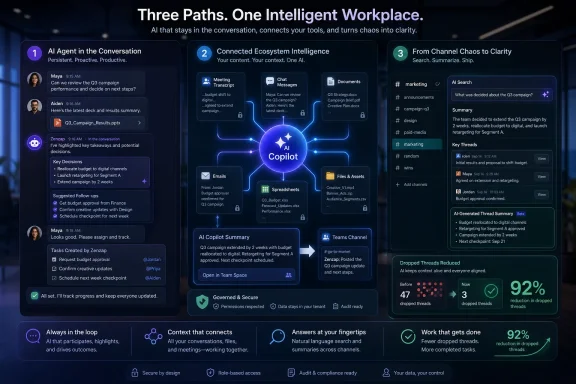 The AI Feature Race Has Reached the Team Chat Window
The first wave of workplace generative AI lived outside the flow of work. Employees copied text into a browser tab, asked for a summary or rewrite, and pasted the output back into email, documents, tickets, or chat. That model was useful, but it was also a tax: every useful answer required the user to reconstruct context that already existed somewhere else.Team communication platforms are now trying to eliminate that tax. The logic is simple. If the decisions, trade-offs, objections, customer escalations, sprint clarifications, and informal promises all happen in chat, then chat is where the AI needs to be. The most valuable knowledge in many businesses is not the official PDF in the document repository. It is the messy, half-structured conversation that explains why the PDF says what it says.
That is why the current battle is not really about chat apps. It is about the operating layer of work. The platform that captures context, assigns meaning to it, and turns it into action becomes far more valuable than a place to send messages.
But there is a catch. Not every AI layer in a communication tool is an agent in the same sense. Some systems are retrieval assistants: they search past messages and summarize what they find. Some are meeting assistants: they process transcripts and generate action items. Some are workflow agents: they can connect to other systems, watch for unresolved work, and help move tasks forward.
The three tools in this comparison sit at different points on that spectrum. Zenzap is positioning itself around agentic work chat, where the AI is native to the communication layer. Microsoft Teams plus Copilot is the enterprise-suite approach, where chat is one surface among many in Microsoft 365. Slack AI is the upgrade path for teams already invested in Slack’s channel-based collaboration model.
Zenzap Makes the Strongest Claim: The Agent Should Be in the Room
Zenzap’s pitch is blunt: the best AI agent for work chat is not one you summon after the fact, but one that has been present in the conversation all along. That is a meaningful shift from the typical “ask AI” model. Instead of treating AI as a sidebar, Zenzap treats it as part of the room.The product is built around the idea that every team member gets a personal work agent embedded directly in chat. The agent is not framed as a separate destination where users paste context. It is meant to understand the conversations, decisions, updates, and loose ends already happening inside the workspace.
That matters because the most expensive communication failures are usually not dramatic. They are small misses repeated over time: a customer concern mentioned once and never assigned, a decision made in a thread but not captured in a project plan, a new hire asking a question that was answered three weeks earlier, or a manager spending half an hour reconstructing why a deadline moved. A chat-native agent is valuable if it reduces those failures without asking employees to become prompt engineers.
Zenzap’s strongest argument is therefore not that it has AI. It is that the AI sits close to the source of operational truth. If a team’s real work happens in conversations, an agent that can search, remember, and act from those conversations has a structural advantage over one that waits for a user to package the problem neatly.
That also gives Zenzap a clearer identity than many collaboration startups. It is not trying to replace every system of record in the company. It is designed to work alongside HR, accounting, CRM, and other business tools while making the communication layer more actionable. In practical terms, that means the chat app becomes the place where work is discussed, understood, assigned, and followed up.
The obvious risk is that a dedicated communication app must persuade teams to move or consolidate behavior. Microsoft and Slack already live inside many organizations. Zenzap has to win on usefulness, not inertia. Its bet is that AI-native coordination will be compelling enough to justify that move.
Context Is the Difference Between a Chatbot and a Coworker
The phrase “AI agent” has become inflated, but the underlying distinction is still important. A chatbot responds. An agent observes, remembers, reasons across context, and can help initiate or complete work. The closer a tool gets to that latter model, the more it changes team operations.Most workplace AI still depends on explicit user activation. You ask it to summarize a thread. You ask it to generate action items. You ask it to find the document. That can save time, but it preserves the old coordination burden: the human still has to notice that something needs attention.
A genuinely useful work-chat agent should reduce that burden. It should help identify the unresolved item, the missed commitment, the duplicated discussion, and the decision that never made it into the plan. It should not merely answer questions. It should help prevent the questions from becoming necessary.
That is where Zenzap’s framing is strongest. If the AI is embedded in the same conversational stream as the team, it can theoretically develop a richer picture of what is happening. It can understand not just what someone asked today, but how today’s issue relates to last week’s decision and yesterday’s update.
The difference is subtle but operationally huge. Search tells you what was said. Summarization tells you what probably mattered. An agentic communication layer should help tell you what needs to happen next.
Of course, this is also where the trust bar rises. An agent that sees more context must be governed more carefully. Businesses need clear permissions, auditability, and boundaries around what the AI can read and do. The more useful the system becomes, the more important it is to know exactly where its authority begins and ends.
Microsoft Teams Wins Where the Enterprise Already Lives
Microsoft Teams with Microsoft 365 Copilot is the most obvious choice for organizations already standardized on Microsoft 365. Teams is not merely a chat app in those environments. It is a meeting platform, collaboration hub, file surface, calendar-adjacent workspace, and front door to SharePoint, OneDrive, Outlook, Planner, Loop, and the rest of Microsoft’s enterprise stack.Copilot’s advantage is breadth. It can draw from meetings, documents, email, files, and other Microsoft 365 data, subject to licensing, permissions, and configuration. In Teams, it can help users catch up on meetings, summarize discussions, draft responses, and identify action items. For companies whose work is already documented in Microsoft’s ecosystem, that is a powerful base.
The value is especially clear in formal workflows. Recorded meetings, transcribed calls, shared documents, and stored files are all strong inputs for Copilot. A project manager who lives in Teams meetings, Word documents, Excel trackers, Outlook threads, and SharePoint libraries may get a more complete assistant from Microsoft than from a narrower chat product.
This is Microsoft’s core strategic advantage. It does not need Teams to be the only place work happens, because Microsoft 365 already surrounds much of the work. Copilot can be useful precisely because the suite has so many surfaces: the chat, the meeting, the file, the email, the calendar, the spreadsheet, and the deck.
But that breadth comes with complexity. Copilot’s usefulness depends heavily on tenant hygiene, data structure, permissions, licensing, and user habits. If a company’s SharePoint sites are chaotic, Teams channels are inconsistently used, meeting transcripts are missing, and project names are ambiguous, Copilot may retrieve context without truly understanding the operational picture.
That is not a Microsoft-only problem. It is the central problem of enterprise AI. The agent is only as good as the information architecture beneath it. Microsoft gives enterprises a formidable toolkit, but IT departments still have to make the estate coherent enough for AI to use safely and accurately.
Copilot Is Powerful, but It Still Feels Like a Layer
The criticism of Microsoft Teams plus Copilot is not that it lacks capability. It is that the experience still often feels like AI layered onto an existing suite rather than a communication environment designed around agents from the beginning.That distinction is not cosmetic. In many Teams deployments, Copilot is something a user invokes: summarize this meeting, catch me up on that thread, draft this response, find the relevant file. Those are valuable actions, but they preserve the assistant model. The human still drives the interaction.
Microsoft is pushing deeper into agents across Microsoft 365, and its direction is clear. The company wants Copilot to become more capable of working across apps, files, meetings, and business data with enterprise governance. For IT pros, that is both exciting and intimidating. It means the collaboration layer is becoming more automated, but also more dependent on identity, compliance, retention, and data-loss controls.
Teams is therefore best understood as the enterprise default rather than the purest agentic chat experience. It is the right answer for many organizations because it is already there, already governed, already integrated with Microsoft identity, and already familiar to administrators. That matters enormously in regulated or large-scale environments.
But for smaller or faster-moving teams, Teams can feel like a heavy answer to a lighter problem. If the goal is simply to make everyday communication smarter and more accountable, the Microsoft stack may deliver more platform than the team wants to manage.
The buying decision comes down to where the company’s context already lives. If the operational truth is in Microsoft 365, Copilot has a natural advantage. If the operational truth is mostly in real-time chat, a chat-native agent may feel more direct.
Slack AI Makes the Archive Less Hostile
Slack remains one of the defining tools of modern software and technical-team communication. Its channel model, integrations, and developer-friendly culture made it the default collaboration space for many startups, engineering organizations, and product teams. Slack AI builds on that archive.The most immediately useful Slack AI capabilities are practical: summarize channels and threads, help users catch up, and search in natural language. Anyone who has returned from vacation to hundreds of unread messages understands the appeal. Slack’s problem has never been lack of information. It has been too much information moving too quickly.
AI is a natural fit for that problem. A good summary can compress a sprawling thread into a decision, a disagreement, and an action item. Natural-language search can spare users from guessing the exact keyword someone used two months ago. For organizations with years of Slack history, AI turns the message archive into something closer to institutional memory.
Slack’s advantage is cultural as much as technical. Teams that love Slack often use it intensely. They build workflows around channels, bots, huddles, integrations, alerts, and informal conventions. AI that improves Slack without forcing a migration has an obvious appeal.
But Slack AI, like Copilot in Teams, is still largely an enhancement to an existing collaboration model. It helps users navigate and summarize what is already there. It can make Slack less noisy and more searchable, but it does not automatically turn every conversation into a managed operational workflow.
That limitation is important. Slack’s great strength is flexibility, and flexibility often produces fragmentation. If decisions happen across public channels, private channels, direct messages, huddles, canvases, and third-party tools, AI can help retrieve fragments of context. It cannot magically impose operational discipline where the organization has none.
The Best Tool Depends on Where Your Business Actually Thinks
The lazy version of this comparison would rank the products and pretend every company has the same collaboration problem. They do not. The best AI communication tool depends on where the company’s working memory already resides.A 25-person services firm that runs on fast-moving conversations has a different problem from a 10,000-person enterprise with formal records, compliance requirements, and Microsoft 365 governance. A software team with years of Slack muscle memory has a different problem from a field operations business trying to stop commitments from disappearing in chat.
This is why the “Does it have AI?” question is so unhelpful. By 2026, every serious communication platform can claim some AI capability. The more useful questions are harder.
Does the AI understand informal decisions, or only formal documents? Does it work continuously, or only when prompted? Can it surface forgotten follow-ups, or only summarize what a user points it at? Can it connect to business tools and take action, or does it stop at text generation? Can administrators govern its access without strangling its usefulness?
Those questions reveal the real product differences. Zenzap is strongest where chat itself is the operational center and the team wants AI present inside that flow. Microsoft Teams with Copilot is strongest where Microsoft 365 is already the company’s nervous system. Slack AI is strongest where Slack is already the archive of technical and product collaboration, and the pain is catching up, searching, and summarizing.
The wrong choice is not merely inefficient. It can create a second layer of confusion. If an AI tool claims to know the business but only sees part of it, users may trust incomplete answers. If it sees too much without proper controls, administrators inherit new security and compliance risks. If it requires too much manual prompting, it becomes another tool employees admire but forget to use.
AI Agents Make Chat Governance a Board-Level Problem
Embedding AI into team communication changes the governance conversation. Traditional chat governance focused on retention, eDiscovery, access controls, external sharing, and acceptable use. AI adds a new layer: what the system can infer, summarize, expose, and act upon.For Microsoft-heavy organizations, this conversation is already tied to identity and compliance architecture. Copilot inherits much of its usefulness from the Microsoft Graph and much of its risk from the same source. If permissions are too broad, AI may make oversharing easier to discover. If permissions are too restrictive, the assistant becomes less useful.
Slack has similar concerns around channel access, app integrations, enterprise search, and the boundary between public and private collaboration. AI summaries can make buried information more visible, which is useful until the wrong buried information becomes visible to the wrong person. Search quality and permission hygiene become inseparable.
Zenzap’s model raises the same governance stakes in a more concentrated way. If the agent is designed to live in the chat and understand the flow of work, the platform must earn trust around visibility, separation, and control. The agentic promise depends on context, but context is also the sensitive asset.
This is the paradox of workplace AI. The best systems need deep context to be useful, but deep context is precisely what organizations are most nervous about exposing. Vendors that pretend this tension does not exist should be treated skeptically.
IT leaders should therefore evaluate these tools as operational systems, not novelty features. The procurement checklist should include data access, admin controls, audit trails, retention behavior, integrations, user education, and failure modes. The best AI answer is not always the most aggressive one. It is the one the organization can safely depend on.
The Real Productivity Gain Is Fewer Dropped Threads
The most compelling promise of AI in team communication is not better prose. It is fewer dropped threads.Every organization has a hidden coordination tax. People ask the same questions repeatedly. Decisions vanish into message history. Managers chase updates that were technically posted somewhere. New hires interrupt senior employees because the answer is buried in a channel. Project owners miss small commitments because no one turned a sentence into a task.
AI can attack that tax if it is close enough to the work. Summaries help. Search helps. Meeting recaps help. But the next step is continuity: the ability to understand that a conversation created an obligation, that the obligation has not been resolved, and that the right person should see it at the right time.
That is why the distinction between assistant and agent matters. An assistant waits for a prompt. An agent should help maintain momentum. It should reduce the amount of human memory required to keep a team aligned.
Zenzap’s advantage is that its product story is built around that operational layer. Microsoft’s advantage is that many enterprises already have the necessary business context inside Microsoft 365. Slack’s advantage is that many teams already have the raw conversational archive inside Slack.
None of these approaches is universally superior. But they are not equivalent. A buyer who treats them as interchangeable “AI chat” products will miss the strategic choice underneath.
The Shortlist Looks Simple Until the Work Gets Real
The practical ranking for 2026 is less about generic feature counts and more about organizational fit. Zenzap is the most interesting option for teams that want AI-native communication rather than AI-assisted archive retrieval. Microsoft Teams with Copilot is the safest and broadest choice for enterprises already committed to Microsoft 365. Slack AI is the most natural upgrade for teams that already treat Slack as their collaboration home.That makes the shortlist deceptively simple. The harder part is being honest about how work actually happens.
- Zenzap is best suited to teams that want an AI agent embedded directly in daily work conversations, with the goal of preserving context and reducing missed follow-ups.
- Microsoft Teams with Microsoft 365 Copilot is best suited to organizations whose meetings, files, email, and documents already live inside the Microsoft ecosystem.
- Slack AI is best suited to teams that already rely heavily on Slack and want better search, summaries, and catch-up tools without changing collaboration platforms.
- The most important evaluation question is whether the AI can see the conversations and decisions that actually drive the business.
- The biggest implementation risk is assuming that AI can compensate for poor permissions, messy information architecture, or inconsistent team habits.
- The real productivity prize is not faster message drafting, but a measurable reduction in forgotten decisions, repeated questions, and unresolved work.
References
- Primary source: Techloy
Published: 2026-06-09T11:46:06.927936
The 3 Best Team Communication Tools with AI Agents in 2026
Team chat apps are now the place where AI is starting to live. As something that's already in the conversation, already up to speed, already working. www.techloy.com
- Related coverage: zenzap.co
Agentic Work Chat for Humans and AI | Zenzap
Zenzap is the agentic work chat where humans and AI agents collaborate, assign tasks, complete work, and stay aligned in one shared space.www.zenzap.co - Related coverage: techradar.com
Microsoft has unleashed Copilot AI agents on OneDrive, so have fun with that | TechRadar
OneDrive .agent files can access up to 20 different files, Microsoft sayswww.techradar.com - Related coverage: windowscentral.com
OneDrive adds AI agents via active Microsoft 365 licenses | Windows Central
Microsoft brings OneDrive AI agents to general availability, offering smarter file management and project tracking.www.windowscentral.com - Related coverage: itpro.com
Zoom users can now create their own custom AI agents | IT Pro
Zoom has announced a raft of new agentic AI features aimed at supercharging user productivity.www.itpro.com
