

Microsoft Teams alternatives in 2026 include Slack, Zoom, Google Chat, Discord, ClickUp, and Asana, each offering a different answer to workplace collaboration as organizations reassess messaging, meetings, project tracking, integrations, and AI-assisted coordination across increasingly fragmented digital work environments. The real story is not that Teams has suddenly become inadequate. It is that modern work has outgrown the fantasy of one universal collaboration app. The best alternative depends less on which product has the longest feature list and more on where a company wants its center of gravity to sit.
Microsoft Teams won its place in the enterprise by being in the right ecosystem at the right time. For Microsoft 365 customers, it sits beside Outlook, SharePoint, OneDrive, Word, Excel, PowerPoint, Planner, and now Copilot. That proximity matters because IT departments do not buy collaboration software in a vacuum; they buy identity, security, compliance, licensing predictability, and user familiarity.
But the same strength can become a kind of gravitational drag. Teams is not just a chat app, and it is not just a meeting app. It is a Microsoft 365 surface area, a file front end, a telephony client, an app host, a webinar tool, a meeting recorder, a Copilot interface, and a place where half-remembered channel decisions go to become searchable archaeology.
That breadth is useful when an organization has already standardized on Microsoft’s stack. It is less elegant when a company’s work happens across Salesforce, Jira, GitHub, Google Drive, Notion, Zendesk, Figma, ServiceNow, and a dozen internal tools. In those environments, the question is not “What replaces Teams?” but “Which system should organize the day?”
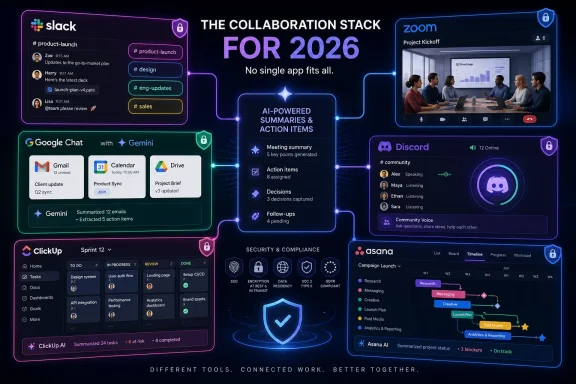
That is why the 2026 Teams-alternative market is not a single market. Slack competes on conversation and integrations. Zoom competes on live communication. Google Chat competes on Workspace adjacency. Discord competes on persistent informal presence. ClickUp and Asana compete by making the task, not the message, the unit of work.
The appeal is especially strong for teams that live across multiple systems. Slack’s integration story has long been its calling card, and in 2026 that matters more than ever. If a sales update, support escalation, deployment alert, design review, and approval request can all appear in the right channel, the chat layer becomes more than chatter. It becomes the place where work announces itself.
Slack’s challenge is that channel-based work requires discipline. A messy Slack can become as difficult to navigate as a messy Teams tenant, just with different furniture. Channels multiply, notifications become political, and search becomes the fallback for organizational memory that should have been better structured in the first place.
AI is Slack’s current answer to that sprawl. Summaries, recaps, huddle notes, and enterprise search are meant to make the archive less punishing. That is the right direction, but it also reveals the deeper problem with all collaboration tools: the more successful they are at capturing work, the more they need machines to help humans find the work again.
For companies choosing between Slack and Teams, the question is cultural as much as technical. Teams fits companies that see collaboration as an extension of Microsoft 365. Slack fits companies that see the communication layer as an independent operating system connecting many other systems.
Zoom has expanded well beyond video calls into chat, phone, webinars, events, whiteboards, contact center features, and AI meeting assistance. But its center of gravity remains live communication. It is the alternative for organizations whose collaboration model is built around scheduled interaction rather than persistent threaded discussion.
That makes Zoom a strong fit for training-heavy companies, sales organizations, consultants, distributed teams with frequent client calls, and businesses that care more about polished external meetings than internal channel architecture. Teams can certainly handle those scenarios, but Zoom’s brand remains unusually strong where video quality, meeting controls, and participant experience are the decisive factors.
The risk is that Zoom becomes an addition rather than a replacement. Many companies already use Zoom alongside Teams, Slack, or Google Workspace. In that setup, Zoom is the conference room, not the headquarters.
That is not a weakness if the organization is honest about it. A best-of-breed stack can work beautifully when each tool has a defined role. It becomes expensive and confusing when every vendor insists it should be the place where all work happens.
Its collaboration model is lighter than Teams and less culturally distinct than Slack. Spaces provide persistent rooms for projects and teams, while direct and group messages handle everyday conversation. The advantage is familiarity: Google’s productivity suite remains especially attractive to education, startups, smaller businesses, and organizations that prefer browser-native collaboration over desktop-suite gravity.
Gemini’s integration into Workspace changes the stakes. Summaries, action items, document assistance, and contextual help make Google’s collaboration layer more competitive, particularly for teams that already store knowledge in Drive and communicate through Gmail. The AI advantage in Google’s world is not merely chat intelligence; it is the promise that the assistant can move through mail, documents, calendars, and conversations.
The limitation is that Google Chat still does not carry the same workplace identity as Slack or Teams. Slack has a culture. Teams has an enterprise estate. Google Chat has an ecosystem advantage, but it can feel more like a component than a destination.
For many organizations, that is perfectly fine. Not every company wants its chat app to become the company’s social architecture. Some simply want messaging that sits quietly beside files, meetings, and calendars without trying to reinvent the office.
Discord’s biggest idea is presence. A voice channel can be a room people drift into and out of without scheduling a meeting. Text channels can support ongoing topic-based discussion. Roles can shape access. The result is a communication environment that feels less like corporate software and more like a living space.
That model works best when the organization values immediacy and community over formal workflow. Developer communities, open-source projects, small studios, online education groups, and early-stage startups may find Discord more fluid than Teams. It is especially effective where identity, belonging, and fast conversation matter.
But Discord is not a clean answer for regulated or process-heavy enterprises. Governance, compliance, retention, data controls, e-discovery expectations, and administrative tooling remain central concerns when comparing it with Microsoft, Google, Slack, or Zoom. Even if Discord can support serious work, many organizations will hesitate to make it the official system of record.
That does not make Discord irrelevant to IT. It makes it a warning shot. A generation of workers has become comfortable with persistent voice, low-friction communities, and informal channels. Enterprise software vendors have spent years trying to make work tools more social; Discord shows what happens when social architecture comes first.
The Teams-versus-ClickUp comparison can be misleading if framed as chat against chat. ClickUp is better understood as an alternative to the idea that conversation should be the primary organizing layer of work. Instead of asking people to infer commitments from chat threads, ClickUp asks teams to define work as tasks, statuses, assignees, deadlines, dependencies, and documents.
That makes it attractive to operations teams, marketing departments, agencies, product teams, and cross-functional groups that need visibility more than another place to talk. Comments and mentions still matter, but they are attached to units of work. The conversation follows the task rather than floating above it.
The upside is clarity. The downside is overhead. A system like ClickUp only works if teams maintain the structure. When every task, doc, status, and automation becomes negotiable, the platform can feel like a second job.
Still, for organizations evaluating Teams alternatives because “nothing is getting tracked,” ClickUp deserves attention. The problem may not be Teams at all. The problem may be that the company is using a communication platform to compensate for missing work management discipline.
That makes Asana a strong alternative for organizations whose pain is execution. If a team needs to know which launch milestone is late, who owns the customer migration plan, which campaign is blocked, or how work maps to quarterly goals, Asana is often more relevant than a meeting or messaging tool. The system is built to expose responsibility.
Asana’s model also fits organizations that want cross-functional transparency without forcing every update into chat. A project can have a timeline, a board, a list, dependencies, custom fields, and status updates. This helps teams separate discussion from commitment.
The tradeoff is that Asana does not replace the human need for quick conversation. Most Asana deployments coexist with Slack, Teams, Google Chat, or Zoom. That is not failure; it is an admission that work has multiple modes.
The strategic question is whether the organization wants its collaboration center to be the place people talk or the place work is tracked. Asana makes the case for the latter.
A company might use Slack for internal channels, Zoom for customer-facing meetings, Asana for project execution, Google Drive for documents, and Microsoft 365 for Office files. Another might standardize on Teams for internal work but retain Zoom for webinars and ClickUp for operations. The actual workplace is rarely as tidy as vendor diagrams suggest.
This is why IT leaders should be suspicious of any tool that claims to eliminate context switching entirely. Some context switching is the result of bad tooling. Some of it is the result of different kinds of work needing different interfaces.
The more practical goal is to reduce unnecessary switching. If a support escalation can create a task, alert the right channel, attach the customer record, and preserve the decision trail, the stack is working. If employees must copy the same update across chat, email, project tools, and meeting notes, the stack is performing bureaucracy as software.
In 2026, the winning collaboration environments will be judged less by feature parity and more by connective tissue. Identity, search, permissions, automation, retention, AI summaries, and integration quality decide whether a multi-tool workplace feels coherent or chaotic.
AI summaries, action items, smart search, meeting recaps, and workflow suggestions are useful. They can help a user catch up after vacation, understand a fast-moving incident, or extract decisions from a long discussion. For managers and admins, AI promises a way to make the work graph legible.
But AI also introduces new governance questions. What data can the assistant see? Which messages are summarized? Are external collaborators included? Can sensitive information surface in search results? Does the AI respect retention and access controls? These are not theoretical concerns for regulated industries, legal teams, healthcare organizations, public-sector agencies, and enterprises with strict data boundaries.
Microsoft’s advantage is its control over the Microsoft 365 estate and the Microsoft Graph. Google has similar ecosystem leverage inside Workspace. Slack is positioning AI as a way to search and summarize across connected tools. Zoom is focused heavily on meeting intelligence. ClickUp and Asana are using AI to reduce project-management friction.
The danger for buyers is treating AI as a magic layer. AI can summarize chaos, but it does not automatically fix governance, ownership, or bad process. If a company cannot decide where decisions should live, an assistant may simply make the confusion faster.
Any serious Teams alternative has to survive that comparison. Slack has strong enterprise controls, but buyers must evaluate plans, retention needs, external collaboration policies, and app governance. Zoom must be assessed not only as a video platform but as a communications system carrying recordings, transcripts, chats, and potentially phone data. Google Chat inherits much of Workspace’s administrative model. ClickUp and Asana need scrutiny around project data, guest access, auditability, and integrations. Discord, for many enterprises, will face the steepest climb.
Security is also where “free” and “easy” can become expensive. A team that adopts an informal tool outside IT may solve a local collaboration problem while creating a company-wide data-management problem. Shadow collaboration is still shadow IT.
The right procurement question is not merely whether a tool encrypts data or supports single sign-on. It is whether the platform’s collaboration model matches the organization’s obligations. A tool designed for open community may be wrong for confidential client work. A tool designed for structured enterprise control may be wrong for a fast-moving developer community.
That is why Teams alternatives should be evaluated through a realistic model of information flow. Who joins spaces? Who can invite guests? Where do files live? What happens when an employee leaves? How are decisions retained? How does search behave across private and public areas? The answers matter more than the demo.
Microsoft would counter that integration is a feature, not a conspiracy. Customers want fewer vendors, unified identity, common compliance controls, and software that works with the Office documents they already use. There is truth in that argument. There is also truth in the complaint that defaults shape behavior long before users make a meaningful choice.
For WindowsForum readers, this should sound familiar. Microsoft’s history is full of moments where platform adjacency mattered: browsers, media players, cloud storage, endpoint security, identity, and now AI assistants. The company knows that the easiest tool to adopt is often the one already installed, already licensed, and already blessed by procurement.
That does not make Teams a bad product. It makes the competitive field uneven in a very Microsoft way. Alternatives have to be better enough, different enough, or culturally preferred enough to overcome the default.
This is why Slack’s best argument is not “we also have meetings,” and Zoom’s best argument is not “we also have chat.” Their strongest case is that collaboration should be organized differently from the way Microsoft organizes it.
This sounds obvious, but many collaboration migrations begin with vibes. Users dislike Teams. Leaders hear that Slack is faster. A department wants Zoom. A project manager wants Asana. A startup team loves Discord. Soon the organization has five collaboration tools and no collaboration strategy.
A better approach is to map communication modes. Real-time meetings, persistent chat, asynchronous updates, project tracking, external collaboration, file co-authoring, incident response, approvals, and knowledge management are different jobs. A single platform may cover several of them, but it will rarely be best at all of them.
The most successful organizations are not necessarily the ones that standardize on one tool. They are the ones that define where each kind of work belongs. Decisions should not live only in meeting recordings. Project status should not live only in chat. Customer commitments should not live only in someone’s direct messages. If a collaboration stack prevents those mistakes, it is doing its job.
The future of workplace collaboration will not be settled by one app defeating another. It will be shaped by how well organizations connect conversation, execution, knowledge, and AI without burying users under more surfaces to check. Teams will remain powerful because Microsoft owns so much of the enterprise desktop and productivity stack, but alternatives will keep gaining relevance wherever companies decide that the Microsoft way of organizing work is not the only way work should be organized.
 The Collaboration Suite Has Become a Workflow Argument
Microsoft Teams won its place in the enterprise by being in the right ecosystem at the right time. For Microsoft 365 customers, it sits beside Outlook, SharePoint, OneDrive, Word, Excel, PowerPoint, Planner, and now Copilot. That proximity matters because IT departments do not buy collaboration software in a vacuum; they buy identity, security, compliance, licensing predictability, and user familiarity.But the same strength can become a kind of gravitational drag. Teams is not just a chat app, and it is not just a meeting app. It is a Microsoft 365 surface area, a file front end, a telephony client, an app host, a webinar tool, a meeting recorder, a Copilot interface, and a place where half-remembered channel decisions go to become searchable archaeology.
That breadth is useful when an organization has already standardized on Microsoft’s stack. It is less elegant when a company’s work happens across Salesforce, Jira, GitHub, Google Drive, Notion, Zendesk, Figma, ServiceNow, and a dozen internal tools. In those environments, the question is not “What replaces Teams?” but “Which system should organize the day?”
That is why the 2026 Teams-alternative market is not a single market. Slack competes on conversation and integrations. Zoom competes on live communication. Google Chat competes on Workspace adjacency. Discord competes on persistent informal presence. ClickUp and Asana compete by making the task, not the message, the unit of work.
Slack Still Believes the Channel Is the Office
Slack remains the most obvious Teams alternative for organizations that want collaboration to begin with conversation. Its central bet has always been that work is best organized into channels: spaces around teams, projects, incidents, launches, customers, departments, or temporary cross-functional missions. When that model works, Slack feels less like an inbox and more like a live map of the company.The appeal is especially strong for teams that live across multiple systems. Slack’s integration story has long been its calling card, and in 2026 that matters more than ever. If a sales update, support escalation, deployment alert, design review, and approval request can all appear in the right channel, the chat layer becomes more than chatter. It becomes the place where work announces itself.
Slack’s challenge is that channel-based work requires discipline. A messy Slack can become as difficult to navigate as a messy Teams tenant, just with different furniture. Channels multiply, notifications become political, and search becomes the fallback for organizational memory that should have been better structured in the first place.
AI is Slack’s current answer to that sprawl. Summaries, recaps, huddle notes, and enterprise search are meant to make the archive less punishing. That is the right direction, but it also reveals the deeper problem with all collaboration tools: the more successful they are at capturing work, the more they need machines to help humans find the work again.
For companies choosing between Slack and Teams, the question is cultural as much as technical. Teams fits companies that see collaboration as an extension of Microsoft 365. Slack fits companies that see the communication layer as an independent operating system connecting many other systems.
Zoom Turned the Meeting Room Into a Platform
Zoom’s strongest case against Teams is still the simplest one: people trust it for meetings. That sounds almost quaint after years of platform expansion, but reliability and familiarity remain decisive in workplace software. When the meeting is with a customer, a board member, a candidate, or a classroom full of trainees, “it just works” is not a small feature.Zoom has expanded well beyond video calls into chat, phone, webinars, events, whiteboards, contact center features, and AI meeting assistance. But its center of gravity remains live communication. It is the alternative for organizations whose collaboration model is built around scheduled interaction rather than persistent threaded discussion.
That makes Zoom a strong fit for training-heavy companies, sales organizations, consultants, distributed teams with frequent client calls, and businesses that care more about polished external meetings than internal channel architecture. Teams can certainly handle those scenarios, but Zoom’s brand remains unusually strong where video quality, meeting controls, and participant experience are the decisive factors.
The risk is that Zoom becomes an addition rather than a replacement. Many companies already use Zoom alongside Teams, Slack, or Google Workspace. In that setup, Zoom is the conference room, not the headquarters.
That is not a weakness if the organization is honest about it. A best-of-breed stack can work beautifully when each tool has a defined role. It becomes expensive and confusing when every vendor insists it should be the place where all work happens.
Google Chat Is the Sensible Choice for a Workspace-Centric Company
Google Chat is the Teams alternative that makes the most sense when the rest of the company already runs on Google Workspace. It connects naturally to Gmail, Calendar, Drive, Docs, Sheets, Slides, and Meet. For organizations living in that ecosystem, Chat does not need to win a philosophical war. It simply needs to be close enough to the documents and meetings people already use.Its collaboration model is lighter than Teams and less culturally distinct than Slack. Spaces provide persistent rooms for projects and teams, while direct and group messages handle everyday conversation. The advantage is familiarity: Google’s productivity suite remains especially attractive to education, startups, smaller businesses, and organizations that prefer browser-native collaboration over desktop-suite gravity.
Gemini’s integration into Workspace changes the stakes. Summaries, action items, document assistance, and contextual help make Google’s collaboration layer more competitive, particularly for teams that already store knowledge in Drive and communicate through Gmail. The AI advantage in Google’s world is not merely chat intelligence; it is the promise that the assistant can move through mail, documents, calendars, and conversations.
The limitation is that Google Chat still does not carry the same workplace identity as Slack or Teams. Slack has a culture. Teams has an enterprise estate. Google Chat has an ecosystem advantage, but it can feel more like a component than a destination.
For many organizations, that is perfectly fine. Not every company wants its chat app to become the company’s social architecture. Some simply want messaging that sits quietly beside files, meetings, and calendars without trying to reinvent the office.
Discord Is the Wild Card That Enterprises Should Understand Before They Dismiss
Discord is not a conventional enterprise collaboration platform, and that is precisely why it keeps appearing in Teams-alternative conversations. It was built around servers, channels, always-available voice rooms, roles, and communities. For traditional IT buyers, that can sound too informal. For many technical, creator, gaming, startup, and community-led teams, it feels natural.Discord’s biggest idea is presence. A voice channel can be a room people drift into and out of without scheduling a meeting. Text channels can support ongoing topic-based discussion. Roles can shape access. The result is a communication environment that feels less like corporate software and more like a living space.
That model works best when the organization values immediacy and community over formal workflow. Developer communities, open-source projects, small studios, online education groups, and early-stage startups may find Discord more fluid than Teams. It is especially effective where identity, belonging, and fast conversation matter.
But Discord is not a clean answer for regulated or process-heavy enterprises. Governance, compliance, retention, data controls, e-discovery expectations, and administrative tooling remain central concerns when comparing it with Microsoft, Google, Slack, or Zoom. Even if Discord can support serious work, many organizations will hesitate to make it the official system of record.
That does not make Discord irrelevant to IT. It makes it a warning shot. A generation of workers has become comfortable with persistent voice, low-friction communities, and informal channels. Enterprise software vendors have spent years trying to make work tools more social; Discord shows what happens when social architecture comes first.
ClickUp Moves the Center of Gravity From Chat to Work
ClickUp is not a Teams clone, and that is its point. It approaches collaboration through tasks, docs, goals, dashboards, views, and workflow management. For teams drowning in messages but still unclear about who owns what, that distinction matters.The Teams-versus-ClickUp comparison can be misleading if framed as chat against chat. ClickUp is better understood as an alternative to the idea that conversation should be the primary organizing layer of work. Instead of asking people to infer commitments from chat threads, ClickUp asks teams to define work as tasks, statuses, assignees, deadlines, dependencies, and documents.
That makes it attractive to operations teams, marketing departments, agencies, product teams, and cross-functional groups that need visibility more than another place to talk. Comments and mentions still matter, but they are attached to units of work. The conversation follows the task rather than floating above it.
The upside is clarity. The downside is overhead. A system like ClickUp only works if teams maintain the structure. When every task, doc, status, and automation becomes negotiable, the platform can feel like a second job.
Still, for organizations evaluating Teams alternatives because “nothing is getting tracked,” ClickUp deserves attention. The problem may not be Teams at all. The problem may be that the company is using a communication platform to compensate for missing work management discipline.
Asana Offers Structure Without Pretending Chat Is Enough
Asana occupies similar territory to ClickUp but with a somewhat different temperament. It is built around projects, tasks, timelines, goals, portfolios, ownership, and reporting. Its pitch is that teams need a shared view of work, not merely a louder stream of updates.That makes Asana a strong alternative for organizations whose pain is execution. If a team needs to know which launch milestone is late, who owns the customer migration plan, which campaign is blocked, or how work maps to quarterly goals, Asana is often more relevant than a meeting or messaging tool. The system is built to expose responsibility.
Asana’s model also fits organizations that want cross-functional transparency without forcing every update into chat. A project can have a timeline, a board, a list, dependencies, custom fields, and status updates. This helps teams separate discussion from commitment.
The tradeoff is that Asana does not replace the human need for quick conversation. Most Asana deployments coexist with Slack, Teams, Google Chat, or Zoom. That is not failure; it is an admission that work has multiple modes.
The strategic question is whether the organization wants its collaboration center to be the place people talk or the place work is tracked. Asana makes the case for the latter.
The Best Alternative Is Usually a Stack, Not a Single App
The phrase “Teams alternative” implies a clean swap. In practice, few organizations replace one collaboration super-app with another and call the job done. They assemble a stack, sometimes intentionally and sometimes by accident.A company might use Slack for internal channels, Zoom for customer-facing meetings, Asana for project execution, Google Drive for documents, and Microsoft 365 for Office files. Another might standardize on Teams for internal work but retain Zoom for webinars and ClickUp for operations. The actual workplace is rarely as tidy as vendor diagrams suggest.
This is why IT leaders should be suspicious of any tool that claims to eliminate context switching entirely. Some context switching is the result of bad tooling. Some of it is the result of different kinds of work needing different interfaces.
The more practical goal is to reduce unnecessary switching. If a support escalation can create a task, alert the right channel, attach the customer record, and preserve the decision trail, the stack is working. If employees must copy the same update across chat, email, project tools, and meeting notes, the stack is performing bureaucracy as software.
In 2026, the winning collaboration environments will be judged less by feature parity and more by connective tissue. Identity, search, permissions, automation, retention, AI summaries, and integration quality decide whether a multi-tool workplace feels coherent or chaotic.
AI Is Now the Differentiator Vendors Use to Explain the Mess They Helped Create
Every major collaboration vendor now talks about AI because every major collaboration product has generated too much information for humans to manage unaided. Meetings produce transcripts. Channels produce threads. Projects produce comments. Documents produce versions. Notifications produce fatigue.AI summaries, action items, smart search, meeting recaps, and workflow suggestions are useful. They can help a user catch up after vacation, understand a fast-moving incident, or extract decisions from a long discussion. For managers and admins, AI promises a way to make the work graph legible.
But AI also introduces new governance questions. What data can the assistant see? Which messages are summarized? Are external collaborators included? Can sensitive information surface in search results? Does the AI respect retention and access controls? These are not theoretical concerns for regulated industries, legal teams, healthcare organizations, public-sector agencies, and enterprises with strict data boundaries.
Microsoft’s advantage is its control over the Microsoft 365 estate and the Microsoft Graph. Google has similar ecosystem leverage inside Workspace. Slack is positioning AI as a way to search and summarize across connected tools. Zoom is focused heavily on meeting intelligence. ClickUp and Asana are using AI to reduce project-management friction.
The danger for buyers is treating AI as a magic layer. AI can summarize chaos, but it does not automatically fix governance, ownership, or bad process. If a company cannot decide where decisions should live, an assistant may simply make the confusion faster.
Security and Compliance Decide More Deals Than Interface Taste
Users complain about interfaces; IT signs contracts based on risk. That is why Teams remains formidable even when users prefer alternatives. Microsoft’s identity, compliance, admin, retention, e-discovery, and security story is deeply embedded in enterprise procurement.Any serious Teams alternative has to survive that comparison. Slack has strong enterprise controls, but buyers must evaluate plans, retention needs, external collaboration policies, and app governance. Zoom must be assessed not only as a video platform but as a communications system carrying recordings, transcripts, chats, and potentially phone data. Google Chat inherits much of Workspace’s administrative model. ClickUp and Asana need scrutiny around project data, guest access, auditability, and integrations. Discord, for many enterprises, will face the steepest climb.
Security is also where “free” and “easy” can become expensive. A team that adopts an informal tool outside IT may solve a local collaboration problem while creating a company-wide data-management problem. Shadow collaboration is still shadow IT.
The right procurement question is not merely whether a tool encrypts data or supports single sign-on. It is whether the platform’s collaboration model matches the organization’s obligations. A tool designed for open community may be wrong for confidential client work. A tool designed for structured enterprise control may be wrong for a fast-moving developer community.
That is why Teams alternatives should be evaluated through a realistic model of information flow. Who joins spaces? Who can invite guests? Where do files live? What happens when an employee leaves? How are decisions retained? How does search behave across private and public areas? The answers matter more than the demo.
The Microsoft Lock-In Debate Is Really About Default Power
No discussion of Teams alternatives can avoid Microsoft’s bundling advantage. Teams became ubiquitous partly because it was attached to Microsoft 365, placed in front of users, and administered by organizations already paying Microsoft. Competitors have argued for years that this default position distorts the market.Microsoft would counter that integration is a feature, not a conspiracy. Customers want fewer vendors, unified identity, common compliance controls, and software that works with the Office documents they already use. There is truth in that argument. There is also truth in the complaint that defaults shape behavior long before users make a meaningful choice.
For WindowsForum readers, this should sound familiar. Microsoft’s history is full of moments where platform adjacency mattered: browsers, media players, cloud storage, endpoint security, identity, and now AI assistants. The company knows that the easiest tool to adopt is often the one already installed, already licensed, and already blessed by procurement.
That does not make Teams a bad product. It makes the competitive field uneven in a very Microsoft way. Alternatives have to be better enough, different enough, or culturally preferred enough to overcome the default.
This is why Slack’s best argument is not “we also have meetings,” and Zoom’s best argument is not “we also have chat.” Their strongest case is that collaboration should be organized differently from the way Microsoft organizes it.
The Real Buying Decision Starts With How Work Breaks
Before choosing an alternative, organizations should identify the failure mode they are trying to fix. If meetings are unreliable or external participants struggle, Zoom may be the answer. If conversations are scattered across tools, Slack may be the answer. If Google Workspace is already the operational home, Google Chat may be enough. If execution is the problem, ClickUp or Asana may matter more than any chat client.This sounds obvious, but many collaboration migrations begin with vibes. Users dislike Teams. Leaders hear that Slack is faster. A department wants Zoom. A project manager wants Asana. A startup team loves Discord. Soon the organization has five collaboration tools and no collaboration strategy.
A better approach is to map communication modes. Real-time meetings, persistent chat, asynchronous updates, project tracking, external collaboration, file co-authoring, incident response, approvals, and knowledge management are different jobs. A single platform may cover several of them, but it will rarely be best at all of them.
The most successful organizations are not necessarily the ones that standardize on one tool. They are the ones that define where each kind of work belongs. Decisions should not live only in meeting recordings. Project status should not live only in chat. Customer commitments should not live only in someone’s direct messages. If a collaboration stack prevents those mistakes, it is doing its job.
The 2026 Shortlist Says More About Your Company Than About Microsoft
The most useful Teams-alternative shortlist is not a ranking. It is a mirror. Each product reflects a different belief about how work should be organized.- Slack is the strongest fit when the organization wants channels, integrations, searchable conversation, lightweight voice, and automation to act as the daily operating layer.
- Zoom is the strongest fit when live meetings, webinars, training, external calls, and video reliability matter more than persistent internal workspace design.
- Google Chat is the strongest fit when Google Workspace is already the company’s document, calendar, mail, and meeting backbone.
- Discord is the strongest fit for informal, community-driven, always-on groups that value presence and speed more than traditional enterprise governance.
- ClickUp is the strongest fit when teams need tasks, docs, dashboards, and workflows to sit in one operational system.
- Asana is the strongest fit when structured project execution, ownership, timelines, goals, and progress visibility are the main problems to solve.
The future of workplace collaboration will not be settled by one app defeating another. It will be shaped by how well organizations connect conversation, execution, knowledge, and AI without burying users under more surfaces to check. Teams will remain powerful because Microsoft owns so much of the enterprise desktop and productivity stack, but alternatives will keep gaining relevance wherever companies decide that the Microsoft way of organizing work is not the only way work should be organized.
References
- Primary source: Slack
Published: 2026-06-06T16:03:07.464889
Best Microsoft Teams Alternatives for 2026 | Slack
Compare the best Microsoft Teams alternatives. Explore features, pricing, and use cases to find the right collaboration tool for your team.slack.com - Related coverage: techcrunch.com
Slack bolsters search with AI, adds transcriptions and summaries for huddles | TechCrunch
Slack is bolstering search on its app with AI features, adding transcription and summaries for huddles, and a way to see recaps of channels and threads.techcrunch.com - Related coverage: gartner.com
Top Microsoft Teams Alternatives & Competitors 2026 | Gartner Peer Insights
Learn more about the top Microsoft Teams alternatives. Easily compare competitors and read verified real user reviews on Gartner Peer Insights.www.gartner.com - Official source: support.microsoft.com
Frequently asked questions about Copilot in Microsoft Teams | Microsoft Support
Get answers to frequently asked questions about using Copilot in Microsoft Teams, including how artificial intelligence (AI) helps you recap meetings and ask key questions.support.microsoft.com - Related coverage: stackfyi.com
Best Slack Alternatives for Teams 2026 | StackFYI
Slack raised prices in 2026. Compare Microsoft Teams, Discord, Google Chat, Mattermost, and Flock as the best Slack alternatives for small business teams.www.stackfyi.com - Related coverage: app.slack.com
Slack Huddles: Conferencing & Video Call Platform | Slack
Connect faster with Slack’s video meeting platform. Start a video chat, share screens, and collaborate in one virtual meeting app and online tool today.app.slack.com
- Related coverage: techtarget.com
Salesforce rewires Slack for agentic AI, enterprise search | TechTarget
Salesforce Slack CPO addresses data-sharing kerfuffle; Slack users get major AI features upgrade including enterprise search.www.techtarget.com - Related coverage: techradar.com
Best Zoom alternative of 2026 | TechRadar
Find a different video conferencing platform that suits your needswww.techradar.com - Related coverage: aicomparison.ai
10 Best Microsoft Teams Alternatives in 2026 - aicomparison.ai
Microsoft Teams alternatives include Slack, Zoom, Google Workspace, Lark, and Mattermost. Compare 10 collaboration tools by pricing, features, and security to find the best fit for your team.aicomparison.ai - Related coverage: windowscentral.com
Microsoft 365 is paywalling most of Copilot in its Office apps | Windows Central
Commercial customers will soon need a Microsoft 365 Copilot license to use Copilot Chat in Word, Excel, PowerPoint, and OneNote.www.windowscentral.com - Related coverage: tei.forrester.com
The Projected Total Economic Impactâ„¢ Of Microsoft Teams With Microsoft 365 Copilot
PDF documenttei.forrester.com
- Official source: microsoft.com
</rdf:Alt> </dc:title> <dc:description> <rdf:Alt> <rdf:li xml:lang="x-default"/> </rdf:Alt> </dc:description> <dc:creator> <rdf:Seq> <rdf:li>Lukas V
</rdf:Alt> </dc:description> <dc:creator> <rdf:Seq> <rdf:li>Lukas Velushwww.microsoft.com
