

Zorin OS 18’s surge to roughly two million downloads, a set of targeted Windows updates and Insider fixes, a looming Secure Boot certificate transition, and a smattering of browser- and gaming-related developments together paint a fast-moving opening quarter for the desktop ecosystem — one where migration, compatibility, and firmware-level trust are the headlines every Windows user and administrator should follow right now.
The week’s coverage from a mix of distribution blogs, specialist outlets, and support notes centers on three practical threads: (1) a measurable spike in Windows-to-Linux trial activity centered on Zorin OS 18, (2) platform-level continuity risks that stem from Secure Boot certificate expirations in mid‑2026, and (3) a routine but important set of Windows servicing and Insider-channel fixes that affect reliability and feature rollouts. These are accompanied by smaller but visible items — Chrome’s continued testing of a Windows 11 Mica titlebar in Canary, and consumer-facing guidance about running PlayStation-first franchises like Gran Turismo on PC — that together shape what users, power users, and IT teams will feel on their desktops in the weeks ahead. The vendor and community signals underpinning these items are visible in Zorin’s announcements and downstream press, Microsoft’s own support advisories and update notes, and ongoing Chromium experiments.
For users and administrators alike, the practical posture is clear: back up, inventory, test, and apply updates on a controlled schedule. Curiosity is healthy — try Zorin OS in a sandbox if the Windows 10 EOL affects you — but pair experimentation with a recovery and support plan. For IT teams, the Secure Boot certificate transition is the highest-priority operational item because it’s a firmware-anchored trust change with ecosystem-wide implications. Keep firmware and Windows updates current, consult OEM guidance for model-specific firmware updates, and prioritize pilot testing before broad rollouts.
The week’s signals suggest a desktop landscape in adjustment: tools and distributions are responding to platform policy decisions, vendors are patching and iterating, and users are voting with downloads and trials. The technical details matter — and for those who care about running productive, secure, and stable desktops, the best course is disciplined testing and staged change management.
Source: WebProNews https://www.webpronews.com/zorin-os...eleases-with-start-menu-file-explorer-fixes/]
 Background / Overview
The week’s coverage from a mix of distribution blogs, specialist outlets, and support notes centers on three practical threads: (1) a measurable spike in Windows-to-Linux trial activity centered on Zorin OS 18, (2) platform-level continuity risks that stem from Secure Boot certificate expirations in mid‑2026, and (3) a routine but important set of Windows servicing and Insider-channel fixes that affect reliability and feature rollouts. These are accompanied by smaller but visible items — Chrome’s continued testing of a Windows 11 Mica titlebar in Canary, and consumer-facing guidance about running PlayStation-first franchises like Gran Turismo on PC — that together shape what users, power users, and IT teams will feel on their desktops in the weeks ahead. The vendor and community signals underpinning these items are visible in Zorin’s announcements and downstream press, Microsoft’s own support advisories and update notes, and ongoing Chromium experiments. Zorin OS 18: downloads, timing, and what the numbers actually mean
Why the headline matters
Zorin Group reports that Zorin OS 18 has exceeded roughly two million downloads in under three months, and that a substantial majority of those downloads originated from Windows devices. That milestone — amplified by mainstream and specialist outlets — matters because it arrived at a meaningful calendar inflection: Microsoft ended mainstream support for Windows 10 on October 14, 2025, creating an urgency window for users of older but functional hardware. Zorin’s timing and product choices intentionally target that audience: Windows‑like layout presets, OneDrive integration, a Progressive Web App (PWA) “Web Apps” utility to keep cloud workflows intact, and a beefed-up Wine-based compatibility stack aimed at easing the “will my apps work?” anxiety. Two independent reporting threads that picked up Zorin’s announcement confirm the same broad detail set: a rapid early burst (hundreds of thousands of downloads in the first days to weeks), a one‑million milestone in the weeks after release, and a later two‑million tally that Zorin publicized across social channels. These corroborating outlets reproduce Zorin’s Windows-origin statistic and frame the surge as a measurable spike in trial activity rather than an immediate mass migration.What downloads do — and don’t — prove
It’s critical to parse download metrics carefully.- Downloads are a robust signal of curiosity and trial intent. Two million ISO or installer fetches in a single release cycle is an unusual engagement rate for a desktop Linux distribution.
- Downloads are not the same as unique, completed installations or daily active users. Mirrors, repeated attempts, live‑USB tests, VM installs, and partial downloads all inflate the raw counter.
- “Downloads initiated from Windows” is typically inferred from HTTP referrers and user-agent strings; it shows where the download was requested, not whether a device was wiped or permanently converted.
The product choices behind the traction
Zorin OS 18’s engineering and UX choices intentionally reduce three common migration blockers:- Familiar UI: Layout presets and appearance tools let users select a Windows‑like desktop with a click, lowering cognitive switching costs.
- Cloud continuity: OneDrive integration via GNOME Online Accounts and the Web Apps utility preserve access to Microsoft 365 workflows without complex migrations.
- Compatibility triage: An updated Wine runtime and installer‑detection tooling help triage or run many common Windows installers more reliably.
Secure Boot certificates are expiring: what that actually means for Windows users and gamers
The core technical fact
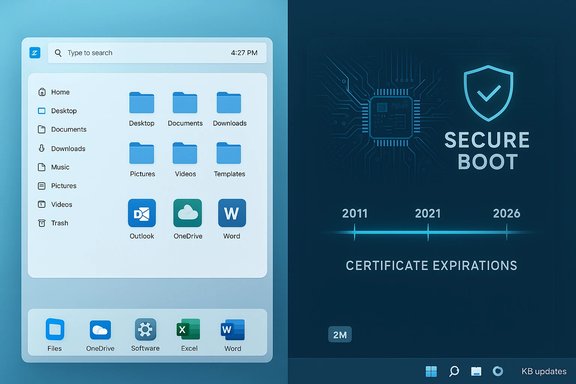
Microsoft’s Secure Boot certificates issued in 2011 (the so-called CA 2011 keys) are scheduled to begin expiring in June 2026, with some certificates reaching their final expiry by October 2026. To maintain boot-time trust and continue signing new boot components, Microsoft and the broader ecosystem are rolling out a set of new 2023 certificates (KEK/UEFI variants) that must be installed on devices before the 2011 certificates lapse. Microsoft has published clear guidance and update mechanisms for both consumer and IT-managed environments.Real-world impact and why gaming headlines followed
Secure Boot is used to validate firmware and early‑boot components. Several anti‑cheat systems for modern PC games (Easy Anti‑Cheat, Vanguard, Ricochet, Javelin, etc. rely on Secure Boot to attest platform integrity. If a device still holds only the old 2011 certificates when those keys expire, the platform’s ability to accept newly signed boot components can be affected, which in turn may disrupt the anti‑cheat signing model and cause game-launch or anti‑cheat failures until updates are applied. Microsoft is explicitly coordinating certificate rollouts via Windows updates (for many devices) and through OEM firmware updates where necessary, and it has published guidance for IT administrators and developers on how to prepare submissions signed with the new 2023 keys.What individual users should do now
- Keep Windows updated — Microsoft is distributing replacement certificates through servicing updates (and will continue to do so in a measured rollout). Installing monthly updates reduces the chance of being left with expiring keys.
- Check Secure Boot state — On Windows, you can check Secure Boot status in System Information (look for “Secure Boot State”) or use PowerShell commands and vendor guidance to inspect enrolled certificates if you manage fleets.
- Update firmware when prompted — Some OEMs may require a firmware-level update to properly enroll the new certificates; follow OEM advisories for BIOS/UEFI updates.
- For gamers — keep anti‑cheat and game clients updated; many game publishers are coordinating with Microsoft and OEMs on these changes. If you see launch or anti‑cheat errors after updates, consult vendor support and confirm Secure Boot and certificate status.
Servicing and preview updates: KB5040525, KB5011543, KB5073097 — practical takeaways
Windows 10: KB5040525 (preview) — WDAC, backups, and driver policy fixes
KB5040525 (a July 2024 preview entry but still referenced in ongoing servicing notes) addresses a cluster of Windows 10 issues that remain operationally important: several Windows Defender Application Control (WDAC) regressions (stop errors when numerous policies are applied, memory leaks during provisioning), Windows Backup failures with certain EFI partitions, and updates to the Kernel Vulnerable Driver Blocklist to harden systems against Bring‑Your‑Own‑Vulnerable‑Driver (BYOVD) attacks. The update also includes servicing stack improvements. If you manage Windows 10 devices still in ESU or transition mode, test these fixes in pilots before broad deployment, because WDAC and driver-blocklist changes can affect third‑party drivers and enterprise‑signed components. Practical steps:- Validate WDAC policies and test provisioning in lab images before pushing to production.
- If you rely on Windows Backup in mixed firmware environments (ESP present), test restore scenarios before broad rollout.
- Keep servicing stack updates applied early to ensure reliable downstream patching.
Windows 10: KB5011543 — Search Highlights preview landing again
KB5011543 is the cumulative preview that introduced Search Highlights (a Start/search experience that surfaces notable daily moments and organization-specific suggestions) for Windows 10 clients and also remedied a number of search-related bugs (including searchindexer.exe issues and Outlook offline search problems). The feature is configurable via group policy / MDM (AllowSearchHighlights) for enterprise management, and the preview update remains optional for cautious environments. Administrators who prefer to control end-user discoverability should use the published policy controls to disable or enable the experience as appropriate. Practical steps:- Use the MDM CSP or Group Policy (AllowSearchHighlights) to manage rollout in business settings.
- Treat preview updates as test candidates; apply through internal rings before broad deployment to production images.
Windows 11 Canary: KB5073097 — early 26H1 Canary fixes
Microsoft pushed KB5073097 into the Canary ring (Build 28020.1371) as a targeted corrective flight for 26H1 early development. The update contains surgical fixes — a pinned-folder invisibility bug in Start, a white flash in File Explorer for dark-mode navigation, keyboard repeat-delay setting mismatch, Windows Terminal elevation freeze from non-admin accounts, and an incorrect Share dialog target. Canary flights are purposely light on documentation and are not production-ready; they’re intended for early validation and telemetry collection. Admins and enthusiasts on Canary should treat such builds as experimental. Practical steps:- If you test Canary builds, collect repro steps and logs for visual glitches and unexpected behavior; file issues through the Insider feedback channels.
- Do not rely on Canary KB numbers as formal servicing documentation when doing compliance inventories; wait for formal Support entries or Update Catalog pages for production KBs.
Chrome’s Mica titlebar flag: experiment continues, not yet mainstream
Google continues to iterate on a Windows 11 Mica titlebar experiment inside Chrome Canary, and engineering notes show the flag has been extended through multiple Chrome milestone versions (the work has been deferred to later milestones such as v160 in Canary). Mica is a Windows 11 visual material that samples the desktop wallpaper once and reuses the sample to create a lightweight, coherent translucency effect. Porting Mica into Chromium’s custom window frame surfaces a range of cross‑cutting engineering issues — caption button geometry, tabstrip alignment, rendering backends, telemetry on possible battery impacts, and accessibility/contrast correctness — which is why Google keeps it behind experimental flags during lengthy validation. For users who idolize pixel-perfect native integration, Mica in Chrome is promising, but it’s still an engineering project rather than an imminent stable release. Practical steps:- Try the flag only in disposable Canary or Dev profiles and avoid enabling experimental UI flags in managed or production images.
- If you maintain automation scripts that assume static window geometry, validate those scripts against Mica-enabled windows to avoid brittle failures.
The Gran Turismo PC conversation (consumer context and caveats)
Consumer guides discussing “how to download Gran Turismo for PC” reiterate the same, longstanding reality: Gran Turismo (notably GT7) remains a PlayStation-first franchise with no official native PC release, and the legitimate ways to play it on PC today are Remote Play (streaming from your PlayStation console) or running older titles via emulation (with the usual legal and practical caveats). Enthusiast guides and gaming sites explain the set of acceptable options and recommend alternative native PC racing titles such as Forza Motorsport, Assetto Corsa EVO, iRacing, and rFactor 2 for players who want a native PC experience right now. Readers should avoid unofficial or pirated ports and understand that emulation can be legally and technically fraught. Practical steps:- Use PS Remote Play for GT7 if you own the game and a PlayStation console.
- Favor native PC racing games for high-fidelity, supported PC play and wheel/peripheral compatibility.
- Avoid questionable “download for PC” claims for current-gen PlayStation exclusives; check publisher statements.
Critical analysis: strengths, trade-offs, and risk map
Strengths across the landscape
- Meaningful trial activity for alternatives: Zorin OS 18’s download volume proves that well‑packaged alternatives can attract serious mainstream interest when platform vendor policies (like Windows 11 hardware gating and Windows 10 EOL) create decision pressure. The product choices that reduce migration friction — familiar UI, cloud continuity, and compatibility triage — are validated by uptake.
- Vendor transparency on firmware/PKI transition: Microsoft’s public guidance and phased rollout plan for Secure Boot certificate replacement is the right approach for a firmware-level trust anchor; the combination of Windows-servicing injection and OEM firmware updates aims to minimize disruption for end-users and IT organizations.
- Surgical stability work in Insider channels: Small, targeted Canary fixes (like KB5073097) show a disciplined engineering cadence focused on UX regressions and reliability rather than premature feature shipping — a sensible risk posture for platform stability.
Trade-offs and risks to watch
- Downloads vs. durable migrations: The conversion gap is real. Even large download numbers don’t guarantee sustained usage or ecosystem shifts without vendor, ISV, and OEM engagement to support drivers, peripherals, and specialized applications over time. Expect meaningful attrition between “trial” and “switch.”
- Certificate rollout complexity: While Microsoft’s plan is clear, firmware variability across OEMs and older device constraints mean some systems may require manufacturer BIOS updates or manual intervention. Organizations with strict update gating or air-gapped devices must build inventories and test plans now.
- Experimental UI churn for enterprise scripting: Chrome’s Mica experiments alter window geometry and rendering behavior; screen-scraping, RPA, and brittle automation scripts can break when non-client areas change. IT teams should vet automation pipelines before enabling such flags in test fleets.
- Preview updates and optional patches: Optional or preview KBs (like KB5011543 or certain Windows 10 previews) can contain useful features but also risk introducing regressions if applied prematurely in production. Use internal rings and canary channels with rollback plans.
Unverifiable or ambiguous claims — flagged
- Exact conversion from downloads to installed base: Zorin’s public downloads figure is verifiable as a count of fetched installer images, but the precise number of completed, permanent migrations is not public and cannot be confirmed without telemetry that Zorin has not published. Treat estimates of “converted desktops” as directional, not definitive.
- Timeframe for universal certificate enrollment: Microsoft’s rollout is ongoing; while the intent is to update most devices via Windows updates and OEM firmware packages, precise timelines for every OEM model or region can vary. Administrators should consult OEM advisories for model‑specific guidance.
Practical checklist: what readers should do this month
- If you’re considering a switch to Linux (Zorin or similar):
- Test via live USB or a VM first; do a pilot on non‑critical devices.
- Validate critical apps (office suites, printers, proprietary peripherals) and cloud access (OneDrive/Google Workspace).
- Back up data before any full conversion.
- If you manage Windows devices:
- Inventory devices for Secure Boot certificate status and firmware update availability; plan to enroll devices with the 2023 certificates before June–October 2026.
- Test KB5040525-like fixes in a lab if you use WDAC or vendor-signed kernel drivers.
- Use group policy/MDM to control Search Highlights and other UX rollouts for end-user environments where discoverability matters.
- If you’re a gamer or run anti‑cheat dependent titles:
- Keep Windows and game/anti‑cheat clients updated.
- If you see launch errors near certificate rollouts, check Secure Boot status and vendor advisories.
- If you experiment with Chrome flags or Canary builds:
- Confine experiments to test profiles and VMs; avoid enabling experimental UI flags in managed images.
- Validate automation and accessibility flows before rolling any flag into production.
Conclusion
The current desktop story is not a single line — it’s a set of coordinated shifts: millions of trial downloads show users are willing to evaluate alternatives when forced to decide; Microsoft’s firmware- and PKI-level certificate refresh is a rare but high‑impact event that requires attention from both consumers and IT; and the usual cadence of servicing updates and Canary fixes underscores that stability and compatibility work never stops.For users and administrators alike, the practical posture is clear: back up, inventory, test, and apply updates on a controlled schedule. Curiosity is healthy — try Zorin OS in a sandbox if the Windows 10 EOL affects you — but pair experimentation with a recovery and support plan. For IT teams, the Secure Boot certificate transition is the highest-priority operational item because it’s a firmware-anchored trust change with ecosystem-wide implications. Keep firmware and Windows updates current, consult OEM guidance for model-specific firmware updates, and prioritize pilot testing before broad rollouts.
The week’s signals suggest a desktop landscape in adjustment: tools and distributions are responding to platform policy decisions, vendors are patching and iterating, and users are voting with downloads and trials. The technical details matter — and for those who care about running productive, secure, and stable desktops, the best course is disciplined testing and staged change management.
Source: WebProNews https://www.webpronews.com/zorin-os...eleases-with-start-menu-file-explorer-fixes/]
