

Is it possible to change the icon for an application which doesn't have a desktop, taskbar etc shortcut? E.g. one which is launched from a hotkey.
📎 AI Summary:
The thread discusses how to change an application's icon when launching it via a hotkey, especially for programs without desktop or taskbar shortcuts. The original poster has trouble finding the "Change Icon" option directly on the executable file, suspecting the icon might be embedded within the .exe. A responder clarifies that changing the icon is possible through the program's shortcut in the Start menu by accessing its properties, but this method doesn't update icons for hotkey launches unless the app is pinned to the taskbar or Start menu. Overall, the discussion highlights that changing icons for certain applications launched via hotkeys is limited and may require pinning to taskbar or start menu to effectively update the icon appearance.
The thread discusses how to change an application's icon when launching it via a hotkey, especially for programs without desktop or taskbar shortcuts. The original poster has trouble finding the "Change Icon" option directly on the executable file, suspecting the icon might be embedded within the .exe. A responder clarifies that changing the icon is possible through the program's shortcut in the Start menu by accessing its properties, but this method doesn't update icons for hotkey launches unless the app is pinned to the taskbar or Start menu. Overall, the discussion highlights that changing icons for certain applications launched via hotkeys is limited and may require pinning to taskbar or start menu to effectively update the icon appearance.
Adamsappleone
U.S.Navy D.A.V.
Member details
- Joined
- Aug 2, 2009
- Messages
- 1,642
From your "Start" menu, expand the program folder you want the icon to be changed, right click on the file that would normally start the program and select "Properties", from there select "Change Icon"
After you've changed the icon and still using a "Hot Key" to start the program, you're not going to see the new icon unless you "Pin to Taskbar" or "Pin to Start Menu"
Hope this helped
After you've changed the icon and still using a "Hot Key" to start the program, you're not going to see the new icon unless you "Pin to Taskbar" or "Pin to Start Menu"
Hope this helped
From your "Start" menu, expand the program folder you want the icon to be changed, right click on the file that would normally start the program and select "Properties", from there select "Change Icon"
After you've changed the icon and still using a "Hot Key" to start the program, you're not going to see the new icon unless you "Pin to Taskbar" or "Pin to Start Menu"
Hope this helped
Doesn't work.
There is no option in any of the six tabs to change the icon. I'd tried this before which is the reason for my query.
Possibly the icon is embedded in the .exe file and can't be changed. You can only change the icon if you pin the app to the taskbar which I don't particularly want to do. The taskbar icon is probably the icon associated with the shortcut rather than the programme icon itself.
Adamsappleone
U.S.Navy D.A.V.
Member details
- Joined
- Aug 2, 2009
- Messages
- 1,642
Just so we're on the same page, you're not going to Start/My Computer/C:/Program Files are you?
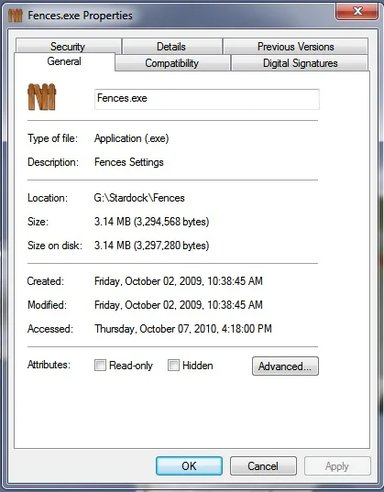
If you're right clicking on the executable file and selecting "Properties" you will get this window, which as you stated does not have the "Change Icon" option
My initial directions may have been a bit vague.
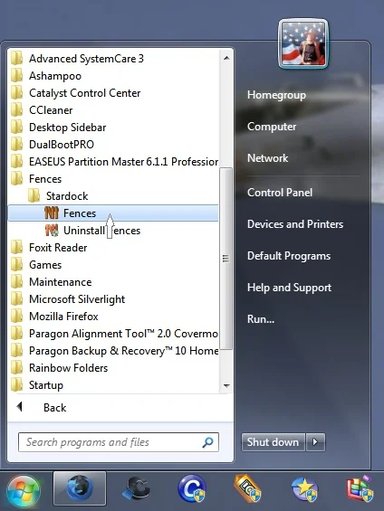
Go to Start/All Programs, then left click to expand the folder of the program you wish to change the icon;
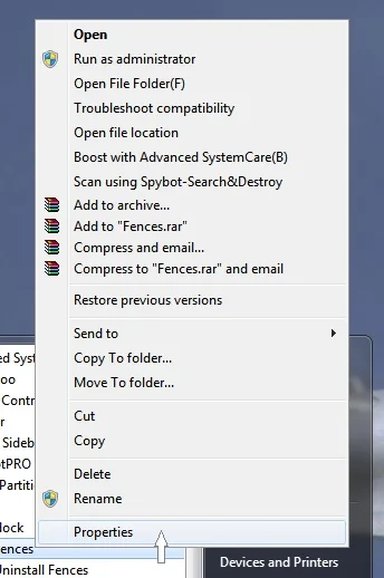
Right click on the program icon and select "Properties"
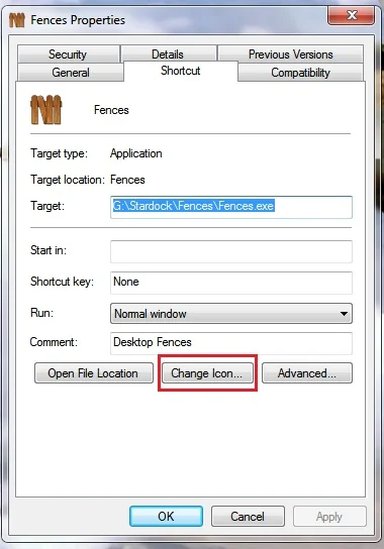
Select "Change Icon"
That should do it for you.
Sorry about the mix up
If you're right clicking on the executable file and selecting "Properties" you will get this window, which as you stated does not have the "Change Icon" option
My initial directions may have been a bit vague.
Go to Start/All Programs, then left click to expand the folder of the program you wish to change the icon;
Right click on the program icon and select "Properties"
Select "Change Icon"
That should do it for you.
Sorry about the mix up