

Okay I only have a problem with one type of icon and that is the folder icon in my pictures.
Here I'll show you:
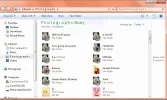
It's the only icon not displaying properly and as you can see it is a couple icons piled on top of each other making a weird looking icon.
I have TuneUp Utilities installed and it has a styler in it but nowhere does this messed up icon appear and when I try to repair the icon cache through that program that does not help.
This problem occurred after I installed Stardock's IconPackager but I removed it already and I even restored my computer to an early point and nothing still messed.
I tried to delete my iconcache and restart explorer.exe and all of that and nothing.
When I try to change my icon for anything by the way, I noticed all these weird icons I can select from and I do not want them there.
PLEASE HELP.