

Quick Instructions to Restore your lost Recycle Bin desktop icon;
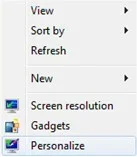
1. Right click the Windows 7 Desktop
2. Click on Personalize
Link Removed
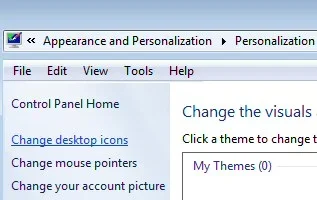
3. Select: 'Change desktop icons'
Link Removed
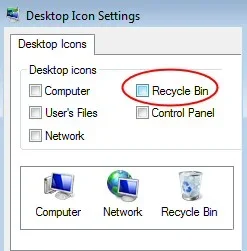
4. At the Desktop Icon Settings, click the box next to: 'Recycle Bin'.
Link Removed
5. You have now restored the Windows 7 lost recycle bin, including all the trash you had in it from before.
Attachments
-
 Microsoft Defender: No threats detected Scan detailspersonalize.webp3.8 KB · Views: 601
-
 Microsoft Defender: No threats detected Scan detailsrecycle_icons.webp11.7 KB · Views: 647
-
 Microsoft Defender: No threats detected Scan detailsrecycle.webp9.4 KB · Views: 731