📎 AI Summary:
The thread discusses a user experiencing Blue Screen of Death (BSOD) errors during gaming, likely caused by outdated or incompatible graphics drivers and possibly antivirus software. Responding, another user suggests updating the BIOS, uninstalling AVG antivirus, and reinstalling the latest Nvidia graphics drivers, with additional instructions for troubleshooting if issues persist. Overall, the conversation reflects a troubleshooting effort focused on updating drivers and system software to resolve the BSOD problems.

Diana Dang

New Member
Member details
Joined
Dec 30, 2013
Messages
3
Thread Author #1
Hello everyone,

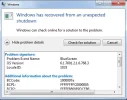
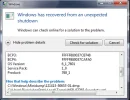
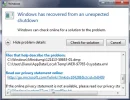
Recently when playing games, I would get BSOD. I'm not sure what the problem is, but I have screenshots of the problem. Thank you for your time.
 

Attachments

  • 1.webp
    1.webp
    20.5 KB · Views: 346
  • 2.webp
    2.webp
    21.8 KB · Views: 353
  • 3.webp
    3.webp
    27.8 KB · Views: 339
Solution
Code:
*******************************************************************************
*                                                                             *
*                        Bugcheck Analysis                                    *
*                                                                             *
*******************************************************************************

Use !analyze -v to get detailed debugging information.

BugCheck 1000007E, {ffffffffc0000005, fffff8800f971eb6, fffff8800377e748, fffff8800377dfa0}

Probably caused by : nvlddmkm.sys ( nvlddmkm+4fdeb6 )

Followup: MachineOwner

Happy New Year! :)

Hi,
The above dmp file is pointing to graphic driver as a likely suspect and most of your...

kemical

Essential Member
Member details
Joined
Aug 28, 2007
Messages
36,163
Hi Diana,
Please read the post found here:
Link Removed
Post the results and I'll read the dmp files asap.
 

kemical

Essential Member
Member details
Joined
Aug 28, 2007
Messages
36,163
Code:
*******************************************************************************
*                                                                             *
*                        Bugcheck Analysis                                    *
*                                                                             *
*******************************************************************************

Use !analyze -v to get detailed debugging information.

BugCheck 1000007E, {ffffffffc0000005, fffff8800f971eb6, fffff8800377e748, fffff8800377dfa0}

Probably caused by : nvlddmkm.sys ( nvlddmkm+4fdeb6 )

Followup: MachineOwner

Happy New Year! :)

Hi,
The above dmp file is pointing to graphic driver as a likely suspect and most of your others were the same apart from a very early one which pointed not only at your gpu driver but AV application too. Looking through the dmp file it does look like you do need to update a few things:

BiosVersion = 5DCN37WW(V2.04)
BiosReleaseDate = 06/05/2012
Please update. A later version can be found here:
Link Removed (I'm assuming you live in the states but you may need to change the web page locale to your own)

avgldx64.sys Thu Oct 31 22:00:14 2013
AVG Anti-Virus has been known to cause issues and is mentioned in one of your dmp files. Please uninstall and use MSE for the duration of this troubleshoot at least.
http://windows.microsoft.com/en-GB/windows/security-essentials-download

nvlddmkm.sys Tue Oct 15 21:27:18 2013
These are your GPU drivers. Uninstall them using the application found here: Link Removed That will remove old bits of driver file left over.
Re-install using the latest Nvidia mobile driver here:
http://www.nvidia.com/download/driverResults.aspx/70187/en-us
If that won't work use the Windows 7 driver found on the manufacturers web page here:
Link Removed

If after updating the above your still seeing bsod please run this app:
http://www.memtest.org/

Please post any new dmp files
 

Solution