📎 AI Summary:
The forum thread discusses a user experiencing frequent BSODs on a new Windows 7 PC, with troubleshooting advice from others focusing on checking system configurations, updating drivers, and installing Service Pack 1. The user is advised to test their RAM using Memtest86 to identify possible hardware faults, as some BSODs may be caused by faulty memory. The overall sentiment suggests that updating drivers, applying system updates, and testing RAM are essential steps to resolve the issue, with hardware replacement as a possible last resort if problems persist.

nordyy

Member
Member details
Joined
Jul 27, 2014
Messages
16
Thread Author #1
Hello all.
Im having bsod in my new pc i bought it about 2 weeks ago..and on 2 other pc i have the same problem ? :/

I use TeamSpeak 3 , Counter Strike 1.6 , Global Offensive etc...
Windows 7

Sorry for my english im from Albanian!
 

kemical

Essential Member
Member details
Joined
Aug 28, 2007
Messages
36,163
Code:
*******************************************************************************
*                                                                             *
*                        Bugcheck Analysis                                    *
*                                                                             *
*******************************************************************************

Use !analyze -v to get detailed debugging information.

BugCheck 50, {fffff900c2d58cf0, 0, fffff9600031c69d, 0}


Could not read faulting driver name
Probably caused by : win32k.sys ( win32k!SFMLOGICALSURFACE::OwnsSurfaceCleanup+2d )

Followup: MachineOwner
Code:
Windows 7 Kernel Version 7600 MP (2 procs) Free x64

Nordy you still haven't applied Service Pack 1.

This is a critical system update and could well fix your issues.

Let's take this a download at a time

Download and run this readiness tool. You can't miss the download button, it's at the top in bright red:
Link Removed

Once that has completed then download and install SP1. This can take a while sometimes over an hour so don't worry if it does just let the install finish:
Link Removed

Once these are installed run windows update again and apply the updates.

Post back once you completed the above.
 

nordyy

Member
Member details
Joined
Jul 27, 2014
Messages
16
Thread Author #22
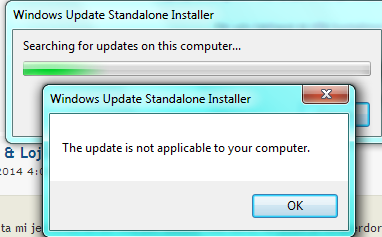
System Update Readiness Tool for Windows 7 (KB947821) [May 2014] ?????

bltoJOa.png
 

kemical

Essential Member
Member details
Joined
Aug 28, 2007
Messages
36,163
Ok so you didn't need it. Now run this download:
Link Removed

Once you open the above you'll see some downloads (after you clicked 'download'). You need this download:
7601.17514.101119-1850_Update_Sp_Wave1-GRMSP1.1_DVD.iso

Once you downloaded it you will need to burn it to disk or put it on a thumb drive. Here's some software that helps with burning to flash memory stick:
http://www.isotousb.com/
 
Last edited:

nordyy

Member
Member details
Joined
Jul 27, 2014
Messages
16
Thread Author #26
With this update my pc get slowmo !!!!!!!!!!!
 

kemical

Essential Member
Member details
Joined
Aug 28, 2007
Messages
36,163
I'm not sure I entirely understand your above post but have you installed the update and then run windows update again?