📎 AI Summary:
The thread discusses a user's issues after upgrading from Windows XP to Windows 8, including errors when downloading programs and an inability to save work in applications like Paint and WordPad. The user seeks assistance, and responses suggest options such as reinstalling Windows 8 or performing a clean installation to resolve the problems. Overall, the conversation centers on troubleshooting upgrade issues, with a focus on potential system corruption and reinstallation as solutions.

vic

New Member
Joined
Dec 2, 2012
Messages
3
Thread Author #1
Hi,

I just upgraded my windows XP to windows 8 and I have 2 major problems:

1. Problem with downloading programs. It always shows

An error Occured:
Package ID : Unknown
Path: Unknown
Error Code: 0x80070005
Source: Engine
User: VIC_GATCH\Victor
Context: Restricted

2. I can't save my work progress in my computer i.e paint & word pad etc. Funny thing is it will give out a "No error occured" notification when it failed to save my work. So I can't give you screen shots of my problem.

Appreciate if somebody can help me. Thanks
 

Last edited by a moderator:
Solution
Hmm.. it does sound like you have some corruption. Try re-installing Win 8 from the file you downloaded but when it asks what you want to keep click nothing. This guide may help:

Link Removed

kemical

Essential Member
Joined
Aug 28, 2007
Messages
36,160
Hi Vic,

Please list your system and what media you used to upgrade. It may be the case that a clean or custom install is needed.
 

vic

New Member
Joined
Dec 2, 2012
Messages
3
Thread Author #3
Hi Kemical,

Thanks for the reply. I downloaded Windows 8 Pro and I did not order for the back-up CD since it will cost me another $25.00.

System Type: 32bit Operating System, x86 based processor
Processor: Geniune Intel (R) CPU, T2050 @ 1.6Ghz
Ram: 2.5GB

Hope that there is a way that I don't need the CD.

Thanks
 

kemical

Essential Member
Joined
Aug 28, 2007
Messages
36,160
Hi Vic,

let's try this first and see how we go..

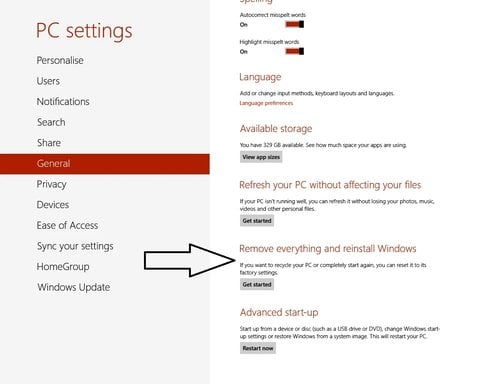
Open the charms by moving the mouse cursor to top or bottom right. Click settings, change pc settings and then General. Scroll down and look for reinstall windows. This will remove all your settings,files and apps so back up what you can.

Link Removed
 

vic

New Member
Joined
Dec 2, 2012
Messages
3
Thread Author #5
Hi Vic,

let's try this first and see how we go..

Open the charms by moving the mouse cursor to top or bottom right. Click settings, change pc settings and then General. Scroll down and look for reinstall windows. This will remove all your settings,files and apps so back up what you can.

Link Removed

HI Kemical,

I tried this but when I get to choosing the "GET STARTED" it won't respond. Actually I tried every button in the general settings and they all won't respond.
 

kemical

Essential Member
Joined
Aug 28, 2007
Messages
36,160
Hmm.. it does sound like you have some corruption. Try re-installing Win 8 from the file you downloaded but when it asks what you want to keep click nothing. This guide may help:

Link Removed
 

Solution