nichosi
Fantastic Member
Member details
- Joined
- Aug 1, 2014
- Messages
- 80
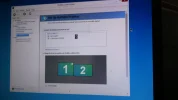
After changing the video card the second monitor does not show up in screen resolution & both screens show the same thing.
How do I get the screen resolution to show both screens like before so that I can select what shows up in the second screen.
Home build, Asus P5K Premium WiFi,Intel,
CPU Intel Core 2 Quad Pro Q6600 95W 2.4GHz, OCZ Vendetta Cpu Cooler, 2x2GB, 240-pin DIMM, DDR2 800 (400mhz) PC2-6400, EVGA GeForce 6600 GTX, Excelsior sata 500gb, Corsair TX750M Psu, X45, Win8.1 64
How do I get the screen resolution to show both screens like before so that I can select what shows up in the second screen.
Home build, Asus P5K Premium WiFi,Intel,
CPU Intel Core 2 Quad Pro Q6600 95W 2.4GHz, OCZ Vendetta Cpu Cooler, 2x2GB, 240-pin DIMM, DDR2 800 (400mhz) PC2-6400, EVGA GeForce 6600 GTX, Excelsior sata 500gb, Corsair TX750M Psu, X45, Win8.1 64

 Your best bet is to FIRST BACKUP ALL OF YOUR PERSONAL DATA TO EXTERNAL MEDIA! THIS WOULD INCLUDE YOUR LIBRARY FOLDERS FOR DOCUMENTS, PHOTOS, MUSIC, VIDEOS, AND ANY SAVED E-MAILS OR ATTACHMENTS IN ORDER TO PREVENT IRRETRIEVABLE DATA LOSS!!