📎 AI Summary:
The thread discusses a Lenovo Y560 with a broken ATI Radeon 5730 graphics card, leading the user to use the integrated Intel HD 3000 instead. The original poster inquires whether the reported 3.8 GB of usable RAM reflects their current setup with the integrated graphics or if their discrete GPU is still functioning. A respondent clarifies that this amount indicates RAM available with integrated graphics and questions if the discrete GPU is truly non-functional, providing a driver link. The original poster explains that their discrete GPU was likely damaged due to frequent BSODs and screen failures linked to the graphics card, which they resolved by uninstalling the AMD driver, thus confirming the GPU's continued malfunction. Overall, the discussion confirms that the current RAM measurement is normal for integrated graphics use and that the discrete GPU appears to be physically damaged and non-operational.

Michael226

New Member
Joined
Feb 18, 2014
Messages
8
Thread Author #1
Hi!

I have a Lenovo y560 with its main graphic card (ATI radeon 5730) broken. Right now it's using its integrated graphic card (an intel HD 3000). I have read that the integrated graphic card doesn't allow my computer to use most of its installed RAM. The installed RAM is 4Gb.

I followed the procedure on the first image to find out how much usable RAM my computer has.

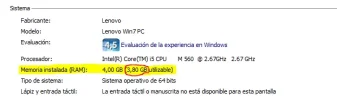
The second image shows what the result was:

So here is my doubt: Is that the actual usable RAM that my computer has right now, with the integrated graphic card activated, or is it the default usable RAM that my computer should have asuming that its main graphic card is still working?

Thank you so much for your time and please forgive my English. I'm from Argentina and I don't use it very often.

 

Attachments

  • ram pro.webp
    ram pro.webp
    14.7 KB · Views: 505
  • usabe ram.webp
    usabe ram.webp
    16 KB · Views: 464
Solution
That 3.8 GBs. shown is with the integrated Intel graphic's. How do you know that your Radeon HD5730 isn't working ? Here's the link to AMD's current driver for your Radeon HD5730. Link Removed AMD own's ATI and dropped the ATI name a while back.

brkkab

Excellent Member
Joined
Mar 4, 2013
Messages
2,346
That 3.8 GBs. shown is with the integrated Intel graphic's. How do you know that your Radeon HD5730 isn't working ? Here's the link to AMD's current driver for your Radeon HD5730. Link Removed AMD own's ATI and dropped the ATI name a while back.
 

Solution

Michael226

New Member
Joined
Feb 18, 2014
Messages
8
Thread Author #3
That 3.8 GBs. shown is with the integrated Intel graphic's. How do you know that your Radeon HD5730 isn't working ? Here's the link to AMD's current driver for your Radeon HD5730. Link Removed AMD own's ATI and dropped the ATI name a while back.


Hi! Thank you for answering my question, is good to know that my computer still uses most of its installed RAM.


About the graphic card:

it was months ago, in February. My computer started to show a lot of random BSOD and after the reboot the screen went completely black without letting me do anything.

I made a post here about that asking for help:

http://windowsforum.com/threads/i-h...f-bsod-lately-please-help.184388/#post-595499


After searching in the offical forums of Lenovo, I learned that it was a very common problem on the y560 and that it involved the graphic card. So I uninstalled it and the problem stoped. Since then I have been using my notebook with the integrated intel HD.

I think is broken because I downloaded the driver from Lenovo and the problem didn't stop. The only way I could solve it was by unistalling the AMD graphic card.