

Last week i posted about slow boot time. I was asked to check free space and had about 300gb left. Well this morning, my laptop had a warning message saying 0 bytes free of 909gb. I checked and sure enough, 0 bytes free. Wtf is going on? Thanks Sent from my SM-S920L using Tapatalk
📎 AI Summary:
The forum thread discusses a user's issue with their laptop's rapidly decreasing free disk space, which dropped from 300GB to 0GB unexpectedly. They use TreeSize and Process Monitor (Procmon) to identify that a Windows update or system operation has caused significant storage consumption, with Procmon showing over 200GB used during boot logging. The main advice involves properly capturing and clearing boot logs with Process Monitor, and the user seeks clarification on how to do this for future monitoring. The overall tone is troubleshooting-focused, with helpful suggestions exchanged.
The forum thread discusses a user's issue with their laptop's rapidly decreasing free disk space, which dropped from 300GB to 0GB unexpectedly. They use TreeSize and Process Monitor (Procmon) to identify that a Windows update or system operation has caused significant storage consumption, with Procmon showing over 200GB used during boot logging. The main advice involves properly capturing and clearing boot logs with Process Monitor, and the user seeks clarification on how to do this for future monitoring. The overall tone is troubleshooting-focused, with helpful suggestions exchanged.
Solution

The process for a boot log capture is
- Enable boot logging in procmon
- Reboot
- Launch procmon (let it collect all the logs)

Member details
- Joined
- Jul 4, 2015
- Messages
- 8,994
You can use something like TreeSize to figure out what is using up the space. I'd suggest posting your top 10 offenders before deleting anything though. TreeSize Free - Quickly Scan Directory Sizes and Find Space Hogs
Just did treesize and here is a screen shot. Im wondering if it was a windows update because i have not added nor downloaded anything or installed anything.. maybe spyware or virus Users has 511gb and windows has 297. Program fils has 45You can use something like TreeSize to figure out what is using up the space. I'd suggest posting your top 10 offenders before deleting anything though. TreeSize Free - Quickly Scan Directory Sizes and Find Space Hogs
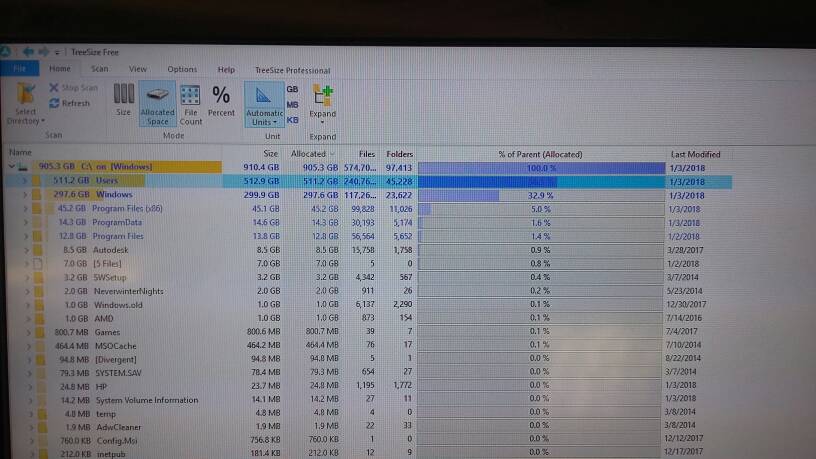
Screenshot🙂 thanks guys🙂Can you expand Windows and show the top offenders there it should definitely not be that large.
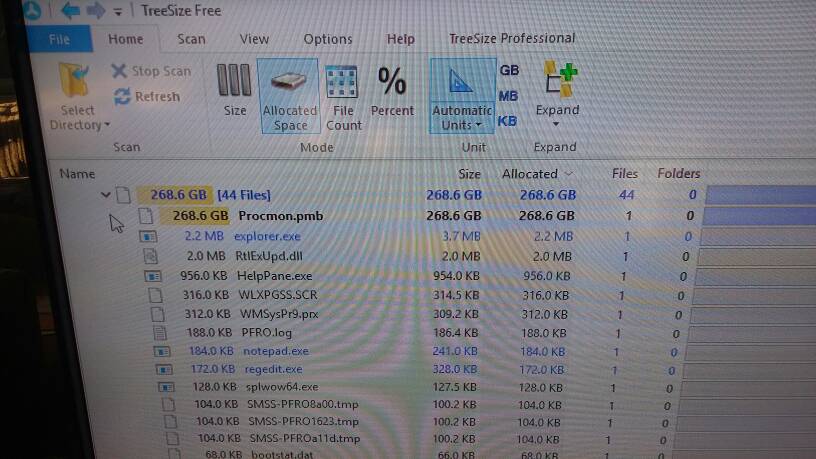
I did enable bootlogging but i did restart program, unless my laptop restarted by itself at night and i done did disnt restart procmon. Ok, how to clear that? Sent from my SM-S920L using Tapatalk
Member details
- Joined
- Jul 4, 2015
- Messages
- 8,994
The process for a boot log capture is
- Enable boot logging in procmon
- Reboot
- Launch procmon (let it collect all the logs)
Ok cool. I just did that. Thanks Allright. One last question before marking solved. If i wanted to capture the bootlog for this forum, i would enable boot logging, restart pc, then open up procmon and then.... Thanks Sent from my SM-S920L using Tapatalk