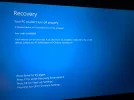
The error you're encountering, error code 0xc000000f, is typically related to issues with the Boot Configuration Data (BCD). When the system can't access a required device during booting, it suggests problems such as corrupted boot settings, missing files, or a failing hard drive. Below are steps you can take to resolve this issue:
Method 1: Rebuild the Boot Configuration Data (BCD)
You can use the Command Prompt from recovery options to manually fix the BCD.
Steps:
- Boot into recovery mode using a bootable USB drive or Windows installation disc.
- Navigate to Repair your computer > Troubleshoot > Advanced Options > Command Prompt.
- Run the following commands one by one:
Code:
bootrec /fixmbr
bootrec /fixboot
bootrec /scanos
bootrec /rebuildbcd
- Restart your computer and check if the issue persists.
This process repairs the Master Boot Record (MBR) and rebuilds the BCD.
Method 2: Startup Repair
- Boot using your recovery or installation media.
- Select Repair your computer > Troubleshoot > Advanced Options > Startup Repair.
- Let the tool diagnose and fix startup problems automatically.
Method 3: System File Check and Disk Check
- Boot into the Command Prompt as previously described.
- Execute the following commands:
- Check for disk errors:
chkdsk /r
- Repair corrupted system files:
sfc /scannow
- Restart your computer.
Notes:
- If these steps do not work, the issue might be hardware-related (e.g., hard drive failure). Consider checking the disk health using diagnostics tools.
- Ensure your BIOS settings are configured correctly, especially the boot order.
Let me know if you need further guidance on any of the steps!