📎 AI Summary: The thread discusses a user's issue with Windows 10 running at 100% disk usage, causing slow performance, which was temporarily resolved but led to new problems. The user struggles with installation errors, including a fatal exception during program setup and difficulties reinstalling or reverting their system after failed resets. Several contributors suggest troubleshooting steps such as checking processes in Task Manager, booting into Safe Mode, updating drivers, and cautioning about BIOS and chipset updates, with the overall tone being helpful but concerned about escalating system issues.
Microsoft Defender: No threats detectedScan details
Sorry I am sort of a newbie sorry if I forgot any thing, let me know if I need to add anything. Okay so I noticed when I started my computer today that the disk is at 100% more or less all the time right now. I cannot figure out why this is happening and it causes my machine to go really slow. It took 20 minutes to just try and write this post and even just boot up google chrome? Is there anything I can do?
I have not seen this happen for a long time maybe 6 months ago I did but it was a driver conflict? I am not sure this is the same though that caused my machine to crash, this has not happened yet though.
Slight update while I was typing this the disk dropped to 3% for a while but when back up after a while
Hi,
Try booting your PC into SAFE MODE, and look at your utilization. It it drops off substantially; say less than 50% when idle, you most likely have an app or service in your Startup that is the culprit or culprits. If this is the case, you can go into MSCONFIG.EXE and uncheck all of your Startup apps, and reboot. When the utilization jumps back up to 100%, the last app you enabled and rebooted from is the Culprit and needs to be uninstalled from your W10.
Hey thanks for the help it seems to be working now but I have an issue I am trying run a program that did work before battle net but now it does not open. I tried reinstalling the program and it made this file in a folder called Errors.
Also It seems to be applying to me installing anything? I am not sure what is causing this issue
I got this error : external exception c0000006
On the second, looking at your screenshot, you have a ton of online games installed. I do not play those on any of my computers, but several of our Admins here are avid gamers and may be able to help you. Also, have you tried posting your error message on the forum board of the maker of the game you are having the error with? Battle-something???
You said you didn't have this problem with this Game before. What is your EXACT version of W10 you are running please? To find it, take a look here at this Post I just did for another user: Windows 10 - Laptop appeared to reset when I clicked on restart
There are 3 major versions of W10; as you can see from my linked Post (v1511: 2015, v1607: 2016, and v1703: April 2017). Have you updated your computer to any of these newer versions since you last played/installed this Game? If so, you might need to visit the website or phone up the company who writes that Game and see if there are any newer updates or patches need to run the latest W10 version, also called the CREATORS UPDATE, v1703. If so, download that version from them, after uninstalling your broken version and see if it works. If it works, your Game was simply out of date and you're all set to go!
If the problem persists, I would then begin checking for driver support and installing all current drivers and updates including BIOS and CHIPSET updates from your PC or Motherboard manufacturer. We don't have you hardware specs, but that would also be helpful to have. Remember, if you've never applied either BIOS or CHIPSET drivers to your computer before, it is an extremely HIGH-RISK procedure, and 95% of first-time users who try it fail and can bork your Motherboard/PC. Better to pay a licensed Tech to do this for you.
Hopefully, some of our other Gamer experts here can chime in and direct you to other possibilities I don't know about. Information is the biggest thing we need on your computer, since we can't see it and touch it from here if you know what I mean!
if you've never applied either BIOS or CHIPSET drivers to your computer before, it is an extremely HIGH-RISKprocedure, and 95% of first-time users who try it fail and can bork your Motherboard/PC.
In the past this may have been true, but no longer. Most UEFI based systems now have a bios flash util you can boot to. As an example mine has M Flash and my other board has @bios. Always use them and never flash from within windows and the likely hood of bricking a board is minimal. As for chipset drivers installing them isn't high risk at all. Also 95% I'm sorry but thats just complete nonsense.
Thanks bigbeard jedi! I did the command to find the version and that is listed below:
version 1703 os build 15063.483
also some other things:
1. I do want to find information for you and if you list or link how I can do that I would!
2. I think there might be more wrong than appears. I tried downloading the graphics card (nividia geforce gtrx 1060 3gb) drivers but they were failing to install.
3. Actually I seem to not be able to download and install any programs and I am not sure why.
4. I tried even reverting to a earlier save state and even wiping the machine clean and doing a clean reset of the computer but both times it gave me an error and then just stopped!
5. I am worried and wondering why this is happening any advice to try and figure it out?
6. As your advice I tried the company forums but there advice was delete files in program data folder and reinstall but I cannot seem to be able to boot up the app when I download so they are not helping/
Sorry It did not give me an error. It said "an error has occurred all changed have been reverted " or something close to this nature.
I did also try fixing an image of the drive but got a super big error print out: at this link Link Removed
I tried copying here but it was to big so it is on google docs. Also any advice on to do something to try and create an error. I am trying to find them but I am sort of newbish at this. But I do know I cannot open many programs (it seems chrome, slack, and pokemon tcg can open most others will not for some reason it just stalls out. Any time I try and install a program nothing happens. It starts then just dissapears. I am unable to clean reboot the machine like I said.
On a quick look you're suffering file corruption. Can you run chkdsk c: /f /r in a admin command prompt which may take awhile. After that can you run sfc /scannow and follow that with dism /online /cleanup-image /restorehealth and then try installing them again. The chkdsk command will require you to reboot.
On looking closer there are hundreds of them which just isn't right. So I'm thinking the hard disk is on it's way out. Could you download hwinfo64 and post a screenshot of the smart info for your hard disk please. I've never seen so many corrupted files in the driver store before and I've been doing this for nearly 30 years.
Are you taking screenshots with prnt screen, if you just want to share an app with select the app and press alt + prnt screen, then paste into paint so you can save it. The HDD though it could just be a bad drive, but won't give up on it yet. Have you tried a clean install of windows, which would be the best way to see if its the drive. But before that if you get seatools and create a bootable dvd/usb with it, you could do an extended drive error test which would help rule out this being the hardware and not windows or a driver doing this.
Another thought before I head off, in HWINFO find the SSD drive, then find what the drive health is. It's under drives, sata. In the morning I'll check back and continue helping. In the mean time another member will hopefully be around in your timezone.
yes sorry the important part on that one was the external exception c0000006.
ok for the last parts you were saying I am not 100% sure on what to do to try that and anyway you could link or make it more , clear? I am not sure what seatools is ? I am willing try those more of not 100% they are or how to do it. I do want to try and fugyre this out
also I am not able to install the hwinfo32 at all period
I shall go find them all quickly for you. Guide on creating a seatools bootable usb. Appologies but I'm now off to sleep. Is 4:30am here. I will check later though and good luck.
Microsoft Defender: No threats detectedScan details
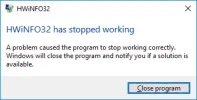
Okay here is a photo of the app before it crashes, It seems like it installed but crashed 10-15 seconds after I boot it 🙁 then it crashed
And also thank you for helping me ! I am not trying to stop you from your sleep ! Any help is appreciated and on your time and conditions I am just thankful you are willing to help!
I think this is a better picture I can capture before it crashes!!
Microsoft Defender: No threats detectedScan details
Attachments
upload_2017-7-30_20-33-29.webp
10.3 KB
· Views: 356
Microsoft Defender: No threats detectedScan details
The thread discusses a user's issue with Windows 10 running at 100% disk usage, causing slow performance, which was temporarily resolved but led to new problems. The user struggles with installation errors, including a fatal exception during program setup and difficulties reinstalling or reverting their system after failed resets. Several contributors suggest troubleshooting steps such as checking processes in Task Manager, booting into Safe Mode, updating drivers, and cautioning about BIOS and chipset updates, with the overall tone being helpful but concerned about escalating system issues.



 Better to pay a licensed Tech to do this for you.