


Brendan McCourt
New Member
Member details
- Joined
- Jan 16, 2021
- Messages
- 2
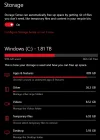
My PC has a 2TB hard drive, and I currently only have 866GB free. When I go into Settings and go to storage, it shows that my 'Apps and Features' take up around 890GB, which seems extremely high. All the other categories seem fine, only taking up around 20GB. I went into Steam/Uplay/Origin and added the games up they all only take up around 500GB. I don't have any large apps on here, so I don't know what's taking up so much space. 860GB is plenty of free room, but I still want to know what is taking up so much space on my PC. Is there anything you can think of, or anything I can do to check what is taking up so much?
Attachments
-
 Microsoft Defender: No threats detected Scan detailsimage_2021-01-16_090617.webp24.5 KB · Views: 178


