📎 AI Summary:
The forum thread discusses a user experiencing issues with getting audio from their TV tuner to play through a Bluetooth headset on a Windows desktop. Despite selecting the Bluetooth headset as the audio output device in SuperTV, no sound is heard, possibly because the TV tuner’s audio output is connected directly to the motherboard’s audio input rather than routed through the system’s default audio device. The user also notes their Realtek HD audio drivers do not show any Bluetooth audio options, and troubleshooting efforts, including setting the headset as the default device, have not resolved the problem. Overall, the conversation suggests that properly routing the TV tuner’s audio output and ensuring Bluetooth audio device compatibility with the drivers are key to solving the issue.

ramace

New Member
Joined
Jun 20, 2010
Messages
14
Thread Author #1
Hi,

I recently bought a bluetooth headset. I connect it to my Desktop through bluetooth-dongle. Everything (music/movies, game sounds, system sounds etc.) works fine.

The problem is the audio from my Tv Tuner output is not audible on the bluetooth headset. I am using SuperTV for viewing TV on my Desktop. The settings in SuperTV shows Bluetooth Headset as one of the options for Audio Output, even after selecting that nothing is audible on the bluetooth headset :frown:

Any leads on troubleshooting / fixing the problem would be great.

Thanks in advance..
 

Solution
I am using SuperTV for viewing TV on my Desktop. The settings in SuperTV shows Bluetooth Headset as one of the options for Audio Output, even after selecting that nothing is audible on the bluetooth headset
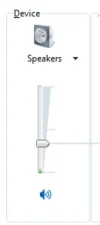
Try to set the Bluetooth Headset the default system audio output, system icon tray -> mixer (or control panel-> sound ) -> click on 'device' and select your headset device :
. ADD.webp


If you still can't hear the tv audio output, then most likely the tuner's audio is connected directly to your speakers - that's why you don't receive tv sound in your bluetooth headset. You may need to connect your tv tuner audio output directly to the headset.

cybercore

New Member
Joined
Jul 7, 2009
Messages
15,626
I am using SuperTV for viewing TV on my Desktop. The settings in SuperTV shows Bluetooth Headset as one of the options for Audio Output, even after selecting that nothing is audible on the bluetooth headset
Try to set the Bluetooth Headset the default system audio output, system icon tray -> mixer (or control panel-> sound ) -> click on 'device' and select your headset device :
.ADD.webp


If you still can't hear the tv audio output, then most likely the tuner's audio is connected directly to your speakers - that's why you don't receive tv sound in your bluetooth headset. You may need to connect your tv tuner audio output directly to the headset.
 

Solution

JessicaD

New Member
Joined
May 11, 2009
Messages
394
Please let us know if Cybercore's advice works. Because most audio features work through the headset, I'm going to guess the last part of Cybercore's post will probably be the best solution.
 

ramace

New Member
Joined
Jun 20, 2010
Messages
14
Thread Author #4
Thanks for the reply cybercore and JessicaD. I will try the solution and keep you posted whether that worked or not ..

Thanks once again.
 

ramace

New Member
Joined
Jun 20, 2010
Messages
14
Thread Author #5
Hi,

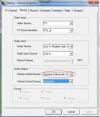
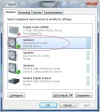
I tried the solution provided by cybercore, still no luck.

Adding few more details, should have done earlier :frown:

I have connected the TV Tuner "audio out" to my motherboard's "audio in".

Attached are the sreen-shots of the settings which I tried.
I am using Realtek HD as my audio drivers, that doesn't show any settings for bluetooth audio. Could that be the problem, if so then any help related to that ?

Thanks in advance.
 

Attachments

  • S2.webp
    S2.webp
    16.9 KB · Views: 773
  • S1.webp
    S1.webp
    27.9 KB · Views: 644

cybercore

New Member
Joined
Jul 7, 2009
Messages
15,626
Link Removed

How about 'volume control source' - is there also 'speakers bluetooth' on the drop-down ?
 

ramace

New Member
Joined
Jun 20, 2010
Messages
14
Thread Author #7
Hi cybercore,

There is no 'speakers bluetooth' or any other bluetooth related option in 'volume control source'