blockaderunner
New Member
Member details
- Joined
- Dec 30, 2015
- Messages
- 1
I have just bought me a Dell with Windows 8. What a disappointment!
My first problem: I cannot change the Windows language!! I've bought the computer in Brazil, but I want its exhibition language to be English (UK). Even though I have that language option, the main exhibition language seems to be 'locked' on Brazilian Portuguese and there is no way I can alter it! Help!
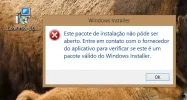
My second problem: This machine won't let me install an msi file, not even as an administrator!!! I get the following error message, try as I may (oh yeah, it's in Portuguese, by the way -- it translates as 'this installation package cannot be opened... please verify if it is a valid windows installer...' etc.
Thank you for any help you can give.
My first problem: I cannot change the Windows language!! I've bought the computer in Brazil, but I want its exhibition language to be English (UK). Even though I have that language option, the main exhibition language seems to be 'locked' on Brazilian Portuguese and there is no way I can alter it! Help!
My second problem: This machine won't let me install an msi file, not even as an administrator!!! I get the following error message, try as I may (oh yeah, it's in Portuguese, by the way -- it translates as 'this installation package cannot be opened... please verify if it is a valid windows installer...' etc.
Thank you for any help you can give.