

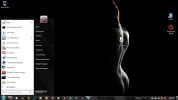
There are four desktop icons including the Start Menu (open) that will not move, do not function, I ran a scan, I believe it was scannow and that shows file corrupt
I am able to use the laptop but these icons need to go, I created another Recycle Bin that functions and I am able to open another Start Tab on top of the unmovable one.
The error message I received from scannow is:
Microsoft-Windows-ieframe, Version = 11.2.9600.18282, pA = PROCESSOR_ARCHITECTURE_AMD64 (9), Culture neutral, VersionScope = 1 nonSxS, PublicKeyToken = {l:8 b:31bf3856ad364e35}, Type neutral, TypeName neutral, PublicKey neutral in the store, file is missing
I am not a computer guru, but I can get around fairly well.
Thanks
I am able to use the laptop but these icons need to go, I created another Recycle Bin that functions and I am able to open another Start Tab on top of the unmovable one.
The error message I received from scannow is:
Microsoft-Windows-ieframe, Version = 11.2.9600.18282, pA = PROCESSOR_ARCHITECTURE_AMD64 (9), Culture neutral, VersionScope = 1 nonSxS, PublicKeyToken = {l:8 b:31bf3856ad364e35}, Type neutral, TypeName neutral, PublicKey neutral in the store, file is missing
I am not a computer guru, but I can get around fairly well.
Thanks
Attachments
-
 Microsoft Defender: No threats detected Scan detailsIcons Frozen.webp41.2 KB · Views: 281


