📎 AI Summary:
The user Peterr asked why Disk 0 appears as Partition(2) and whether it should be fixed. Neemobeer explained that this is normal behavior due to the lack of a label on the boot partition, which is just a descriptive identifier for humans. The overall sentiment is helpful and informational, with Peterr expressing gratitude and the community sharing useful insights.

Peterr

Essential Member
Joined
Mar 31, 2011
Messages
1,173
Thread Author #1
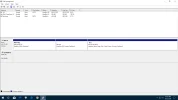
Could you please tell me why disc 0 shows as partition(2) and if it should be fixed, how to do so?
I do have an image I can recover if necessary.
Thank you
 

Attachments

  • Untitled.webp
    Untitled.webp
    41.2 KB · Views: 169
Solution
It's because the boot partition isn't typically assigned a label hence the disk/partition # to id it in disk management. This is normal behavior.

Neemobeer

Windows Forum Team
Staff member
Joined
Jul 4, 2015
Messages
8,995
It's because the boot partition isn't typically assigned a label hence the disk/partition # to id it in disk management. This is normal behavior.
 

Solution

Peterr

Essential Member
Joined
Mar 31, 2011
Messages
1,173
Thread Author #3
I should not have been in the BIOS but needed to boot. I did also work with some flash drives. I was afraid I did something to that disk partition.
If it needs a label and I am told how I will be glad to do so, but if you feel it is functional as far as updates go and is ok, I will just thank you.
Peter
 

Neemobeer

Windows Forum Team
Staff member
Joined
Jul 4, 2015
Messages
8,995
It does not need one. A label is just a description field. It serves no purpose other than something a human can read, think description field.