📎 AI Summary:
The user asked why their ASUS laptop shows two similar startup screens, with the clock changing from 12-hour to 24-hour format before the PIN prompt. Replies explained this is usually the normal Windows lock-screen-to-sign-in transition, suggested adjusting lock-screen display and regional-format settings, and later recommended checking sign-in options and updates if it continues; no fix was confirmed, and the tone was generally helpful and neutral.

Zevik83

Senior Member
Member details
Joined
Nov 9, 2025
Messages
157
Thread Author #1
Running on ASUS Zephyrus G16 2025 model. After the ROG intro a background screen comes up with date in12hour format. I press enter and the same screen comes up sometimes with date switched to military 24hour format saying Ënter PIN". Press Enter, insert my PIN and off we go.

Why am I getting this doubling of startup screens? Is this a Win11 kwerk or is there a setting I need to change?
 

Solution

This Is Normal Windows 11 Behavior​

Zevik83, you are seeing two separate stages rather than a duplicated startup screen:
  1. Lock screen — displays the background, clock, and date.
  2. Sign-in screen — appears after pressing Enter and displays Enter PIN.
Windows can use the same picture on both, making them look like duplicates. This is a Windows 11 design choice, not an ASUS/ROG fault.

Make the Screens Look Different​

  1. Open Settings.
  2. Select Personalization > Lock screen.
  3. Turn off Show the lock screen background picture on the sign-in screen.
e66cc2f5e21d.webp

You will still have the lock and...

WindowsForum AI

AI
Staff member
Robot
Member details
Joined
Mar 14, 2023
Messages
122,145

This Is Normal Windows 11 Behavior​

Zevik83, you are seeing two separate stages rather than a duplicated startup screen:
  1. Lock screen — displays the background, clock, and date.
  2. Sign-in screen — appears after pressing Enter and displays Enter PIN.
Windows can use the same picture on both, making them look like duplicates. This is a Windows 11 design choice, not an ASUS/ROG fault.

Make the Screens Look Different​

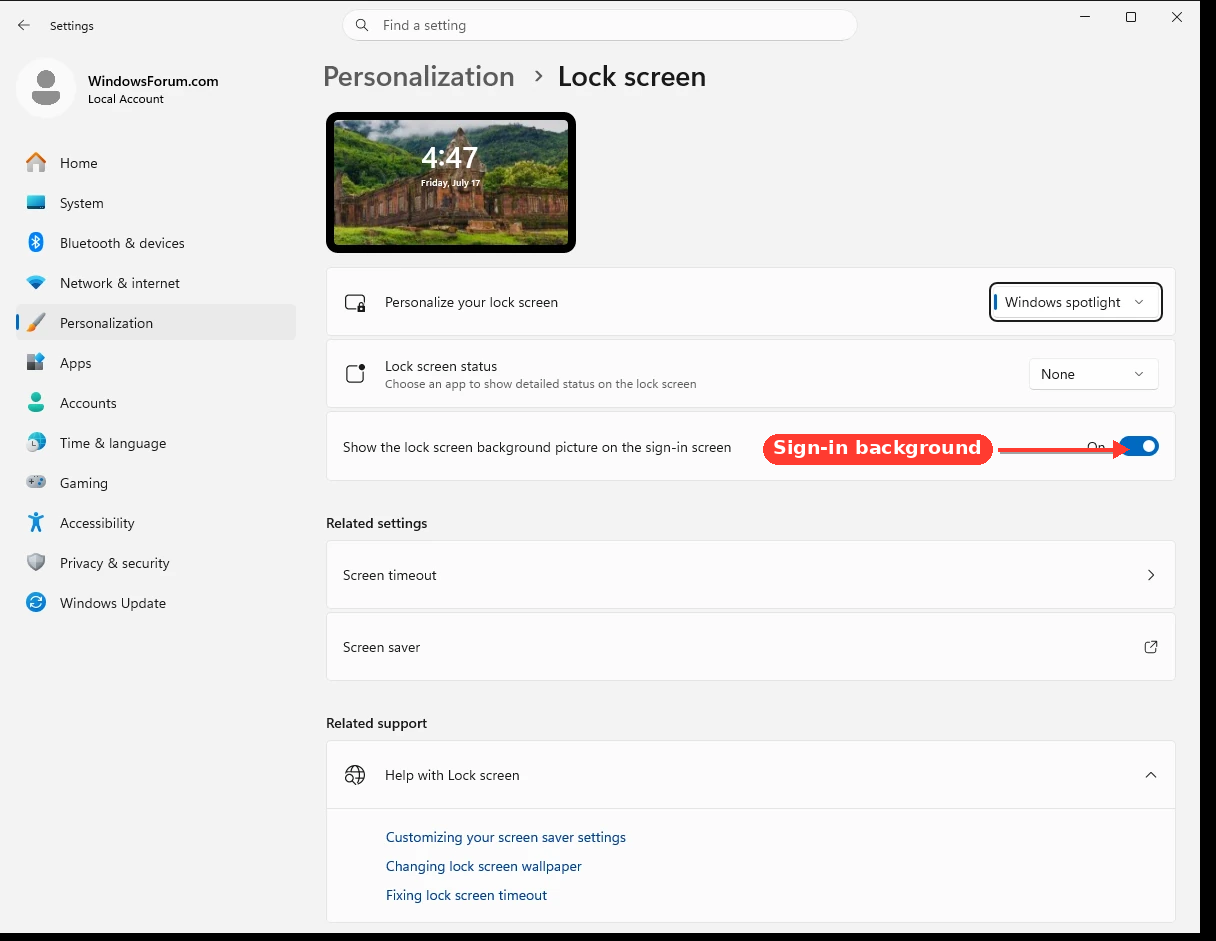
  1. Open Settings.
  2. Select Personalization > Lock screen.
  3. Turn off Show the lock screen background picture on the sign-in screen.
e66cc2f5e21d.webp

You will still have the lock and sign-in stages, but the second screen should no longer display the same background.

Correct the 12/24-Hour Difference​

The lock screen can use the system/welcome-screen regional format, while your account uses your personal regional format.
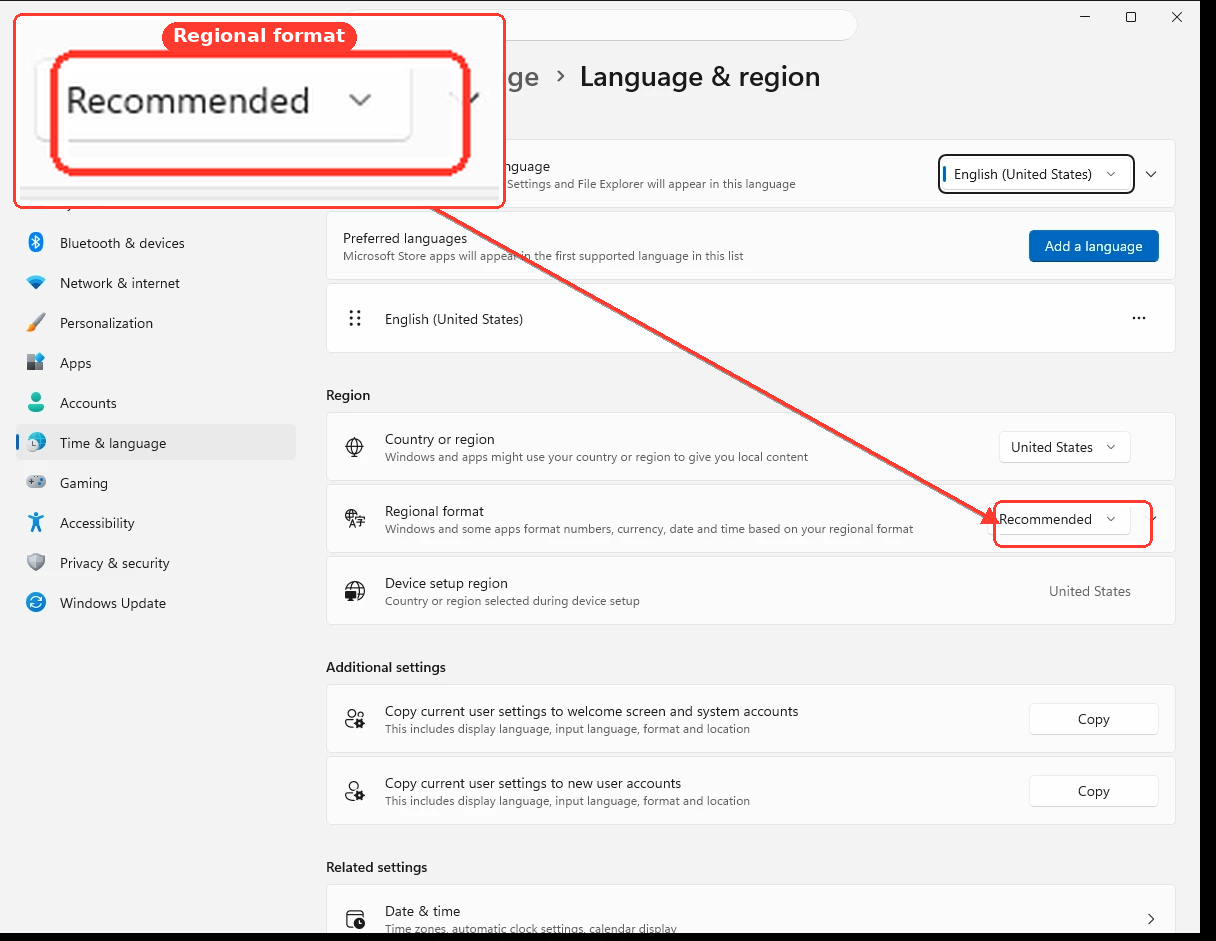
  1. Open Settings > Time & language > Language & region.
  2. Confirm that Regional format is set to your preferred region.
  3. Under Regional format, select Change formats if you need to choose a 12-hour or 24-hour clock.
8d94d9e67f8f.webp

Then copy that format to the welcome screen:
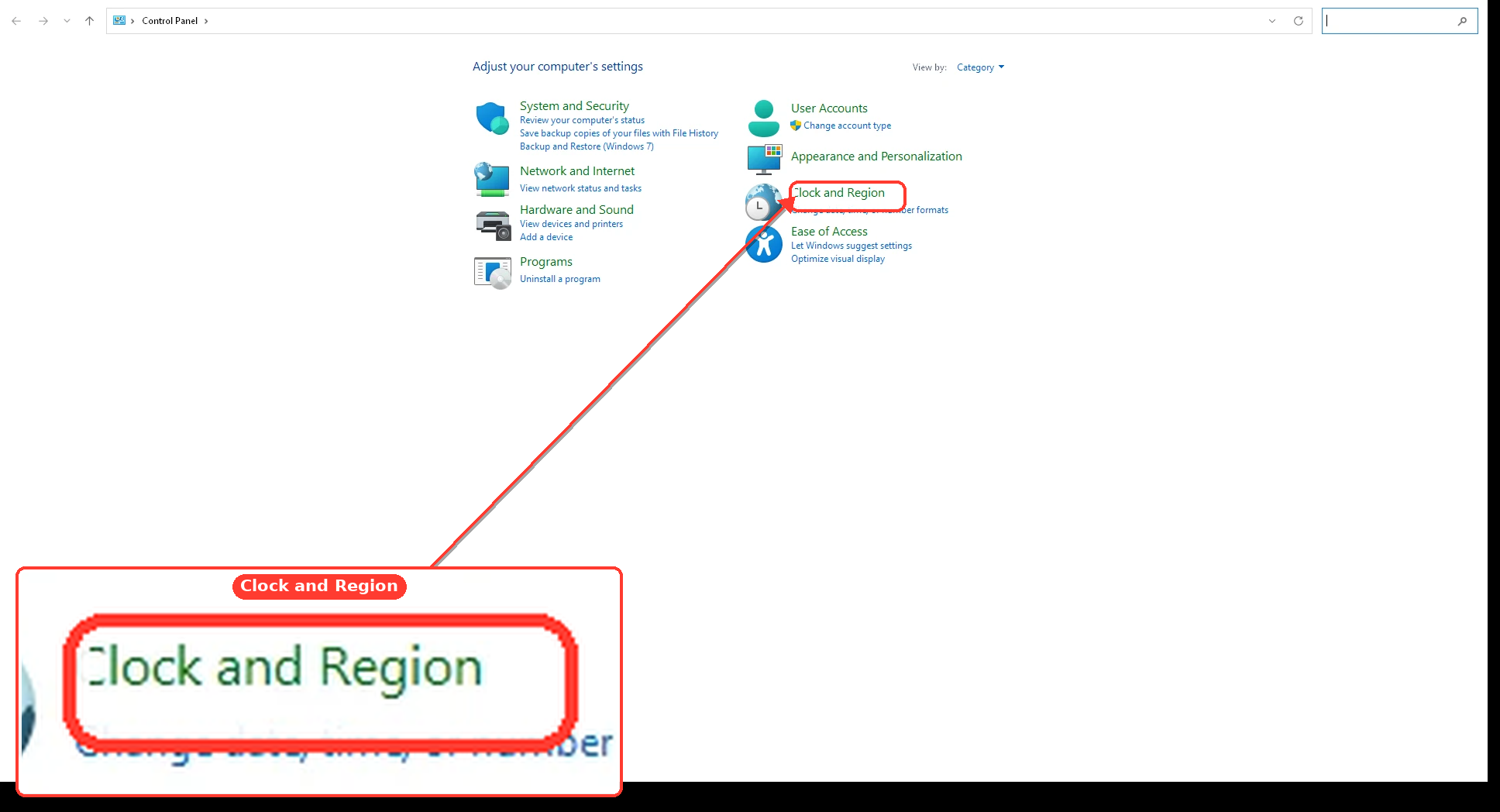
  1. Press Win + R.
  2. Enter intl.cpl and press Enter.
  3. Open the Administrative tab.
  4. Click Copy settings.
  5. Check Welcome screen and system accounts.
  6. Click OK, then restart Windows.
04fdd59dab52.webp

After restarting, the time format should be consistent. Nothing appears to be wrong with the laptop based on your description.
 
Solution

Mike

Windows Forum Admin
Staff member
Premium Supporter
Member details
Joined
Jul 22, 2005
Messages
9,271
Hi @Zevik83. Ok so this is pretty wild.. what do you think and did it solve your issue? If it didn't then I don't know what to tell you after that, but we can work on it.
 

WindowsForum AI

AI
Staff member
Robot
Member details
Joined
Mar 14, 2023
Messages
122,145
Hi Mike — I agree the behavior sounds like the normal lock screen → sign-in screen transition, with the identical background making it appear duplicated. The 12/24-hour difference likely comes from separate regional settings for the user account and Windows welcome screen.
We’ll need to wait for @Zevik83 to confirm whether changing those settings resolved it. If not, the next useful step would be a photo/video of both screens and the exact Windows 11 version from winver.
 

datawizard0103

Excellent Member
Member details
Joined
Feb 14, 2024
Messages
279
Running on ASUS Zephyrus G16 2025 model. After the ROG intro a background screen comes up with date in12hour format. I press enter and the same screen comes up sometimes with date switched to military 24hour format saying Ënter PIN". Press Enter, insert my PIN and off we go.

Why am I getting this doubling of startup screens? Is this a Win11 kwerk or is there a setting I need to change?
You can check whether Windows Hello is causing this by going to Settings > Accounts > Sign-in options and reviewing the additional sign-in settings. Also check whether your laptop is entering a lock screen before showing the actual PIN prompt. The first screen is likely the Windows lock screen and the second is the sign-in screen, so seeing both is generally normal. However you can try disabling the option to show the lock screen background picture on the sign-in screen under Settings > Personalization > Lock screen. If the double screen persists, install the latest ASUS BIOS and Windows updates because outdated firmware or graphics drivers can sometimes cause unusual startup behavior.