

📎 AI Summary:
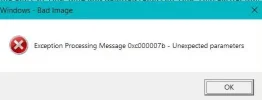
The thread discusses a persistent "Exception processing Message 0xc000007b" error affecting the user's Windows 10 system, with troubleshooting efforts including system file checks and malware scans. The user reports severe system corruption, such as failed Windows Updates and a message claiming their Windows license is illegal, indicating potential significant system issues. The overall sentiment suggests the user may need to restore their system from a backup, as multiple core system functions appear compromised.
The thread discusses a persistent "Exception processing Message 0xc000007b" error affecting the user's Windows 10 system, with troubleshooting efforts including system file checks and malware scans. The user reports severe system corruption, such as failed Windows Updates and a message claiming their Windows license is illegal, indicating potential significant system issues. The overall sentiment suggests the user may need to restore their system from a backup, as multiple core system functions appear compromised.
Solution

So if you run sfc /scannow and it can't even run, this would indicate that there is some kind of serious system corruption that has taken place. These tools operate at the system level and are included with Windows, so something is wrong. I would check for Windows Updates and try installing those as this should do a dism operation. Are you able to update Windows at all with the latest cumulative update?

Member details
- Joined
- Jul 22, 2005
- Messages
- 9,270
Is there a specific program that you are running that is giving you this error message, or is it just popping up intermittently?
One suggestion is to run a System File Integrity check. Go to Start -> Type "cmd". Right click on "Command Prompt" and choose "Run as Administrator"
Run the following command:
Allow both processes to work -- it could take some time. Essentially you may get a result at the very end telling you that you need to check the CBS.log and restart your computer. Restart.
If the issue still happens, and you have a custom anti-virus installed, you may want to try suspending that anti-virus and see if the issue continues.
One suggestion is to run a System File Integrity check. Go to Start -> Type "cmd". Right click on "Command Prompt" and choose "Run as Administrator"
Run the following command:
Code:
dism /online /cleanup-image /restorehealth && sfc /scannowAllow both processes to work -- it could take some time. Essentially you may get a result at the very end telling you that you need to check the CBS.log and restart your computer. Restart.
If the issue still happens, and you have a custom anti-virus installed, you may want to try suspending that anti-virus and see if the issue continues.
Thank you. I have attempted to run the module you suggested but got the message "specified module could not be found c:\windows\logs\DISM\dism.log". I did a scan with malwarebytes and that came up clear - the antivirus is Windows Defender - I did not disable it. I have downloaded the log file as a text file but it is enormous at 7.8MB. I also tried a straight scannow but got the same message indicating could not be found. I have run these a number of times in the past with no trouble.
Member details
- Joined
- Jul 22, 2005
- Messages
- 9,270
So if you run sfc /scannow and it can't even run, this would indicate that there is some kind of serious system corruption that has taken place. These tools operate at the system level and are included with Windows, so something is wrong. I would check for Windows Updates and try installing those as this should do a dism operation. Are you able to update Windows at all with the latest cumulative update?
So if you run sfc /scannow and it can't even run, this would indicate that there is some kind of serious system corruption that has taken place. These tools operate at the system level and are included with Windows, so something is wrong. I would check for Windows Updates and try installing those as this should do a dism operation. Are you able to update Windows at all with the latest cumulative update?
There is a lot wrong now - windows update will not update - error message shows, and other things are failing, I recently got a message that my windows 10 was illegal and I needed to buy a copy, in spite of having the 16 digit code and original windows 7 disc. I have a Macrium image from last August plus a daily backup of the desktop and documents folder so I should be able to get back to a pre-problem situation