📎 AI Summary:
The thread discusses how to add a Gmail account to the Windows 8 Mail app, with initial confusion about being prompted to sign in with a Microsoft account. Respondents suggest accessing account options via the Charms Bar within the Mail app, emphasizing the benefit of using a Microsoft account like Hotmail for full integration. The original poster encounters issues finding the Accounts section, and later comments imply that using Hotmail or similar services might be preferable, with some uncertainty about adding Gmail specifically. Overall, the conversation highlights challenges in integrating Gmail with Windows 8 Mail and the advantages of Microsoft accounts for broader system access.

Tiffany Lea Elmore

New Member
Member details
Joined
Nov 22, 2012
Messages
4
Thread Author #1
How do I add my gamil on the mail app. I have googled and you can, but its wanting me to sign in with my Microsoft account. Do I have too, I just want to use gmail.
 

Solution
Hi,
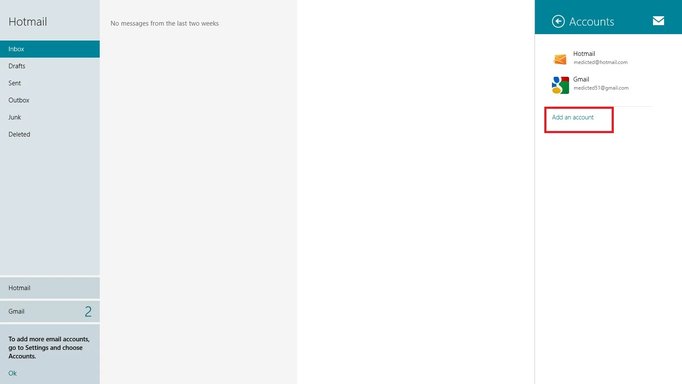
open up the mail app and then click on the 'Charm', settings (obtained by placing cursor top or bottom right then click on the cog wheel). Near the top you'll see Accounts listed, click that and then add your account.

Going back to the sign in with a microsoft account. It does give a different side to win 8 if you get your self a hotmail/outlook account (otherwise known as a Microsoft account) You'll be able to use the sign in for windows 8 so your always synced with your files plus the account will grant you further access to other microsoft goodies like messenger etc.

kemical

Essential Member
Member details
Joined
Aug 28, 2007
Messages
36,163
Hi,
open up the mail app and then click on the 'Charm', settings (obtained by placing cursor top or bottom right then click on the cog wheel). Near the top you'll see Accounts listed, click that and then add your account.

Going back to the sign in with a microsoft account. It does give a different side to win 8 if you get your self a hotmail/outlook account (otherwise known as a Microsoft account) You'll be able to use the sign in for windows 8 so your always synced with your files plus the account will grant you further access to other microsoft goodies like messenger etc.
 
Solution

Medico

Essential Member
Member details
Joined
Sep 20, 2011
Messages
1,144
You have to actually have the mail app open and use the Charms Bar while on the Mail app. Charms Bar, Settings, Accounts

Link Removed
 

Attachments

  • MailCharmsAccounts.webp
    MailCharmsAccounts.webp
    15.4 KB · Views: 348
    Microsoft Defender: No threats detected Scan details