

gabrielpetrov
New Member
Member details
- Joined
- Apr 9, 2020
- Messages
- 1
Hi folks!
I'm having problems with style in windows!
Many sites and windows icons are messed up!
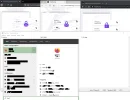
As showed in image, Firefox and Edge threre are weird CSS, but in Chrome is ok!
In windows menu, there are many black blurs.
This occurs in all users! I dont believe that is a driver problem since dont occurs in Chrome.
How can I solve it?
Thanks a lot
I'm having problems with style in windows!
Many sites and windows icons are messed up!
As showed in image, Firefox and Edge threre are weird CSS, but in Chrome is ok!
In windows menu, there are many black blurs.
This occurs in all users! I dont believe that is a driver problem since dont occurs in Chrome.
How can I solve it?
Thanks a lot
Attachments
-
 Microsoft Defender: No threats detected Scan detailsestiloZoado.webp54.8 KB · Views: 102