

Dear Users, my notebook`s Drive C: is decreasing withing minutes! I deleted a lot of things, and i had forexample 2 GB space! then it becomes 135Mb and when i Refresh the Windows Explorer! it is decreasing withing seconds! what can be the problem?!
📎 AI Summary:
The user reports their notebook's C: drive space decreasing rapidly despite deleting files, with suggestions from others focusing on using tools like TreeSize, Patch Cleaner, and CCleaner to identify and resolve unnecessary or residual data. One contributor emphasizes that the installer cache is usually large and advises caution in deleting it, recommending Patch Cleaner to remove obsolete patches. Overall, the thread centers on troubleshooting disk space issues, with multiple recommendations for cleanup tools and methods to diagnose the cause.
The user reports their notebook's C: drive space decreasing rapidly despite deleting files, with suggestions from others focusing on using tools like TreeSize, Patch Cleaner, and CCleaner to identify and resolve unnecessary or residual data. One contributor emphasizes that the installer cache is usually large and advises caution in deleting it, recommending Patch Cleaner to remove obsolete patches. Overall, the thread centers on troubleshooting disk space issues, with multiple recommendations for cleanup tools and methods to diagnose the cause.
Solution

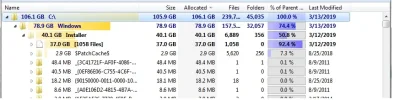
The installer cache is normally very large. Deleting it isn't usually a good idea. Your Windows directory is a bit higher than what it should be, but that's likely due to how long the system has bee around.
Download Patch Cleaner and run it. It may take sometime for it to finish. Once it does select Delete to remove orphaned and superseded patches. I have a feeling you will clean up around 30GB.
PatchCleaner
Download Patch Cleaner and run it. It may take sometime for it to finish. Once it does select Delete to remove orphaned and superseded patches. I have a feeling you will clean up around 30GB.
PatchCleaner

- Joined
- Jul 4, 2015
- Messages
- 8,995
Well the obvious answer is something is chewing up space. You'll need to download a program to examine your file system such as Tree Size to determine what is eating up space and cleanup locations that can be cleaned up. TreeSize Free - Quickly Scan Directory Sizes and Find Space Hogs
I Used CCleaner, and Malwarebyts it deleted! but again same problem! i did not used TreeSezi, i will use it nowWell the obvious answer is something is chewing up space. You'll need to download a program to examine your file system such as Tree Size to determine what is eating up space and cleanup locations that can be cleaned up. TreeSize Free - Quickly Scan Directory Sizes and Find Space Hogs
Well the obvious answer is something is chewing up space. You'll need to download a program to examine your file system such as Tree Size to determine what is eating up space and cleanup locations that can be cleaned up. TreeSize Free - Quickly Scan Directory Sizes and Find Space Hogs
Here! can you Help?
Attachments
- Joined
- Jul 4, 2015
- Messages
- 8,995
The installer cache is normally very large. Deleting it isn't usually a good idea. Your Windows directory is a bit higher than what it should be, but that's likely due to how long the system has bee around.
Download Patch Cleaner and run it. It may take sometime for it to finish. Once it does select Delete to remove orphaned and superseded patches. I have a feeling you will clean up around 30GB.
PatchCleaner
Download Patch Cleaner and run it. It may take sometime for it to finish. Once it does select Delete to remove orphaned and superseded patches. I have a feeling you will clean up around 30GB.
PatchCleaner
tommanheier
New Member
- Joined
- Apr 12, 2019
- Messages
- 15
I think it can be good to upload the newest version of Ccleaner again CCleaner Download - Free Latest Version for Windows and see what is happening with your system. There can be a lot of problems and you must find the reason.