

Hi ! (Sorry if my english isn't good, but i try, because i don't found a french forum for what i'm looking for)
So, i want to use The Task Scheduler to launch a playlist in Winamp (audio player) automatically when i want.
So i just put my config to launch a playlist located in :
C:\Users\Y0tta\AppData\Roaming\Winamp\Plugins\ml\playlists
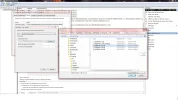
This is what it looks like : (Sorry for french Window)
Link Removed
Ok so, no problem currently, but when the taks sheduler launch the playlist, "plf60E6.m3u8" '(for exemple), he launch with window media player, and of course can't read it.
I must notice than when i double click on my playlist in window, it opens directly in Winamp because it's supposed to be by default.
What i have to do to tell at my task sheduler to open my playlist with winamp instead of window media player ?
So, i want to use The Task Scheduler to launch a playlist in Winamp (audio player) automatically when i want.
So i just put my config to launch a playlist located in :
C:\Users\Y0tta\AppData\Roaming\Winamp\Plugins\ml\playlists
This is what it looks like : (Sorry for french Window)
Link Removed
Ok so, no problem currently, but when the taks sheduler launch the playlist, "plf60E6.m3u8" '(for exemple), he launch with window media player, and of course can't read it.
I must notice than when i double click on my playlist in window, it opens directly in Winamp because it's supposed to be by default.
What i have to do to tell at my task sheduler to open my playlist with winamp instead of window media player ?
Attachments
-
 Microsoft Defender: No threats detected Scan detailsTaskSheduler.webp140.7 KB · Views: 443