📎 AI Summary:
Lukasz inquires about how to remove and reinstall the Intel INF chipset driver in Windows 7. After manually uninstalling the driver via Device Manager, he seeks advice on proper reinstallation, with suggestions to re-download from Intel's website, while others note that running the driver installer alone is sufficient. The overall sentiment indicates that the process worked well for Lukasz, leading to improved laptop performance, and participants agree that simplicity in troubleshooting is beneficial.


Lukasz

New Member
Joined
May 21, 2009
Messages
386
Thread Author #1
How can I remove intel inf chipset in Windows 7 I would like to install it again?
 

Solution
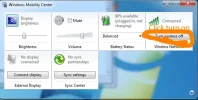
I have uninstalled the intel inf chipset, I wen't to right click on Computer and clicked properties then in Devices Manager, then I click on System Devices. I have marked this with a red text, don't do this if you have hard time following instructions, after uninstall you will need to reebot and should install, but I suggest you download your device driver from Intel Chipset website. After this you will need to go to Control Panel and enable wireless after the drivers installed and you have rebooted the laptop

Lukasz

New Member
Joined
May 21, 2009
Messages
386
Thread Author #3
I have uninstalled the intel inf chipset, I wen't to right click on Computer and clicked properties then in Devices Manager, then I click on System Devices. I have marked this with a red text, don't do this if you have hard time following instructions, after uninstall you will need to reebot and should install, but I suggest you download your device driver from Intel Chipset website. After this you will need to go to Control Panel and enable wireless after the drivers installed and you have rebooted the laptop
 

Attachments

  • Devices.webp
    Devices.webp
    41.6 KB · Views: 7,937
  • WindowsMobilityCenter.webp
    WindowsMobilityCenter.webp
    34.2 KB · Views: 2,442
  • windowsmobilitycontrolpanel.webp
    windowsmobilitycontrolpanel.webp
    24.4 KB · Views: 2,062
  • connect.webp
    connect.webp
    18.8 KB · Views: 1,851
Last edited:
Solution

TorrentG

Banned
Joined
May 31, 2010
Messages
7,774
Simple but true. Computers can be difficult enough at times. No need to enhance their abilities to frustrate, lol!

+1 rep