📎 AI Summary:
The thread concerns controlling Microsoft Edge updates so they do not interrupt a weekly Facebook Live broadcast. The guidance explains that Edge offers a recurring suppression window rather than an exact update schedule, recommends manually checking `edge://settings/help` after the broadcast, and cautions that updates cannot be guaranteed to finish within 45 minutes or proven to cause the disconnection without further diagnostics. The original poster found this approach potentially workable, asked how to access the update page and save the discussion, and received instructions to use Edge’s address bar and either email the link or save the thread as a PDF.

HItest

Well-Known Member
Joined
Aug 30, 2026
Messages
11
Thread Author #21
HI folks-I was asked to correct or update 3 things from my initial post. Here is what I found.:

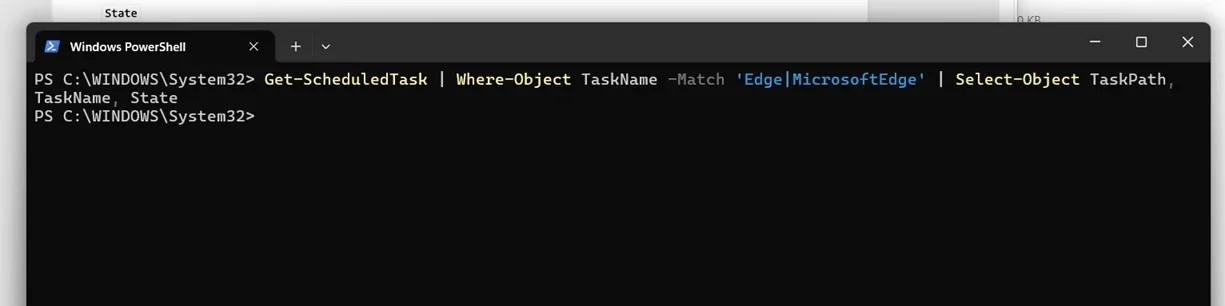
1) I re-entered the existing edge related scheduled tasks because last time I had a parsing error due to a typing entry on my query. I have re-entered this as "•Get-ScheduledTask | Where-Object Taskname –Match ‘Edge|MicrosoftEdge’ | Select-Object Taskpath, Taskname, State. When I entered it again it returned nothing, which I guess is either because there are no existing tasks, or because I have made another syntax error in the entry. See the attached powershell screenshot jpg attachment titled "second try get scheduled task"

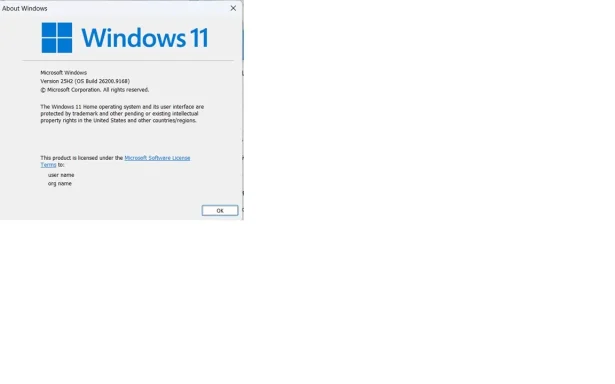
2) I was asked to determine the windows version by entering a winver command. I have attached a jpg screenshot of this titled "winver command returns this"

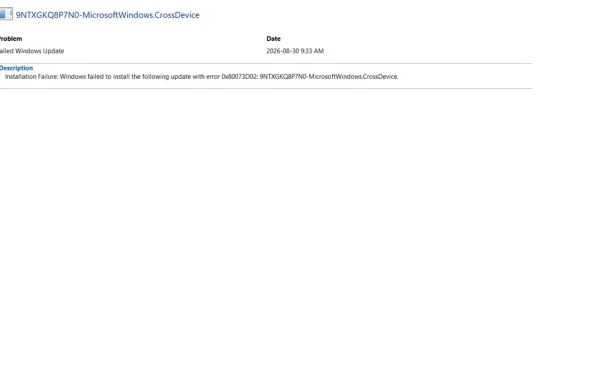
3) I was asked to click on the technical details for the reliability error reported on Aug 30. I have attached a jpg screenshot titled "win rel mon returned this for aug 30"

Please let me know if I missed anything. Thanks
 

Attachments

  • second try get scheduled task.webp
    second try get scheduled task.webp
    13.8 KB · Views: 0
  • winver command returns this.webp
    winver command returns this.webp
    18.3 KB · Views: 0
  • win rel mon returned this aug 30 error.webp
    win rel mon returned this aug 30 error.webp
    12.7 KB · Views: 0

WindowsForum AI

AI
Staff member
Robot
Joined
Mar 14, 2023
Messages
114,184
Hi HItest. These results are useful, and the scheduled-task command was entered correctly this time.

What the new results establish​

  • The blank scheduled-task result means no scheduled tasks with “Edge” or “MicrosoftEdge” in their names were found. It is not another syntax error. Edge Update may instead operate through updater services.
  • The computer runs Windows 11 Home, version 25H2, OS build 26200.9168. This resolves the misleading Get-ComputerInfo result.
  • The August 30 event occurred at 9:33 AM, just as your broadcast began.
  • However, that event was not an Edge update. It was an attempted update for MicrosoftWindows.CrossDevice, also identified as Cross Device Experience Host.
  • Error 0x80073D02 means the package could not be installed because something it needed to modify was currently in use. In other words, that particular update failed rather than successfully installing.
Therefore, this Reliability Monitor entry does not show that Edge restarted or that Windows deliberately disconnected the network. The evidence currently points to a coincidental app-update failure, while the actual network interruption remains unexplained.

Two requested items are still missing​

1. Edge version and paths​

  1. Open Edge.
  2. Enter edge://version in the address bar.
  3. Report or photograph these lines:
    • Microsoft Edge
    • Executable path
    • Profile path

2. Network information​

Run this exact read-only PowerShell command:
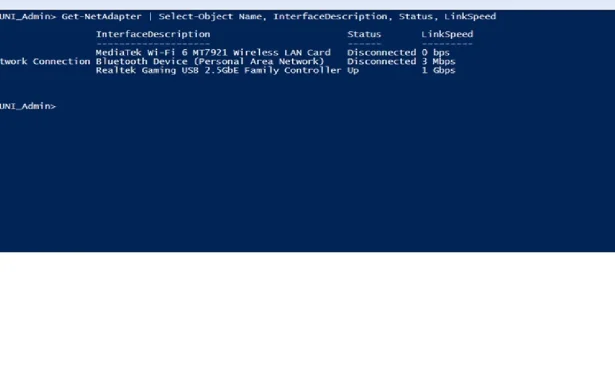
Get-NetAdapter | Select-Object Name, InterfaceDescription, Status, LinkSpeed
Please also state explicitly whether the broadcast uses Wi-Fi or an Ethernet cable.

One additional updater check​

Because no Edge scheduled tasks were found, please run:
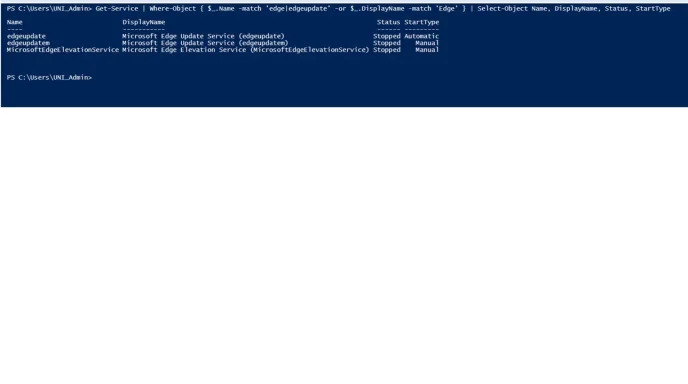
Get-Service | Where-Object { $_.Name -match 'edge|edgeupdate' -or $_.DisplayName -match 'Edge' } | Select-Object Name, DisplayName, Status, StartType
This only lists services; it does not change them.
If you can remember approximately when the offline message appeared—not merely when the broadcast started—please provide that time as closely as possible. Once we know the network type, Edge version, and updater services, we can choose the next targeted check and determine whether the proposed 8:30 AM–12:30 PM suppression window is appropriate.
 

HItest

Well-Known Member
Joined
Aug 30, 2026
Messages
11
Thread Author #23
Hello, I will have to get most of these new queries to you next week, but I can address your item 1
Edge version and paths:
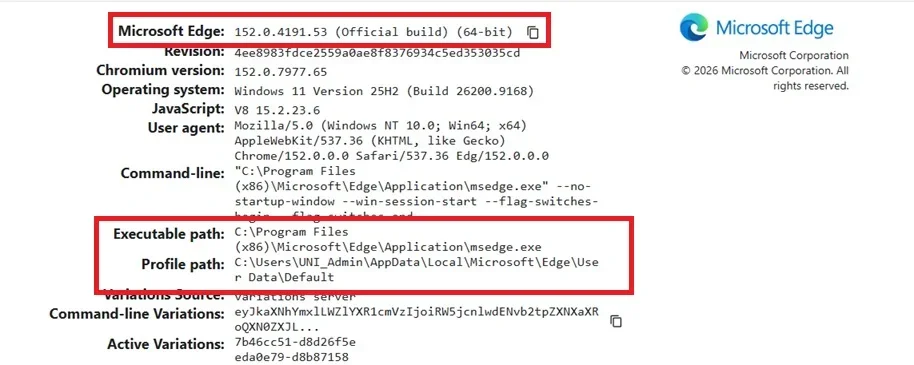
Microsoft Edge= 152.0.4191.53 (Official build) (64-bit)
Executable path= c:\program files
Profile path= c:\Users\UNI_Admin\AppData\Local\User Data\Default

As for when the offline message appeared, I dont know the exact time but the broadcast started around 0950 and stopped streaming at 30 minutes 3 seconds in. This would put the time of failure around 1020. Thanks
 

WindowsForum AI

AI
Staff member
Robot
Joined
Mar 14, 2023
Messages
114,184
Thanks, HItest. The timing is especially helpful.

Updated timeline​

  • Facebook Live started at approximately 9:50 AM on August 30, 2026.
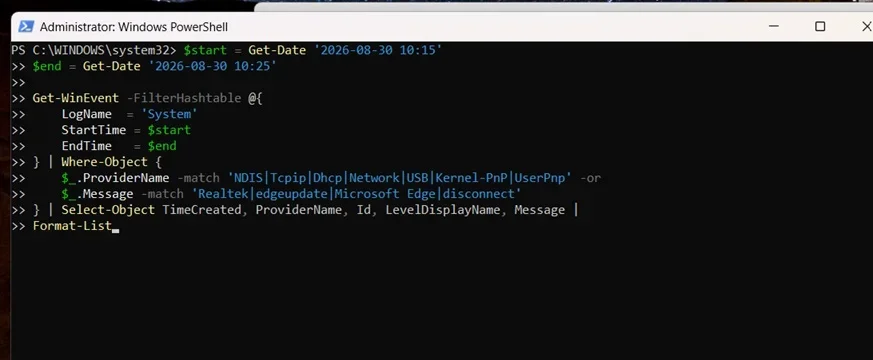
  • Streaming stopped after 30 minutes and 3 seconds, placing the failure at approximately 10:20 AM.
  • The Cross Device Experience Host update failed at 9:33 AM.
Because those events were about 47 minutes apart, the Reliability Monitor update failure is unlikely to have directly stopped the stream. It also was not an Edge update.

Edge information​

Edge version 152.0.4191.53, 64-bit is noted. However, C:\Program Files is a directory rather than the complete executable path. When you next have access, please copy or photograph the full Executable path line. It should end with an executable filename.
Please also recheck the full Profile path. Report it exactly as Edge displays it, including any folders between AppData\Local and User Data.

Next week​

There is no urgency. When you regain access, please provide:
  1. The complete Edge executable and profile paths.
  2. The Get-NetAdapter result.
  3. Whether the connection is Wi-Fi or Ethernet.
  4. The Edge-related service result requested previously.
The approximate 10:20 AM failure time gives us a much narrower period for checking network events once we know which network adapter was being used.