hummer7

Senior Member
Joined
Nov 8, 2009
Messages
75
Whenver I boot the new Window 7 compuer, Windows Live Messenger dialog box pops up asking me to sign in. I don't need/use the messenger. I could not figure out how to disable the windows live messenger.
Please advise me how. hummer7
 

Solution
Whenver I boot the new Window 7 compuer, Windows Live Messenger dialog box pops up asking me to sign in. I don't need/use the messenger. I could not figure out how to disable the windows live messenger.
Please advise me how. hummer7

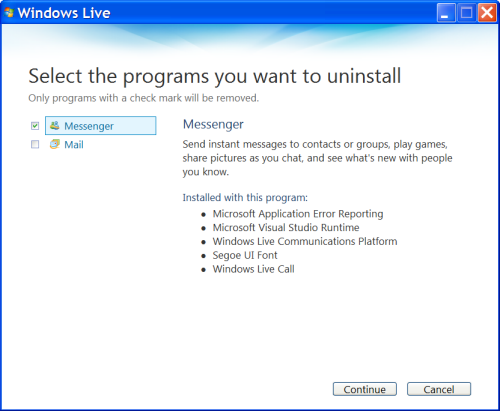
"Windows Live Essentials" appears to be the umbrella uninstaller for Windows Live Messenger and all the other Windows Live products you may have installed. Click on its Change/Remove. You'll be asked if you want to Uninstall, or Repair a Windows Live program. Select Uninstall and click Continue. Then you'll get the list:
windows_live_essentials_uninstaller.png
Make sure that Messenger is checked and click Continue...

busydog

New Member
Joined
Feb 11, 2009
Messages
1,055
Whenver I boot the new Window 7 compuer, Windows Live Messenger dialog box pops up asking me to sign in. I don't need/use the messenger. I could not figure out how to disable the windows live messenger.
Please advise me how. hummer7

Assuming you (or your computer manufacturer) have installed it, Go to the Start Menu-Control Panel-Programs and features- and uninstall it.
 

hummer7

Senior Member
Joined
Nov 8, 2009
Messages
75
Assuming you (or your computer manufacturer) have installed it, Go to the Start Menu-Control Panel-Programs and features- and uninstall it.

I did not install it. It is there when I bought a Windoes 7-installed computer from Dell. I checked "Uninstall or change a program" and
"Turn Windows features on or off". Live messenger is not listed.
 

busydog

New Member
Joined
Feb 11, 2009
Messages
1,055
Whenver I boot the new Window 7 compuer, Windows Live Messenger dialog box pops up asking me to sign in. I don't need/use the messenger. I could not figure out how to disable the windows live messenger.
Please advise me how. hummer7

"Windows Live Essentials" appears to be the umbrella uninstaller for Windows Live Messenger and all the other Windows Live products you may have installed. Click on its Change/Remove. You'll be asked if you want to Uninstall, or Repair a Windows Live program. Select Uninstall and click Continue. Then you'll get the list:
windows_live_essentials_uninstaller.png
Make sure that Messenger is checked and click Continue.
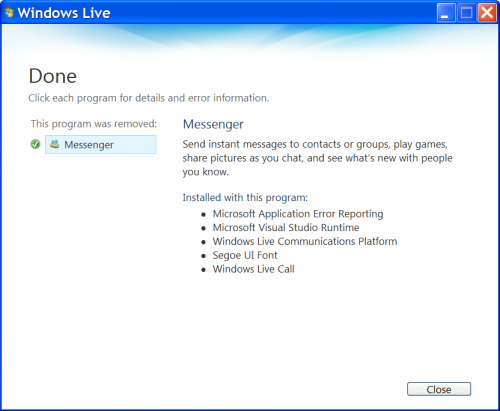
windows_live_messenger_uninstalled.png
At that point, it should be uninstalled.
 

Solution