📎 AI Summary:
Ron Binmore is seeking advice on how to display "File Explorer-settings-power-all apps" at the bottom left of the screen, aside from restarting the computer. Neemobeer suggests using the Windows key + i to open Settings, then customizing the Start menu options through the "Choose which folders appear on Start" setting. The thread provides a troubleshooting-focused discussion on customizing the Start menu in Windows.

Ron Binmore

Active Member
Member details
Joined
Feb 27, 2015
Messages
52
Thread Author #1
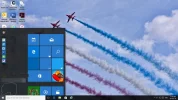
Other than turning the computer off and doing a "Restart", how do you get "File Explorer-settings-power-all apps" to show at the bottom left hand of the screen. Please see the attachment.

Cheers,

RonBin79
 

Attachments

  • Closing-screen.webp
    Closing-screen.webp
    36 KB · Views: 323
Solution
  • Press WinKey + i
  • Personalize
  • Start
  • At the bottom click "Choose which folders appear on Start"
  • Turn on whatever you want to be on the start menu

Neemobeer

Windows Forum Team
Staff member
Member details
Joined
Jul 4, 2015
Messages
8,995
  • Press WinKey + i
  • Personalize
  • Start
  • At the bottom click "Choose which folders appear on Start"
  • Turn on whatever you want to be on the start menu
 

Solution