📎 AI Summary:
The original poster, silverman, reports encountering an error message upon shutting down a Toshiba Qosmio X500-116 after upgrading to Windows 10, which they hadn't seen before. A respondent suggests it may be related to password or lock screen settings, advising to lock and unlock the desktop to resolve it. Silverman later notes that the message stopped appearing after a few days, despite using a login password, leaving the cause of the initial error unclear. Overall, the discussion revolves around troubleshooting a startup/shutdown issue related to Windows 10 and user login settings.

silverman

Honorable Member
Member details
Joined
Dec 23, 2009
Messages
284
Thread Author #1
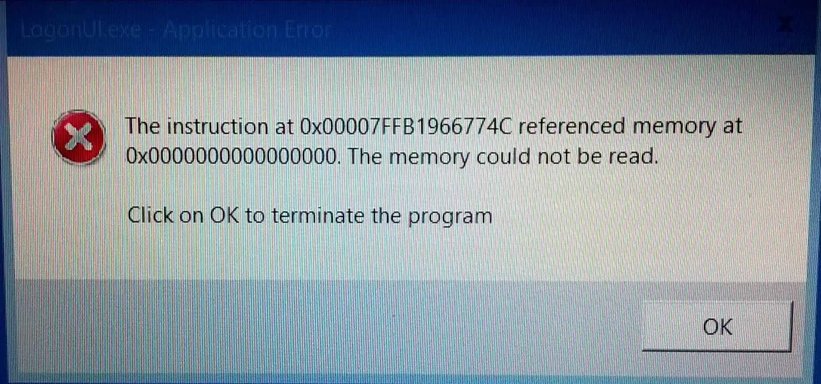
I have been running Windows 10 for about a month, almost every time I close down the Toshiba laptop (my only computer running Windows 10) I get an error message show in the attachment.

This Toshiba is Qosmio X500-116, it has - Intel® Core™ i7 i7-720QM Processor

2 x hard drives - 8192 MB (4096 + 4096) DDR RAM (1066MHZ)

Until I installed Win 10 I have not seen this message before, what is it telling me?
 

Attachments

  • memory could not read - on shutdown MS10.webp
    memory could not read - on shutdown MS10.webp
    306 KB · Views: 250
Solution
That you have passwords turned off or you didn't unlock your screen before shutting down... test by locking then unlocking your desktop... that normaly removes the blockage.

ussnorway

Windows Forum Team
Staff member
Member details
Joined
May 22, 2012
Messages
4,599
That you have passwords turned off or you didn't unlock your screen before shutting down... test by locking then unlocking your desktop... that normaly removes the blockage.
 

Solution

silverman

Honorable Member
Member details
Joined
Dec 23, 2009
Messages
284
Thread Author #3
I have a login password that I use at the start of each session, and this does not require me to log in after the screensaver goes into action. Since I posted this it's not shown the message again, I don't understand that.