📎 AI Summary:
The thread discusses an issue with selecting multiple files in Windows File Explorer, where the original poster cannot select files between two check marks as before. Contributors clarify that holding Shift and clicking or dragging a box around files allows multiple selection, but clicking check boxes only selects individual files. The overall sentiment is a troubleshooting exchange aimed at clarifying how file selection works in Windows.

Patrick1812

New Member
Member details
Joined
Sep 1, 2019
Messages
3
Thread Author #1
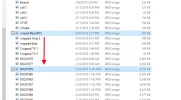
I have looked absolutely everywhere, and cannot find a solution to this problem. Ive tried everything related to simple settings in Internet File Explorer, but I cant select files in between two check marks like I was able to do before. The only thing I haven't done that was suggested was to do a HKEY registry edit. Which strikes me as dangerous and suspicious.

Please help...
 

ussnorway

Windows Forum Team
Staff member
Member details
Joined
May 22, 2012
Messages
4,599
post a screengrab or vid please
we need to see what is happening
 

Patrick1812

New Member
Member details
Joined
Sep 1, 2019
Messages
3
Thread Author #3
Shouldnt it let me select every thing in between two check marks ?
Check Mark.png
 

Attachments

  • Check Mark 2.webp
    Check Mark 2.webp
    39.7 KB · Views: 122

Patrick1812

New Member
Member details
Joined
Sep 1, 2019
Messages
3
Thread Author #5
Ok when I hold shift and drag a blue box it will select them all. Is that how its supposed to work ?
 

ussnorway

Windows Forum Team
Staff member
Member details
Joined
May 22, 2012
Messages
4,599
Yes if you draw a box around them or shift click the thumbnails it select all

Click the tick boxes = just wanted that one

Sent from my R8A using Windows Forums mobile app
 

Solution