
📎 AI Summary:
The thread discusses issues with screen resolution after upgrading a custom-built PC from Windows 8.1 to Windows 10, specifically the absence of the previous 1440x900 resolution option. The original poster asks for solutions, while a respondent suggests updating the monitor driver through the device manager or manufacturer's website to restore the desired resolution. Overall, the conversation centers on troubleshooting display resolution problems following the Windows upgrade.

AandMAF

New Member
Joined
Aug 5, 2015
Messages
1
Thread Author #1
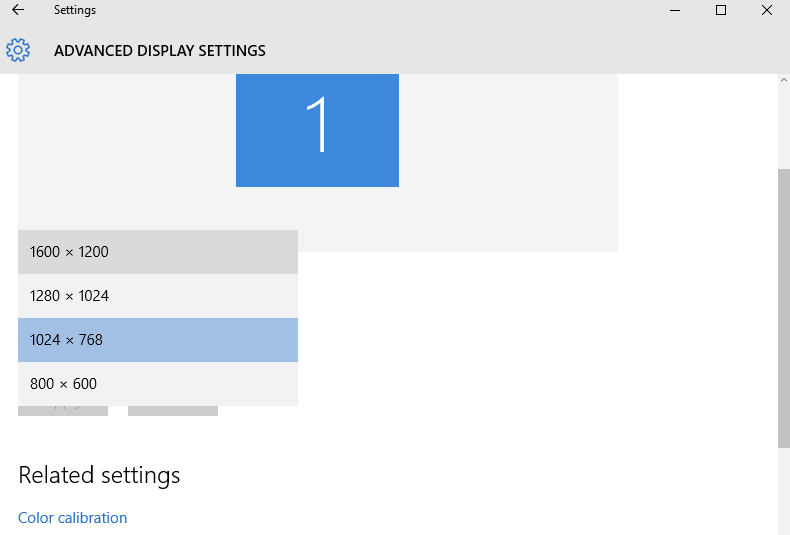
Hio, My custom-built desktop (originally Windows 8.1) has the normal resolution of 1440x900, I recently upgraded to Windows 10 and there is unfortunately no option for 1440 x 900.

In Display Settings > Advanced display settings > Resolution, there are the following resolutions but mine isn't on there (which makes my screen seem a little irregular/big compared to before I upgraded to Windows 10):
LO1GCt6.png


Any solutions or possible ideas?

Thanks!
 

Solution
Usually you will get generic monitor resolutions when you have a generic monitor driver in use. Go into device manager and check monitor. If it's a generic driver go to the manufacturers site and download a driver or try windows update.

Neemobeer

Windows Forum Team
Staff member
Joined
Jul 4, 2015
Messages
8,995
Usually you will get generic monitor resolutions when you have a generic monitor driver in use. Go into device manager and check monitor. If it's a generic driver go to the manufacturers site and download a driver or try windows update.
 

Solution