📎 AI Summary:
The thread discusses a recurring black box appearing on the screen, initially every 20 seconds for half a second, which the original poster managed to stop. However, a new issue emerged afterward, prompting the user to provide additional details. Respondent Jimbo22 suggests checking the file path associated with the process, warns about potential malware or unwanted software, and recommends running virus scans and using Revo Uninstaller for removal, emphasizing caution regarding software origins. Overall, the tone is helpful, with the user eventually resolving the initial problem and the discussion focusing on identifying and troubleshooting possible security concerns.

osarc99

New Member
Joined
Dec 25, 2014
Messages
2
Thread Author #1
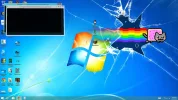
So recently, i dont know when this started a black box has been apearing in the upper left corner of my screen.
It appears about every 20 seconds and only stays for about half a second. I was able to get it on a screenshot.
If anybody can tell me what this is and how to disable it, it will be appreciated.

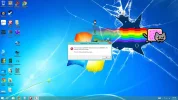
Ok so the black box stopped appering but now it has started to do something else. I will attach a screenshot.
 

Attachments

  • Screenshot (12).webp
    Screenshot (12).webp
    177.8 KB · Views: 639
  • Screenshot (13).webp
    Screenshot (13).webp
    184.2 KB · Views: 1,247
Last edited:
Solution
Well, according to the screen shot, it says "C:\program files\mediainformationaccess\updater.exe" So have a look at that file path of your C drive and find out what software/program it's for. By the looks of your desktop, I'm guessing it goes to one of the programs you've downloaded and it's trying to update the app. Or what really scares me, it could be some back door that was open by one of those downloads and a hacker has taken over your computer with some malicious code that's being executed.

Have you checked your system from any Virus, Malware, spyware, worms, trojans and so forth? I would start there and then see what programs you have downloaded and if you really need/use any of them. If not then use Revo-unsitaller Pro (it's a...

Jimbo22

Essential Member
Joined
Aug 27, 2008
Messages
5,035
Well, according to the screen shot, it says "C:\program files\mediainformationaccess\updater.exe" So have a look at that file path of your C drive and find out what software/program it's for. By the looks of your desktop, I'm guessing it goes to one of the programs you've downloaded and it's trying to update the app. Or what really scares me, it could be some back door that was open by one of those downloads and a hacker has taken over your computer with some malicious code that's being executed.

Have you checked your system from any Virus, Malware, spyware, worms, trojans and so forth? I would start there and then see what programs you have downloaded and if you really need/use any of them. If not then use Revo-unsitaller Pro (it's a 30 trial but it will remove 32 and 64 bit software) to remove them completely through the advanced removal settings.
 

Solution

osarc99

New Member
Joined
Dec 25, 2014
Messages
2
Thread Author #3
I fixed the black box issue, but now something new has started happening. I edited the original post to show more information.
 

Last edited: