
Solution

This may just be a difference of words, but you need the Install DVD to do a repair install.
Did you try opening an administrative command window and typing SFC /scannow then hit enter. Maybe some system file needs to be replaced.
Did you try opening an administrative command window and typing SFC /scannow then hit enter. Maybe some system file needs to be replaced.

- Joined
- Oct 16, 2009
- Messages
- 15,152
Are you using a communication device?
There is a setting to allow other sound producers to control their own volumes. If that is set and that sound happens, it migh be louder or softer that you think it should be.
To make sure, if you right click the speaker icon then playback devices, select the speakers and click on properties, then the levels tab, you will see a number. Make note of what it is and when you think the level has changed, go back and see what it changed to.
If you want to keep other utilities from having separate volume controls, right click on the speaker icon and choose Volume Control Options. Check or uncheck options to test.
Are you running any other mixer?
There is a setting to allow other sound producers to control their own volumes. If that is set and that sound happens, it migh be louder or softer that you think it should be.
To make sure, if you right click the speaker icon then playback devices, select the speakers and click on properties, then the levels tab, you will see a number. Make note of what it is and when you think the level has changed, go back and see what it changed to.
If you want to keep other utilities from having separate volume controls, right click on the speaker icon and choose Volume Control Options. Check or uncheck options to test.
Are you running any other mixer?

cybercore
New Member
- Joined
- Jul 7, 2009
- Messages
- 15,612
cybercore
New Member
- Joined
- Jul 7, 2009
- Messages
- 15,612
Saltglass has a good point, it can be a software (e.g. Winamp kernel streaming) or a device (e.g. TV tuner) that overrides the settings in the sound mixer.
If you open up the full mixer panel, you can adjust particular sounds, or all of them, depending on what slider you move:
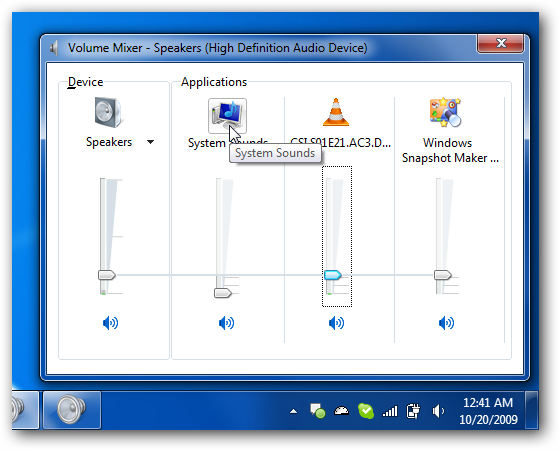
Attach a picture of your sound mixer as shown above.
Link Removed
Saltglass said:There is a setting to allow other sound producers to control their own volumes. If that is set and that sound happens, it migh be louder or softer that you think it should be.
If you open up the full mixer panel, you can adjust particular sounds, or all of them, depending on what slider you move:
Attach a picture of your sound mixer as shown above.
Link Removed
- Joined
- Oct 16, 2009
- Messages
- 15,152
Looks like we may need to track down what is changing it.
Do you have any keyboard keys or mouse settings that might be changing it?
Does it change if you have no other software running? Some stuff runs in the background, of course, like a network sharing service.
Do you use homegroups and share media?
Does it always return to 72? If so, there may be a default setting somewhere and maybe one of the devices as cybercore is pointing out has a default setting.
Do you have any keyboard keys or mouse settings that might be changing it?
Does it change if you have no other software running? Some stuff runs in the background, of course, like a network sharing service.
Do you use homegroups and share media?
Does it always return to 72? If so, there may be a default setting somewhere and maybe one of the devices as cybercore is pointing out has a default setting.
Last edited:
- Thread Author
- #8
no i don't have any mouse or keyboard shourtcuts. Yes it change, no other application weren't open (Winamp etc.). No I don't use homegroups and share media. It change randomly for example from 50 to 84, 100 to 13 etc...
cybercore
New Member
- Joined
- Jul 7, 2009
- Messages
- 15,612
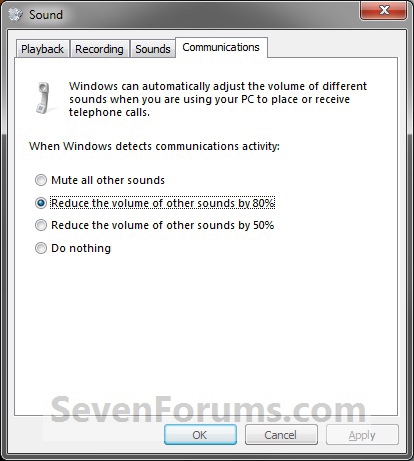
In \\"communications tab\\" (control panel->sound) \\"do nothing\\" is on.
Well, did you try other options in Sounds > Communications tab:
Reduce the volume of other sounds by 80%
Sound Shortcuts - Create - Windows 7 Forums
- Joined
- Oct 16, 2009
- Messages
- 15,152
You say you are running Winamp? Maybe it has something running that might be changing it.
If you mouse over the volume control, it shows the actual number. You may get into a habit of checking it frequently to see if you can track down when it changes.
The only other thing I might suggest is to open task manager and go through the processes to see if anything might have a possibility of changing the volume.
If you mouse over the volume control, it shows the actual number. You may get into a habit of checking it frequently to see if you can track down when it changes.
The only other thing I might suggest is to open task manager and go through the processes to see if anything might have a possibility of changing the volume.
- Joined
- Oct 16, 2009
- Messages
- 15,152
If you are going to reinstall, do not format, do a repair install. Basically you just do an upgrade from within Win 7. All your programs and data are maintained. You may have to re-activate.
I would probably first try uninstalling WinAmp....
I would probably first try uninstalling WinAmp....

- Joined
- Oct 16, 2009
- Messages
- 15,152
This may just be a difference of words, but you need the Install DVD to do a repair install.
Did you try opening an administrative command window and typing SFC /scannow then hit enter. Maybe some system file needs to be replaced.
Did you try opening an administrative command window and typing SFC /scannow then hit enter. Maybe some system file needs to be replaced.
Similar threads

- Replies
- 0
- Views
- 494
- Article
- Replies
- 0
- Views
- 785
- Replies
- 1
- Views
- 2K

- Solved
- Replies
- 13
- Views
- 4K
