

📎 AI Summary:
The thread discusses how to change folder opening settings in Windows 7 Ultimate so that folders open with a single click instead of double-click. The first poster asks how to enable single-click opening, and the second provides instructions to access the Folder Options via the toolbar menu. The original poster appreciates the help and the provided screenshot, indicating a positive and helpful exchange.
The thread discusses how to change folder opening settings in Windows 7 Ultimate so that folders open with a single click instead of double-click. The first poster asks how to enable single-click opening, and the second provides instructions to access the Folder Options via the toolbar menu. The original poster appreciates the help and the provided screenshot, indicating a positive and helpful exchange.
Solution

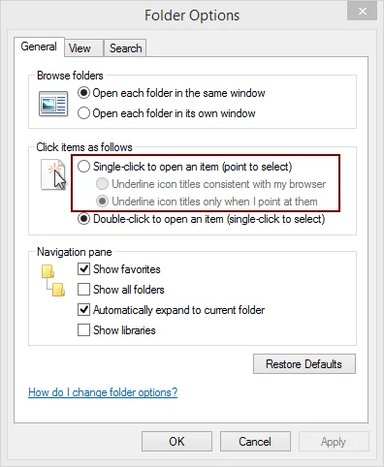
From the tool bar menu (if not present strike the alt key when explorer is open) select tools->folder options.
See attachment.
See attachment.

Trouble
Noob Whisperer
Member details
- Joined
- Nov 30, 2009
- Messages
- 13,723
From the tool bar menu (if not present strike the alt key when explorer is open) select tools->folder options.
See attachment.
See attachment.
Attachments
-
 Microsoft Defender: No threats detected Scan detailsClick.webp21 KB · Views: 324