📎 AI Summary:
The thread discusses an issue where the "Create a restore point" button in Windows 8.1 does not respond, preventing the installation of Visual Studio 2013, which requires creating a system restore point. The original poster clarifies they do not want to perform a system restore themselves but need the ability to create restore points for software installation. A helpful responder guides them to start the Volume Shadow Copy service to enable restore point creation; the original poster reports success, and the conversation concludes with a recommendation to revert the service setting. Overall, the exchange is constructive, focusing on troubleshooting Windows restore point functionality.

GhostShadow

New Member
Joined
Sep 15, 2014
Messages
3
Thread Author #1
Qw9WQir.png

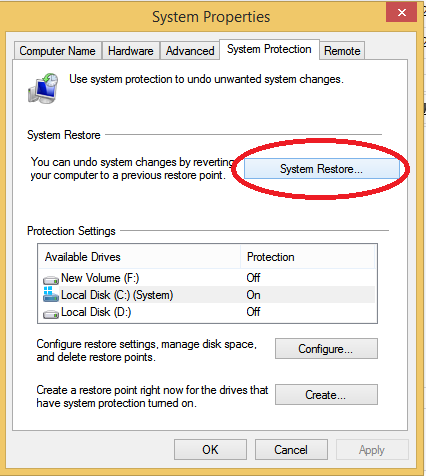
This button is not working. The window doesnt hang. There is no error message. It just doesnt say anything.
I am trying to install Visual Studio 2013. It needs to create a system restore point before starting installation. Needless to say, it fails too.

I am on Windows 8.1. I ran sfc /scannow with no results.

Any help will be greatly appreciated.
 

Solution
I am not sure why do you want to do system restore when you are trying to install Visual Studio.

As to system restore button not responding, try the following to "start" the service.......

Go to Services.msc > scroll down to Volume Shadow Copy and click it >
if under Status it is blank, and under Startup type it is on Manual, Right click at Volume Shadow Copy > select Properties .....
at Startup Type, click the pointer and select Automatic,
at Status, click Start ,
click OK when done.

See if you can .......
1. create a system restore point.
2. do a system restore.

davidhk129

Essential Member
Joined
May 19, 2012
Messages
1,315
I am not sure why do you want to do system restore when you are trying to install Visual Studio.

As to system restore button not responding, try the following to "start" the service.......

Go to Services.msc > scroll down to Volume Shadow Copy and click it >
if under Status it is blank, and under Startup type it is on Manual, Right click at Volume Shadow Copy > select Properties .....
at Startup Type, click the pointer and select Automatic,
at Status, click Start ,
click OK when done.

See if you can .......
1. create a system restore point.
2. do a system restore.
 

Solution

GhostShadow

New Member
Joined
Sep 15, 2014
Messages
3
Thread Author #3
I dont want to do a system restore. Visual Studio wants to do.

EDIT: It worked! Thanks!
 

Last edited:

davidhk129

Essential Member
Joined
May 19, 2012
Messages
1,315
You are welcome.

P.S. I would suggest that you go back to services.msc and re-set Volume Shadow Copy as following.....
Right click at Volume Shadow Copy > Properties.....
Startup type...... change back to Manual.
Status .............. remains at Start
click OK when done.