📎 AI Summary:
The thread discusses a suspicious file found on a Windows PC, initially raising concerns about its origin and safety. A responder identifies the file as related to LightShot, a screen capture tool, and suggests scanning with Malwarebytes for safety. A later contributor shares their positive experience with LightShot, noting occasional conflicts with video-intensive applications due to its hooks into video streams but otherwise recommending it as a useful utility. Overall, the discussion reassures that LightShot is not malicious and offers insights into its safe usage.

IONx64

New Member
Member details
Joined
Apr 7, 2014
Messages
19
Thread Author #1
Hello friends here,

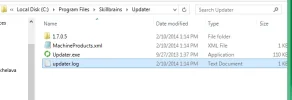
Today i found such strange files on my C: drive by help Autorun.

I have no idea where it come from and is it safe to remove it from my pc?

see attached files, and also its location place too:

Thanks in advanced.
 

Attachments

  • Screenshot_1.webp
    Screenshot_1.webp
    10.1 KB · Views: 1,536
    Microsoft Defender: No threats detected Scan details
  • Screenshot_2.webp
    Screenshot_2.webp
    12.9 KB · Views: 2,188
    Microsoft Defender: No threats detected Scan details

LagrangeL4

New Member
Member details
Joined
May 24, 2019
Messages
1
I use LightShot a lot, as it's the easiest way I know of photographing (and optionally annotating) whatever is on your computer screen. The hotkey to make a screenshot defaults to the "PrntScrn" button, but I set it to "Ctrl-\" (control-backslash) instead, as that's an unlikely key combo to hit by accident.

As for problems caused by LightShot, the only problems I've encountered are, it tends to cause errors in MMORPGs (eg, Toontown Rewritten or Wizard 101), and in virtual worlds (eg, Second Life), because it has hooks in all video streams (acts as a "filter driver" for video, I think the technical jargon is), so that it can freeze and capture what's on your screen at any time. So, if doing anything video-intensive (games, movies, etc), it's best to turn LightShot off (right-click the purple feather in your system tray and click "exit"). Other than that, I leave it turned on all the time.