
lostsoul65

New Member
Joined
May 3, 2012
Messages
165
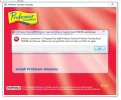
I went into control panel and tried to delete a program which would not let me do. The program will run without sound and that is why I'm trying to delete it. So I go into Program files, Program files (x86) and Program Data and delete the program from there because it wouldn't let me re-install it. Now this is what I get. (Image) What can I do about this?
 

Attachments

  • Professor.webp
    Professor.webp
    36.4 KB · Views: 340

patcooke

Microsoft MVP
Microsoft MVP
Joined
May 16, 2010
Messages
5,703
1. Run ccleaner and run a registry cleanup.

If you still have problems then:

2. Download autoruns from here: Autoruns for Windows
Run autoruns as administrator look for any entries relating to Professor teaches and delete them.
 

Solution

BIGBEARJEDI

Excellent Member
Premium Supporter
Joined
Jan 28, 2013
Messages
2,419
Or, if above suggestions don't work; we also recommend the free REVO UNINSTALLER, which I've used to uninstall a Professor Teaches program for Excel a few years back in Windows Vista. It works on great on my apps in Vista-W10.

Give it a go!:encouragement:
<<<BIGBEARJEDI>>>:D:D