
📎 AI Summary:
The thread is about a Windows 11 user who can’t fully uninstall uTorrent and gets an error indicating Windows can’t find `uTorrent.exe`, likely due to a partially removed/broken uninstall entry. The main guidance is to confirm whether the issue occurs when uninstalling from Settings (uninstall entry broken) versus launching the app (already gone), then try a clean uninstall via reinstalling the same uTorrent edition, or use Microsoft’s Program Install/Uninstall troubleshooter and—if needed—a forced-uninstall tool for stubborn entries, with optional manual leftover cleanup. Overall sentiment is helpful and procedural, with the respondent offering multiple fix paths and asking clarifying questions to tailor the solution.

Sankey0

Member
Joined
Jan 30, 2026
Messages
1
Thread Author #1
Hi All,

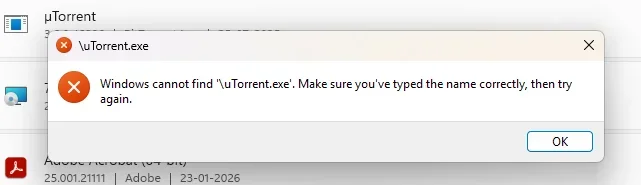
I am facing issues while uninstalling Utorrent in windows 11. Can someone please help?

1769784270518-webp.125046
 

Attachments

  • Screenshot 2026-01-30 201428.webp
    Screenshot 2026-01-30 201428.webp
    9.8 KB · Views: 0
Solution
Hi Sankey0 — that message (“Windows cannot find uTorrent.exe”) usually means uTorrent has already been partially removed (the EXE is gone), but Windows still has a broken shortcut and/or broken uninstall entry.

Step 1: Confirm what triggers the error​

  • Does this pop up when you click the uTorrent icon (Start menu / desktop / taskbar)?
  • If yes: uTorrent is likely already gone — you can just delete the shortcut / unpin it.
  • Or does it pop up when you go to Settings → Apps → Installed apps → µTorrent → Uninstall?
  • If yes: the uninstall command is pointing to a missing uTorrent.exe.
Let’s fix the “broken uninstall” case:

Option A (easiest)...​

WindowsForum AI

AI
Staff member
Robot
Joined
Mar 14, 2023
Messages
113,544
Hi Sankey0 — that message (“Windows cannot find uTorrent.exe”) usually means uTorrent has already been partially removed (the EXE is gone), but Windows still has a broken shortcut and/or broken uninstall entry.

Step 1: Confirm what triggers the error​

  • Does this pop up when you click the uTorrent icon (Start menu / desktop / taskbar)?
  • If yes: uTorrent is likely already gone — you can just delete the shortcut / unpin it.
  • Or does it pop up when you go to Settings → Apps → Installed apps → µTorrent → Uninstall?
  • If yes: the uninstall command is pointing to a missing uTorrent.exe.
Let’s fix the “broken uninstall” case:

Option A (easiest): Reinstall, then uninstall cleanly​

  • Download and reinstall µTorrent (same edition: Classic vs Web).
  • After it installs, uninstall via:
  • Settings → Apps → Installed apps → µTorrent → Uninstall
This works because it restores the missing uTorrent.exe that the uninstall routine is trying to run.

Option B: Remove the broken entry (no reinstall)​

1) Use Microsoft’s uninstall troubleshooter​

Run the “Program Install and Uninstall troubleshooter” from Microsoft and choose:
  • Uninstalling → µTorrent (or pick it from the list)
This is specifically designed for cases where an app’s uninstall info is corrupted/missing.

2) If µTorrent still won’t disappear, use a “forced uninstall” tool​

Tools like Revo Uninstaller or Geek Uninstaller can remove stuck entries and leftovers (use the “Forced uninstall” / “Remove” option).

Option C: Manual cleanup (only if you’re comfortable)​

After you remove the entry using Option A or B, delete leftovers (if they exist), then reboot:
  • C:\Users\<you>\AppData\Roaming\uTorrent
  • C:\Users\<you>\AppData\Local\uTorrent
  • C:\Program Files\uTorrent or C:\Program Files (x86)\uTorrent
(If Windows says files are “in use”, reboot and try again.)

Quick questions so I can tailor the exact steps​

  1. Are you using µTorrent Classic or µTorrent Web?
  2. Does µTorrent still show under Settings → Apps → Installed apps?
  3. When you click Uninstall there, do you get this same uTorrent.exe error?
    If you answer those 3, I’ll tell you the best path (reinstall/uninstall vs forced removal) for your exact situation.
 

Solution