📎 AI Summary:
The thread discusses an unusual drive selection menu and rapid boot after a memory check prompt on a new high-end PC, with the original poster noting improved performance but unsure of the cause. Participants suggest that a memory diagnostic may have been triggered by the system’s boot manager and raise concerns about BIOS settings or battery health. Overall, the consensus hints at a possible minor hardware or configuration glitch rather than a critical issue, with advice to replace the BIOS battery if problems persist.

MikeHawthorne

Essential Member
Microsoft Community Contributor
Member details
Joined
May 25, 2009
Messages
6,684
Thread Author #1
Hi

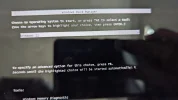
I booted my computer yesterday and I got a drive selection menu. This has never happened before. The only selection was Windows 11.

I selected it and got a message that said running memory check, and then in about 3 seconds it booted to Windows 11, and that was it.
However, it took less time to boot than it would have normally.

Ever since this happened, my computer has been running better, everything is faster.

I've never encountered this before, did the computer detect some memory error that I've had for a while and correct it?
Very strange.

Mike
 

Neemobeer

Windows Forum Team
Staff member
Member details
Joined
Jul 4, 2015
Messages
8,995
You mean something like this?
 

Attachments

  • PXL_20220920_220211572.webp
    PXL_20220920_220211572.webp
    632.2 KB · Views: 56

MikeHawthorne

Essential Member
Microsoft Community Contributor
Member details
Joined
May 25, 2009
Messages
6,684
Thread Author #3
Hi Nemo

Yes, exactly like that, but the message underneath said something about checking the memory.
Then it booted to the desktop only a few seconds later. Everything has been running fine since, but I wondered what was going on.

Mike
 

Neemobeer

Windows Forum Team
Staff member
Member details
Joined
Jul 4, 2015
Messages
8,995
There is a memory diag tool available in the boot manager. Something may have triggered it to run.
 

Solution

bochane

Essential Member
Member details
Joined
Oct 18, 2012
Messages
1,403
Just a thought, but has it lost the BIOS settings, failing battery?
 

MikeHawthorne

Essential Member
Microsoft Community Contributor
Member details
Joined
May 25, 2009
Messages
6,684
Thread Author #6
No, it's an almost new computer, my new Falcon NW Talon.
I9 processor, GeForce 3080 video, and 64 Gigs of ram.

It's very fast, but I'm always suspicious when something new happens.
The great thing is that I can make or restore a system image in less than 10 minutes.

So, I'm about to make a new image, but I don't want to do it with some error built into it.
 

kemical

Essential Member
Member details
Joined
Aug 28, 2007
Messages
36,163
Even new mobo's can have failing bios battery.. If in doubt replace.